# Use Tripo in Codex
Talk to Codex the way you talk to a person. Ask for a 3D model; the **Tripo 3D** plugin generates it and saves the file into your project. You do not need to know APIs, terminals, or 3D software.
This is a start-from-zero walkthrough. Do the steps in order. If one step fails, fix it before going on.
## What you need
1. **A computer** (Mac or Windows).
2. **Codex** — OpenAI's coding assistant. It lives in the ChatGPT desktop app or the Codex CLI. It is **not** a normal ChatGPT chat window.
3. **Node.js 20 or later.** The plugin uses it in the background. You will not write any Node code.
4. **A Tripo account.** New accounts receive free credits. Create one at [developers.tripo3d.ai](https://developers.tripo3d.ai) if you do not have one.
Check Node.js. Open Terminal (Mac) or PowerShell (Windows) and run:
```bash
node -v
```
You should see a number like `v20.11.0` or higher. If the command is not found, install the LTS version from [nodejs.org](https://nodejs.org/), then close and reopen the terminal and try again.
Installing the plugin and signing in are free. **Generating a model spends Tripo credits.**
## Step 1. Open Codex, not ChatGPT chat
This is the most common mistake.
1. Open the **ChatGPT desktop app** (or the Codex CLI).
2. Switch to **Codex**.
3. Open the folder where you want the 3D files to appear. If you do not have a project yet, create an empty folder and open that.
If you stay in a normal ChatGPT conversation, the Tripo plugin will not load. That is expected: this plugin only works in Codex.
## Step 2. Install the Tripo 3D plugin
1. In Codex, open **Plugins**.
2. Open the **Plugins Directory**.
3. Search for **Tripo 3D**.
4. Install it, then confirm it is **enabled**.
After a successful install you should see two capabilities: generate a 3D asset, and build game-ready assets. You do not need to turn them on one by one — keep the plugin enabled.
Trouble? You cannot find Tripo 3D
- Confirm you are in **Codex**, not ChatGPT chat.
- Quit the ChatGPT desktop app completely and open it again, then search once more.
- If it still does not appear, use [Tripo CLI](/en/docs/cli) instead. It is the same generation engine, driven from the terminal.
## Step 3. Send your first message
Copy the whole block below and paste it into Codex:
```text
I want a low-poly treasure chest with textures. Save the GLB file in the ./assets folder.
If Tripo is not set up yet, walk me through every step like I have never used it.
Do not ask me to paste an API key into the chat.
```
Press send. Codex should now:
1. Check whether Tripo is ready on your computer.
2. If you are not signed in, show a **verification URL** and a **one-time code**.
3. Wait while you finish sign-in in the browser.
4. Generate the model and write it into `./assets`.
**Never paste an API key into the chat.** The plugin does not need you to do that. If Codex asks for a key, reply: `Sign in with the browser instead. Do not ask me for a key.`
## Step 4. Sign in in the browser (first time only)
When Codex shows a URL and a code, complete these clicks yourself. Leave Codex running — do not stop it.
1. Open the verification URL in your browser.
2. If the page asks you to sign in, sign in or create an account at [developers.tripo3d.ai](https://developers.tripo3d.ai), then return to the verification page.
3. Type the one-time code into the **Verification code** field. Check that it matches the code in Codex **exactly**.
4. If your account already has API keys, pick any one of them. If you have none, one is created for you — there is nothing to choose.
5. Click **Authorize**.
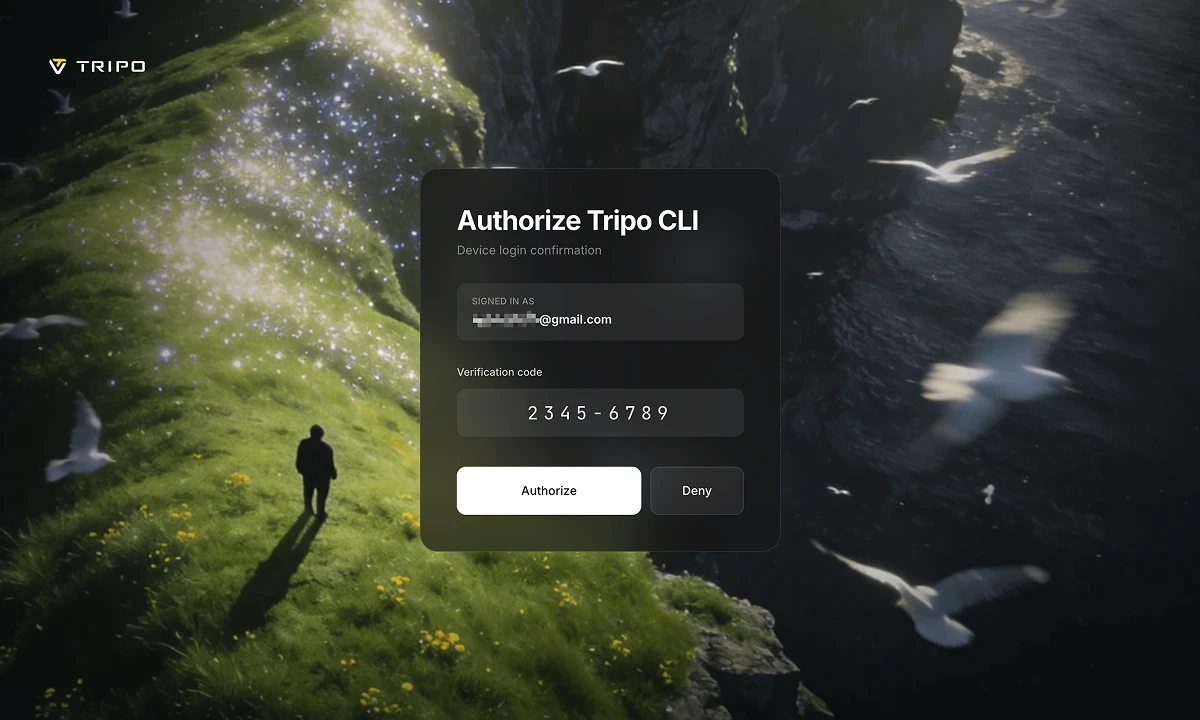
When authorization succeeds, Codex continues by itself. You should not copy anything back into the chat.
The code expires after a while. If it fails, ask Codex: `Please sign in to Tripo again.`
Trouble? The browser did not open, or sign-in did not finish
- Copy the URL from Codex and paste it into the browser yourself.
- The code in the page must match the code in Codex. If you are unsure, ask Codex to sign in again for a fresh code.
- Keep Codex waiting. Sign-in can take several minutes; stopping it early throws the code away.
## Step 5. Wait, then open the files
Keep Codex open. The first generation often takes a few minutes. Codex is waiting for Tripo to finish — that is normal, not a freeze.
When it is done, Codex should:
- Tell you where the files were saved (usually under `./assets`)
- Mention how many credits were used
- Look at a preview image if one was generated
Open that folder. You typically get:
- A model file such as `model.glb`
- `preview.png` — a picture of the model
- `task.json` — a record of the job
If the preview is not what you asked for, tell Codex: `That is not what I wanted. Try again with a new seed.`
## What to say next
Use ordinary language. These are ready to copy.
**Turn an image into 3D** (put `concept.png` in your project folder first):
```text
Turn concept.png into a 3D model and save it in ./assets.
```
**Continue from the last model** (does not generate from scratch — cheaper):
```text
From the last model, make a 1500-face LOD and save it in ./assets.
```
**Game props, then wire them into code:**
```text
Make three placeholder props for my scene as GLB files in ./assets, then load them in the project code.
```
If you ask for several models at once, Codex should **ask you to confirm** before spending credits. That is working as designed.
## If something goes wrong
| What you see | What to do |
| --- | --- |
| The plugin does not appear | You are in ChatGPT chat. Switch to Codex. |
| Codex asks you to paste an API key | Refuse. Say: `Sign in with the browser. Do not ask me for a key.` |
| Sign-in page does nothing | Paste the URL from Codex into the browser. Check that the codes match. |
| "Not enough credits" | Nothing finished generating. Add credits in the [console](https://developers.tripo3d.ai), then ask Codex to try again. |
| Generation failed midway | Credits for a failed task are refunded automatically. Ask Codex to try again. |
| Files are not in your project | Tell Codex the exact folder, for example `Save it in ./assets`. |
| The result looks bad | Ask Codex to redo it. Do not keep regenerating in a silent loop. |
## Related pages
- [Tripo CLI](/en/docs/cli) — the same engine, used from the terminal
- [Plugins](/en/docs/plugins) — Unity, Blender, and other editors
- [Authentication](/en/docs/authentication) — API keys (you should not need this for Codex)
- [Billing](/en/docs/billing) — how credits work