# ComfyUI Nodes
ComfyUI-Tripo is Tripo's official custom-node extension for ComfyUI. It supports generating 3D models from text, a single image, or multiview images within ComfyUI workflows, along with model import, texturing, refinement, mesh processing, low-poly optimization, stylization, rigging, animation retargeting, format conversion, and retopology.
| Item | Value |
| --- | --- |
| Node package version | 1.3.0 |
| Source tag | v1.3.1.1 |
| Source | [VAST-AI-Research/ComfyUI-Tripo](https://github.com/VAST-AI-Research/ComfyUI-Tripo) |
## Capabilities and changelog
### Capabilities
- Generate 3D models from text prompts.
- Generate 3D models from images.
- Import models from a URL through model_url.
- Support splitting models into separate parts.
- Rig and animate 3D models.
- Convert formats and retopologize models.
### Changelog
- 2026-06-30: added Mesh Segmentation v2.0 for splitting models into separate parts and direct URL import through model_url.
- 2026-05-28: added model import.
- 2025-06-19: updated to the newest API and added more nodes.
- 2025-03-31: switched to the tripo3d package.
- 2025-02-24: removed glbviewer.
- 2025-02-01: adapted to the new API and switched model viewing to Preview 3D.
- 2024-11-11: adapted to the new API.
- 2024-10-14: added model conversion.
- 2024-09-13: added support for model_version v2.0-20240919.
## Installation
**Choose one** method, then restart ComfyUI.
### ComfyUI-Manager
Open [Custom Nodes Manager](https://github.com/ltdrdata/ComfyUI-Manager), search for Tripo for ComfyUI, and install it.
### comfy-cli
Install [comfy-cli](https://github.com/Comfy-Org/comfy-cli) through [Comfy Registry](https://registry.comfy.org/), then run:
~~~bash
comfy node registry-install comfyui-tripo
~~~
### From source
Place the repository in ComfyUI/custom_nodes/ComfyUI-Tripo, then install its dependencies:
~~~bash
cd ComfyUI/custom_nodes
git clone https://github.com/VAST-AI-Research/ComfyUI-Tripo.git
python -m pip install -r ComfyUI-Tripo/requirements.txt
~~~
## API key configuration
Create an API key on the [Tripo platform](https://platform.tripo3d.ai/), then configure it with one of the methods below.
The node package resolves an API key in this order:
1. A non-empty apikey input on the node.
2. The TRIPO_API_KEY environment variable.
3. config.json in the ComfyUI-Tripo directory, with a TRIPO_API_KEY field.
The Generate and Import nodes expose apikey. Downstream nodes receive the resolved key through MODEL_INFO.
Do not expose a real API key in screenshots, shared workflows, logs, or source repositories. Clear the apikey field before sharing a workflow and prefer an environment variable for local use.
### Environment variable launch examples
Windows:
~~~shell
set TRIPO_API_KEY=tsk_XXXXXXX
python.exe main.py [--cpu]
~~~
Linux or macOS:
~~~bash
TRIPO_API_KEY=tsk_XXXXXXX python main.py [--cpu]
~~~
## Node overview
ComfyUI-Tripo provides the following 11 Tripo nodes:
| Internal ID | Display name | Capability | Output |
| --- | --- | --- | --- |
| TripoAPIDraft | Tripo: Generate model | Generate from text, image, or multiple views | model_file, MODEL_INFO |
| TripoImportModel | Tripo: Import model | Import a local model or model URL | MODEL_INFO |
| TripoTextureModel | Tripo: Texture model | Texture a model | model_file, MODEL_INFO |
| TripoRefineModel | Tripo: Refine Draft model | Refine a draft model | model_file, MODEL_INFO |
| TripoMeshSegmentation | Tripo: Segment mesh | Segment a mesh | model_file, MODEL_INFO |
| TripoMeshCompletion | Tripo: Complete mesh | Complete a segmented mesh | model_file, MODEL_INFO |
| TripoSmartLowPoly | Tripo: Smart low poly | Create a low-poly model | model_file, MODEL_INFO |
| TripoStylizeModel | Tripo: Stylize model | Apply a geometric style | model_file, MODEL_INFO |
| TripoAnimateRigNode | Tripo: Rig model | Automatically rig a model | model_file, MODEL_INFO |
| TripoAnimateRetargetNode | Tripo: Retarget rigged model | Apply a preset animation | model_file, MODEL_INFO |
| TripoConvertNode | Tripo: Convert model | Convert and export a model | model_file |
Preview 3D is provided by ComfyUI and is not one of these 11 nodes.
## Connections and data flow
~~~mermaid
flowchart LR
G["Generate model"] -->|MODEL_INFO| P["Model processing"]
I["Import model"] -->|MODEL_INFO| P
P -->|MODEL_INFO| R["Rig model"]
R -->|MODEL_INFO| A["Retarget rigged model"]
A -->|MODEL_INFO| C["Convert model"]
~~~
- model_file is the downloaded path produced by a generation or processing task. It can be sent to a ComfyUI preview or file-handling node.
- MODEL_INFO contains the Tripo task context used by downstream Tripo nodes: task_id, resolved apikey, file_prefix, and output_directory.
- A model from outside this node chain must first pass through TripoImportModel. A file path alone cannot replace MODEL_INFO.
- Connect nodes through MODEL_INFO when further Tripo processing is required. The model_file output is not the processing context.
## Complete node reference
“Required” indicates whether a node parameter must be provided. The apikey field may be left empty to use the environment or configuration fallback. A dash means no explicit default is set.
### Generation and import
### TripoAPIDraft — Tripo: Generate model
Creates the first Tripo task in a workflow. It has no node prerequisite.
| Input | Type | Required | Default | Values or range |
| --- | --- | --- | --- | --- |
| mode | ENUM | Yes | first value | text_to_model, image_to_model, multiview_to_model |
| apikey | STRING | Yes | empty | API key or fallback |
| prompt | STRING, multiline | No | empty | Text prompt |
| negative_prompt | STRING, multiline | No | empty | Negative text prompt |
| image | IMAGE | No | — | Source image; front image in multiview mode |
| image_left | IMAGE | No | — | Optional left view |
| image_back | IMAGE | No | — | Optional back view |
| image_right | IMAGE | No | — | Optional right view |
| model_version | ENUM | No | v3.1-20260211 | v1.4-20240625, v2.0-20240919, v2.5-20250123, v3.0-20250812, v3.1-20260211 |
| texture | BOOLEAN | No | true | Enable texture generation |
| pbr | BOOLEAN | No | true | Enable PBR maps |
| image_seed | INT | No | 42 | Used by text mode |
| model_seed | INT | No | 42 | Model seed |
| texture_seed | INT | No | 42 | Texture seed |
| texture_quality | ENUM | No | standard | standard, detailed |
| geometry_quality | ENUM | No | standard | standard, detailed; image mode only |
| texture_alignment | ENUM | No | original_image | original_image, geometry |
| face_limit | INT | No | -1 | -1–500000; values ≤ 0 are sent as unset |
| quad | BOOLEAN | No | false | Request quad topology |
| compress | BOOLEAN | No | false | Compress output |
| generate_parts | BOOLEAN | No | false | Generate parts |
| smart_low_poly | BOOLEAN | No | false | Enable smart low-poly generation |
| auto_size | BOOLEAN | No | false | Automatically size the model |
| orientation | ENUM | No | default | default, align_image; image and multiview modes |
| file_prefix | STRING | No | empty | Prefix for the downloaded filename |
| output_directory | STRING | No | empty | Destination directory override |
Mode requirements:
| Mode | Conditionally required | Notes |
| --- | --- | --- |
| text_to_model | prompt | Fails with “Prompt is required” when empty |
| image_to_model | image | Fails with “Image is required” when absent |
| multiview_to_model | image | image is the front view; left, back, and right are optional |
Outputs: STRING model_file and MODEL_INFO. Common failures: missing conditional input, missing/invalid API key, rejected API task, or output move failure. Minimum connection: prompt or image → TripoAPIDraft → Preview 3D; use MODEL_INFO for later processing.
### TripoImportModel — Tripo: Import model
Creates Tripo task context for a model that did not originate in this node chain.
| Input | Type | Required | Default | Values or range |
| --- | --- | --- | --- | --- |
| apikey | STRING | Yes | empty | API key or fallback |
| model_file | file selector | No | none | Model in the ComfyUI input directory |
| model_url | STRING | No | empty | Direct URL to a model |
| file_prefix | STRING | No | empty | Prefix propagated to downstream downloads |
| output_directory | STRING | No | empty | Directory propagated to downstream downloads |
A non-empty model_url takes priority over model_file. If both are empty, the node fails. The upload control accepts .glb, .fbx, .obj, .stl, .ply, .3mf, and .gltf; the backend input scan also recognizes .zip.
Output: MODEL_INFO only. Common failures: neither source is provided, a local file is missing, the URL cannot be fetched, the format is rejected, or the import task fails. Minimum connection: local file or URL → TripoImportModel → any processor that accepts MODEL_INFO.
### Model processing
### TripoTextureModel — Tripo: Texture model
Requires MODEL_INFO from Generate, Import, or another compatible processor.
| Input | Type | Required | Default | Values or range |
| --- | --- | --- | --- | --- |
| model_info | MODEL_INFO | Yes | — | Upstream task context |
| model_version | ENUM | No | v3.0-20250812 | v2.5-20250123, v3.0-20250812 |
| texture | BOOLEAN | No | true | Enable texture |
| pbr | BOOLEAN | No | true | Enable PBR maps |
| texture_seed | INT | No | 42 | Texture seed |
| texture_quality | ENUM | No | standard | standard, detailed |
| texture_alignment | ENUM | No | original_image | original_image, geometry |
| text_prompt | STRING, multiline | No | empty | Texture guidance text |
| image_prompt | IMAGE | No | — | Texture reference |
| style_image | IMAGE | No | — | Style reference |
| part_names | STRING, multiline | No | empty | One part name per line |
| compress | BOOLEAN | No | false | Compress output |
| bake | BOOLEAN | No | true | Bake texture |
Outputs: STRING model_file and MODEL_INFO. Common failures: incompatible task context, invalid reference image, or API task failure. Minimum connection: Generate/Import MODEL_INFO → TripoTextureModel → Preview 3D or another processor.
### TripoRefineModel — Tripo: Refine Draft model
| Input | Type | Required | Default | Values or range |
| --- | --- | --- | --- | --- |
| model_info | MODEL_INFO | Yes | — | Draft-model task context |
Outputs: STRING model_file and MODEL_INFO. The upstream task must be a refinable draft; an incompatible task or failed API task causes failure. Minimum connection: Generate draft MODEL_INFO → TripoRefineModel → Preview 3D.
### TripoMeshSegmentation — Tripo: Segment mesh
| Input | Type | Required | Default | Values or range |
| --- | --- | --- | --- | --- |
| model_info | MODEL_INFO | Yes | — | Upstream task context |
| model_version | ENUM | Yes | v1.0-20250506 | v1.0-20250506, v2.0-20260430 |
| segmentation_granularity | ENUM | No | balanced | simple, balanced, detailed |
| ref_image | IMAGE | No | — | Segmentation reference image |
| split_by_connectivity | BOOLEAN | No | true | Split disconnected geometry |
segmentation_granularity, ref_image, and split_by_connectivity are sent only with v2.0-20260430; v1 ignores them. Outputs: STRING model_file and MODEL_INFO. Common failures: incompatible model, invalid reference image, or API task failure. Minimum connection: Generate/Import MODEL_INFO → TripoMeshSegmentation → Completion or Preview 3D.
### TripoMeshCompletion — Tripo: Complete mesh
| Input | Type | Required | Default | Values or range |
| --- | --- | --- | --- | --- |
| model_info | MODEL_INFO | Yes | — | Segmented-model task context |
| model_version | ENUM | Yes | v1.0-20250506 | v1.0-20250506 |
| part_names | STRING, multiline | No | empty | One part name per line |
Outputs: STRING model_file and MODEL_INFO. A task that is not suitable for completion or a failed API task causes failure. Minimum connection: Segment MODEL_INFO → TripoMeshCompletion → Preview 3D.
### TripoSmartLowPoly — Tripo: Smart low poly
| Input | Type | Required | Default | Values or range |
| --- | --- | --- | --- | --- |
| model_info | MODEL_INFO | Yes | — | Upstream task context |
| model_version | ENUM | Yes | P-v2.0-20251225 | P-v2.0-20251225 |
| quad | BOOLEAN | No | false | Request quad topology |
| part_names | STRING, multiline | No | empty | One part name per line |
| face_limit | INT | No | 10000 | -1–20000 |
| bake | BOOLEAN | No | true | Bake output |
Outputs: STRING model_file and MODEL_INFO. Common failures: incompatible model/parts or API task failure. Minimum connection: Generate/Import MODEL_INFO → TripoSmartLowPoly → Preview 3D or Convert.
### TripoStylizeModel — Tripo: Stylize model
| Input | Type | Required | Default | Values or range |
| --- | --- | --- | --- | --- |
| model_info | MODEL_INFO | Yes | — | Upstream task context |
| style | ENUM | Yes | first value | lego, voxel, voronoi, minecraft |
| block_size | INT | Yes | 80 | 1–1000 |
Outputs: STRING model_file and MODEL_INFO. Common failures: incompatible model, unsupported style for the task, or API task failure. Minimum connection: Generate/Import MODEL_INFO → TripoStylizeModel → Preview 3D.
### Rigging and animation
### TripoAnimateRigNode — Tripo: Rig model
The node checks whether the model is riggable and obtains a rig type before submitting the rig task.
| Input | Type | Required | Default | Values or range |
| --- | --- | --- | --- | --- |
| model_info | MODEL_INFO | Yes | — | Upstream task context |
| model_version | ENUM | Yes | v2.0-20250506 | v1.0-20240301, v2.0-20250506 |
| out_format | ENUM | Yes | glb | glb, fbx |
| spec | ENUM | Yes | tripo | mixamo, tripo |
Outputs: STRING model_file and MODEL_INFO. It fails when the model cannot be rigged, no suitable rig type is found, or the API task fails. Minimum connection: Generate/Import MODEL_INFO → TripoAnimateRigNode → Retarget or Preview 3D.
### TripoAnimateRetargetNode — Tripo: Retarget rigged model
Requires MODEL_INFO from a successfully rigged model.
| Input | Type | Required | Default | Values or range |
| --- | --- | --- | --- | --- |
| model_info | MODEL_INFO | Yes | — | Rigged-model task context |
| animation | ENUM | Yes | first value | See all 16 presets below |
| out_format | ENUM | Yes | glb | glb, fbx |
| bake_animation | BOOLEAN | No | true | Bake the animation |
| export_with_geometry | BOOLEAN | No | false | Include geometry in export |
The 16 animation values are: preset:idle, preset:walk, preset:run, preset:dive, preset:climb, preset:jump, preset:slash, preset:shoot, preset:hurt, preset:fall, preset:turn, preset:quadruped:walk, preset:hexapod:walk, preset:octopod:walk, preset:serpentine:march, and preset:aquatic:march.
Outputs: STRING model_file and MODEL_INFO. An unrigged/incompatible task or failed API task causes failure. Minimum connection: Rig MODEL_INFO → TripoAnimateRetargetNode → Preview 3D or Convert.
### Format output
### TripoConvertNode — Tripo: Convert model
This is an output node and returns no MODEL_INFO.
| Input | Type | Required | Default | Values or range |
| --- | --- | --- | --- | --- |
| model_info | MODEL_INFO | Yes | — | Upstream task context |
| format | ENUM | Yes | first value | GLTF, USDZ, FBX, OBJ, STL, 3MF |
| quad | BOOLEAN | No | false | Request quad topology |
| force_symmetry | BOOLEAN | No | false | Force symmetry |
| face_limit | INT | No | -1 | -1–500000 |
| flatten_bottom | BOOLEAN | No | false | Flatten the bottom |
| flatten_bottom_threshold | FLOAT | No | 0.01 | 0.0–1.0 |
| texture_size | INT | No | 4096 | 128–4096 |
| texture_format | ENUM | No | JPEG | BMP, DPX, HDR, JPEG, OPEN_EXR, PNG, TARGA, TIFF, WEBP |
| pivot_to_center_bottom | BOOLEAN | No | false | Move pivot to center-bottom |
| scale_factor | FLOAT | No | 1.0 | Minimum 0 |
| with_animation | BOOLEAN | No | true | Preserve animation |
| pack_uv | BOOLEAN | No | false | Pack UVs |
| bake | BOOLEAN | No | true | Bake output |
| part_names | STRING, multiline | No | empty | One part name per line |
| fbx_preset | ENUM | No | blender | blender, mixamo, 3dsmax |
| export_vertex_colors | BOOLEAN | No | false | Export vertex colors |
| export_orientation | ENUM | No | +x | +x, +y, -x, -y |
| animate_in_place | BOOLEAN | No | false | Export animation in place |
Output: STRING model_file. Common failures: unsupported conversion for the source task, invalid export settings, or API/output move failure. Minimum connection: any compatible MODEL_INFO → TripoConvertNode.
## Workflow examples
Preview 3D is shown as an optional ComfyUI viewer and is not included in the Tripo node count.
~~~mermaid
flowchart LR
T["Text"] --> GT["Generate model
mode: text_to_model"]
IM["Image"] --> GI["Generate model
mode: image_to_model"]
MV["Front + optional views"] --> GM["Generate model
mode: multiview_to_model"]
GT --> V["Preview 3D"]
GI --> V
GM --> V
~~~
1. **Text to Model:** provide prompt, select text_to_model, then send model_file to Preview 3D.
2. **Image to Model:** connect an IMAGE to image, select image_to_model, then preview model_file.
3. **Multiview to Model:** connect the front image to image and optional views to image_left, image_back, and image_right.
4. **Texture Model:** Generate or Import → connect MODEL_INFO to Texture → preview the new model_file.
5. **Refine Model:** Generate a compatible draft → connect MODEL_INFO to Refine → preview the refined file.
6. **Rig and Retarget:** Generate or Import → Rig → Retarget; use MODEL_INFO for both links, then preview or Convert.
7. **Import and Process:** local file or URL → Import → Segment/Smart low poly/Stylize/Texture. Import returns context, not a preview file.
8. **Convert and Export:** connect the final MODEL_INFO from Generate, Import, processing, Rig, or Retarget to Convert and choose the output format.
### Official workflow PNGs
The six PNG files below contain embedded ComfyUI workflow data. Save an original PNG with its download link, then drag it into ComfyUI or load it manually. Values visible in the images are workflow examples; use the parameter tables above for current defaults.
#### Text to Mesh
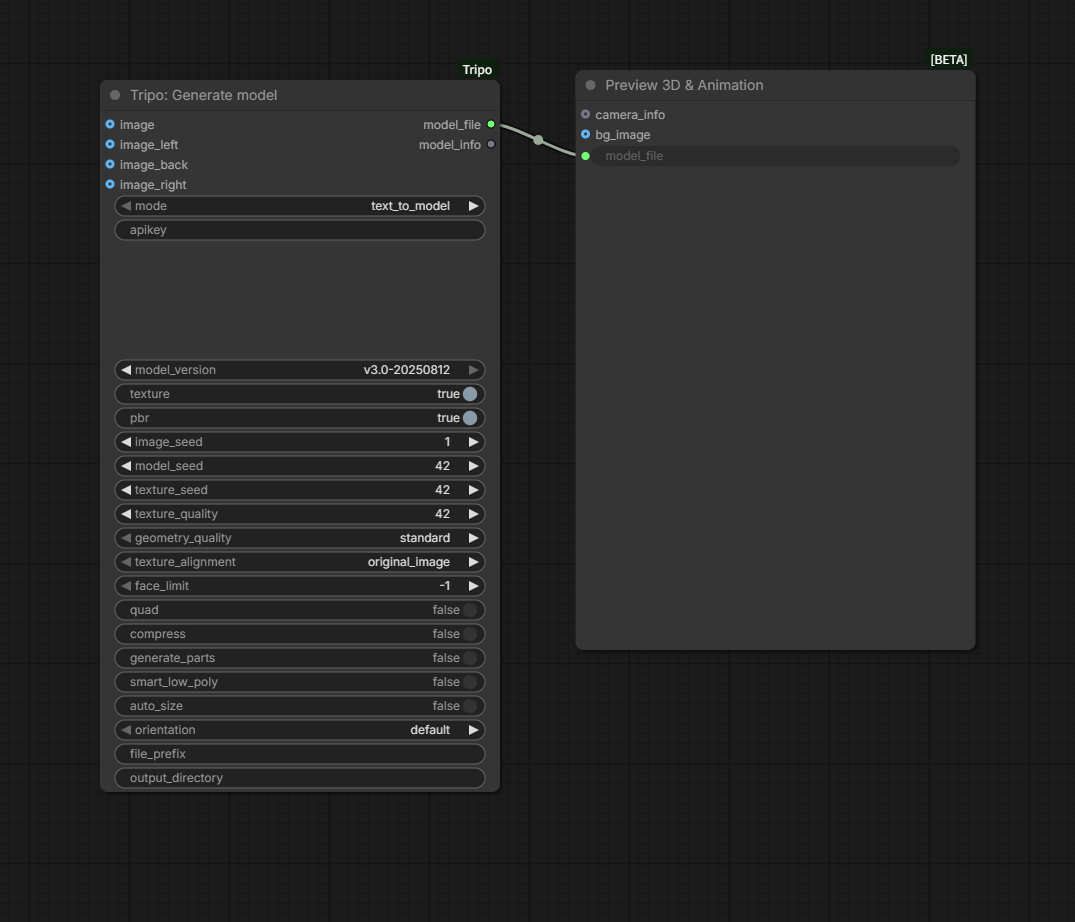
Generate a model from a text prompt and send model_file to Preview 3D.
Download the original workflow PNG
#### Image to Mesh
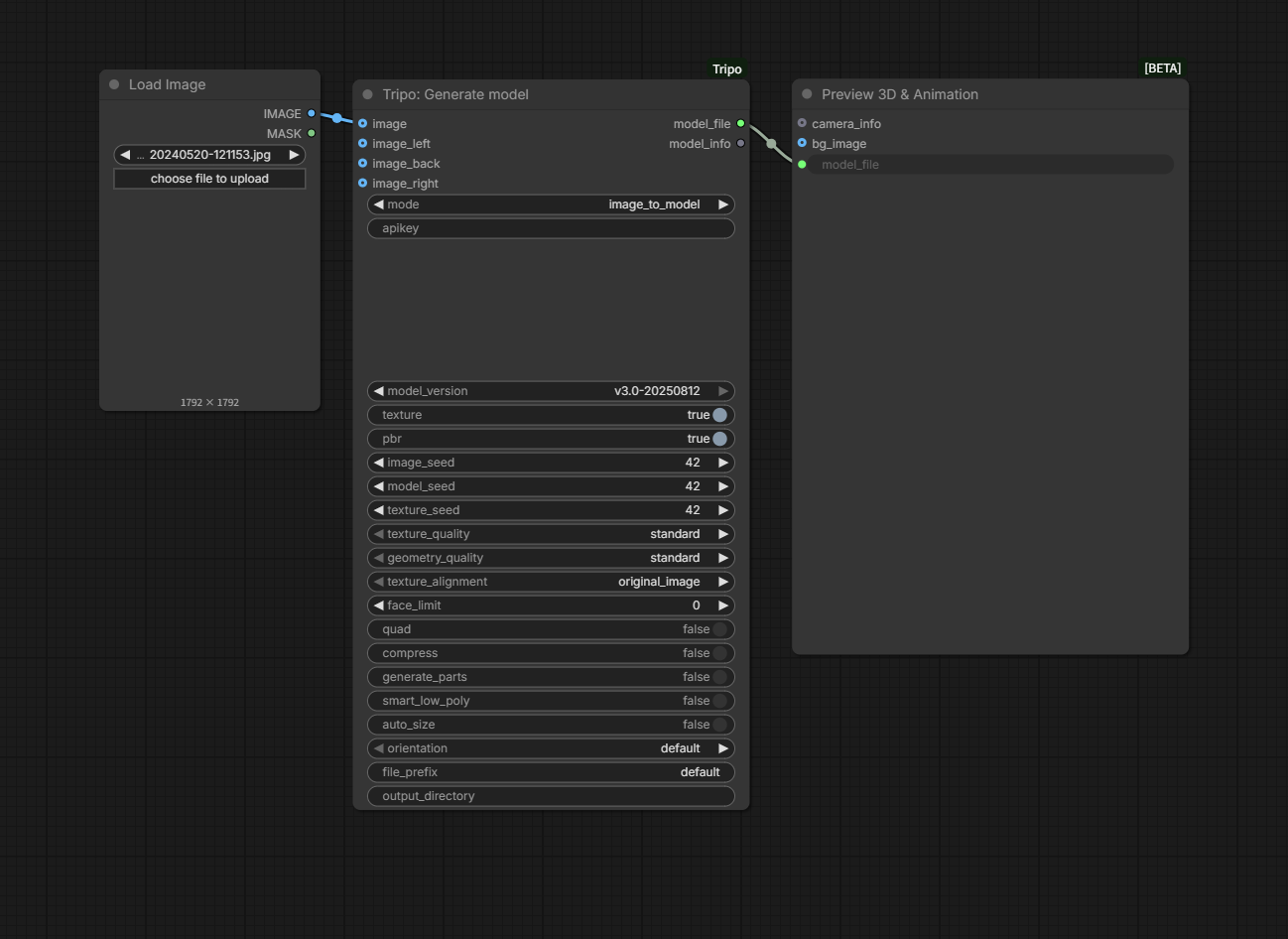
Load an image, connect it to Generate model in image_to_model mode, and preview the result.
Download the original workflow PNG
#### Multiview Images to Mesh
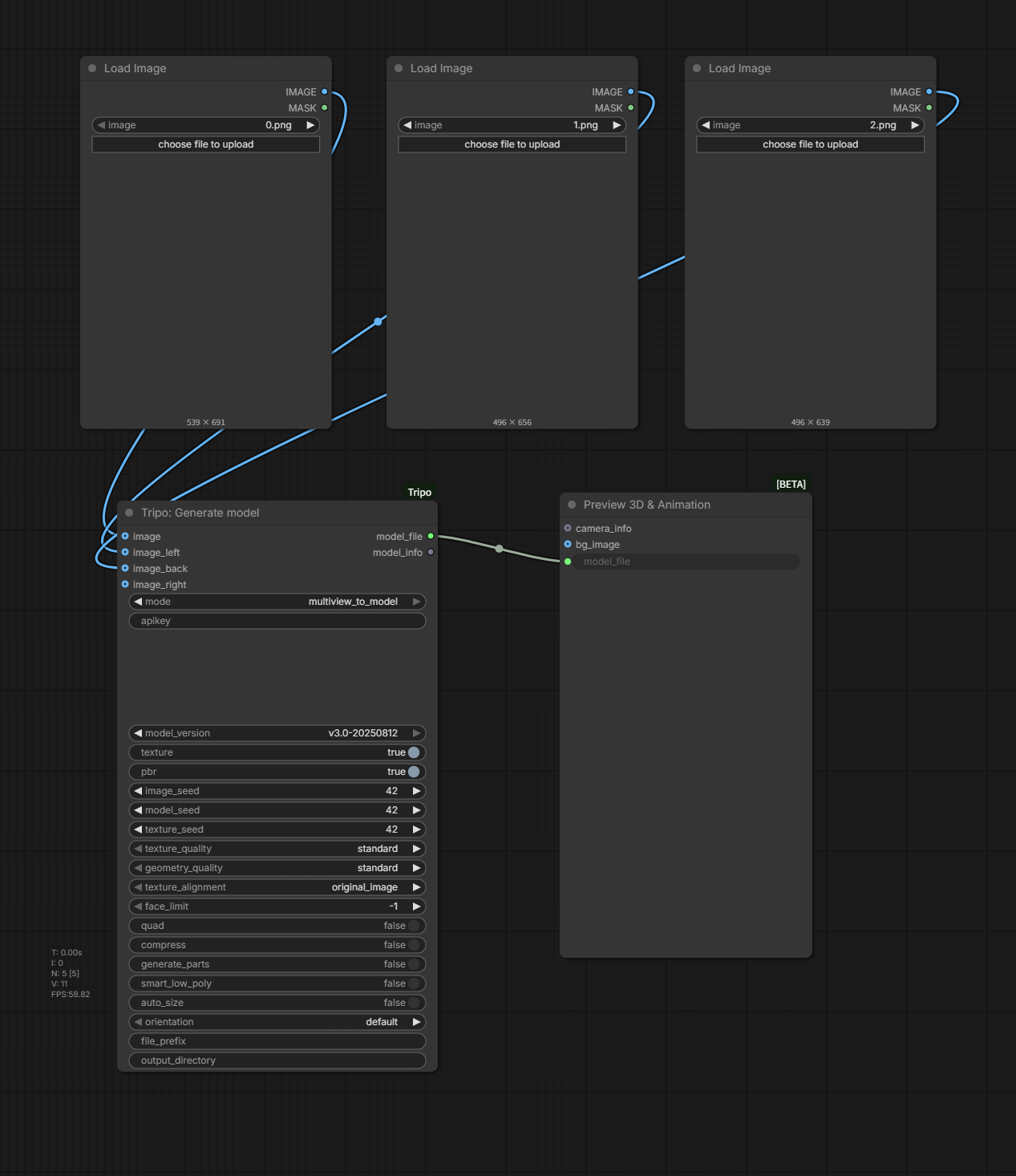
Connect the front and optional side views to Generate model in multiview_to_model mode.
Download the original workflow PNG
#### Texture a generated model
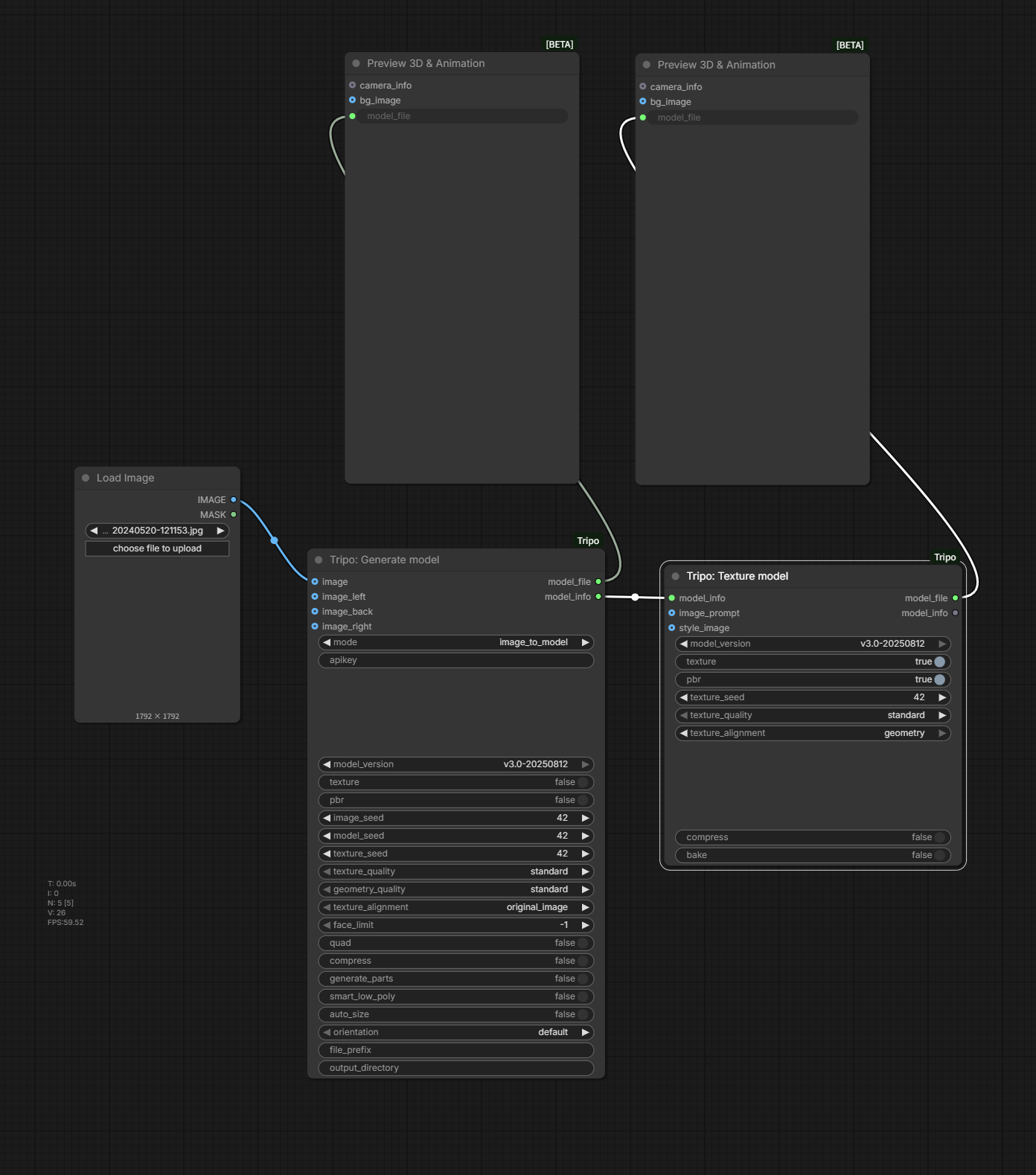
Pass MODEL_INFO from Generate model to Texture model and preview both outputs.
Download the original workflow PNG
#### Refine a draft Mesh
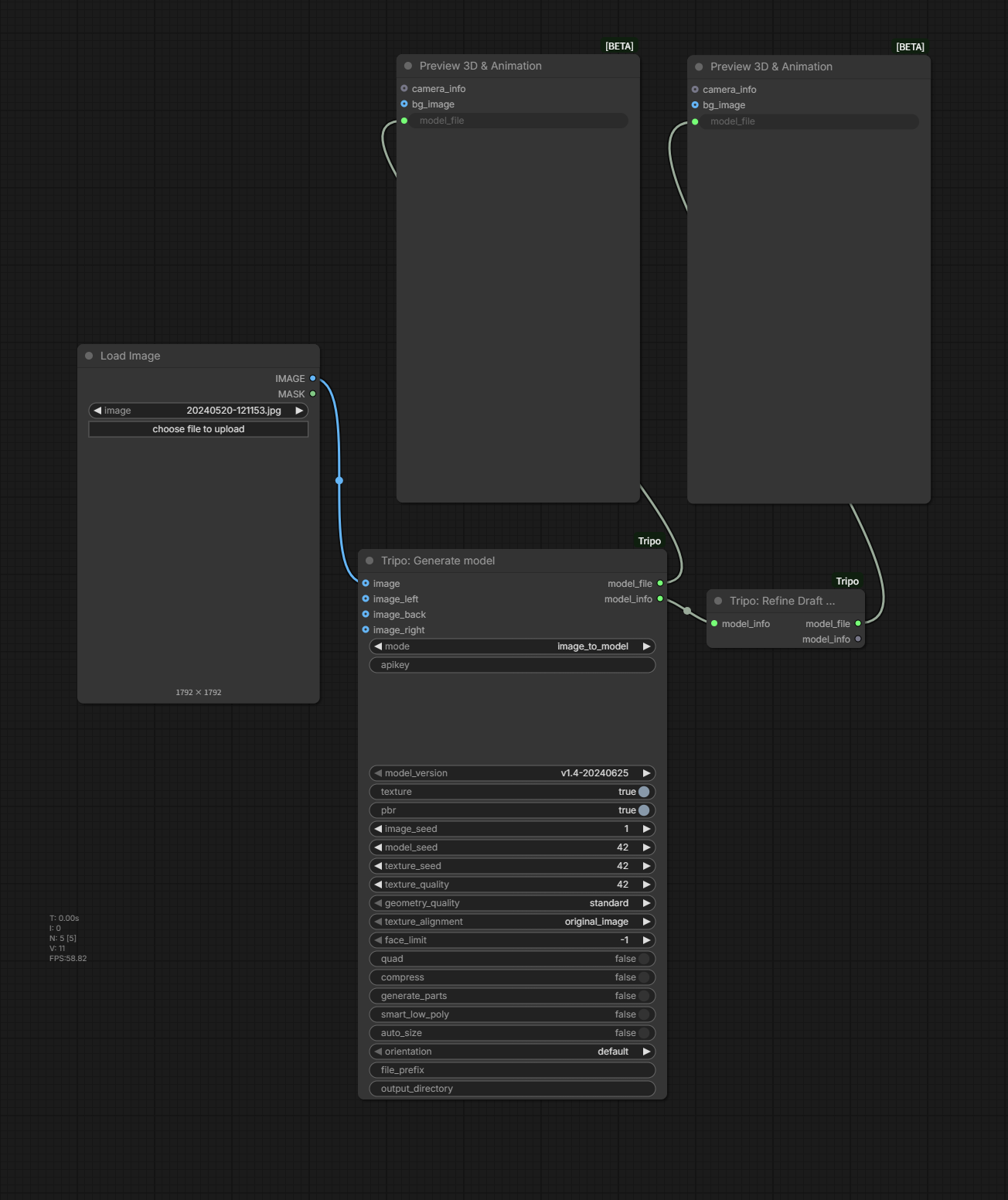
Generate a compatible draft, pass its MODEL_INFO to Refine Draft model, and preview the refined file.
Download the original workflow PNG
#### Animation / Rig and export
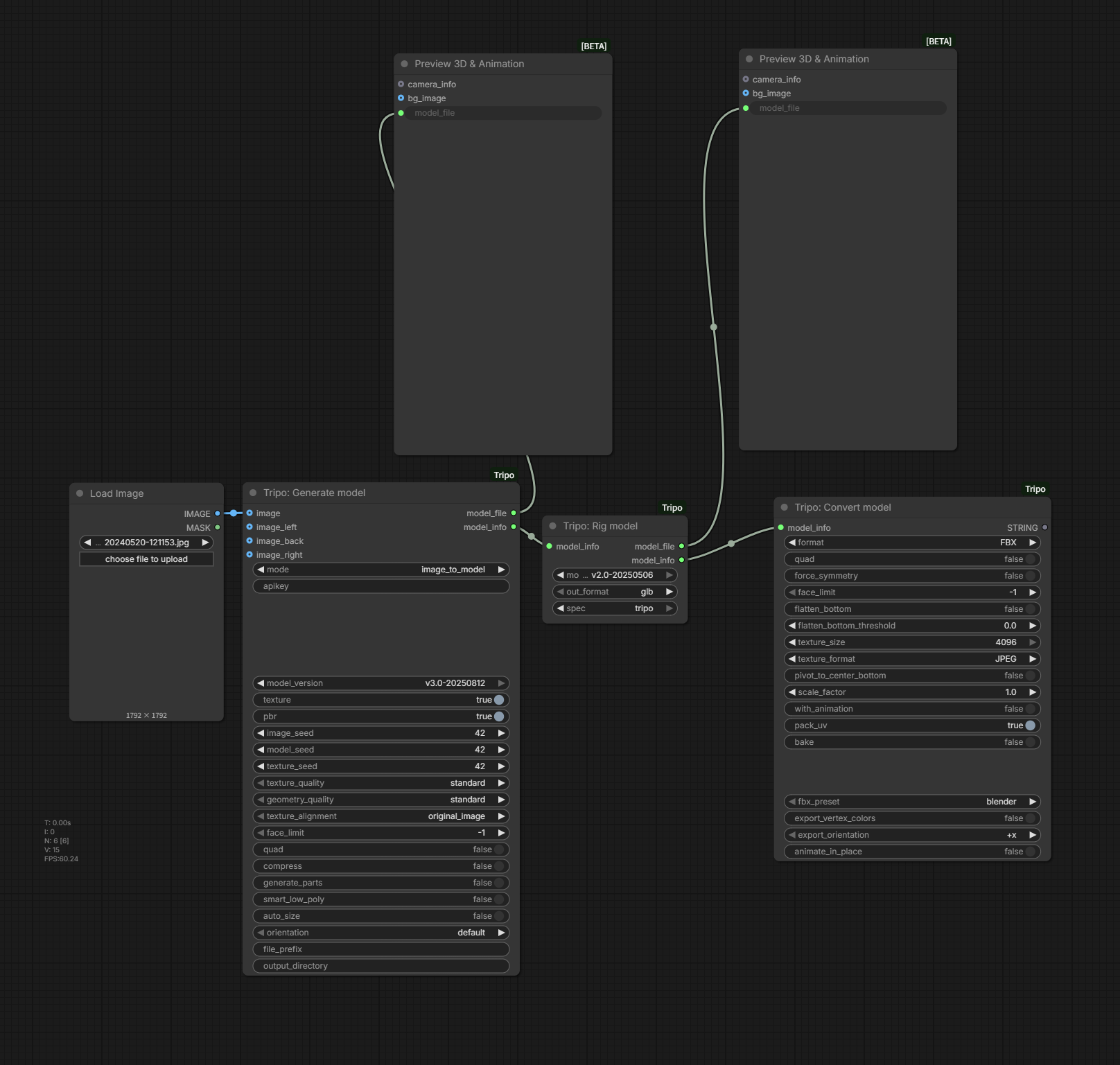
Download the original workflow PNG
## Output and troubleshooting
By default, downloaded models are written to ComfyUI/output. Generate and Import establish file_prefix and output_directory; that metadata is propagated through downstream MODEL_INFO. A non-empty prefix is prepended to the downloaded filename. A non-empty directory moves the downloaded file to that directory and creates it when needed.
| Symptom | Check |
| --- | --- |
| TRIPO API key is required | Set a non-empty node key, TRIPO_API_KEY, or the field in config.json. |
| Prompt/front image is required | Match mode with its conditionally required input. |
| Import does not start | Provide a reachable model_url or an existing model_file; URL has priority. |
| Model cannot be rigged | Try a suitable character model; Rig stops when the riggable check fails or returns no rig type. |
| API task fails | Read the reported error_code and error_msg; also verify account access and balance. |
| Output cannot be moved | Check that output_directory is valid and writable and that the source file still exists. |
| Nodes do not appear | Restart ComfyUI, verify the repository directory, and install requirements.txt. |
| Import upload button fails | Verify the extension listed by the upload control and inspect the ComfyUI upload response. |