Author: 希彼赫
 Try it live
 About this project
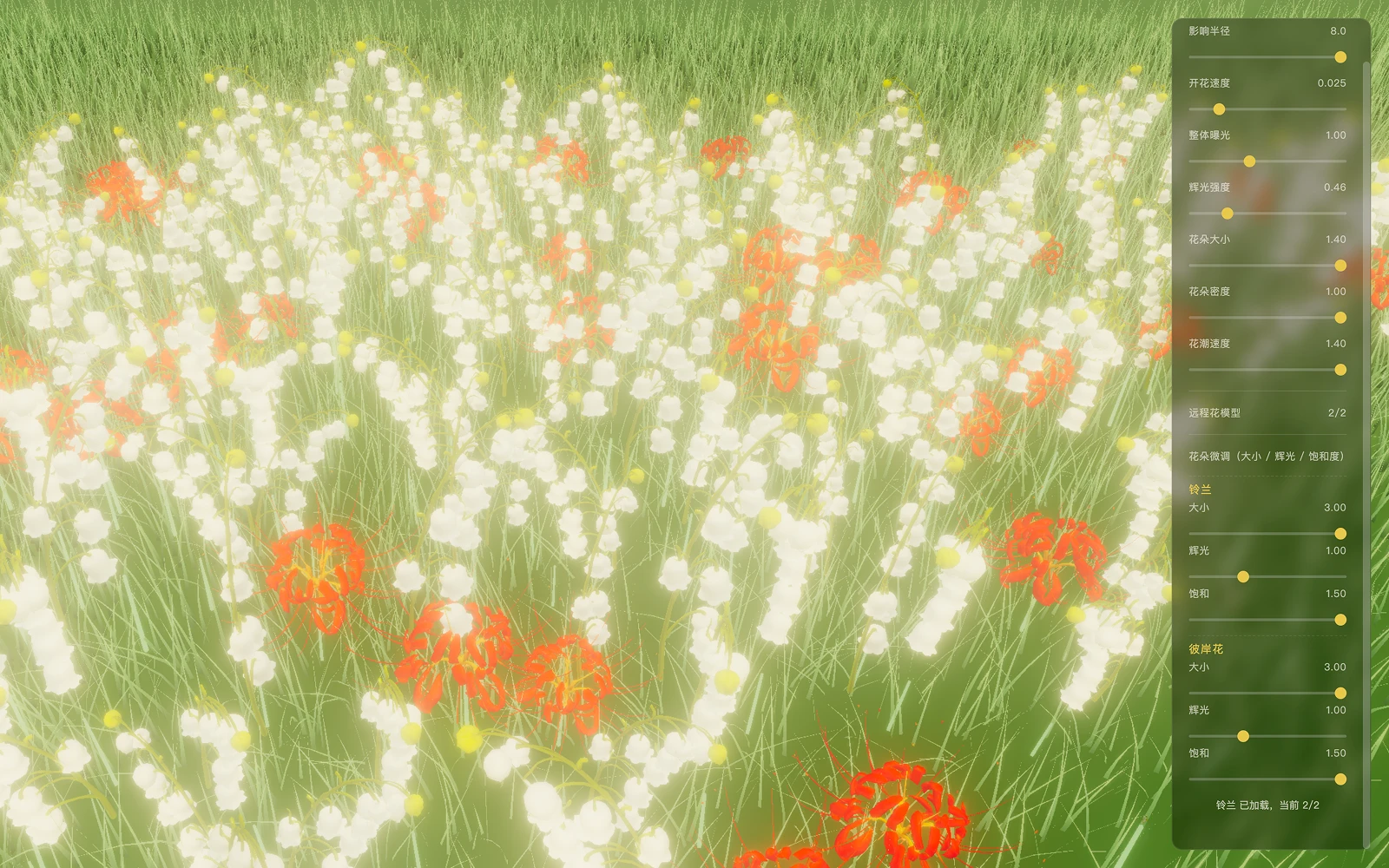
Bloom is a real-time flower field that runs in the browser: sweep your mouse across the field, or turn on the camera and pinch with both hands, and waves of flowers bloom along your path.
Flowers are rendered in real time from remotely loaded 3D flower models, with tunable influence radius, bloom speed, glow, flower size, density and wave speed — a playable interactive piece and a testbed for how 3D assets perform in real time.
Highlights
- Sweep the mouse across the field and waves of flowers bloom along your path
- Drag to orbit the camera and scroll to zoom — frame the field from any angle
- Turn on the camera and pinch twice to set the whole field blooming at once
- Glow, density, wave speed plus per-flower size and saturation are all tunable; press H to hide the UI for a clean recording
Technical breakdown
Assets · Tripo text-to-3D
All six flowers in the field — white, yellow, daisy, purple, blue and red — come straight out of Tripo text-to-3D: write one prompt, get back a GLB with PBR materials. Each flower stays within 2,000–8,000 triangles — not for the sake of visual polish, but because the field plants nearly five thousand of them at once: the lighter the models, the steadier the frame rate.
Every model ships to the same convention: facing +Z, base at the origin, about one unit tall. The code never needs a special case for any single flower — swap in a new one and it just works.
Thousands on screen · InstancedMesh
Getting a few thousand flowers to bloom in a browser at once comes down to Three.js InstancedMesh: each species keeps just one geometry and one material, and instancing does the copying — about 4,900 blooms by default, one draw call per species, far less strain than you’d expect.
The bloom animation never touches the models either: update each instance’s scale in instanceMatrix, and every flower grows from a tiny sprout at the ground into full bloom.
Bloom waves · raycasting + radial wavefront
As the mouse sweeps past, a Raycaster projects the cursor onto the meadow, and the landing point becomes the origin of the bloom wave; every flower checks how far it sits from that point to decide when to open — near ones first, far ones later, spreading outward ring by ring. It sounds elaborate, but the core is just one simple distance calculation.
Gesture input · MediaPipe Hands
With the camera on, MediaPipe Hands tracks 21 landmarks of your hand in real time. The code watches for exactly one thing: whether thumb and index finger pinch together — pinch twice, and the whole field blooms from right where your fingertip points. To avoid false triggers, only the right hand counts.
Glow · bloom post-processing
That dreamy halo over the scene comes from UnrealBloomPass post-processing: the field-wide glow sits at 0.46 by default — luminous without blowing out. Each flower species also keeps its own glow and saturation knobs, so you can push the atmosphere all the way up without washing out any flower’s own color.