Author: Theodore
 Try it live
 About this project
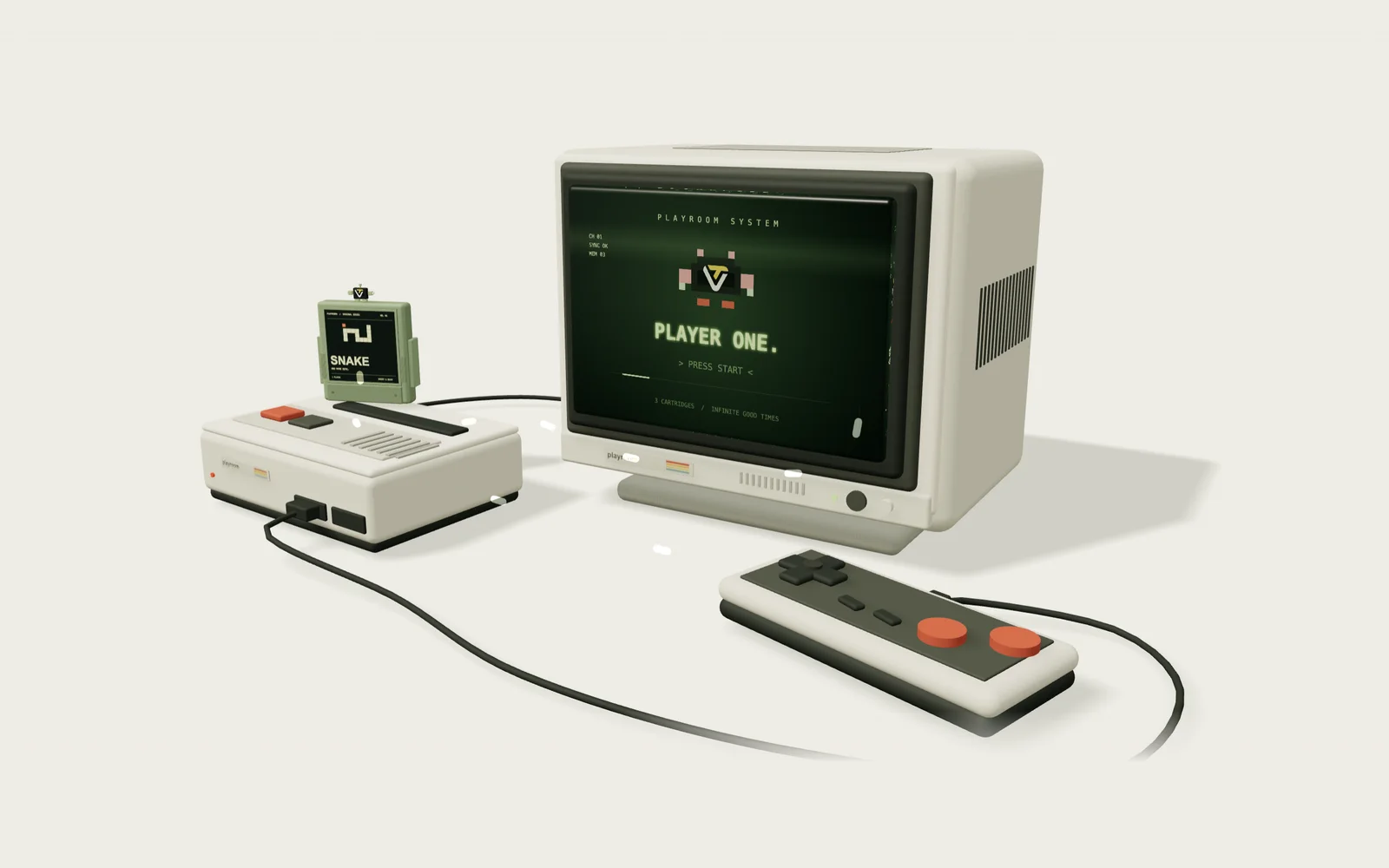
Playroom is a living-room arcade that runs in the browser. The page opens on a 1989-style game desk — a CRT, a console, a controller and a Snake cartridge already slotted in — that you can drag around and inspect; click the console or POWER ON and the camera dollies into the screen, passes through the tube and lands in a library of three cartridges.
All three games are Playroom originals: Snake is about chaining bites on rhythm, Breakout brings three brick stages and power-ups, and Blocks makes stacking predictable with a landing ghost and seven-piece bags. No account, no updates, no save files — high scores stay in your browser, and music and effects switch off with one button.
The whole project depends only on Three.js and Vite, with no backend and no environment variables; six GLB hardware models and a single Tripo face-mark decal are the entire asset list. When WebGL is unavailable, a text menu takes over and the games remain fully playable.
Highlights
- Drag to orbit the whole living-room setup — CRT, console, controller and cartridge — then click the console or POWER ON to dolly in along the screen and pass through the CRT into the cartridge library.
- Three cartridges, three original games: Snake with a five-second 5× chain and 50-point golden fruit; Breakout with three brick stages plus W (wider paddle) and 3 (triple ball) power-ups; Blocks with seven-piece bags, a landing ghost and combo bonuses.
- Arrow keys / WASD and Space on desktop, P to pause and ESC to exit, touch controls on mobile; high scores live only in your own browser.
- Each game has its own chiptune loop and sound cues, with the CC BY 4.0 track “Trip Of Your Smile” on the menus; if WebGL is unavailable the arcade falls back to text buttons and stays playable.
Technical breakdown
3D assets · Six GLB hardware pieces rebound at runtime
The CRT, console, controller and three cartridges ship as six GLB files (exported from Three.js GLTFExporter, low-poly at 128–384 triangles each). GLTFLoader loads them in parallel and each instance is a deep clone: the capture-centering offsets from export are zeroed, materials are cloned per instance, and every mesh casts and receives shadows. The cartridge label plate is found by its exported local offset, named cartridge-label and re-mapped to a Canvas-painted cover texture; the pixel mascot is rigged from named nodes — mascot-body, both arms, antenna and a logo decal carrying the Tripo face mark, with tone mapping and depth write disabled so the flat decal stays crisp.
The asset layer also keeps a swap slot: point the controller field of public/models/manifest.json at any GLB and fitProp scales it by bounding box to 2.54 units wide, grounds and centres it and takes over the original controller’s position — a custom (for example Tripo-generated) controller drops in without touching code.
Screen and labels · Canvas textures as UI
The scene loads no external texture maps. The CRT face is a 1024×700 CanvasTexture: the idle screen (PLAYROOM SYSTEM / PLAYER ONE / PRESS START) is drawn frame by frame on a 2D context and used as both map and emissiveMap so the tube glows. Each cartridge cover is its own 640×610 canvas, painted on the fly from the catalog’s colour, ink, number and tagline for that game — pixel art and title lettering included.
On power-on a screen lifecycle controller swaps the material to a data-stream texture while the camera orbits back to the front of the tube along a spherical path around the screen centre, dollies in and cuts to the library as it passes through the glass; under prefers-reduced-motion the whole move is skipped for a direct switch.
Interaction · Pointer gestures, raycast picking and cinematic orbit
On the desk view a single pointer sequence is both an orbit drag and a click: the gesture controller records theta / phi at press, treats movement past a threshold as a drag and anything else as a click. Hits are resolved with a Raycaster — on the desk the whole setup acts as the power button, in the library the hit walks up the parent chain to the node carrying a gameId. On release the orbit never freezes in place; a cinematic controller blends the manual offset back into a slow automatic sway.
Hovering or focusing a cartridge lifts it by 0.24, tilts it forward with a slight roll and switches the pixel mascot to that game’s pose, while each cartridge bobs on its own sine phase. Every interpolation in the render loop uses the frame-rate-independent easing 1 − e^(−5·dt), so slow frames never pop.
Games and audio · Standalone 2D sessions and synthesized sound
The three games are pure logic modules (create / step / input); a session layer draws them onto a standalone 2D canvas — 480×480 for Snake and Breakout, 300×540 for Blocks. requestAnimationFrame is scheduled only while running, so pause literally stops the frames, and a 250 ms cap on each step prevents tunnelling after a tab switch. Game events (eat, brick, line, power-up, level) feed a particle-effects layer and collapse by priority into a single sound cue.
All audio is synthesized live with Web Audio oscillators: a 16-step chiptune melody per game (82–120 BPM) and twenty-odd cues built from frequency glides plus envelopes, capped at 64 voices. The menu track is a CC BY 4.0 recording that falls back to the synthesized loop if the download fails; audio mutes when the tab is hidden and the context unlocks only after the first click. High scores go to localStorage and fall back to memory when storage is denied — a failed save never interrupts a game.