

01 / PANORAMICA
Panoramica
Ho cominciato da un ragazzo con una sciarpa rossa e da una cittadina americana deserta degli anni 1980. Una statua senza volto strappa gli edifici e li scaglia verso il cielo. L'idea è diventata una demo d'azione giocabile in terza persona, realizzata in Godot.
Claude ha aiutato a pianificare, scrivere gli script e testare; Tripo ha fornito immagini concept, modelli, rigging e animazione. Io ho diretto il progetto e ho verificato il gioco assemblato in Godot.
Questo approccio pratico segue un workflow di vibe gaming che collega idee, sviluppo assistito dall'IA e test di gioco.
Configurazione del progetto:
- Motore: Godot 4.7.2, Forward+
- Assistente di programmazione IA: Claude Code
- Generazione di immagini: generazione di immagini di Tripo
- Generazione 3D: modelli Tripo delle serie P e H
- Progetto: The Red Scarf, una breve demo di boss fight in terza persona
02 / PANORAMICA
Come si gioca la demo finita
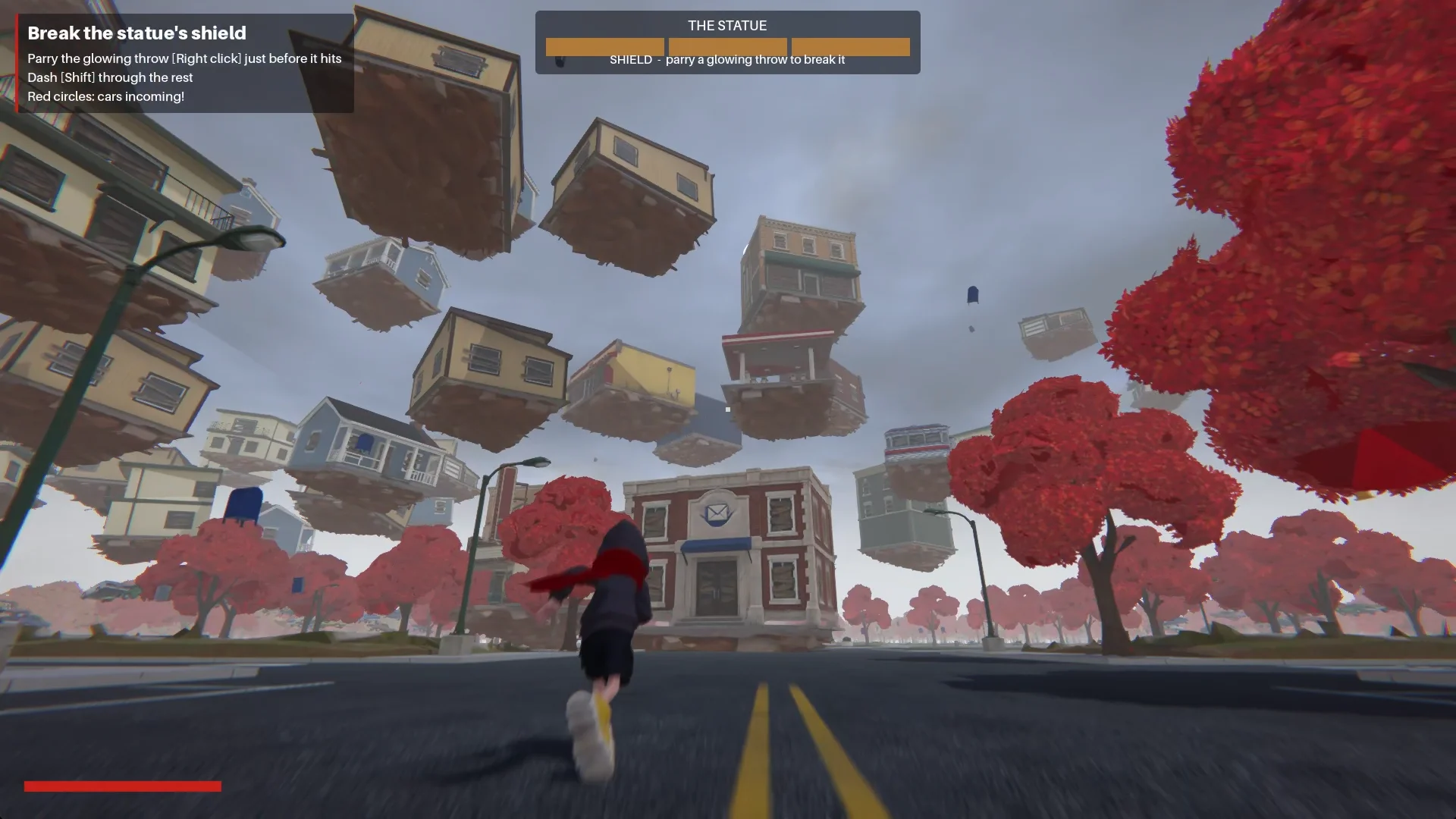
Il ragazzo entra nella cittadina lungo Main Street. In piazza, una statua senza volto sprigiona un'onda d'urto e trascina gli edifici in una spirale attorno a sé.
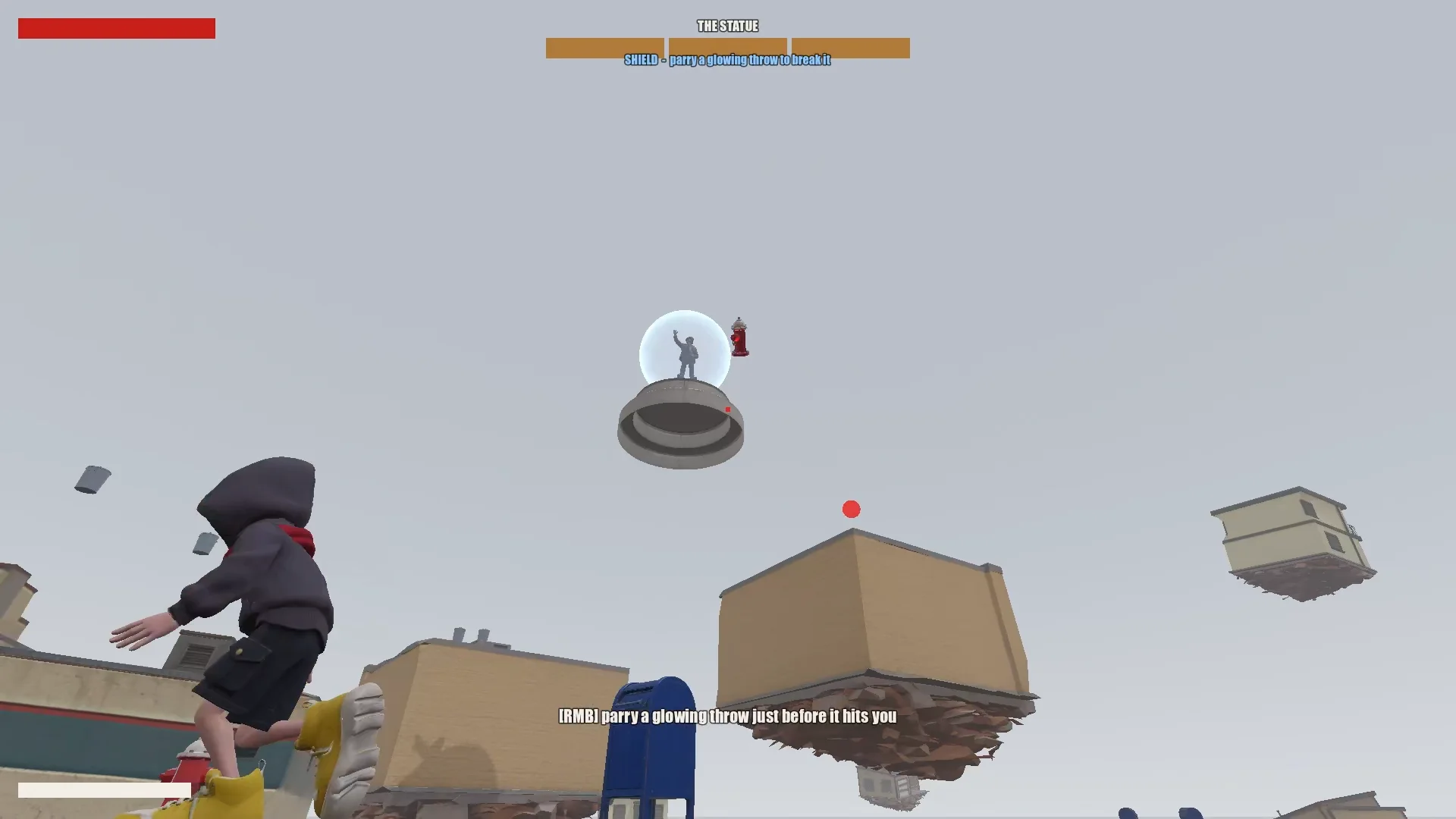
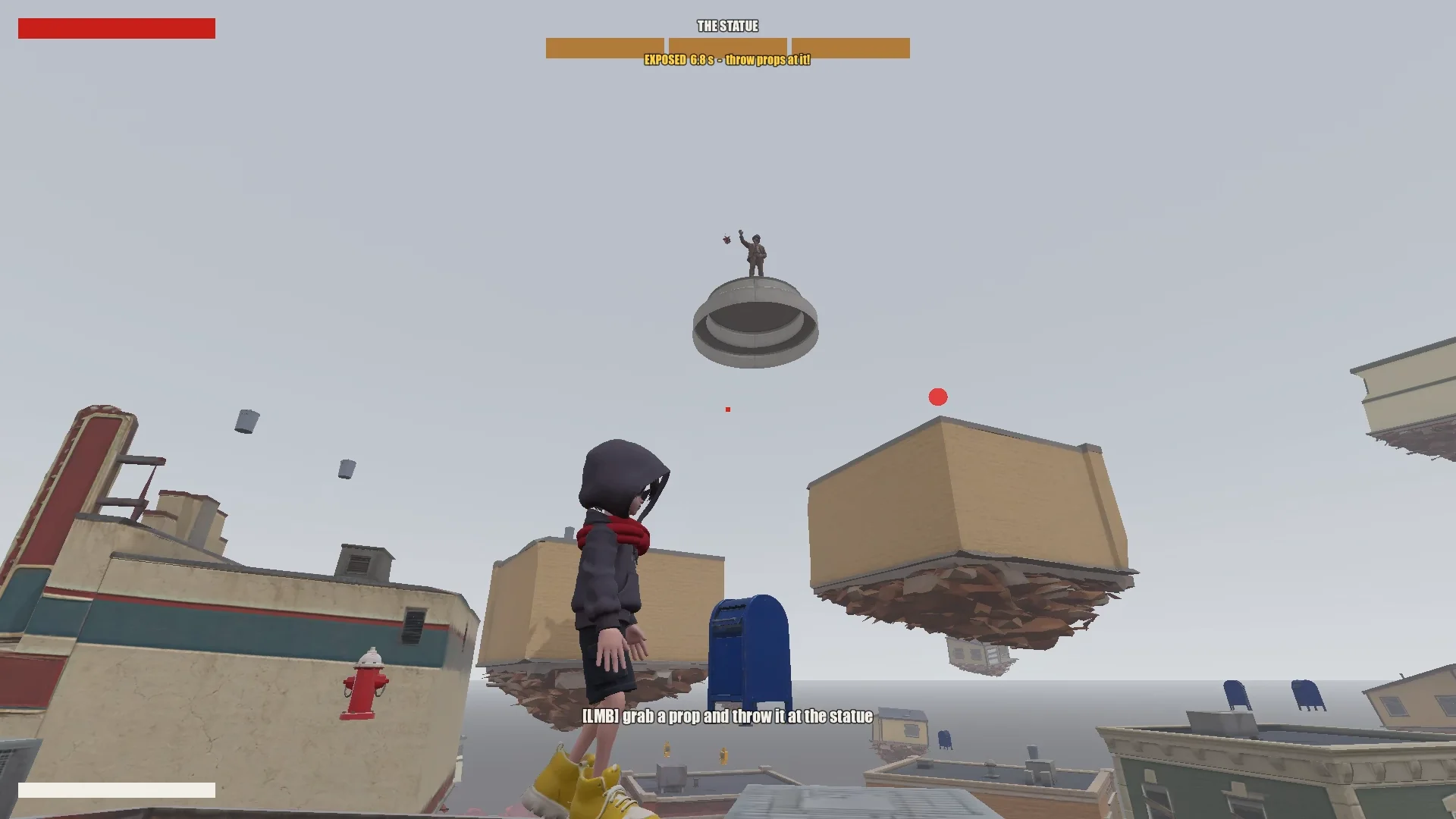
Il giocatore risale i negozi fluttuanti saltando, levitando e usando il balzo con la sciarpa. Parare un proiettile luminoso rompe per qualche istante lo scudo della statua; lanciarle contro gli oggetti vicini la danneggia. Dopo tre round, il ragazzo può raggiungere la statua e sigillarla.
03 / PANORAMICA
Configura gli strumenti e il progetto
Dai a Claude una memoria di progetto
Ho tenuto insieme il progetto Godot, i documenti di design, i concept, i modelli Tripo e gli script. Nella radice, CLAUDE.md registrava le regole che Claude doveva seguire da una sessione all'altra.
Copriva l'essenziale:
- Descrivere il gioco, il tono e la direzione visiva.
- Elencare le regole per gli asset, come uno stile coerente e nessun simbolo o testo indesiderato.
- Richiedere un piano prima delle modifiche importanti.
- Tenere una cronologia dei prompt.
- Annotare le insidie ricorrenti e le convenzioni del progetto man mano che emergono.
Nello stesso file ho aggiunto le correzioni ricorrenti: ordine dei vertici della mesh, orientamento dei modelli, nomi delle animazioni e regole per i bersagli del balzo con la sciarpa. Le sessioni successive potevano riutilizzarle.
Installa Tripo CLI
Per collegare Claude a Tripo, gli ho chiesto di installare Tripo CLI:
Help me install and configure Tripo CLI: npm install -g tripo-cli
Collega Godot e Claude
Claude poteva modificare direttamente le scene di Godot in formato testo e i file GDScript. Una connessione Godot MCP gli permetteva di avviare il gioco, catturare screenshot, esaminare i log e simulare l'input.
Ho verificato la connessione chiedendo a Claude di indicare la scena aperta e l'albero dei nodi, poi confrontando la porta MCP e il progetto con la mia configurazione.
Compare the Godot MCP servers that are available right now and pick the one that fits this project best (Godot 4.7, Claude Code, editor control plus running and inspecting the game).
Explain your choice, then install it into the_red_scarf/ and configure it at project scope (.mcp.json in the project root). Turn telemetry off.
04 / PANORAMICA
Riduci l'idea a un gioco testabile
Scrivi il design, poi sfoltiscilo
Il primo design di Claude copriva la cittadina, il movimento, gli attacchi del boss e il flusso del livello, ma prevedeva troppe fasi e abilità della sciarpa per una demo breve.
I'm making a game demo with Claude, Tripo and Godot. Here's the idea:

The player is a boy in a bright red scarf, a gray hoodie, blue denim shorts and bright yellow basketball sneakers. The scarf is a supernatural object: he can hover with it, move quickly between platforms, grab objects and throw them, and use it as a whip.
The game starts on the main street of a mid-1980s American small town: one main road, houses and shops on both sides (post office, gym, diner and so on). In the central plaza stands a statue of a man in a suit whose face has been erased. It is a hostile supernatural object. When the boy arrives, it releases a shockwave and slowly rises into the sky. The houses around it are torn out of the ground and end up as floating platforms at different heights. The player jumps between them, blocks the objects the statue hurls with telekinesis, fights back, and finally reaches the statue and seals it with the scarf.

Write a short design doc in design/game_design.md: building types, the boss's attacks in two phases, the boy's attacks, defense and movement moves, and the level flow.
Show me your plan first. Ask me if anything is unclear.
L'ho ridotto al loop minimo che avesse ancora il sapore di questo gioco:
Simplify the combat:
1. The boss has only one phase.
2. Remove the scarf shield and the scarf whip.
3. New loop: the player moves across floating buildings and can only break the statue's shield by parrying its attacks (right click / RT, like a fighting-game parry). Once the shield is down, the player throws objects at it to deal damage.
Ho ridotto il combattimento a un'unica fase del boss: parare per rompere lo scudo, lanciare oggetti durante la finestra di vulnerabilità e usare la cittadina fluttuante come sfida di movimento. Ogni mossa rimasta doveva essere al servizio di quel loop.
Costruisci la cittadina a partire dai dati
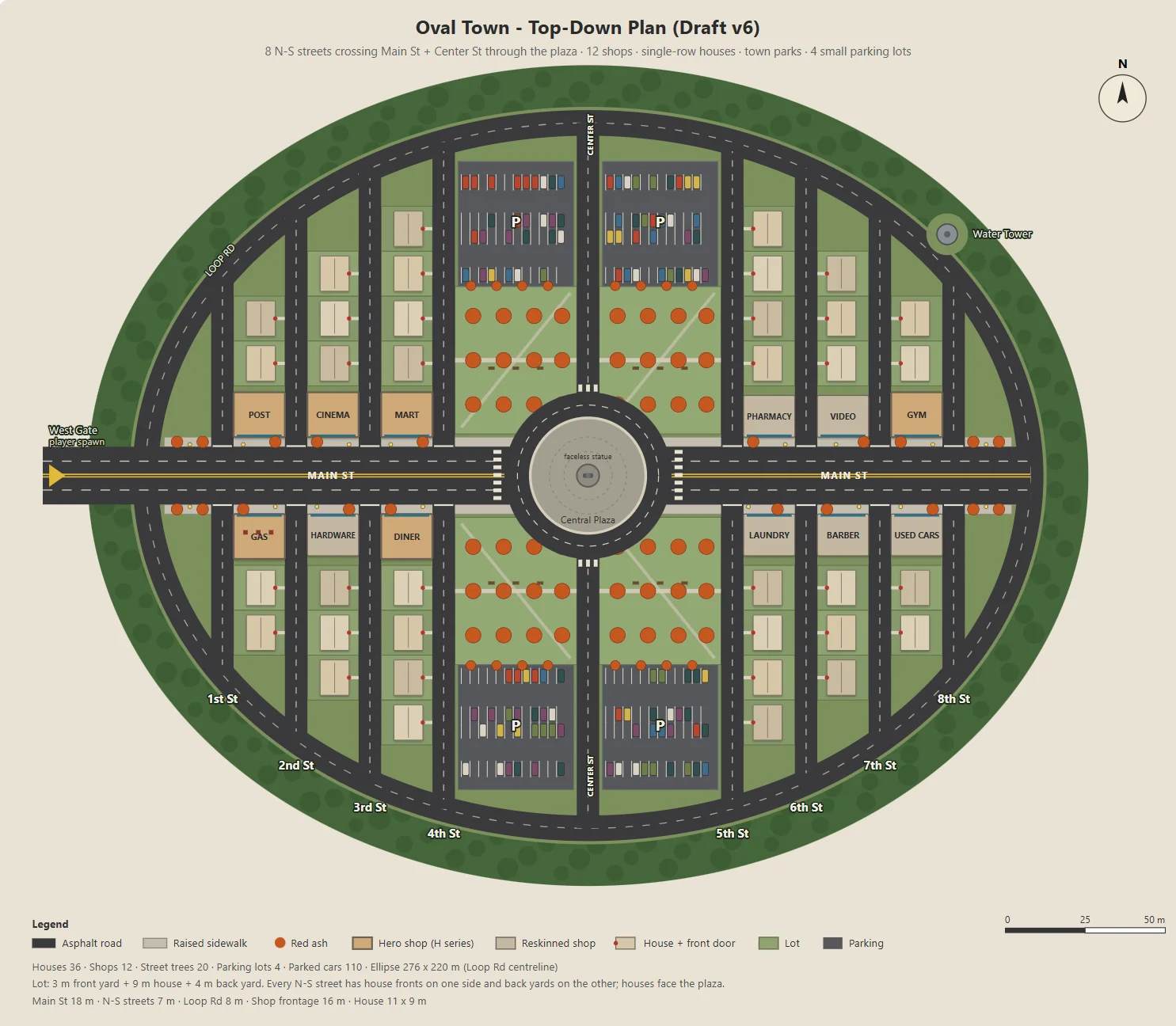
Claude ha scritto uno script Node per generare un SVG parametrico della cittadina ovale: Main Street, dodici negozi, strade residenziali, parchi, parcheggi e una piazza.
Lo stesso script esportava il JSON per il blockout, gli edifici, le strade, i lampioni e gli alberi di Godot. Concept art e livello giocabile condividevano quindi lo stesso layout.
Ho modificato un parametro alla volta, come le dimensioni dei parcheggi, la profondità dei cortili sul retro o gli ingressi dei negozi, così ogni modifica era facile da verificare.
Here's the town I have in mind. The street grid is a grid inside an oval outline:
- The long axis of the oval is the widest street, Main St, lined with functional buildings like the post office and the gym.
- The other streets run perpendicular to Main St on both sides, lined with houses.
- The center of the oval is a round plaza; the statue stands on a concrete pedestal in the middle.
- Asphalt streets with lane markings. Raised concrete sidewalks in front of the shops, with American red ash street trees at regular intervals.

Design the town structure, fill in the details I didn't mention and improve the design.
Draw it as a top-down plan with a Node script (tools/townplan/gen_town_svg.mjs) that generates an SVG from parameters kept at the top of the file.
Definisci una direzione visiva
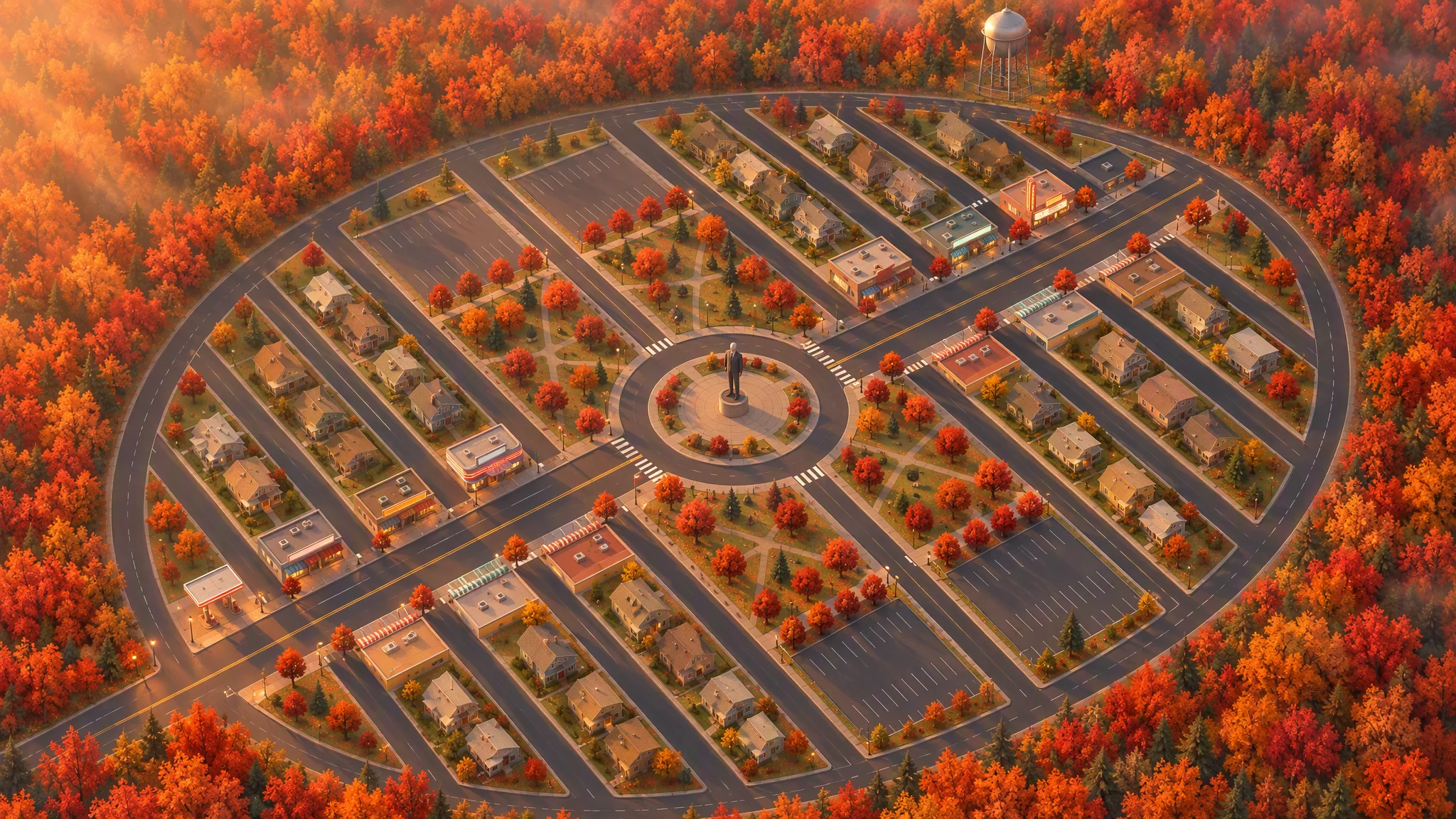
Ho usato il layout come riferimento rigoroso per un'illustrazione vista dall'alto, conservando strade, lotti, impronte degli edifici, alberi e contorno della cittadina.
La prima vista a 45 gradi sembrava una mappa inclinata. Ruotare il riferimento in locale prima di rigenerare ha dato all'immagine un'angolazione convincente.
Strict layout reference: image[1]. Keep every road, block, building footprint, lot, park, parking lot, tree and the oval outline exactly as in image[1]. North up. Add, remove, move or resize nothing. Only restyle it as a finished top-down orthographic illustration of a quiet mid-1980s American small town in autumn.

[...town contents: main street, roundabout and statue, twelve shops seen as flat roofs only, all facing the main street, houses, parks, parking lots, red ash trees, a water tower...]

Style: stylized non-photorealistic game environment, simple hard-edged geometry, flat slightly exaggerated colors, light weathering, no grime. Warm late-afternoon sun from the west.

No vehicles, people, text, lettering, flags, or national or religious symbols. The statue has no face.
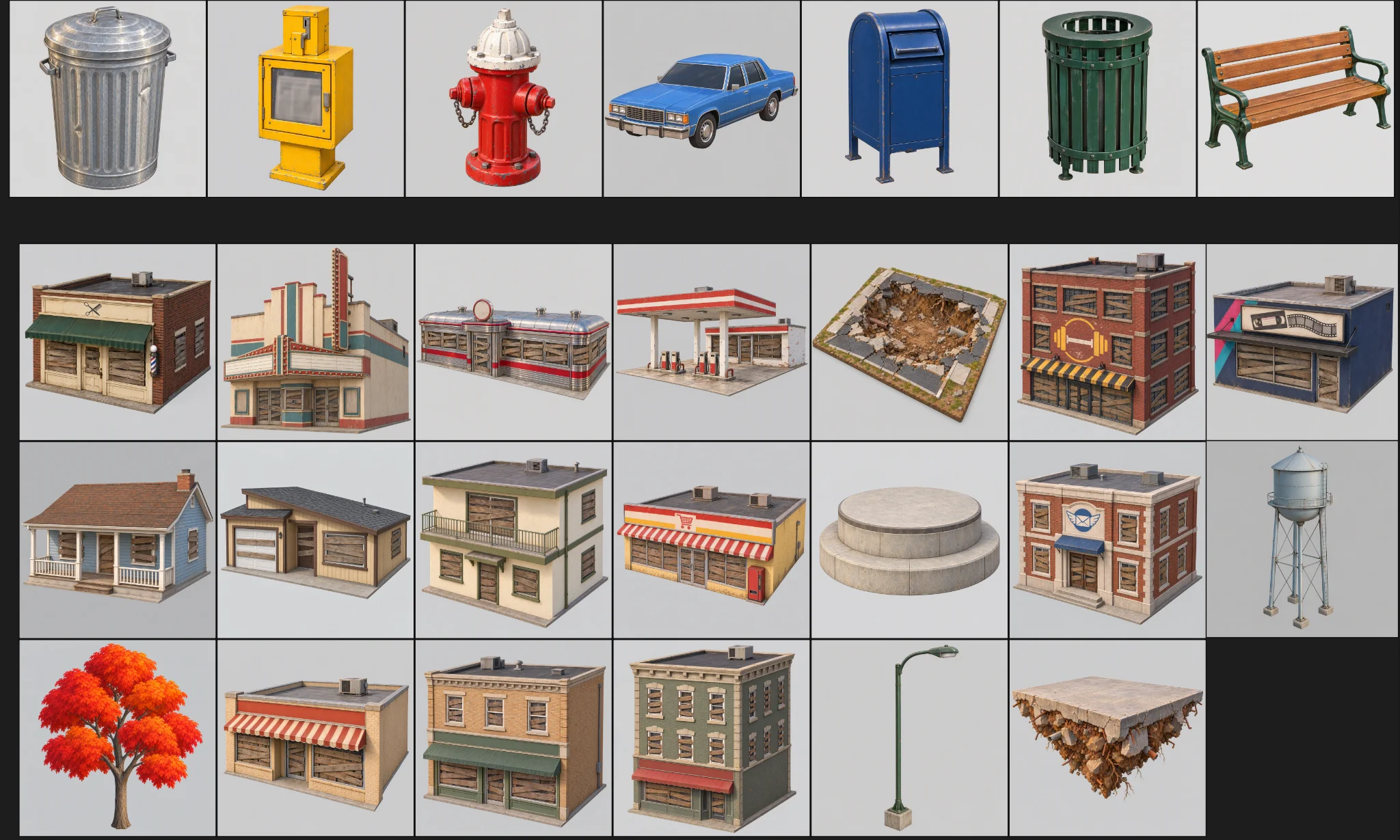
Partendo dalla pianta definitiva e dall'immagine a volo d'uccello, Claude ha elencato gli asset, separando i modelli Tripo dagli oggetti costruiti in Godot. Le fasce di numero di facce hanno mantenuto nel budget circa trenta concept e trenta modelli.
The town concept art is done. Using the final plan (v6), list every asset we need, split into "generate with Tripo" and "build in the engine". Then write a concept-image prompt for each Tripo asset in design/asset_prompts.md.
- Shops on Main St should vary more, with clearly different heights, so the opening walk has an interesting skyline.
- Split scene assets into tiers (S / A / B / C) by importance and size, give each tier a model and a triangle budget (hard cap 10,000 per asset), and estimate the total for the scene.
05 / PANORAMICA
Prototipa un asset prima di creare il resto
Testa un edificio rappresentativo
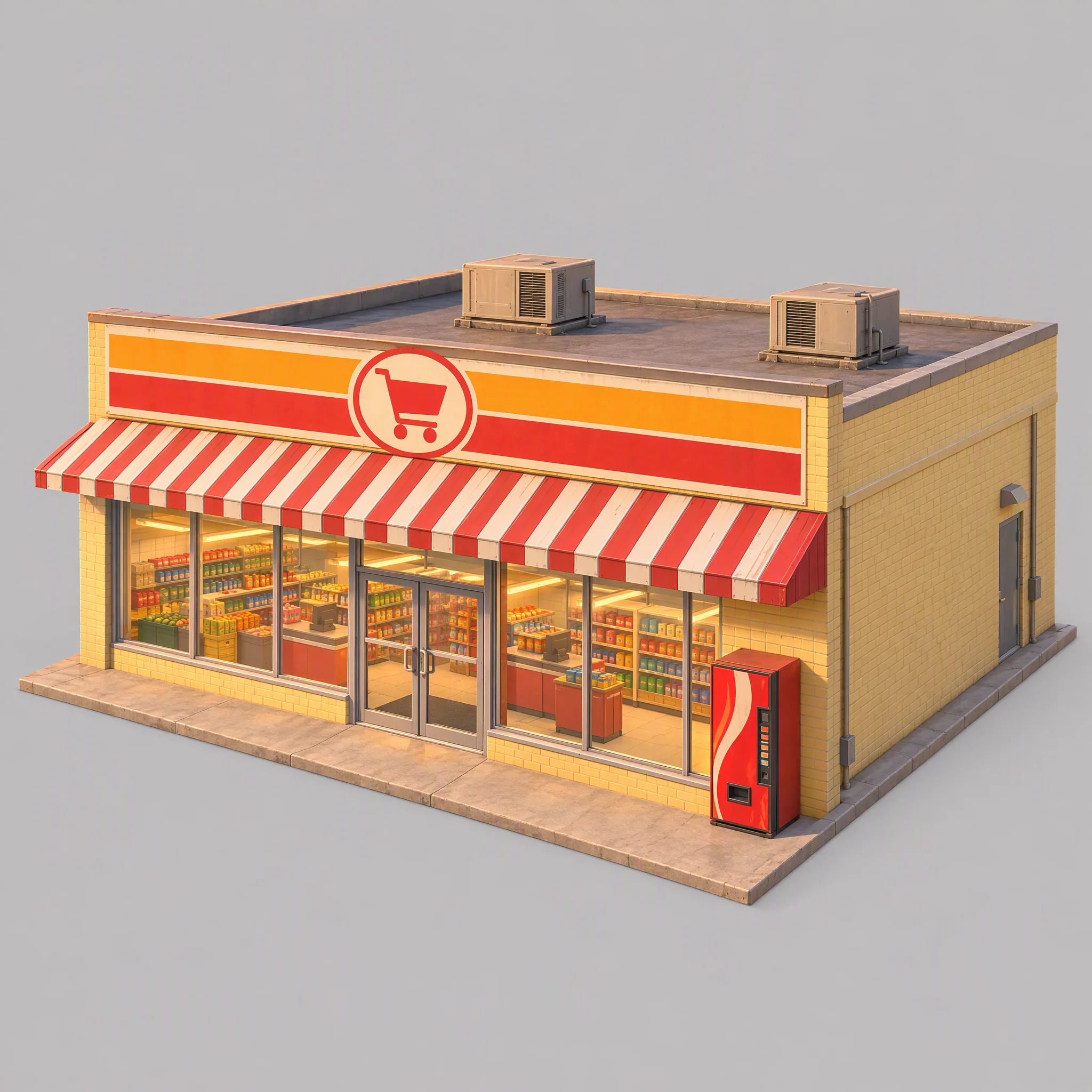
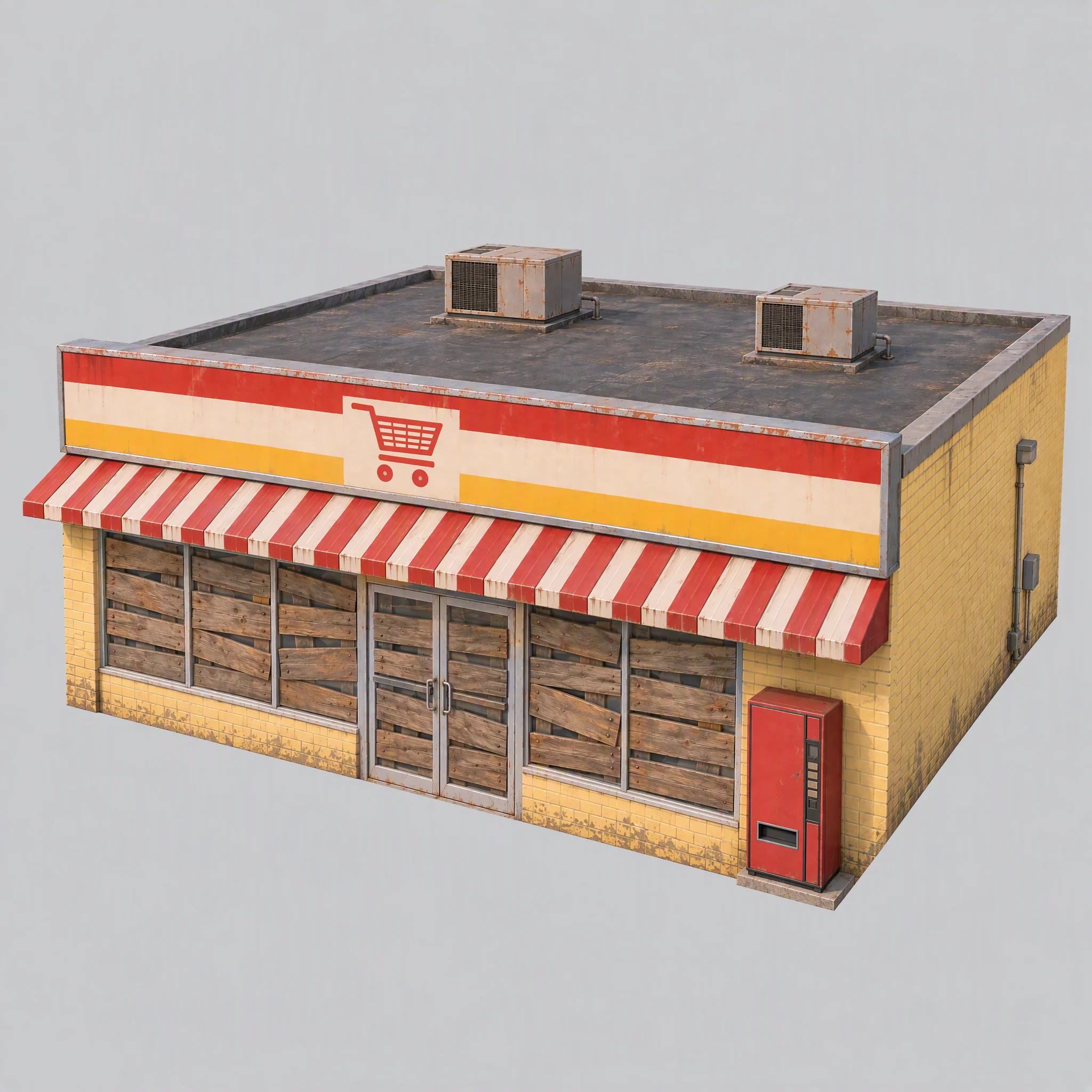
Ho testato la pipeline prima su un solo supermercato, verificandone lo stile visivo, l'idoneità come riferimento per la modellazione e la famiglia di modelli Tripo più adatta.
- L'immagine concept rispetta la direzione visiva della cittadina?
- L'immagine offre un riferimento pulito per la modellazione?
- Quale famiglia di modelli Tripo produce la geometria giusta?
La prima immagine aveva scaffali in vista, una luce calda già incorporata, un distributore automatico che richiamava un marchio e un basamento sovradimensionato.
Ho aggiornato le regole condivise: chiudere le finestre con assi, spegnere le luci, usare un'illuminazione di riferimento bianca e neutra e tenere i basamenti a filo dei muri.
Use image[1] only as a reference for color palette, materials and rendering style. Do not copy its content or camera.

A single isolated one-story small-town supermarket from the mid-1980s: a wide, low box about 16 meters wide, 14 meters deep and 5 meters tall. The front is a long row of large plate-glass windows with a pair of glass doors in the middle, under a flat red-and-white striped metal awning. Above the awning, a tall flat sign panel runs the full width of the roofline, painted with bold color bands and a simple shopping-cart pictogram, no letters. Pale yellow painted brick walls, a flat roof with two boxy rooftop AC units. A plain red vending machine stands beside the doors. All windows and glass doors are boarded up with weathered wooden planks, so no interior is visible. All lights, signs and neon tubes are switched off. The building sits on a thin flat concrete slab exactly the size of its footprint, flush with the walls on every side.

Three-quarter front view from slightly above, the whole building in frame, centered on a plain light gray background, neutral white daylight with soft even lighting and no warm tint, no cast shadows, no ground beyond the slab.

Style: simplified realism with hard-edged, clean forms, mid-1980s American, slightly saturated comic-book colors, light weathering, no grime.

No text, no letters, no logos, no flags, no national or religious symbols, no people, no vehicles
Confronta le famiglie di modelli prima di scalare
Con la stessa immagine del supermercato e limiti di facce controllati, la serie P ha prodotto spigoli vivi più puliti; la serie H aveva triangoli più uniformi e superfici più morbide.
Per questo gioco ho scelto:
- P1.0 per edifici, veicoli e prop che beneficiano di superfici dure e pulite.
- H3.1 per le forme organiche, come la statua e i blocchi di terreno fluttuanti.
- P2.0 per il ragazzo, perché il personaggio aveva bisogno di una topologia pulita per il rigging.
È stata una scelta per questo gioco, non una classifica universale dei modelli.
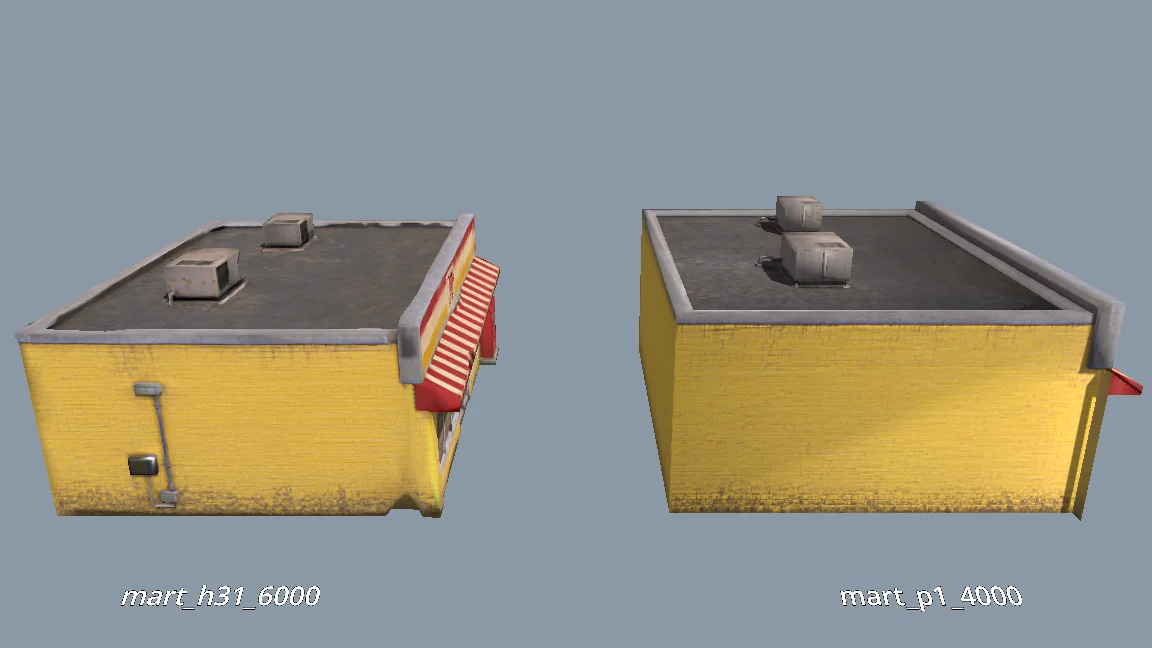
The current models are all clean and fairly flat. For performance, would P1.0 suit the buildings better than H3.1? Run a comparison: generate MART with P1.0 at 4000 faces and with H3.1 at 6000 faces, import both into a test folder, and render them side by side from the storefront, front, corner and top views (shaded and wireframe). Then tell me which one to use and why.
Genera i restanti asset della scena
Dopo che il prototipo ha superato la revisione, ho generato gli asset rimanenti. Ognuno aveva una categoria, una cartella, un preset di modello e un budget di facce.
Il batch prevedeva tre controlli:
Generate concept images for all remaining scene assets the same way as MART, using the prompts in design/asset_prompts.md and cpt/town_birdseye.png as the style reference.
Check balance first. Save each image under cpt/assets/<category>/.
Check every image against the checklist in asset_prompts.md (single object, clean background, no text or symbols, matches the bird's-eye style, no thin fragile parts).
Retry failed tasks individually; never rerun the whole batch.
Record progress in design/batch_checkpoint.md so we can resume if we stop halfway.
When done, list what succeeded, what failed and what needs my review.
- Verificare che ogni immagine contenga un solo oggetto, abbia uno sfondo pulito e non presenti testo accidentale né parti fragili.
- Riprovare singolarmente i task falliti.
- Registrare i progressi in un file di checkpoint.
Ho rigenerato singolarmente gli asset falliti: una stazione di servizio con un buco nel muro posteriore, una torre dell'acqua mancante e un supermercato dalla geometria sconnessa.
Costruisci il personaggio a parte
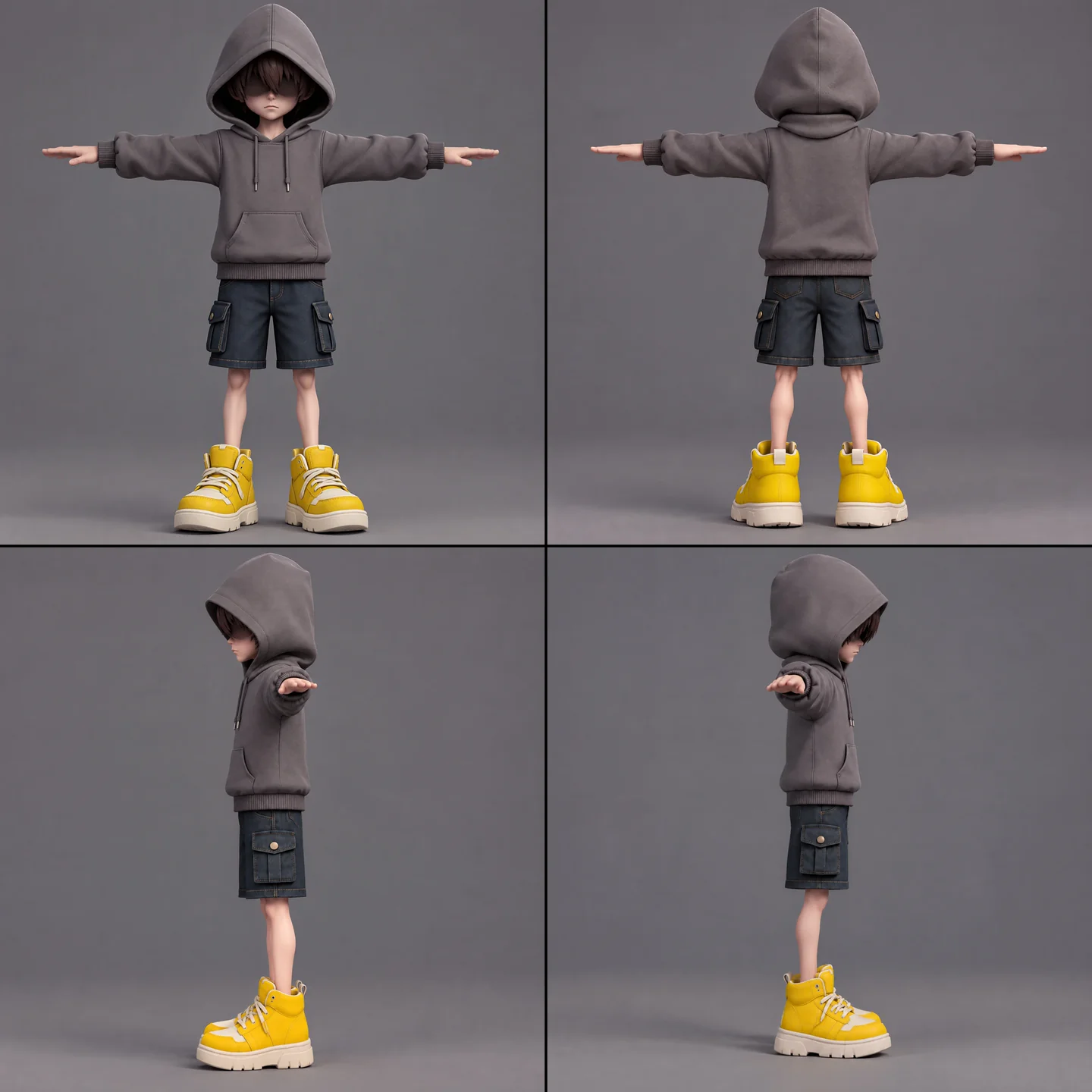
Per il ragazzo servivano concept art, modellazione, una verifica della riggabilità, rigging e retargeting delle animazioni. Ho tenuto separata la sciarpa per evitare pesi di skinning indesiderati e preservarne i movimenti complessi.
A full-body cartoon-style boy in a standard T-pose, arms extended horizontally, legs straight. He wears a gray hoodie with the hood up. His face is shrouded in shadow, eyes hidden, with only his mouth and grayish-brown bangs visible. He has a long red scarf wrapped around his neck, with both hanging ends draped down behind his back, not in front. He wears dark blue denim shorts ending above the knee so his knees are exposed, with buttoned flap pockets on both the left and right sides. He wears oversized yellow sneakers and has relatively thin legs. Cartoon character design, clean 3D model.
Per prima cosa ho eseguito la verifica gratuita della riggabilità. L'elenco delle animazioni comprendeva idle, camminata, corsa, salto, caduta, lancio, parata, balzo con la sciarpa, colpo subito, sconfitta, sigillatura e vittoria. Il retargeting di più di cinque animazioni alla volta falliva, quindi ho usato tre task più piccoli e li ho combinati in Godot.
The boy model is ready at models/boy/boy_body.glb. Rig it and add the animations the demo needs. Run the free rig check first. List the animations you plan to use, mapped to Tripo presets, before generating anything.
Prima di usarle nel batch, ho controllato a mano le viste del personaggio per individuare mani specchiate e capelli scambiati per occhiali da sole.
Standardizza importazioni e controlli di qualità
Un passaggio di importazione aggiungeva normali pesate e spigoli vivi ai muri che sembravano troppo morbidi. I limiti delle texture variavano da asset ad asset, con eccezioni per il ragazzo, la sciarpa, la statua e gli alberi.
Prima di spostare i modelli dalla directory di test alla scena giocabile, ho controllato scala, orientamento, muri, tetti e poligoni sparsi. Gli asset di produzione dovevano avere zero problemi segnalati.
When I inspect the models, the normals are smoothed across every edge, so flat walls look soft and cheap. I want something like Blender's Weighted Normal modifier.
Write a Godot import hook that recomputes weighted normals on import (area-weighted, edges sharper than 30 degrees become hard edges, keep the normal map), plus a setup script that attaches the hook to a list of GLBs and limits texture size (4K, or 2K for small assets) with VRAM compression. Don't apply it to the boy, the scarf, the statue or trees.
Render before/after comparisons so I can judge the result.
06 / PANORAMICA
Costruisci la demo a strati
Parti da un blockout di gameplay
Uno script tool di Godot leggeva il JSON della cittadina per costruire un blockout giocabile con box di collisione colorati, terreno, punto di spawn e layout degli elementi fluttuanti. I controlli nell'Inspector e uno script da riga di comando lo ricostruivano dopo ogni modifica ai dati.
Poi Swap In Models ha sostituito i box con asset Tripo nelle stesse posizioni. Entrambe le versioni usavano gli stessi dati di layout.
I negozi formavano la spirale su cui arrampicarsi; le case restavano sullo sfondo. Un report controllava sovrapposizioni, spazio sopra la testa, distanza tra i tetti e raggiungibilità delle piattaforme.
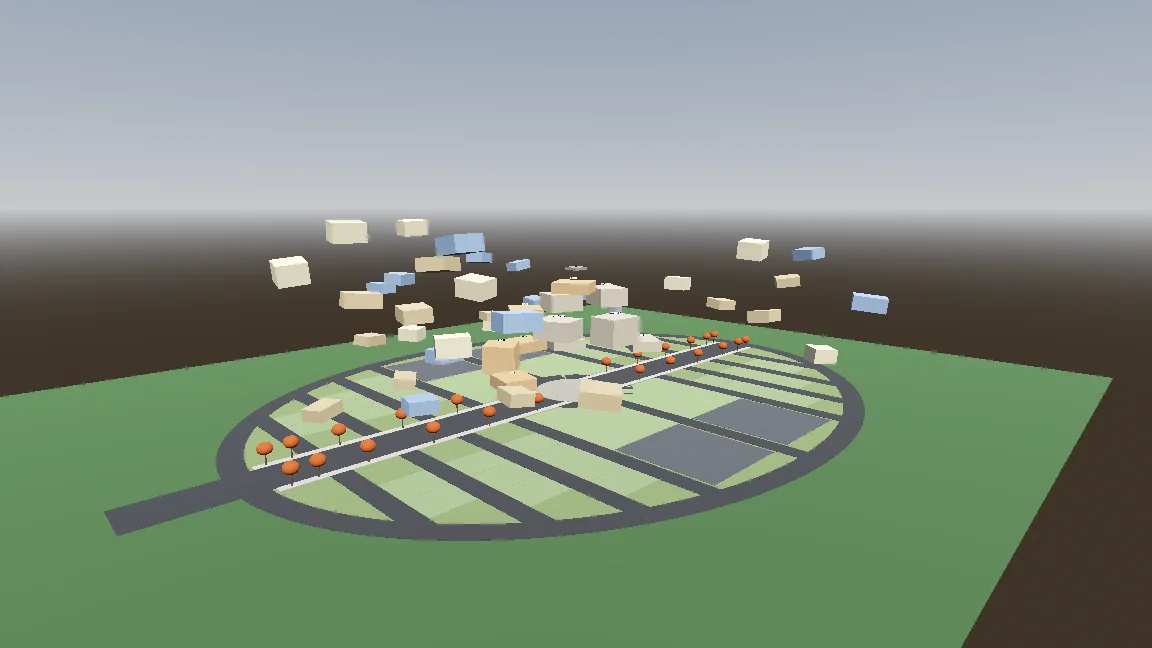
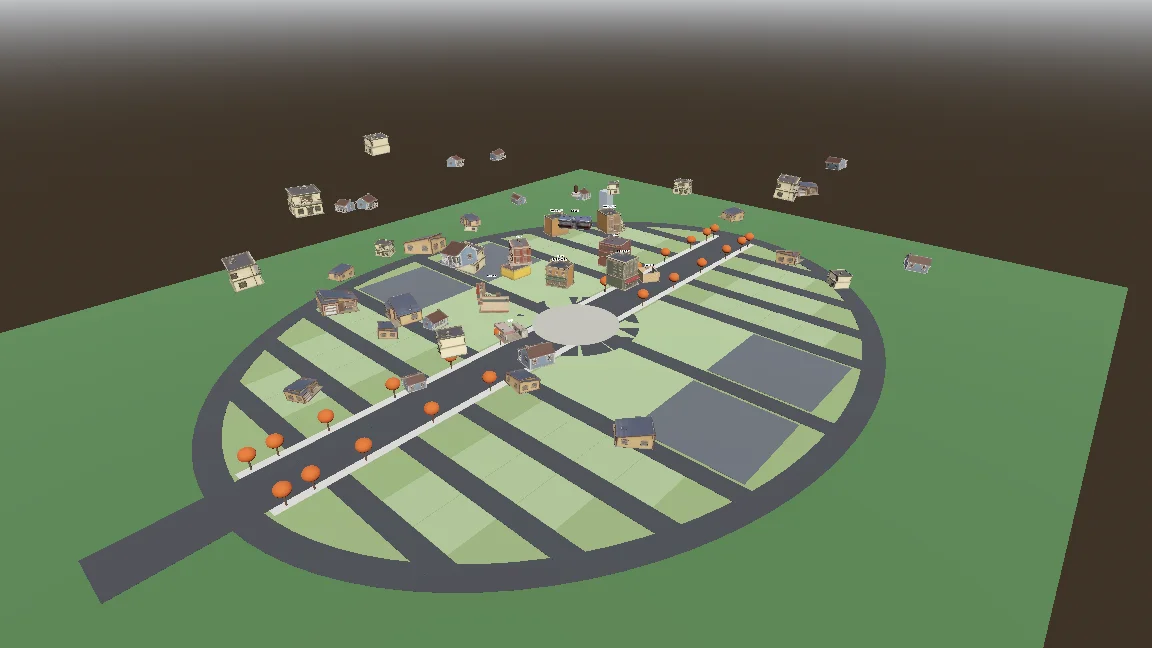
Build a gameplay-only blockout:
- Export the town plan as JSON (gen_town_svg.mjs --json) and write an @tool script (Scripts/town/town_builder.gd) that reads it and generates the ground, a colored box with collision for every shop and house (heights from the design doc), and the player spawn at the west entrance.
- Add inspector buttons: Build Town, Preview Tree, Reset To Ground, Swap In Models.
- Also add a command-line build script so you can rebuild the scene headless.
- Swap In Models replaces each box with res://Assets/Models/<model>.glb, scaled to the lot and rotated to face the street, keeping the position.
Show me screenshots from the street and from above.
Aggiungi il movimento e la sciarpa procedurale
Il controller gestiva gli stati di terra, aria, levitazione e balzo con la sciarpa. Le impostazioni esposte e uno smoke test hanno aiutato a regolare e verificare ogni mossa.
Start the player controller in the blockout scene. Use the rigged boy model directly, no capsule placeholder.
- CharacterBody3D with states: ground, air, hover (hold jump midair, drains scarf energy), scarf leap.
- Third-person over-the-shoulder camera, keyboard + mouse and gamepad input maps.
- AnimationTree state machine built by a generator script (Scripts/tools/build_player_scene.gd), not by hand in the editor.
- All feel parameters exported so I can tune them in the inspector.
- An automated smoke test that spawns the player, runs, jumps, hovers and scarf leap, and saves screenshots.
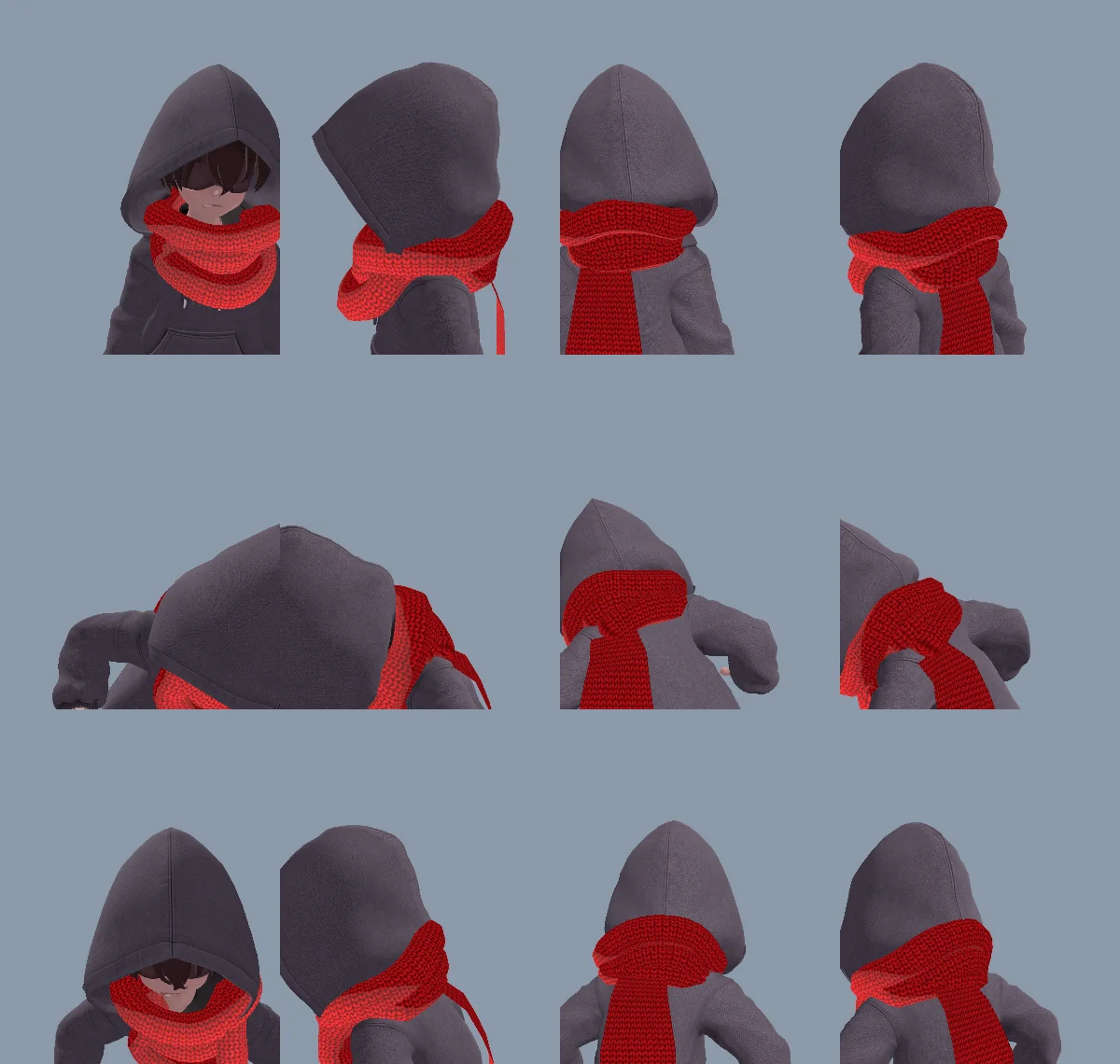
Un avvolgimento al collo realizzato come modello risultava troppo rigido, quindi sia l'avvolgimento sia la coda sono stati generati via codice. La stessa coda poteva pendere, allungarsi, afferrare, avvolgere la statua e lasciare la presa senza modelli né animazioni separati.
Il primo avvolgimento sembrava rovesciato a causa dell'ordine dei vertici dei triangoli e delle normali invertite. Claude ha corretto la mesh e ha annotato la causa in CLAUDE.md.
The neck scarf looks too stiff. Try generating it procedurally instead of using the Tripo model:
- ScarfWrap: three thick, soft knitted loops around the neck, rebuilt every frame from the neck, head and spine bones, pushed out by capsules on the head, neck, chest and upper arms, fuller at the back so it fills the gap between the hood and the shoulders, with a little spring lag.
- ScarfTail: a Verlet chain hanging from the knot at the back, with thickness, stiff enough not to stretch, colliding with body capsules. Reaching out to grab props, hanging from anchors and wrapping the statue all use the same tail (reach(point) / release()).
- Both share one wool material with the red knit texture and a soft sheen at grazing angles.
Keep the per-frame cost low and tell me the measured time.
Rendi intenzionale il balzo con la sciarpa
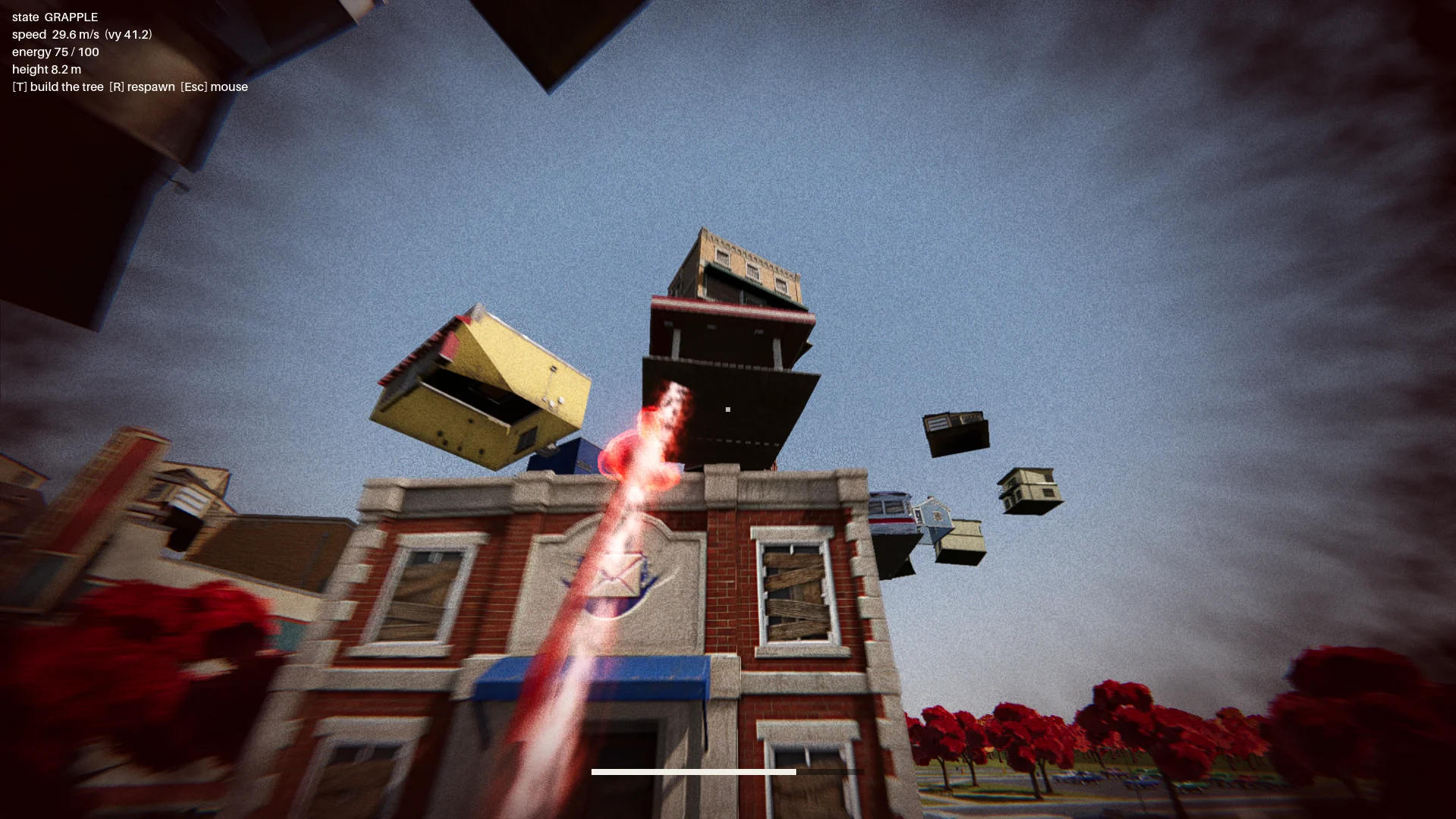
Il primo balzo con la sciarpa oscillava come un rampino. L'ho modificato perché accelerasse verso un punto di atterraggio scelto, con un'aura rossa, polvere, una scia e un impulso all'atterraggio per rendere leggibile il movimento.
I primi bersagli sulle tettoie potevano far passare il ragazzo attraverso un edificio o intrappolarlo. Ho aggiunto controlli sull'atterraggio e sulla traiettoria di volo. Un bersaglio valido doveva:
- trovarsi sul bordo di un vero tetto;
- avere abbastanza spazio libero sopra di sé;
- offrire al personaggio lo spazio per stare in piedi;
- evitare una traiettoria di volo che attraversasse l'edificio di destinazione.
Un report controllava ogni edificio da dodici direzioni ed esigeva zero punti di balzo non validi.
Change how the scarf leap feels. Right now it swings like Spider-Man. Instead, the boy knows where he's going and moves straight to the target. While moving, rotate his model so his feet point at the target, as if his feet were pulling his whole body toward it.
Drop the scarf from the scarf leap and sell the power with effects: a red aura when the scarf leap starts, a puff of dust and a small energy pulse at the start point, a trail along a small arc, then the aura fades on landing with a small shockwave at the contact point.
The speed is not constant: a little slow at first, then accelerating hard, never slowing down until it arrives.
Metti insieme la boss fight
Il percorso comprendeva il menu principale, l'introduzione, l'ascesa della cittadina, il checkpoint, la boss fight in tre segmenti e il finale.
La statua lanciava oggetti, tra cui uno luminoso che si poteva parare. Una parata ne apriva lo scudo per circa sette secondi. Gli attacchi successivi aggiungevano una raffica a ventaglio e un'auto che piombava come una meteora, mentre i controlli di visibilità impedivano i lanci attraverso gli edifici.
Finish all playable content for a first complete version:
- A basic main menu, pause menu and ending screen with buttons.
- The intro: "The Oval Town" title card; when the player enters the plaza, the statue shakes, lifts off its pedestal, a "The Statue" title card, then a shockwave pushes the boy back along the ground. Buildings fly up into the spiral tree. One checkpoint at the end of this sequence.
- The boss fight: shield, parry window about 0.25 s, about 7 s exposed window, damage only from throws while exposed, 3 health segments, attacks unlocked by remaining health: single throw, fan volley (only the glowing one can be parried), car meteor shower.
- Sealing: when its health reaches 0, a scarf leap point appears on the statue; scarf leap to it and press the seal button repeatedly.
- A full-flow automated test that plays the whole game with a real parry, three rounds of throws, a death and restart, the seal and the ending, saving screenshots at each stage.
Show me the plan first, then build it.
Con la salute a zero, sulla statua compariva un bersaglio per il balzo con la sciarpa. Il giocatore premeva ripetutamente il tasto per sigillare così da riempire un anello; smettendo, l'anello tornava a svuotarsi.
07 / PANORAMICA
Rifinisci, testa ed esporta
Cura la resa della scena
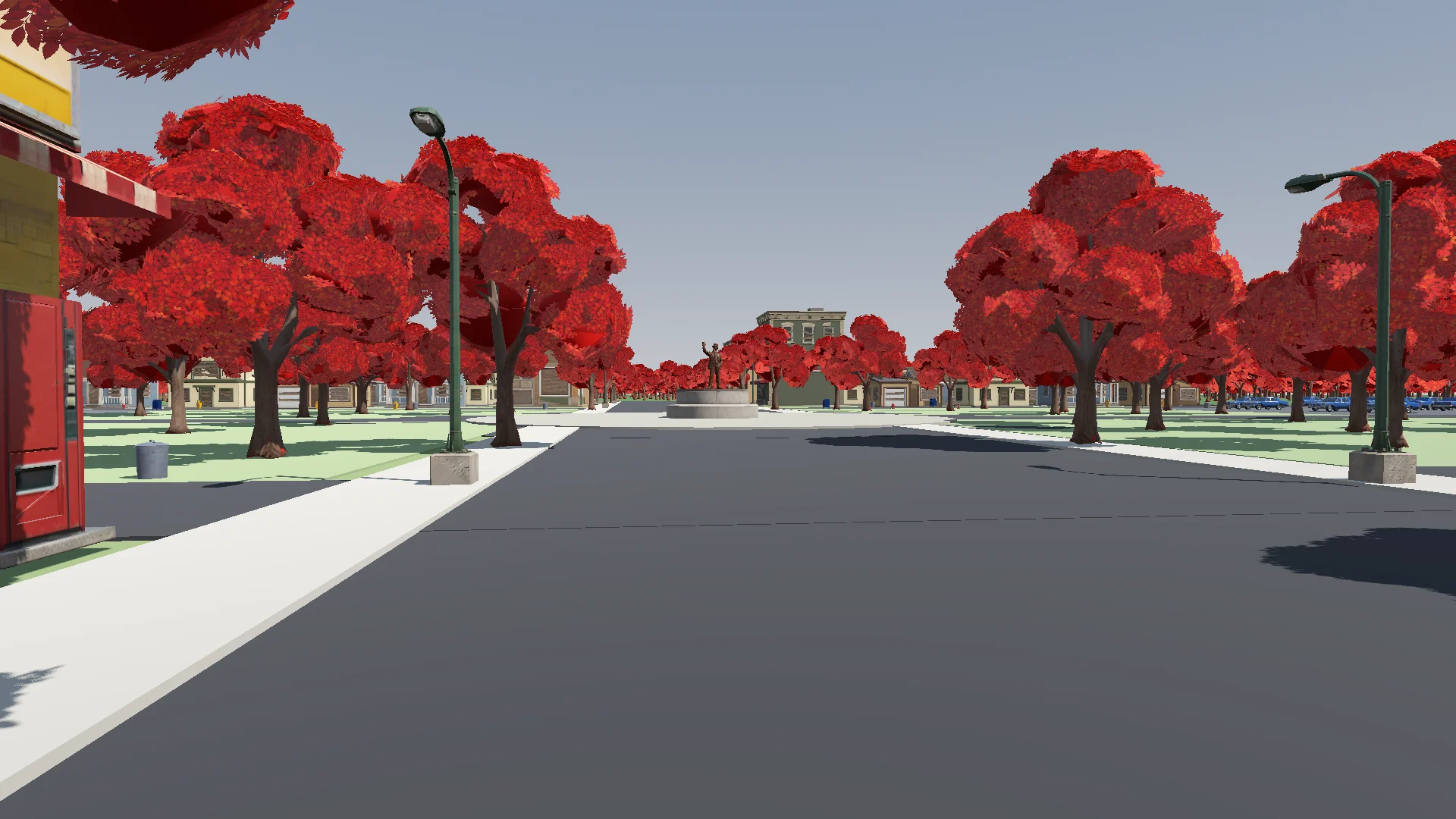
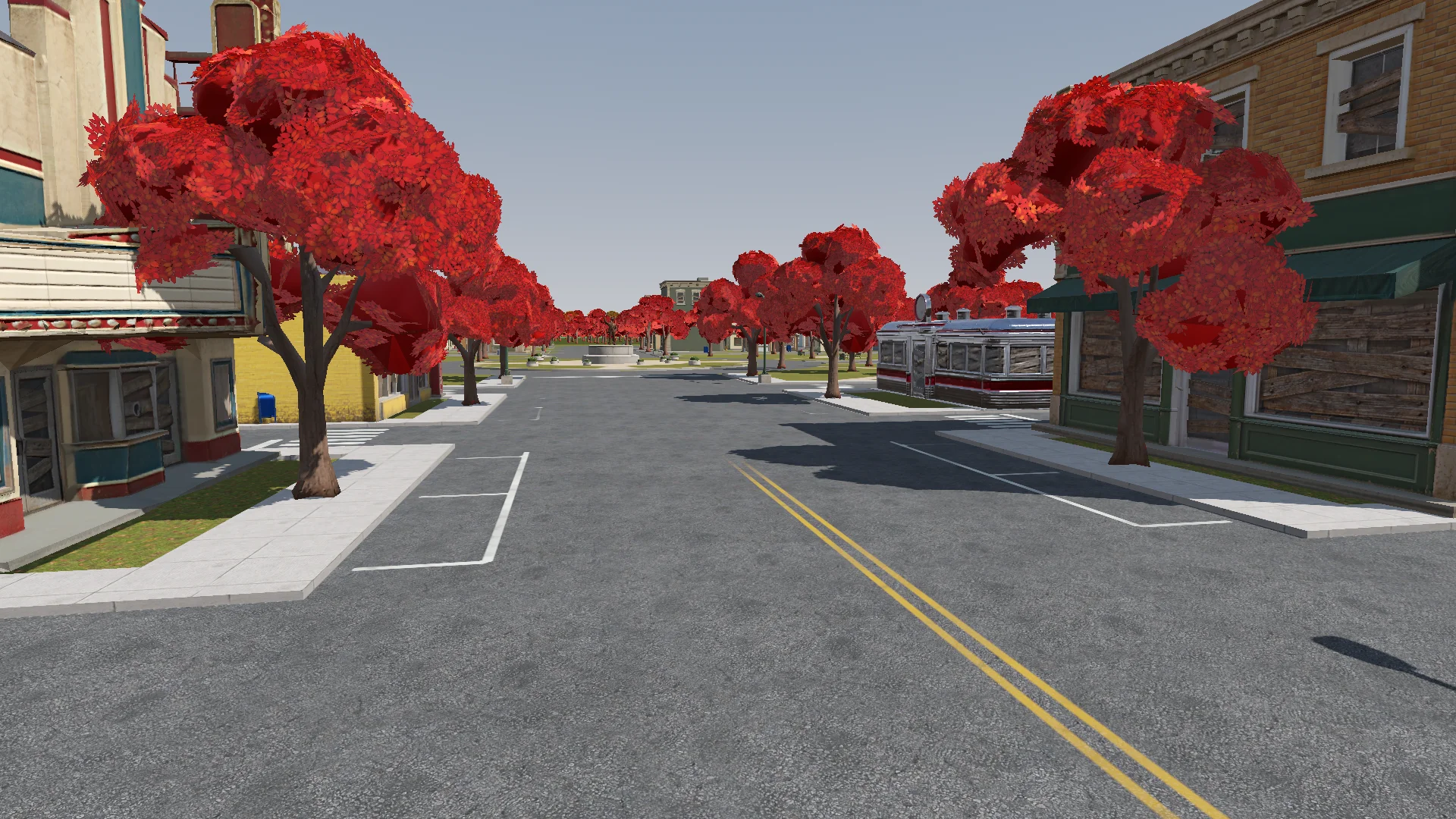
Con il combattimento funzionante, ho aggiunto dettagli del terreno, erba, alberi, illuminazione, post-processing ed effetti. Un unico shader additivo morbido ha dato un aspetto coerente ad aura, anelli, proiettili e scie.
Polish: add the final details to the rest of the town based on the concept art (streets, parks, lane markings and so on). If details are missing or unclear, generate reference images of parts of the town first.
Street layout and lane markings should be as plausible as possible; use Tripo to generate textures if needed. The road surfaces must never flicker.
Add NPR style procedural grass on the lawns.
Ho controllato le modifiche dalla camera del giocatore, cercando strade che sfarfallavano, porte bloccate e lampioni fuori posto.
Render with ACES tone mapping. Add post-processing: bloom, ambient occlusion, SSIL, depth of field, film grain, motion blur, chromatic aberration, FXAA, and an FSR 2 option, all in an Options menu. Bloom, AO, SSIL and DOF have Off / Low / Medium / High; FSR 2 has Off / Native AA / Quality / Balanced / Performance; motion blur, chromatic aberration and film grain are toggles.
Also add VSync and resolution.
The film grain should closely emulate Super 8 film. Godot has no built-in film grain or motion blur, so implement them as Compositor effects.
Aggiungi audio e feedback dell'interfaccia
Ho cominciato con audio sintetizzato, poi l'ho sostituito in gran parte con musica ed effetti CC0 citati nei crediti. I suoni sintetizzati sono rimasti dove nessuna clip era adatta.
Find CC0 music and sound effects to replace the synthesized ones. Music should be synthwave / analog synth. Prefer less popular sources so the game feels unique. Where nothing fits, keep the synthesized sound. Verify the license on every page and generate a credits file.
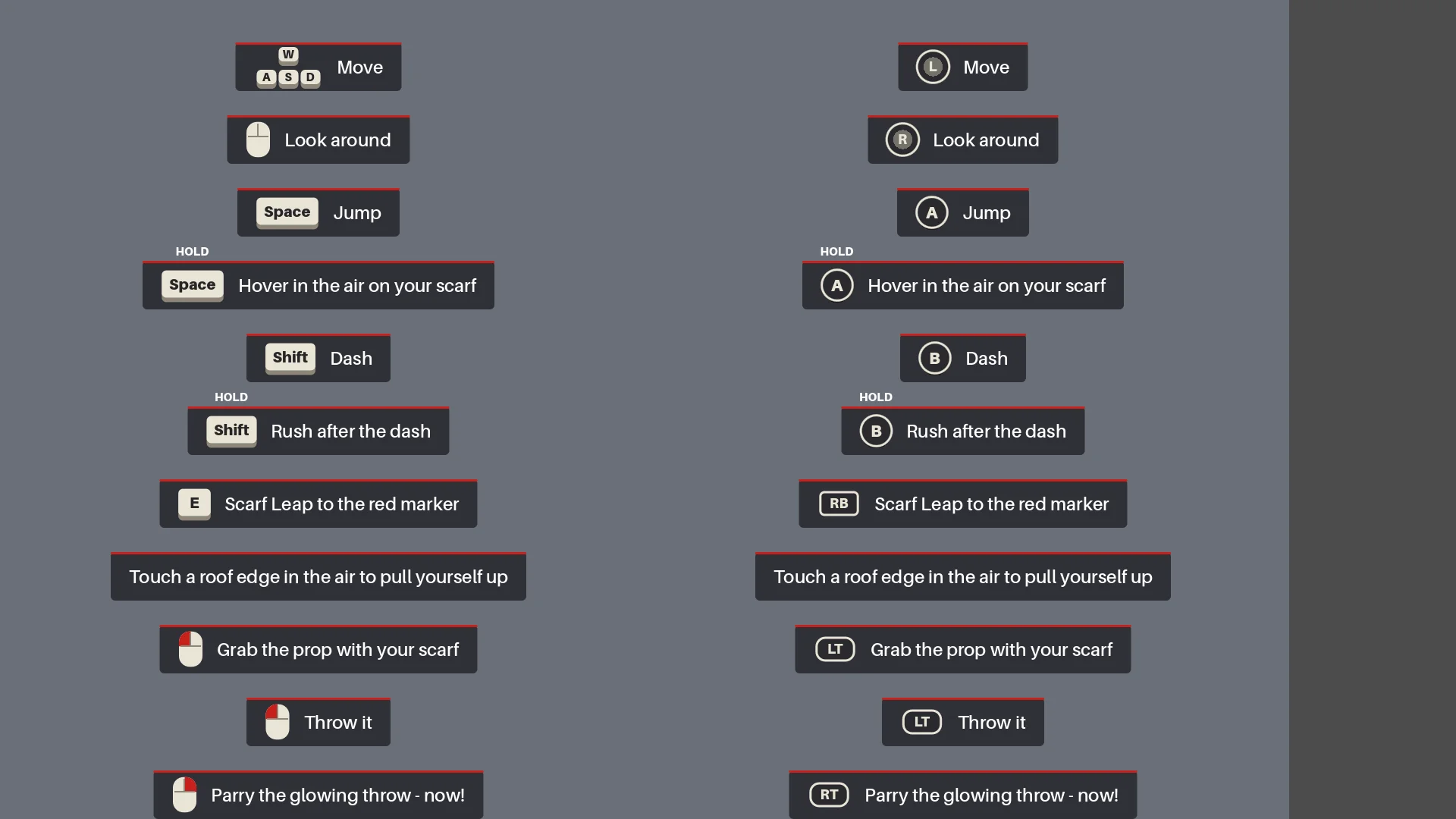
L'HUD mostrava i comandi contestuali finché il giocatore non aveva usato ciascuna mossa. Il primo oggetto luminoso lanciato rallentava brevemente il tempo per insegnare la parata.
Add interactive hints the first time each move is needed (move, jump, hover, dash, rush, Scarf Leap, grab, throw, parry), for a more explicit and intuitive guide to the controls. Each hint stays until the player actually does the move, then it is ticked off.
Esegui il test di regressione completo
Prima dell'esportazione, Claude ha ricostruito le scene, eseguito i report e giocato dal menu al finale, compresi una parata vera, morte e riavvio, sigillatura e screenshot.
Before we export, do a full pass:
1. Rerun every generator in order (build_blockout --float --swap, build_player_scene, build_game) and make sure the main scene is the main menu.
2. Run every report (tree_report, grapple_point_report, street_report, lamp_probe, audio_probe, skin_gap_report) and both automated tests. Everything must pass.
3. Play the game through MCP from the main menu to the ending, take screenshots at each stage and read the game log for errors and warnings.
Report: what passed, what failed, and anything I should check by hand.
La partita completa ha scovato errori di orientamento, effetti mancanti e checkpoint che si azzeravano dopo modifiche al movimento o al timing.
Export a Windows build of the game. Set up a Windows Desktop export preset for the_red_scarf (embed the PCK, the game icon, product name "The Red Scarf"). Check that the export templates for Godot 4.7.2 are installed; if not, tell me how to install them instead of guessing.
Exclude test scenes, test scripts and Assets/Models/_test/. Write a script that sets the build number and exports, run the exported exe once, and report the build size and any errors.
La prima esportazione per Windows pesava 1,15 GB, per lo più texture. Rimuovendo gli asset inutilizzati e i vecchi modelli e usando una compressione più compatta per le normal map, è scesa a 755,5 MB.
08 / PANORAMICA
Cosa porterei nel prossimo progetto
Il workflow che ripeterei è:
- Descrivere il risultato desiderato.
- Realizzare un piccolo prototipo.
- Verificarlo nel runtime reale.
- Trasformare ogni problema ricorrente in una regola o in un report.
- Solo a quel punto, scalare.
Riutilizzerei lo stesso schema: un'unica fonte per il layout della cittadina, checkpoint per i batch di asset, regole geometriche per il balzo con la sciarpa e un test completo della boss fight.
Per una demo simile, parti da un solo personaggio, un solo percorso e un solo nemico. Testa un asset rappresentativo prima di generare in batch e trasforma i problemi ricorrenti in controlli che puoi rieseguire.