

01 / 概要
概要
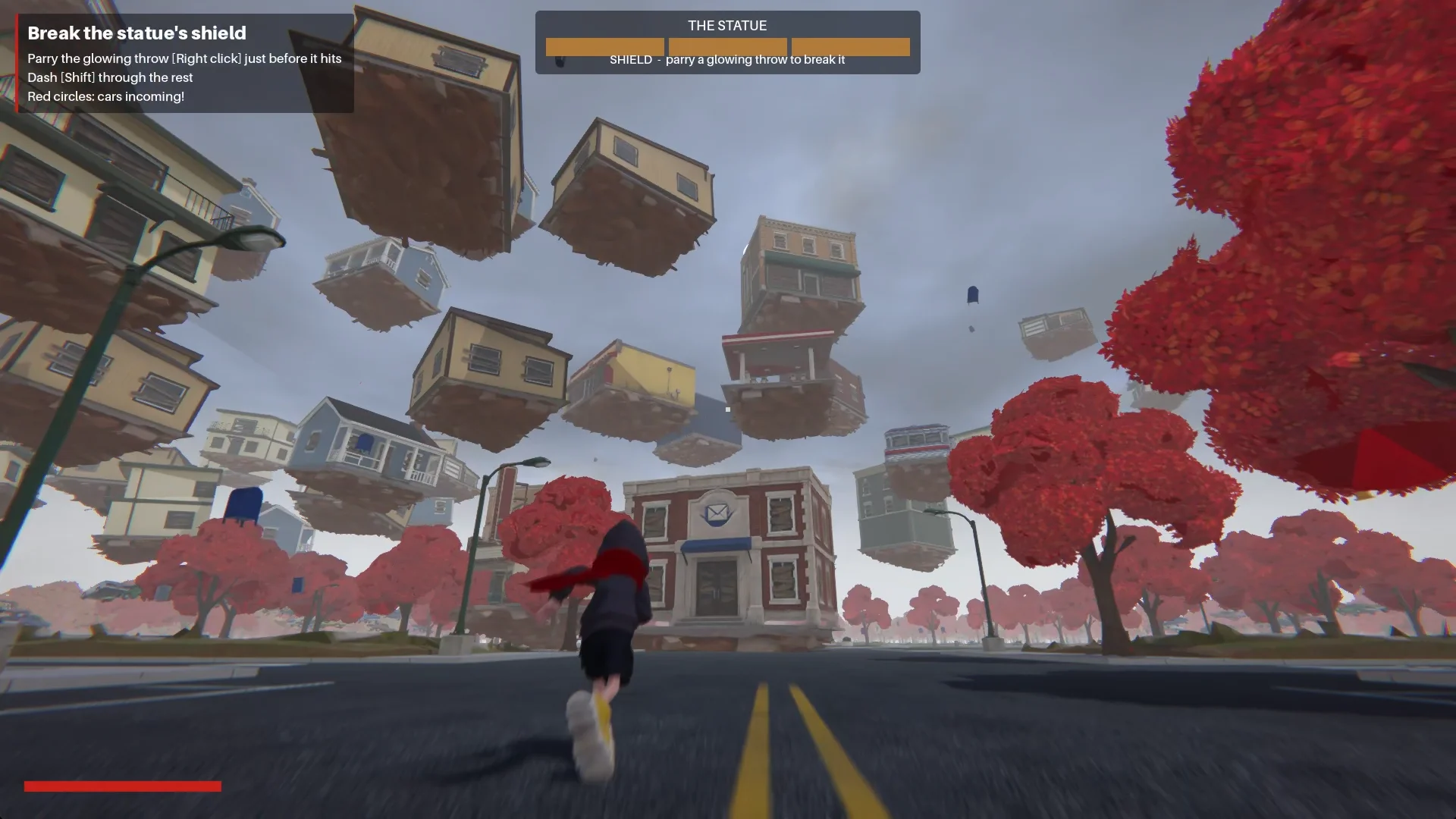
私の出発点は、赤いスカーフを巻いた少年と、人けのない 1980 年代のアメリカの町でした。顔のない像が建物を地面から引きはがし、空へと巻き上げていきます。このアイデアが、Godot で作ったプレイ可能な三人称視点のアクションデモになりました。
Claude には計画、スクリプト作成、テストを手伝ってもらい、Tripo にはコンセプト画、モデル、リギング、アニメーションを提供してもらいました。私自身はプロジェクトのディレクションを担当し、組み上がったゲームを Godot でレビューしました。
この実践的なアプローチは、アイデア、AI 支援による開発、プレイテストをつなぐ vibe gaming のワークフローに沿っています。
プロジェクト構成:
- エンジン:Godot 4.7.2、Forward+
- AI コーディングアシスタント:Claude Code
- 画像生成:Tripo の画像生成
- 3D 生成:Tripo の P シリーズと H シリーズのモデル
- プロジェクト:The Red Scarf(三人称視点の短いボス戦デモ)
02 / 概要
完成したデモのプレイ体験
少年は Main Street を通って町に入ります。広場では顔のない像が衝撃波を放ち、建物を自らの周りへ螺旋状に引き寄せます。
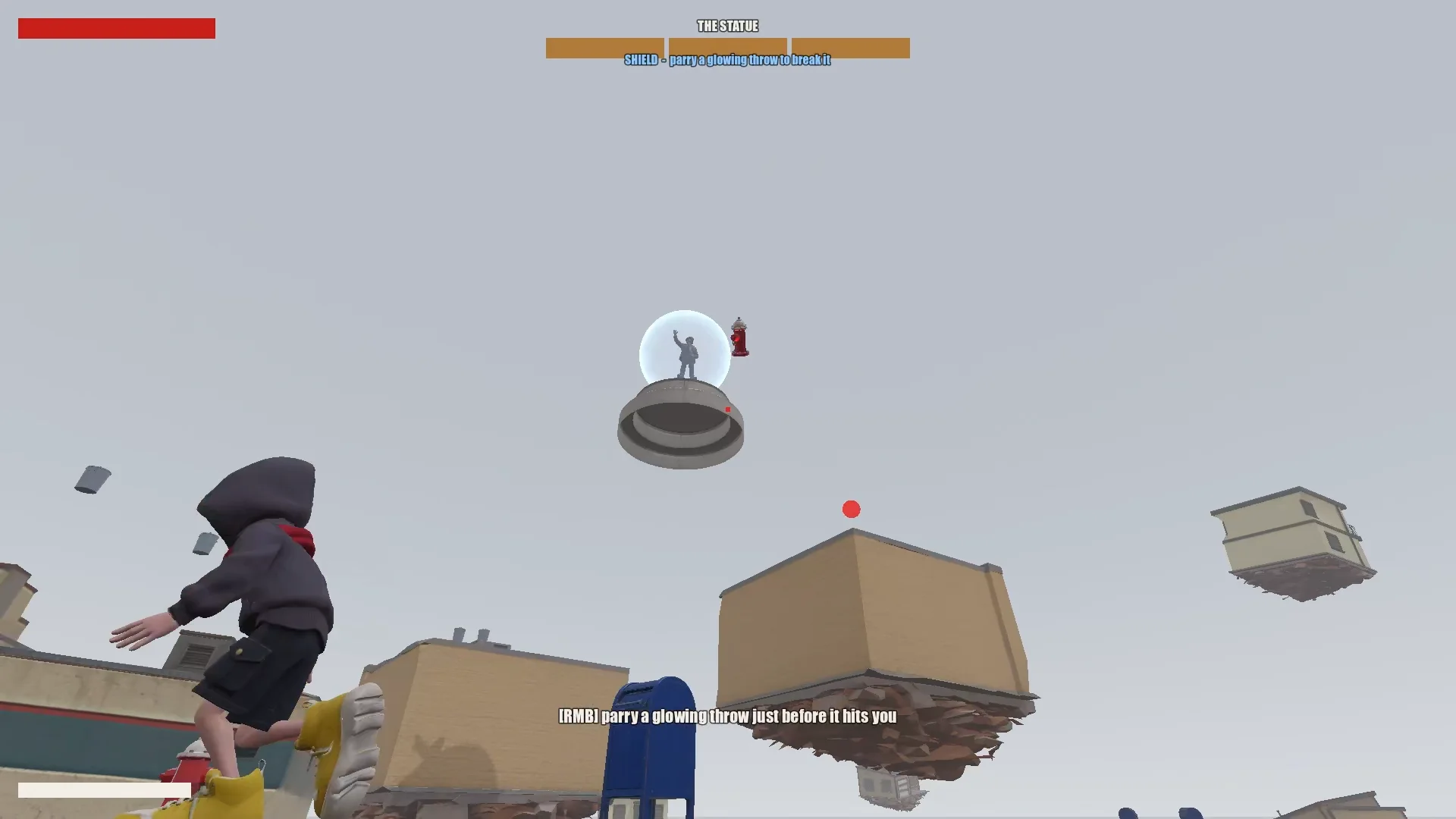
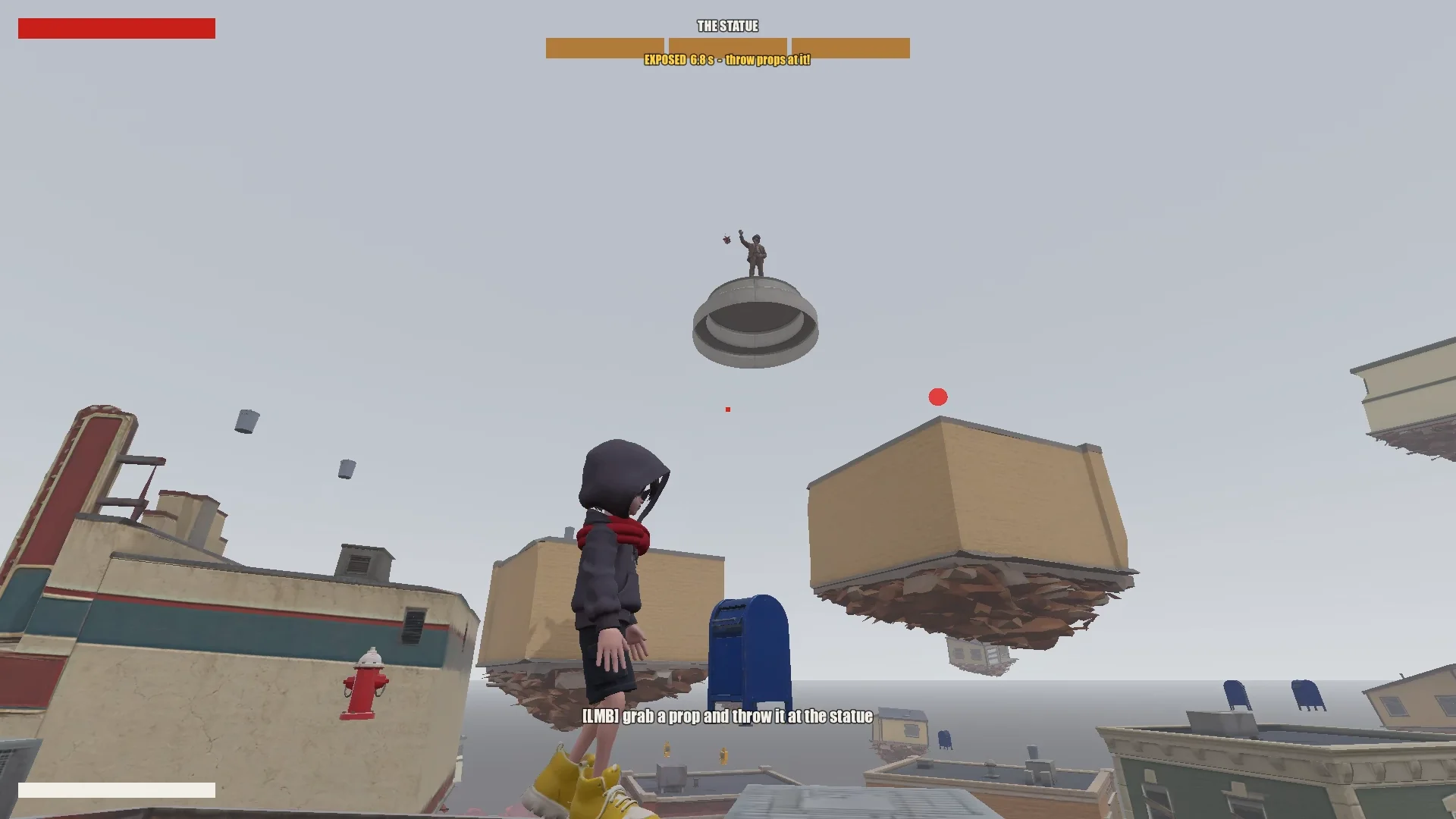
プレイヤーはジャンプ、ホバリング、スカーフ跳躍を駆使して、浮遊する店を登っていきます。光る飛び道具をパリィすると像のシールドが短時間破れ、近くの物を投げつけるとダメージを与えられます。3 ラウンドを終えると、少年は像のもとへたどり着き、封印できるようになります。
03 / 概要
ツールとプロジェクトを準備する
Claude にプロジェクトメモリを与える
Godot プロジェクト、デザインドキュメント、コンセプト画、Tripo のモデル、スクリプトは 1 か所にまとめておきました。ルートの CLAUDE.md には、Claude がセッションをまたいで守るべきルールを記録しました。
書いておいた基本事項は次のとおりです:
- ゲームの内容、トーン、ビジュアルの方向性を記述する。
- スタイルの統一、不要な記号や文字を入れないことなど、アセットのルールを列挙する。
- 大きな変更の前には計画の提示を求める。
- プロンプトの履歴を残す。
- 繰り返し起きる落とし穴やプロジェクトの約束事は、見つかるたびに記録する。
繰り返し必要になる修正も、同じファイルに書き足しました。対象は、メッシュの巻き順、モデルの向き、アニメーション名、スカーフ跳躍のターゲットに関するルールです。以降のセッションでは、それらを再利用できました。
Tripo CLI をインストールする
Claude を Tripo とつなぐため、Tripo CLI をインストールするよう Claude に頼みました:
Help me install and configure Tripo CLI: npm install -g tripo-cli
Godot と Claude をつなぐ
Claude は、テキストベースの Godot シーンと GDScript を直接編集できました。さらに Godot MCP で接続すると、ゲームの実行、スクリーンショットの撮影、ログの確認、入力のシミュレーションまで行えるようになりました。
接続は、開いているシーンとノードツリーを Claude に報告させ、MCP のポートとプロジェクトを自分の設定と照らし合わせて確認しました。
Compare the Godot MCP servers that are available right now and pick the one that fits this project best (Godot 4.7, Claude Code, editor control plus running and inspecting the game).
Explain your choice, then install it into the_red_scarf/ and configure it at project scope (.mcp.json in the project root). Turn telemetry off.
04 / 概要
アイデアをテストできるゲームに絞り込む
まず設計を書き、それから削る
Claude の最初の設計は、町、移動、ボスの攻撃、レベルの流れまで網羅していましたが、短いデモにしてはフェーズもスカーフの能力も多すぎました。
I'm making a game demo with Claude, Tripo and Godot. Here's the idea:

The player is a boy in a bright red scarf, a gray hoodie, blue denim shorts and bright yellow basketball sneakers. The scarf is a supernatural object: he can hover with it, move quickly between platforms, grab objects and throw them, and use it as a whip.
The game starts on the main street of a mid-1980s American small town: one main road, houses and shops on both sides (post office, gym, diner and so on). In the central plaza stands a statue of a man in a suit whose face has been erased. It is a hostile supernatural object. When the boy arrives, it releases a shockwave and slowly rises into the sky. The houses around it are torn out of the ground and end up as floating platforms at different heights. The player jumps between them, blocks the objects the statue hurls with telekinesis, fights back, and finally reaches the statue and seals it with the scarf.

Write a short design doc in design/game_design.md: building types, the boss's attacks in two phases, the boy's attacks, defense and movement moves, and the level flow.
Show me your plan first. Ask me if anything is unclear.
そこで、このゲームらしさが残る最小限のループまで削り込みました:
Simplify the combat:
1. The boss has only one phase.
2. Remove the scarf shield and the scarf whip.
3. New loop: the player moves across floating buildings and can only break the statue's shield by parrying its attacks (right click / RT, like a fighting-game parry). Once the shield is down, the player throws objects at it to deal damage.
戦闘はボスの 1 フェーズだけに絞りました。パリィでシールドを破り、無防備になった隙に物を投げつけ、浮遊する町そのものを移動の課題にする、という構成です。残したアクションは、どれもこのループに役立つものでなければなりませんでした。
データから町を組み立てる
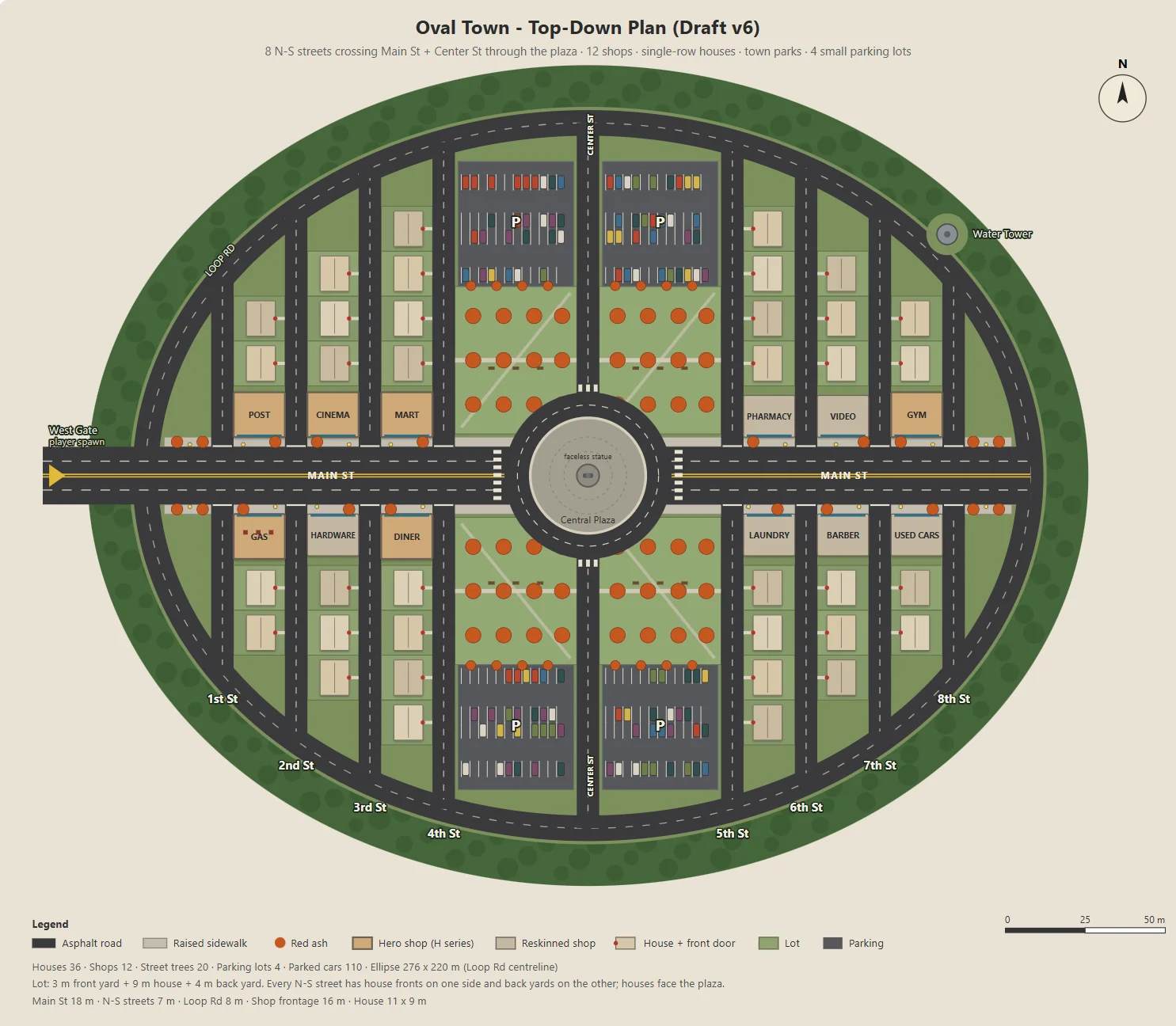
Claude は、楕円形の町をパラメータ化した SVG で生成する Node スクリプトを書きました。町には Main Street、12 軒の店、住宅街の道路、公園、駐車場、広場があります。
同じスクリプトから、Godot のブロックアウト、建物、道路、街灯、樹木に使う JSON も書き出しました。そのため、コンセプト画とプレイ可能なレベルは同じレイアウトを共有していました。
駐車場の広さ、裏庭の奥行き、店の入口など、パラメータは一度に 1 つずつ修正し、変更のたびに確認しやすくしました。
Here's the town I have in mind. The street grid is a grid inside an oval outline:
- The long axis of the oval is the widest street, Main St, lined with functional buildings like the post office and the gym.
- The other streets run perpendicular to Main St on both sides, lined with houses.
- The center of the oval is a round plaza; the statue stands on a concrete pedestal in the middle.
- Asphalt streets with lane markings. Raised concrete sidewalks in front of the shops, with American red ash street trees at regular intervals.

Design the town structure, fill in the details I didn't mention and improve the design.
Draw it as a top-down plan with a Node script (tools/townplan/gen_town_svg.mjs) that generates an SVG from parameters kept at the top of the file.
ビジュアルの方向性を決める
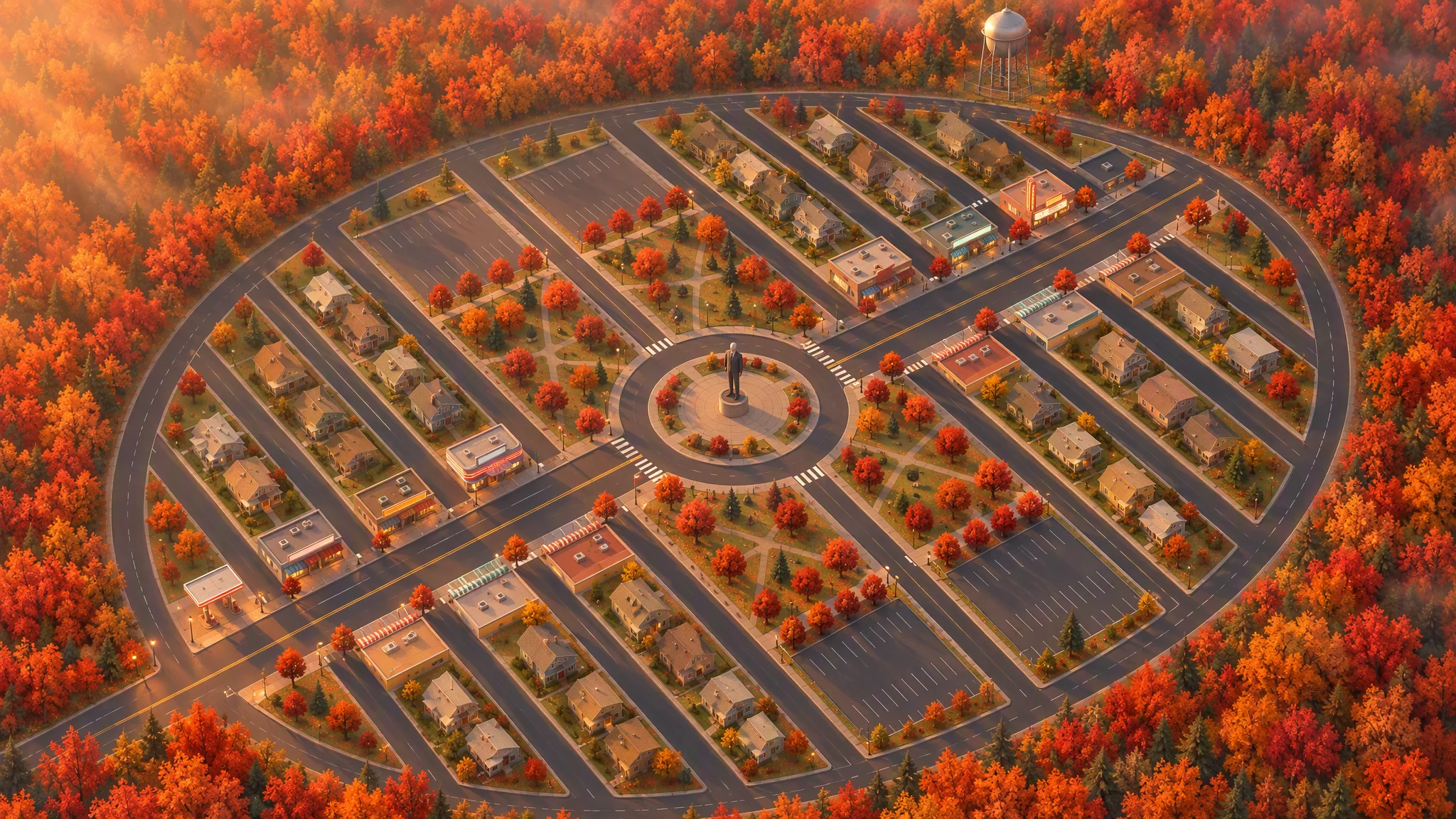
このレイアウトを厳密なリファレンスにして真上から見下ろしたイラストを作り、道路、区画、建物の輪郭、樹木、町の外形をそのまま保ちました。
最初の 45 度ビューは、傾けた地図のように見えました。再生成の前にリファレンスを手元で回転させておくと、説得力のあるアングルになりました。
Strict layout reference: image[1]. Keep every road, block, building footprint, lot, park, parking lot, tree and the oval outline exactly as in image[1]. North up. Add, remove, move or resize nothing. Only restyle it as a finished top-down orthographic illustration of a quiet mid-1980s American small town in autumn.

[...town contents: main street, roundabout and statue, twelve shops seen as flat roofs only, all facing the main street, houses, parks, parking lots, red ash trees, a water tower...]

Style: stylized non-photorealistic game environment, simple hard-edged geometry, flat slightly exaggerated colors, light weathering, no grime. Warm late-afternoon sun from the west.

No vehicles, people, text, lettering, flags, or national or religious symbols. The statue has no face.
最終的な平面図と鳥瞰図をもとに、Claude がアセットを洗い出し、Tripo で作るモデルと Godot 内で組むオブジェクトを分けました。ポリゴン数の段階を設けたことで、約 30 点のコンセプト画と 30 点のモデルを予算内に収められました。
The town concept art is done. Using the final plan (v6), list every asset we need, split into "generate with Tripo" and "build in the engine". Then write a concept-image prompt for each Tripo asset in design/asset_prompts.md.
- Shops on Main St should vary more, with clearly different heights, so the opening walk has an interesting skyline.
- Split scene assets into tiers (S / A / B / C) by importance and size, give each tier a model and a triangle budget (hard cap 10,000 per asset), and estimate the total for the scene.
05 / 概要
残りを作る前に、アセット 1 つで試作する
代表的な建物を 1 つ試す
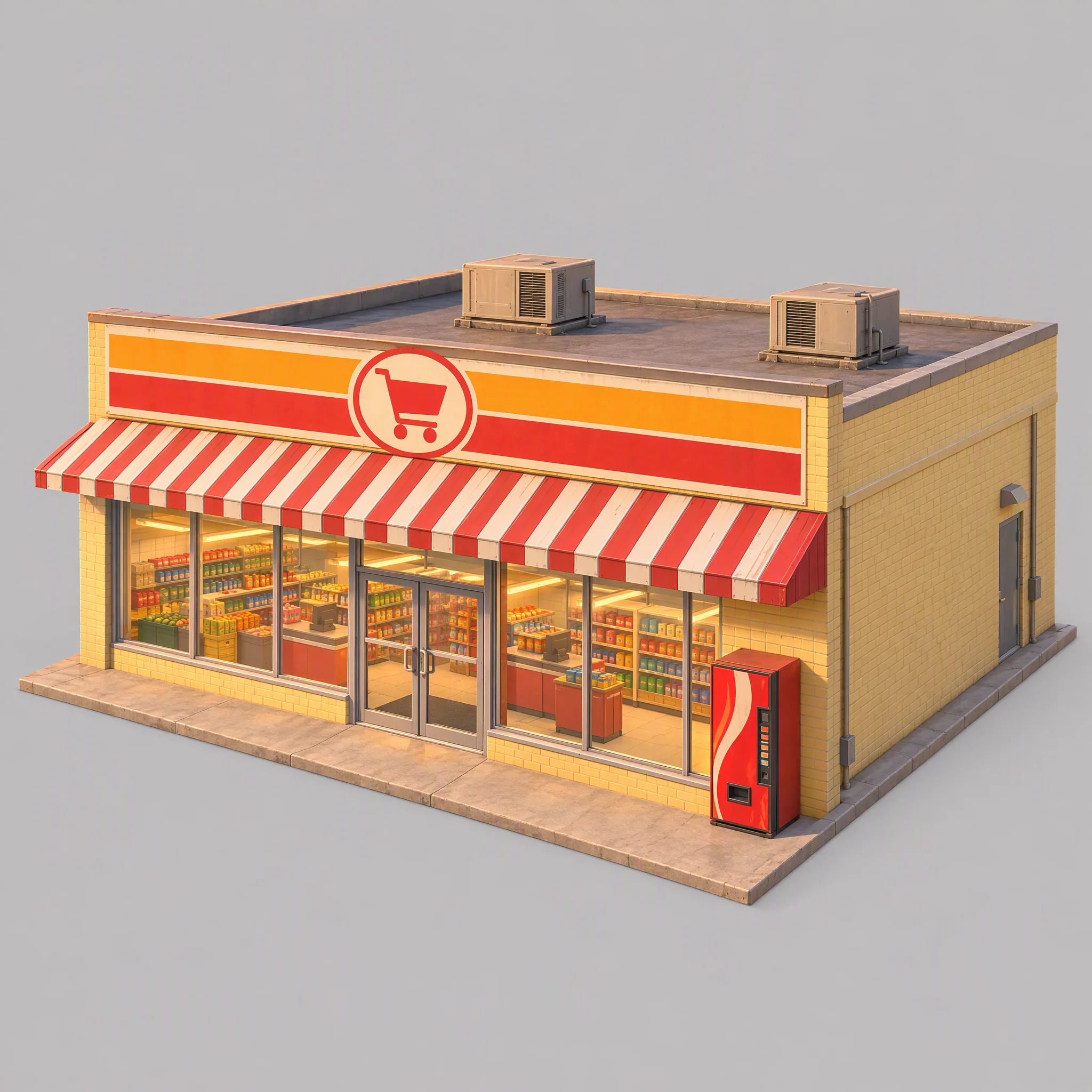
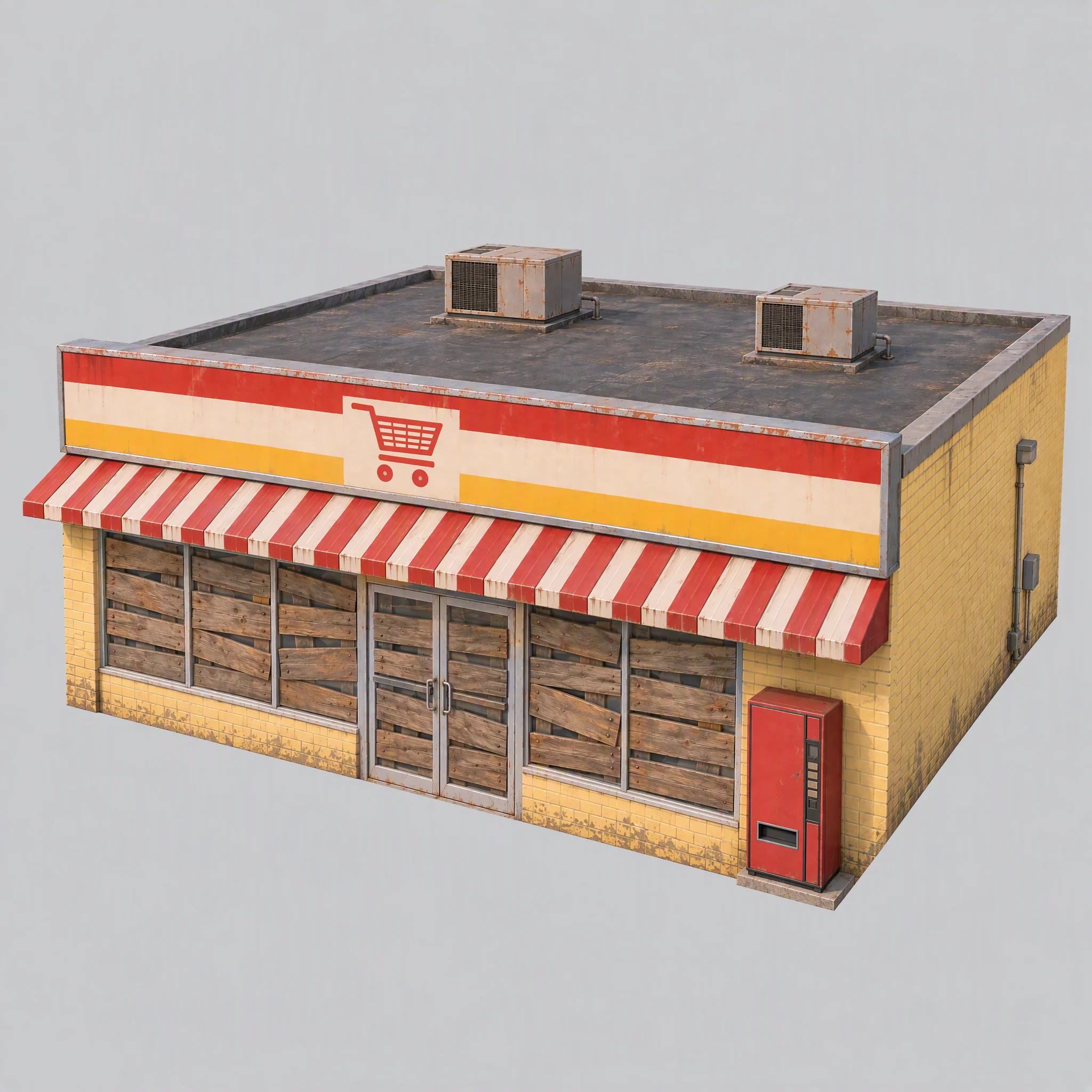
まずスーパーマーケット 1 軒でパイプラインを試し、ビジュアルスタイル、モデリング用リファレンスとしての適性、合う Tripo のモデルシリーズを確かめました。
- コンセプト画は町のビジュアルの方向性に合っているか?
- その画像は、モデリング用のクリーンなリファレンスになるか?
- どの Tripo モデルシリーズなら適切なジオメトリが得られるか?
最初の画像では、棚が見えていて、暖色の光が焼き込まれ、実在のブランドを思わせる自動販売機があり、基礎も大きすぎました。
そこで共通ルールを更新しました。窓は板でふさぐ、照明は消す、リファレンス用のライティングはニュートラルな白にする、基礎は壁と面一にする、という内容です。
Use image[1] only as a reference for color palette, materials and rendering style. Do not copy its content or camera.

A single isolated one-story small-town supermarket from the mid-1980s: a wide, low box about 16 meters wide, 14 meters deep and 5 meters tall. The front is a long row of large plate-glass windows with a pair of glass doors in the middle, under a flat red-and-white striped metal awning. Above the awning, a tall flat sign panel runs the full width of the roofline, painted with bold color bands and a simple shopping-cart pictogram, no letters. Pale yellow painted brick walls, a flat roof with two boxy rooftop AC units. A plain red vending machine stands beside the doors. All windows and glass doors are boarded up with weathered wooden planks, so no interior is visible. All lights, signs and neon tubes are switched off. The building sits on a thin flat concrete slab exactly the size of its footprint, flush with the walls on every side.

Three-quarter front view from slightly above, the whole building in frame, centered on a plain light gray background, neutral white daylight with soft even lighting and no warm tint, no cast shadows, no ground beyond the slab.

Style: simplified realism with hard-edged, clean forms, mid-1980s American, slightly saturated comic-book colors, light weathering, no grime.

No text, no letters, no logos, no flags, no national or religious symbols, no people, no vehicles
規模を広げる前にモデルシリーズを比較する
同じスーパーマーケットの画像を使い、ポリゴン数の上限もそろえて比べたところ、P シリーズはよりクリーンなハードエッジを生み、H シリーズは三角形がより均一で表面もより柔らかくなりました。
このゲームでは、次のように選びました:
- クリーンなハードサーフェスが活きる建物、車両、小物には P1.0 を使う。
- 像や浮遊する地面のパーツなど、有機的な形状には H3.1 を使う。
- キャラクターのリギングにクリーンなトポロジーが必要だったため、少年には P2.0 を使う。
これはあくまでこのゲームに合わせた選択で、どんな場合にも当てはまるモデルのランキングではありません。
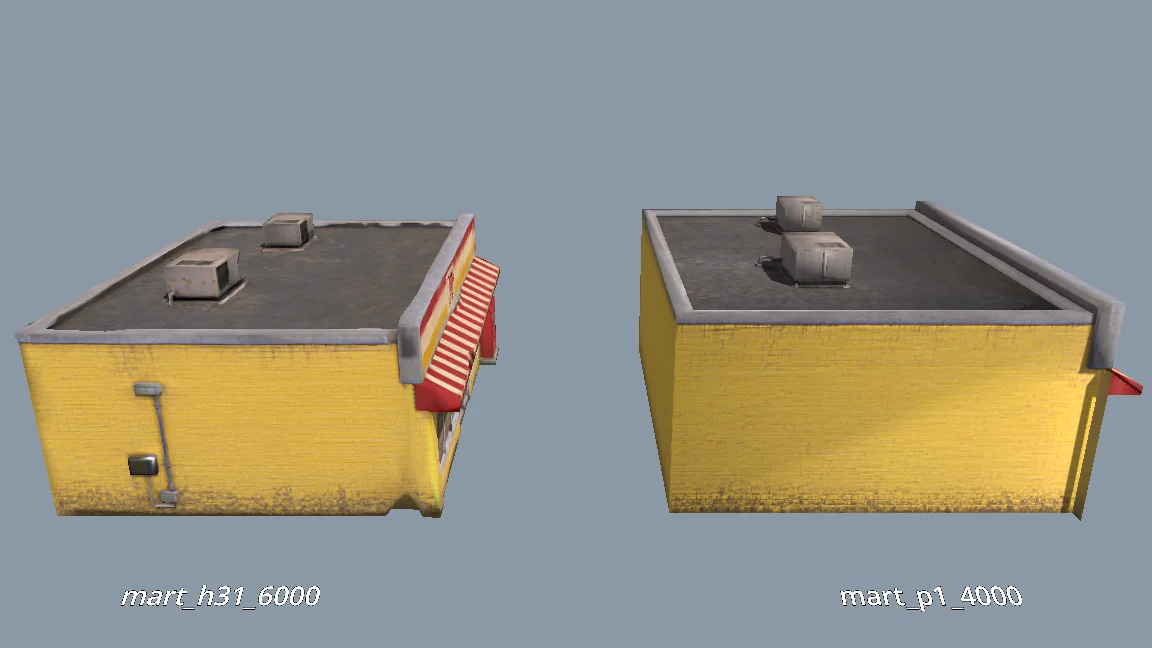
The current models are all clean and fairly flat. For performance, would P1.0 suit the buildings better than H3.1? Run a comparison: generate MART with P1.0 at 4000 faces and with H3.1 at 6000 faces, import both into a test folder, and render them side by side from the storefront, front, corner and top views (shaded and wireframe). Then tell me which one to use and why.
残りのシーンアセットを生成する
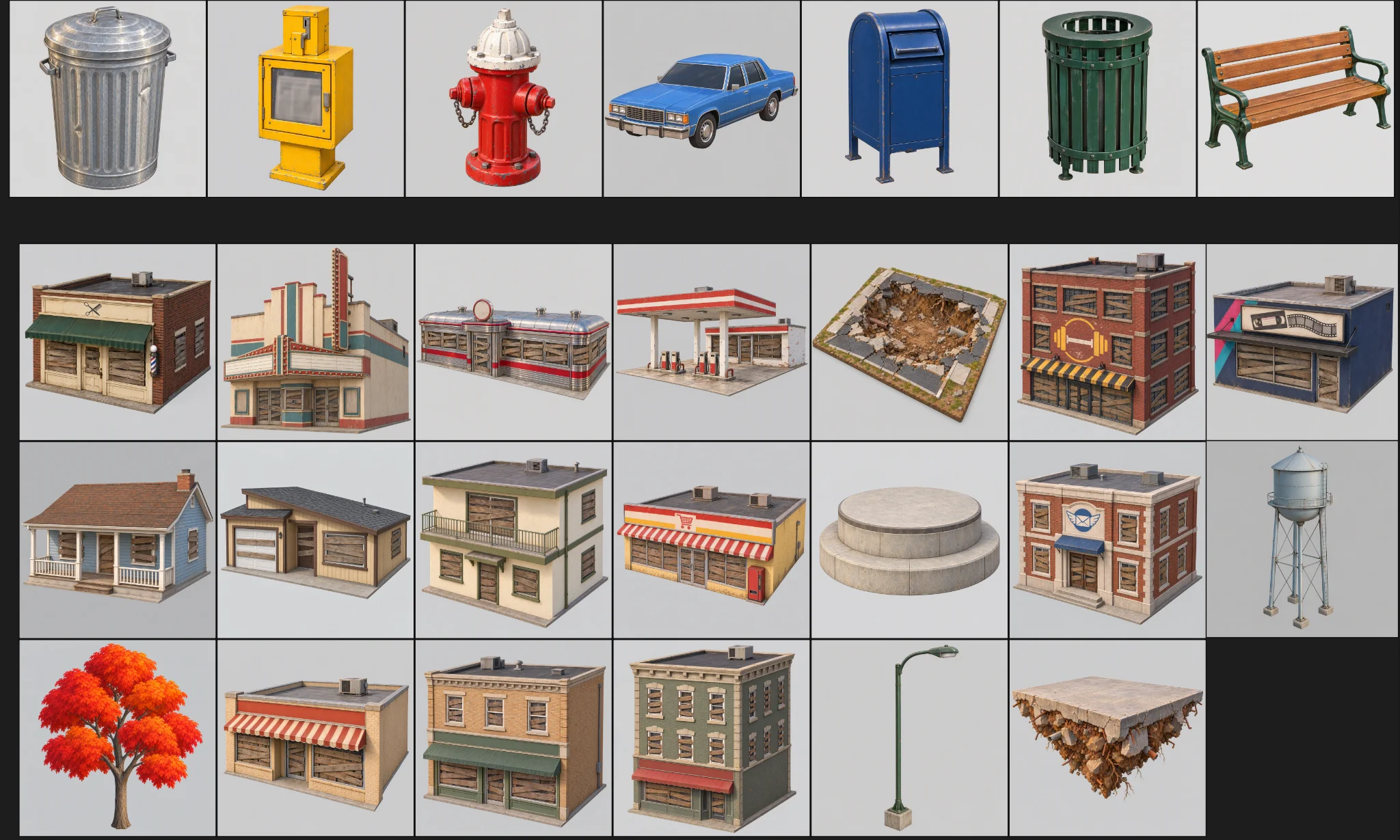
プロトタイプがレビューを通ってから、残りのアセットを生成しました。各アセットには、カテゴリ、フォルダ、モデルプリセット、ポリゴン数の予算を持たせました。
バッチ処理には 3 つのチェックを設けました:
Generate concept images for all remaining scene assets the same way as MART, using the prompts in design/asset_prompts.md and cpt/town_birdseye.png as the style reference.
Check balance first. Save each image under cpt/assets/<category>/.
Check every image against the checklist in asset_prompts.md (single object, clean background, no text or symbols, matches the bird's-eye style, no thin fragile parts).
Retry failed tasks individually; never rerun the whole batch.
Record progress in design/batch_checkpoint.md so we can resume if we stop halfway.
When done, list what succeeded, what failed and what needs my review.
- すべての画像について、オブジェクトが 1 つだけか、背景がクリーンか、意図しない文字がないか、華奢なパーツがないかを確認する。
- 失敗したタスクは個別にやり直す。
- 進捗はチェックポイントファイルに記録する。
失敗したものは 1 つずつ生成し直しました。裏の壁に穴の空いたガソリンスタンド、欠けていた給水塔、ジオメトリがばらけたスーパーマーケットです。
キャラクターは別に作る
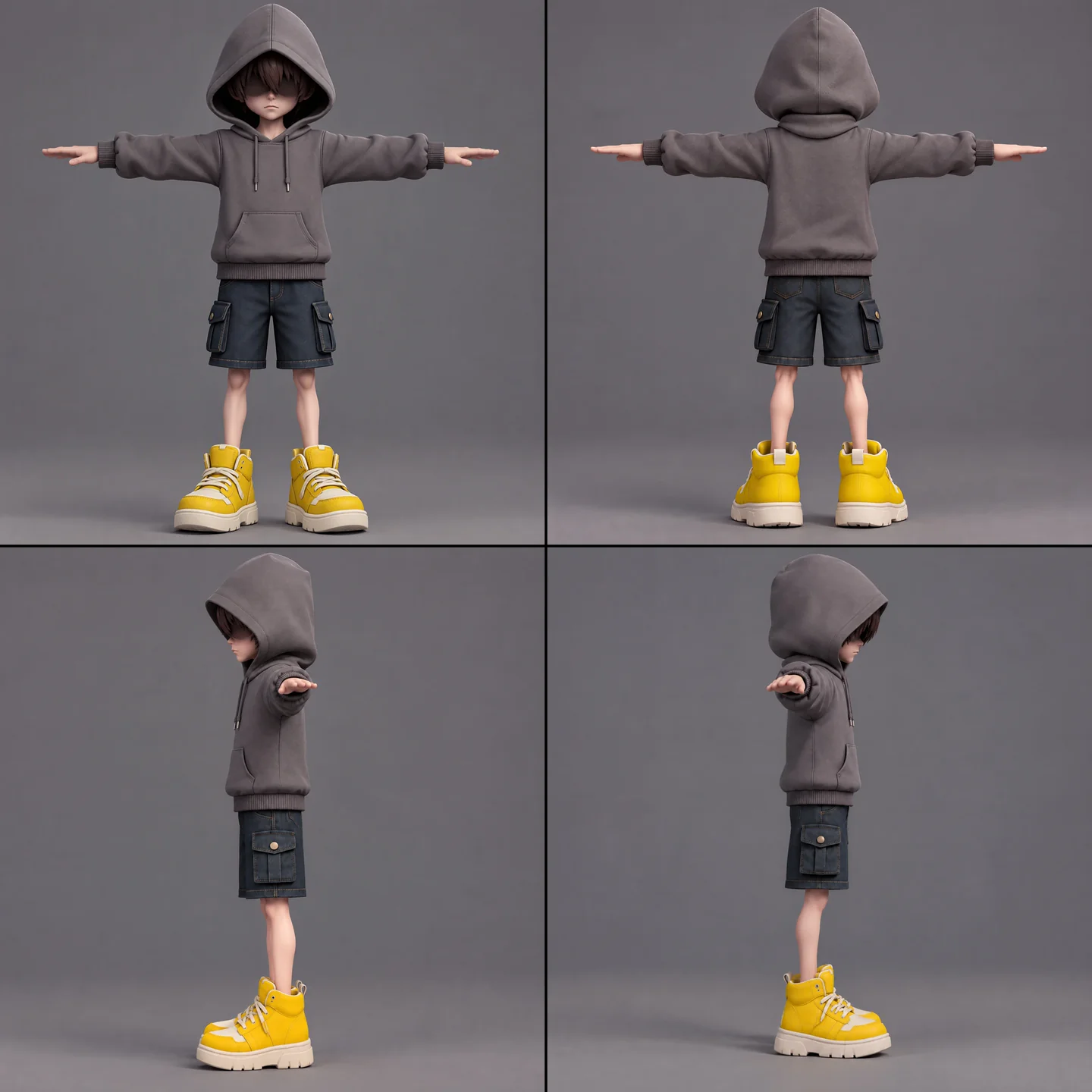
少年には、コンセプト画、モデリング、リグチェック、リギング、アニメーションのリターゲットが必要でした。スカーフは別にしておき、不要なスキンウェイトが付くのを避けるとともに、その複雑な動きを損なわないようにしました。
A full-body cartoon-style boy in a standard T-pose, arms extended horizontally, legs straight. He wears a gray hoodie with the hood up. His face is shrouded in shadow, eyes hidden, with only his mouth and grayish-brown bangs visible. He has a long red scarf wrapped around his neck, with both hanging ends draped down behind his back, not in front. He wears dark blue denim shorts ending above the knee so his knees are exposed, with buttoned flap pockets on both the left and right sides. He wears oversized yellow sneakers and has relatively thin legs. Cartoon character design, clean 3D model.
まず無料のリグチェックを実行しました。アニメーションのリストは、待機、歩行、走行、ジャンプ、落下、投げ、パリィ、スカーフ跳躍、被ダメージ、敗北、封印、勝利です。一度に 5 つを超えてリターゲットすると失敗したため、3 つの小さなジョブに分け、Godot で結合しました。
The boy model is ready at models/boy/boy_body.glb. Rig it and add the animations the demo needs. Run the free rig check first. List the animations you plan to use, mapped to Tripo presets, before generating anything.
バッチで使う前に、キャラクターの各ビューを手作業で確認し、左右が反転した手や、サングラスと誤認された髪がないかをチェックしました。
インポートと品質チェックを標準化する
インポート工程で、柔らかく見えすぎる壁にウェイト付き法線とハードエッジを加えました。テクスチャの上限はアセットごとに変え、少年、スカーフ、像、樹木は例外にしました。
モデルをテスト用ディレクトリからプレイ可能なシーンへ移す前に、スケール、向き、壁、屋根、余分なポリゴンを確認しました。本番用のアセットは、レポートで指摘される問題がゼロであることを条件にしました。
When I inspect the models, the normals are smoothed across every edge, so flat walls look soft and cheap. I want something like Blender's Weighted Normal modifier.
Write a Godot import hook that recomputes weighted normals on import (area-weighted, edges sharper than 30 degrees become hard edges, keep the normal map), plus a setup script that attaches the hook to a list of GLBs and limits texture size (4K, or 2K for small assets) with VRAM compression. Don't apply it to the boy, the scarf, the statue or trees.
Render before/after comparisons so I can judge the result.
06 / 概要
デモを層ごとに組み立てる
ゲームプレイ用のブロックアウトから始める
Godot のツールスクリプトが町の JSON を読み込み、色分けしたコリジョンボックス、地面、スポーン地点、浮遊レイアウトを備えたプレイ可能なブロックアウトを組み立てました。データを変更した後は、インスペクター上の操作やコマンドラインのスクリプトで再構築しました。
続いて Swap In Models で、ボックスを同じ位置のまま Tripo のアセットに置き換えました。どちらのバージョンも同じレイアウトデータを使っています。
登れる螺旋は店で構成し、住宅は背景に残しました。重なり、頭上の空間、屋根の間隔、足場に届くかどうかは、レポートでチェックしました。
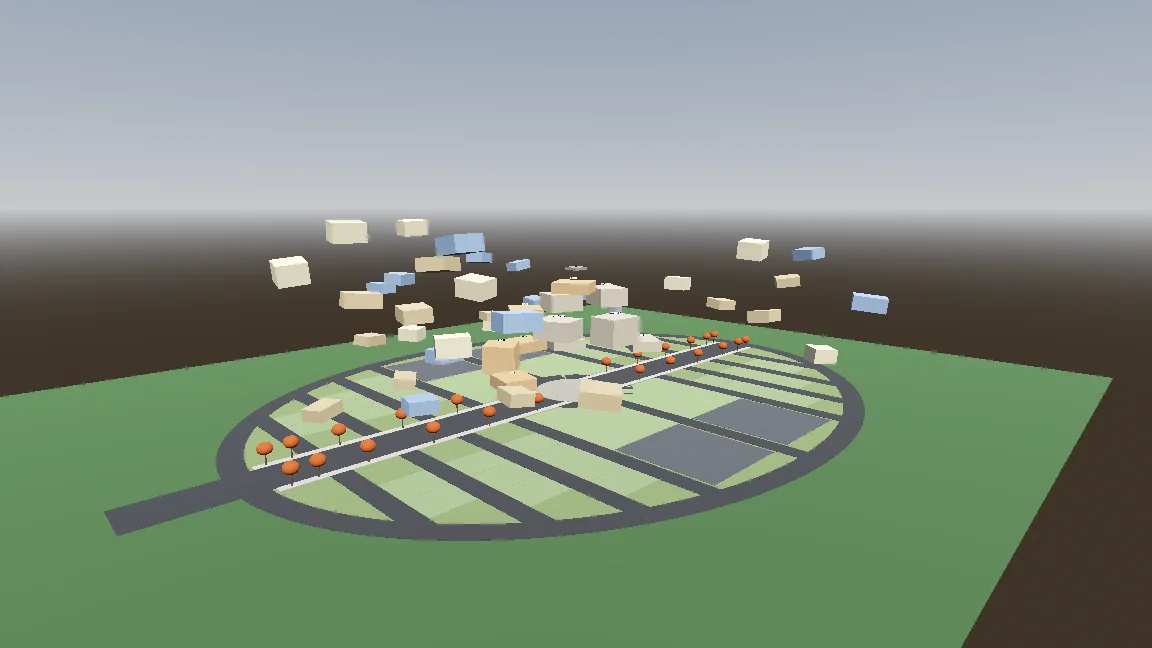
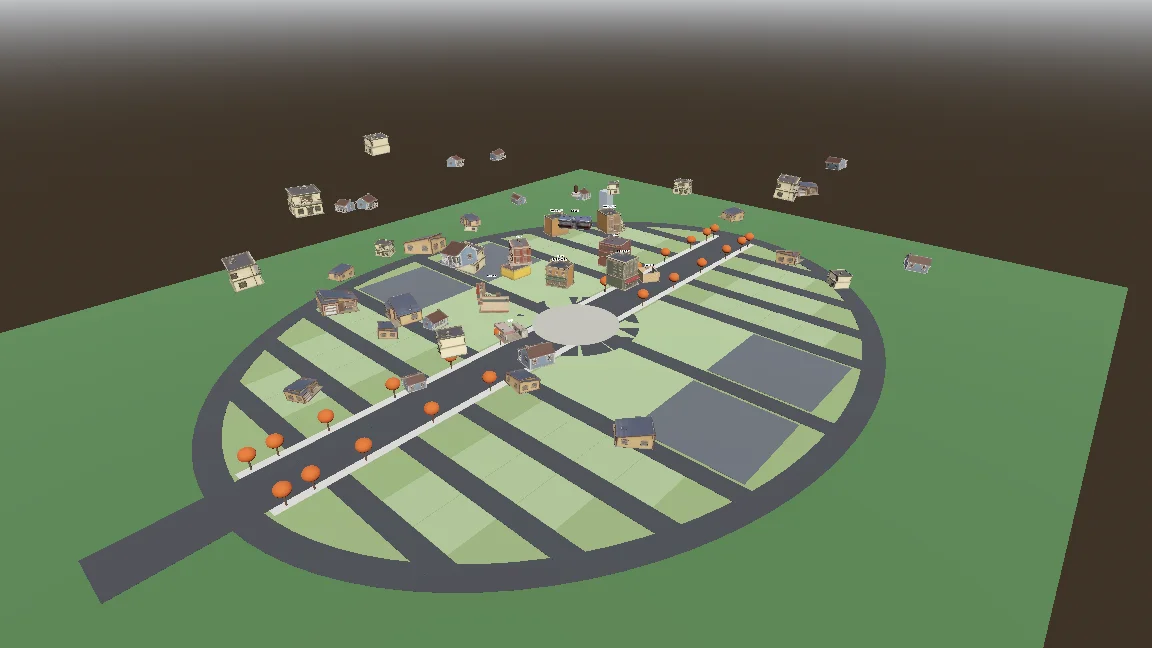
Build a gameplay-only blockout:
- Export the town plan as JSON (gen_town_svg.mjs --json) and write an @tool script (Scripts/town/town_builder.gd) that reads it and generates the ground, a colored box with collision for every shop and house (heights from the design doc), and the player spawn at the west entrance.
- Add inspector buttons: Build Town, Preview Tree, Reset To Ground, Swap In Models.
- Also add a command-line build script so you can rebuild the scene headless.
- Swap In Models replaces each box with res://Assets/Models/<model>.glb, scaled to the lot and rotated to face the street, keeping the position.
Show me screenshots from the street and from above.
移動とプロシージャルなスカーフを加える
コントローラーには、地上、空中、ホバリング、スカーフ跳躍の各ステートを持たせました。公開した設定値とスモークテストが、各動作の調整と確認に役立ちました。
Start the player controller in the blockout scene. Use the rigged boy model directly, no capsule placeholder.
- CharacterBody3D with states: ground, air, hover (hold jump midair, drains scarf energy), scarf leap.
- Third-person over-the-shoulder camera, keyboard + mouse and gamepad input maps.
- AnimationTree state machine built by a generator script (Scripts/tools/build_player_scene.gd), not by hand in the editor.
- All feel parameters exported so I can tune them in the inspector.
- An automated smoke test that spawns the player, runs, jumps, hovers and scarf leap, and saves screenshots.
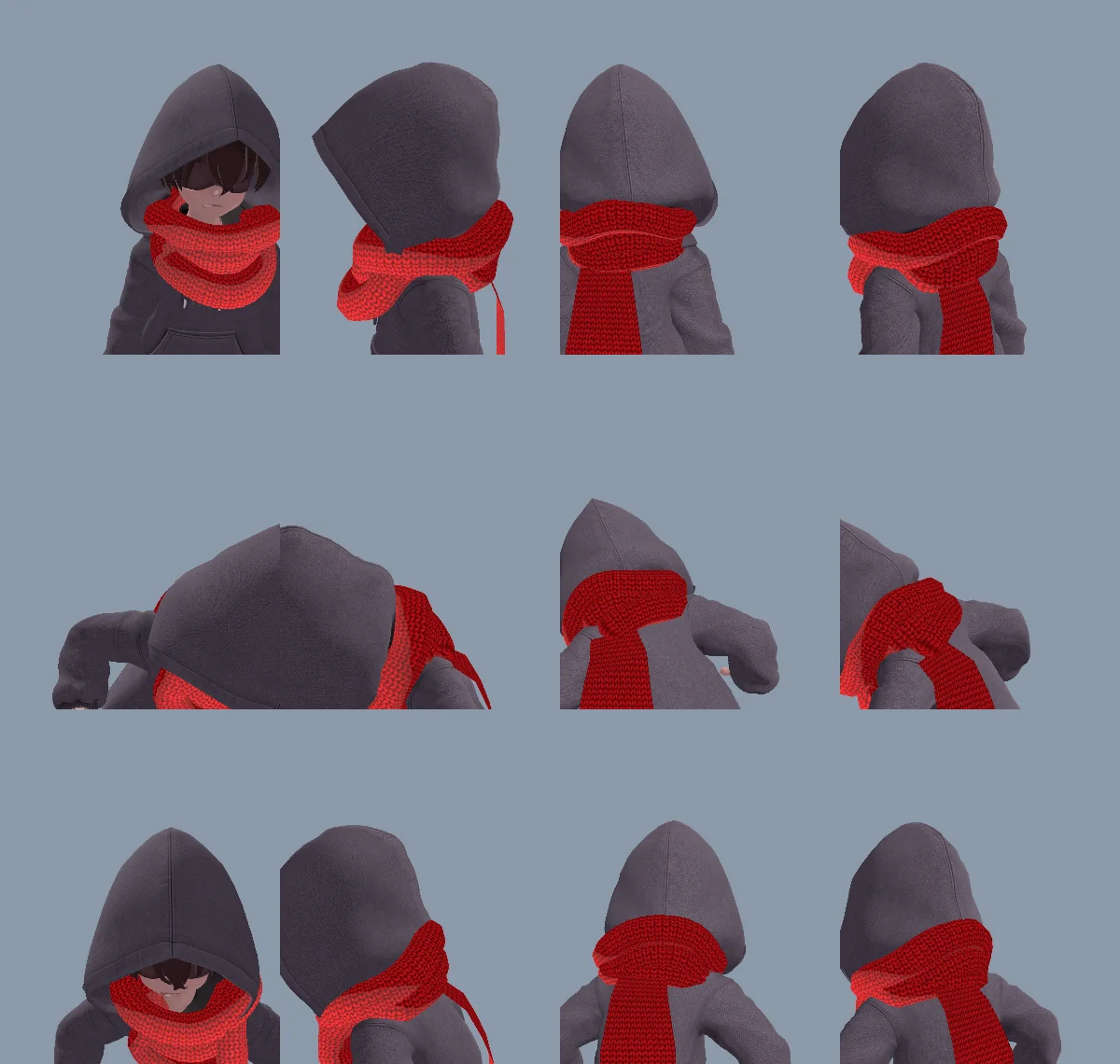
モデリングした首巻きは硬く見えすぎたため、首に巻く部分も、その先に続く端の部分もコードで生成しました。同じ端の部分で、垂れ下がる、伸びる、つかむ、像に巻きつく、放すといった動きをすべて表現でき、モデルやアニメーションを別に用意する必要はありませんでした。
最初の首巻きは、三角形の巻き順と法線の反転が原因で裏返しに見えました。Claude はメッシュを修正し、原因を CLAUDE.md に記録しました。
The neck scarf looks too stiff. Try generating it procedurally instead of using the Tripo model:
- ScarfWrap: three thick, soft knitted loops around the neck, rebuilt every frame from the neck, head and spine bones, pushed out by capsules on the head, neck, chest and upper arms, fuller at the back so it fills the gap between the hood and the shoulders, with a little spring lag.
- ScarfTail: a Verlet chain hanging from the knot at the back, with thickness, stiff enough not to stretch, colliding with body capsules. Reaching out to grab props, hanging from anchors and wrapping the statue all use the same tail (reach(point) / release()).
- Both share one wool material with the red knit texture and a soft sheen at grazing angles.
Keep the per-frame cost low and tell me the measured time.
スカーフ跳躍に狙って跳ぶ手応えを持たせる
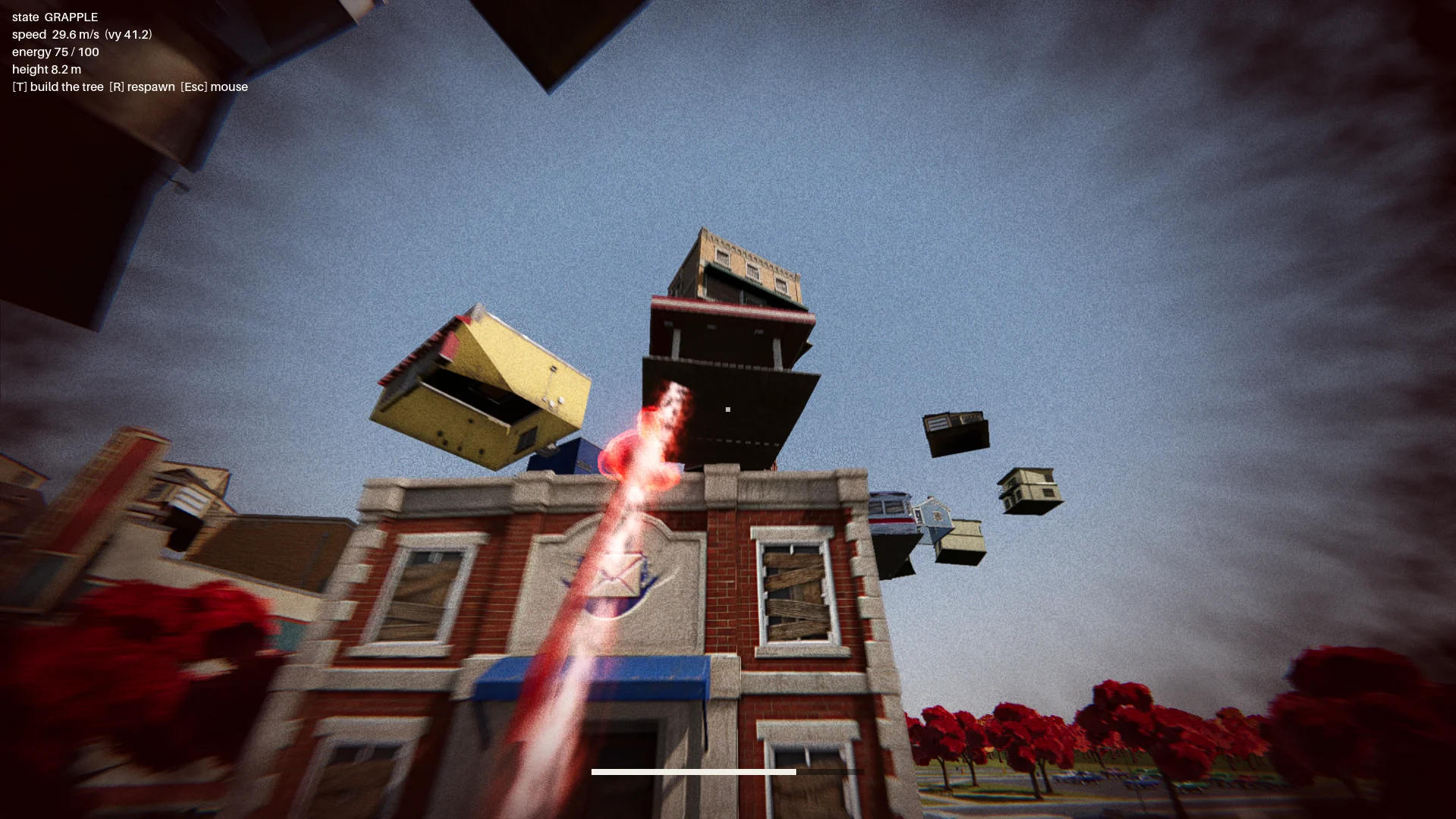
最初のスカーフ跳躍は、グラップリングフックのようにスイングする動きでした。そこで、選んだ着地点に向かって加速する動きに変え、赤いオーラ、土ぼこり、トレイル、着地時のパルスを加えて、動きを読み取りやすくしました。
初期には日よけの上のターゲットのせいで、少年が建物を突き抜けたり、はまり込んで動けなくなったりすることがありました。そこで、着地点と飛行経路のチェックを追加しました。有効なターゲットには、次の条件を課しました:
- 実際の屋根の縁にあること、
- その上方に十分な空間があること、
- キャラクターが立てる広さがあること、
- 飛行経路が着地先の建物を突き抜けないこと。
レポートでは、すべての建物を 12 方向からチェックし、無効な跳躍ポイントがゼロであることを求めました。
Change how the scarf leap feels. Right now it swings like Spider-Man. Instead, the boy knows where he's going and moves straight to the target. While moving, rotate his model so his feet point at the target, as if his feet were pulling his whole body toward it.
Drop the scarf from the scarf leap and sell the power with effects: a red aura when the scarf leap starts, a puff of dust and a small energy pulse at the start point, a trail along a small arc, then the aura fades on landing with a small shockwave at the contact point.
The speed is not constant: a little slow at first, then accelerating hard, never slowing down until it arrives.
ボス戦を一連の流れにつなぐ
ルートには、メインメニュー、イントロ、浮かび上がる町、チェックポイント、3 パートに分かれたボス戦、エンディングを含めました。
像はさまざまな物を投げつけ、その中にはパリィできる光る物体もありました。パリィに成功すると、シールドが約 7 秒間開きました。後半の攻撃には扇状の一斉射と隕石のように降ってくる車が加わり、建物越しの投擲は可視判定で防ぎました。
Finish all playable content for a first complete version:
- A basic main menu, pause menu and ending screen with buttons.
- The intro: "The Oval Town" title card; when the player enters the plaza, the statue shakes, lifts off its pedestal, a "The Statue" title card, then a shockwave pushes the boy back along the ground. Buildings fly up into the spiral tree. One checkpoint at the end of this sequence.
- The boss fight: shield, parry window about 0.25 s, about 7 s exposed window, damage only from throws while exposed, 3 health segments, attacks unlocked by remaining health: single throw, fan volley (only the glowing one can be parried), car meteor shower.
- Sealing: when its health reaches 0, a scarf leap point appears on the statue; scarf leap to it and press the seal button repeatedly.
- A full-flow automated test that plays the whole game with a real parry, three rounds of throws, a death and restart, the seal and the ending, saving screenshots at each stage.
Show me the plan first, then build it.
体力がゼロになると、像の上にスカーフ跳躍のターゲットが現れました。プレイヤーが封印ボタンを連打するとリングが満ちていき、手を止めると減っていきました。
07 / 概要
仕上げ、テスト、書き出し
シーンの見た目を作り込む
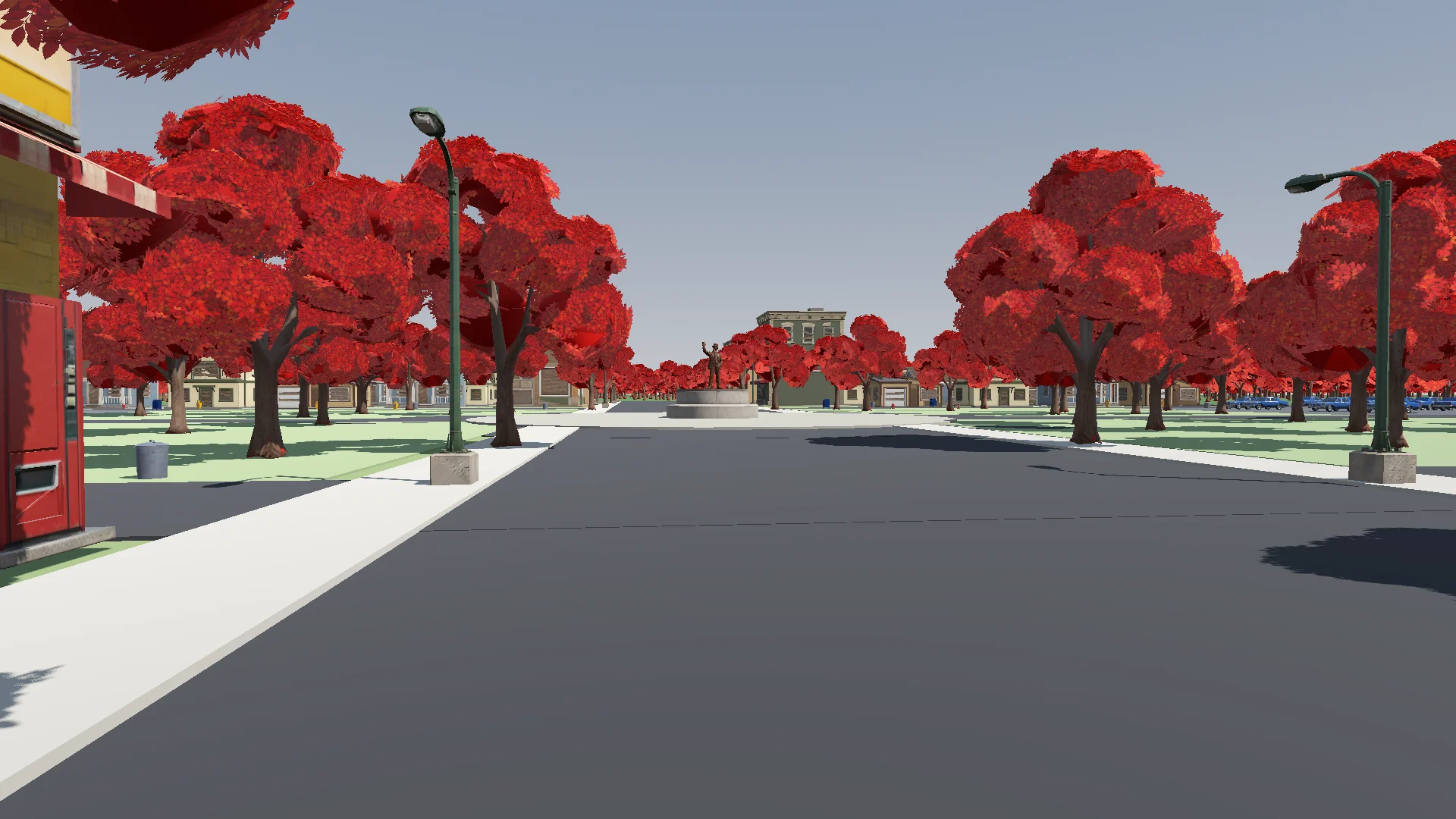
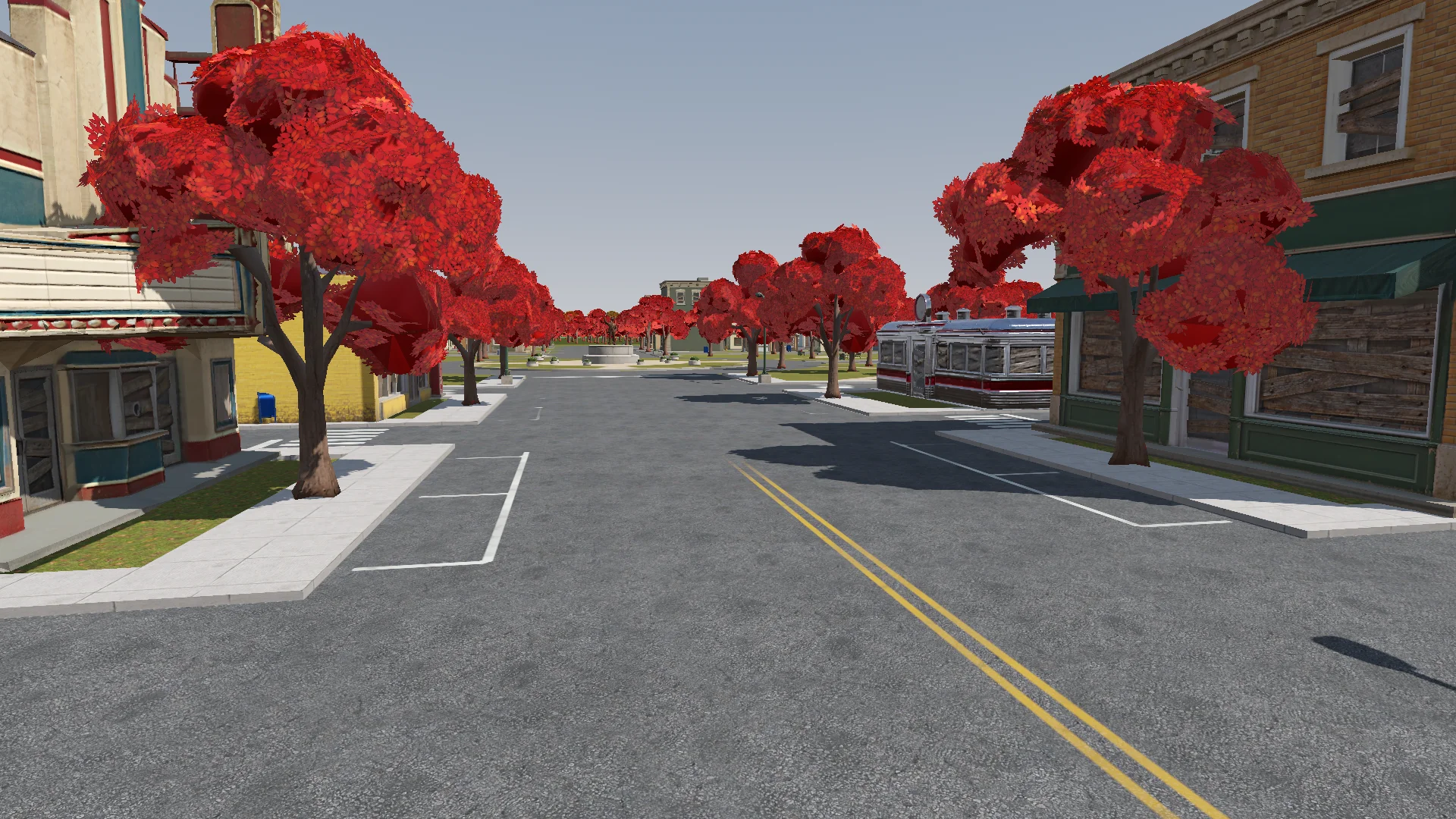
戦闘が機能するようになってから、地面のディテール、草、樹木、ライティング、ポストプロセス、エフェクトを加えました。柔らかな加算合成のシェーダー 1 つで、オーラ、リング、飛び道具、トレイルの見た目に統一感を持たせました。
Polish: add the final details to the rest of the town based on the concept art (streets, parks, lane markings and so on). If details are missing or unclear, generate reference images of parts of the town first.
Street layout and lane markings should be as plausible as possible; use Tripo to generate textures if needed. The road surfaces must never flicker.
Add NPR style procedural grass on the lawns.
変更はプレイヤーのカメラから確認し、ちらつく道路、ふさがれたドア、位置のずれた街灯がないかを見ました。
Render with ACES tone mapping. Add post-processing: bloom, ambient occlusion, SSIL, depth of field, film grain, motion blur, chromatic aberration, FXAA, and an FSR 2 option, all in an Options menu. Bloom, AO, SSIL and DOF have Off / Low / Medium / High; FSR 2 has Off / Native AA / Quality / Balanced / Performance; motion blur, chromatic aberration and film grain are toggles.
Also add VSync and resolution.
The film grain should closely emulate Super 8 film. Godot has no built-in film grain or motion blur, so implement them as Compositor effects.
サウンドとインターフェースのフィードバックを加える
最初は合成音を使い、その後、大半をクレジットを明記した CC0 の音楽と効果音に置き換えました。合う素材が見つからなかった箇所には、合成音を残しています。
Find CC0 music and sound effects to replace the synthesized ones. Music should be synthwave / analog synth. Prefer less popular sources so the game feels unique. Where nothing fits, keep the synthesized sound. Verify the license on every page and generate a credits file.
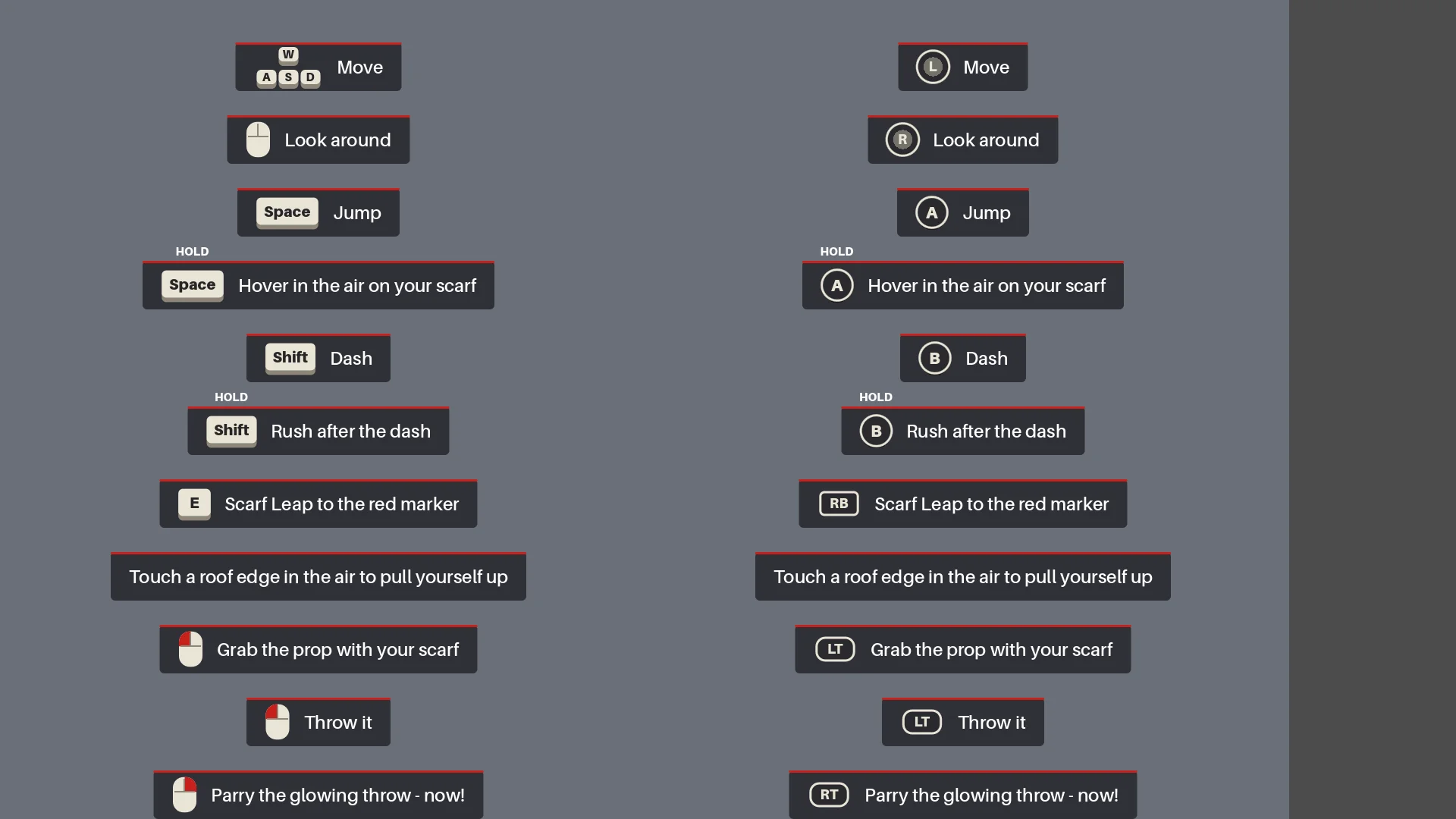
HUD には、プレイヤーが各アクションを使うまで、状況に応じた操作方法を表示しました。最初の光る投擲では時間の流れを一瞬遅くして、パリィのやり方を教えました。
Add interactive hints the first time each move is needed (move, jump, hover, dash, rush, Scarf Leap, grab, throw, parry), for a more explicit and intuitive guide to the controls. Each hint stays until the player actually does the move, then it is ticked off.
回帰テストを通しで実行する
書き出しの前に、Claude はシーンを再構築し、レポートを実行し、メニューからエンディングまで通しでプレイしました。その中で、実際のパリィ、死亡とリスタート、封印、スクリーンショットの撮影も行いました。
Before we export, do a full pass:
1. Rerun every generator in order (build_blockout --float --swap, build_player_scene, build_game) and make sure the main scene is the main menu.
2. Run every report (tree_report, grapple_point_report, street_report, lamp_probe, audio_probe, skin_gap_report) and both automated tests. Everything must pass.
3. Play the game through MCP from the main menu to the ending, take screenshots at each stage and read the game log for errors and warnings.
Report: what passed, what failed, and anything I should check by hand.
通しプレイによって、向きの誤り、エフェクトの欠落、そして移動やタイミングを変更した後に起きるチェックポイントのリセットが見つかりました。
Export a Windows build of the game. Set up a Windows Desktop export preset for the_red_scarf (embed the PCK, the game icon, product name "The Red Scarf"). Check that the export templates for Godot 4.7.2 are installed; if not, tell me how to install them instead of guessing.
Exclude test scenes, test scripts and Assets/Models/_test/. Write a script that sets the build number and exports, run the exported exe once, and report the build size and any errors.
最初の Windows 版の書き出しは 1.15 GB で、大半がテクスチャでした。未使用のアセットと古いモデルを削除し、法線マップをよりサイズの小さい圧縮形式にしたことで、755.5 MB まで減らせました。
08 / 概要
次のプロジェクトに持ち込みたいこと
次も繰り返したいワークフローは、以下のとおりです:
- 目指す結果を記述する。
- 小さなプロトタイプを 1 つ作る。
- 実際のランタイムで確かめる。
- 繰り返し起きる問題は、1 つずつルールかレポートにする。
- そのうえで初めて規模を広げる。
同じパターンも再利用するつもりです。町のレイアウトの元データは 1 つにまとめる、アセットのバッチにはチェックポイントを設ける、スカーフ跳躍にはジオメトリのルールを定める、ボス戦は通しでテストする、というものです。
似たようなデモを作るなら、キャラクター 1 人、ルート 1 本、敵 1 体から始めてください。一括生成の前に代表的なアセットを 1 つテストし、繰り返し起きる問題は再実行できるチェックにしましょう。