

01 / 개요
개요
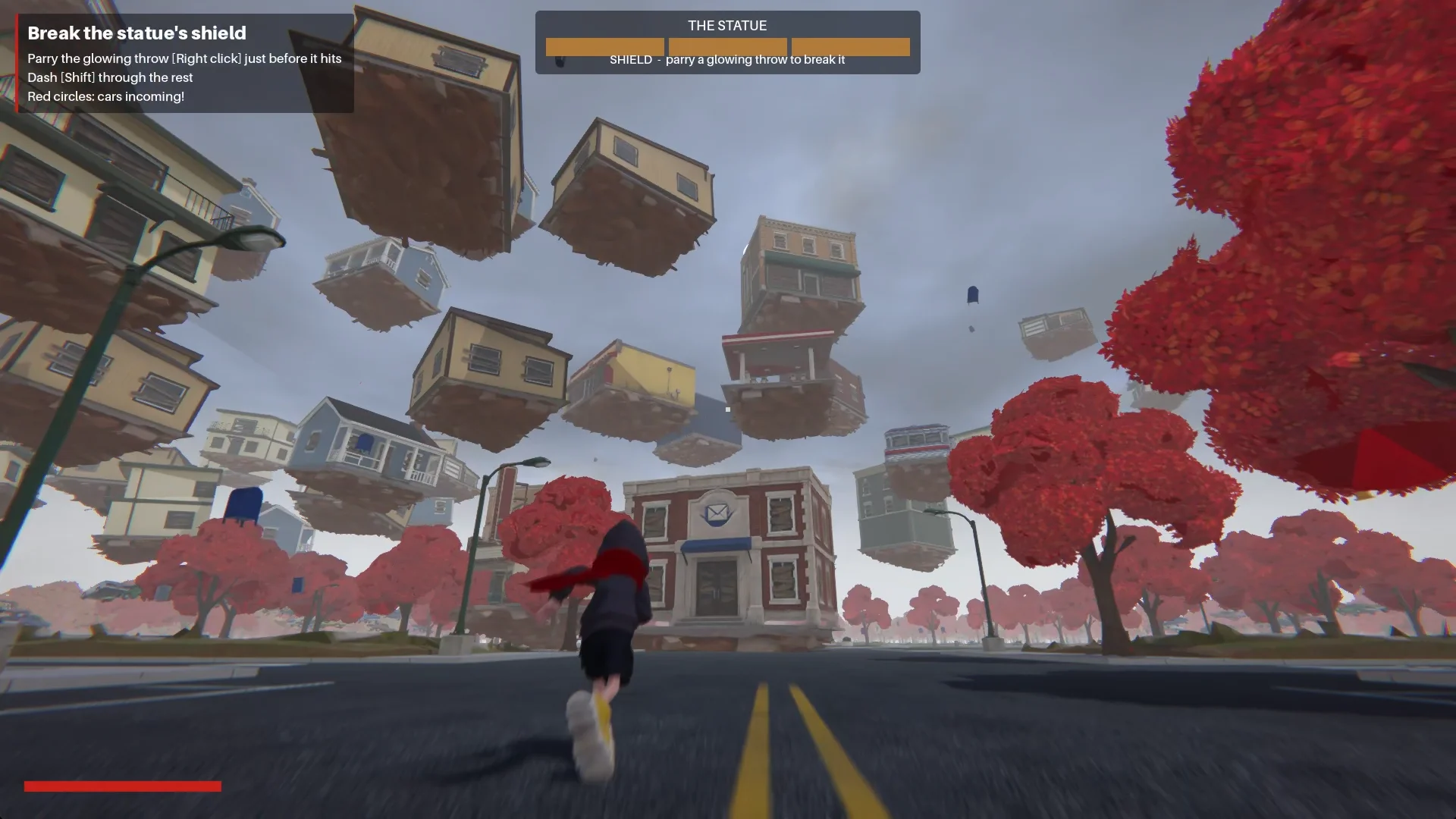
저는 빨간 스카프를 두른 소년과 인적이 끊긴 1980년대 미국의 작은 마을에서 출발했습니다. 얼굴 없는 조각상이 건물들을 땅에서 뜯어내 하늘로 끌어올립니다. 이 아이디어는 Godot로 만든 플레이 가능한 3인칭 액션 데모가 되었습니다.
Claude는 계획, 스크립트 작성, 테스트를 도왔고, Tripo는 콘셉트 이미지, 모델, 리깅, 애니메이션을 제공했습니다. 저는 프로젝트의 방향을 잡고, Godot에서 조립된 게임을 검토했습니다.
이처럼 직접 만들어 보는 방식은 아이디어, AI 보조 개발, 플레이 테스트를 하나로 잇는 바이브 게이밍 워크플로를 따릅니다.
프로젝트 구성:
- 엔진: Godot 4.7.2, Forward+
- AI 코딩 어시스턴트: Claude Code
- 이미지 생성: Tripo 이미지 생성
- 3D 생성: Tripo P 시리즈와 H 시리즈 모델
- 프로젝트: The Red Scarf, 짧은 3인칭 보스전 데모
02 / 개요
완성된 데모는 어떻게 플레이되나
소년은 Main Street를 따라 마을로 들어섭니다. 광장에서는 얼굴 없는 조각상이 충격파를 내뿜고, 건물들을 끌어올려 자기 주위에 나선을 이루게 합니다.
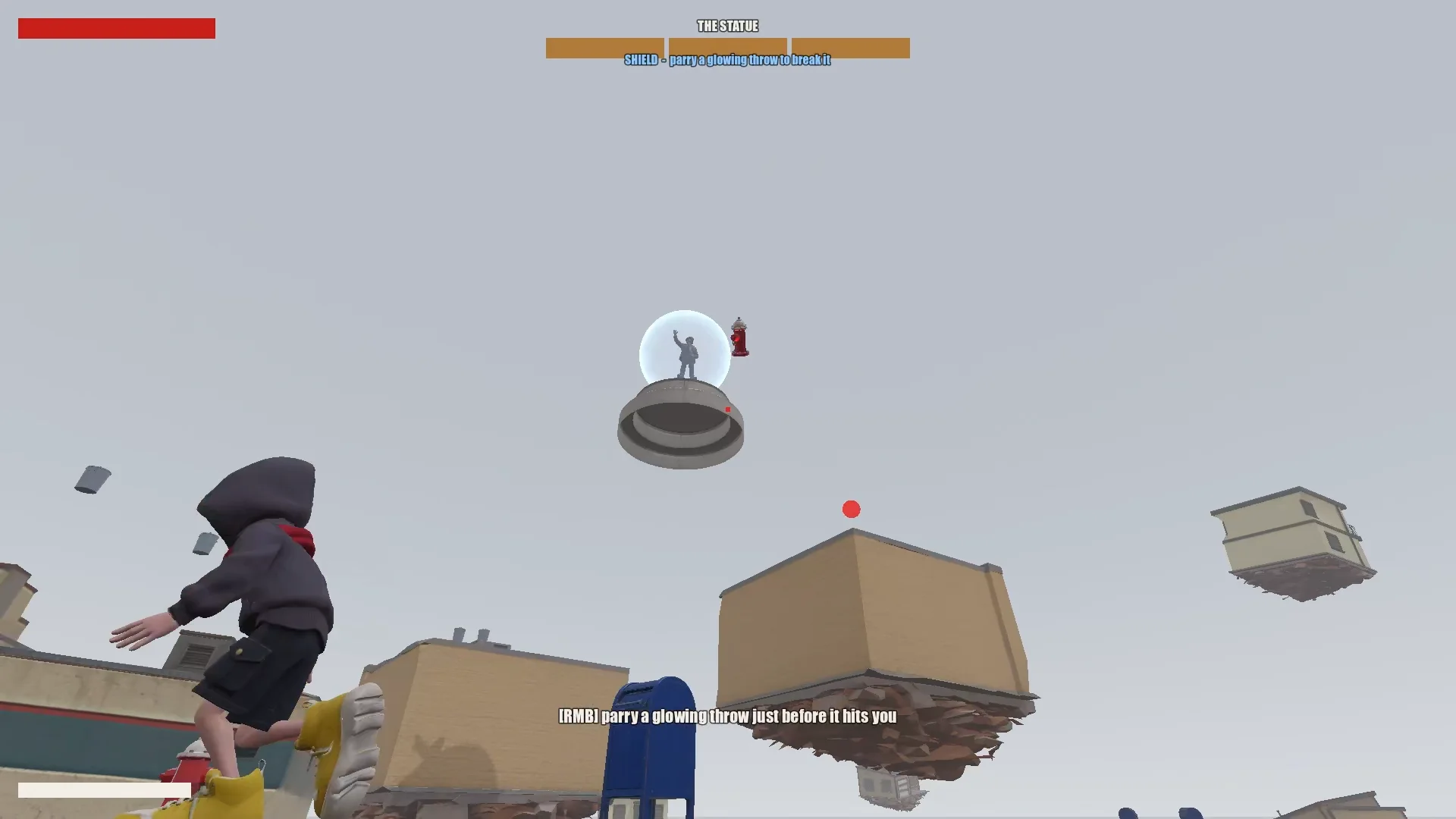
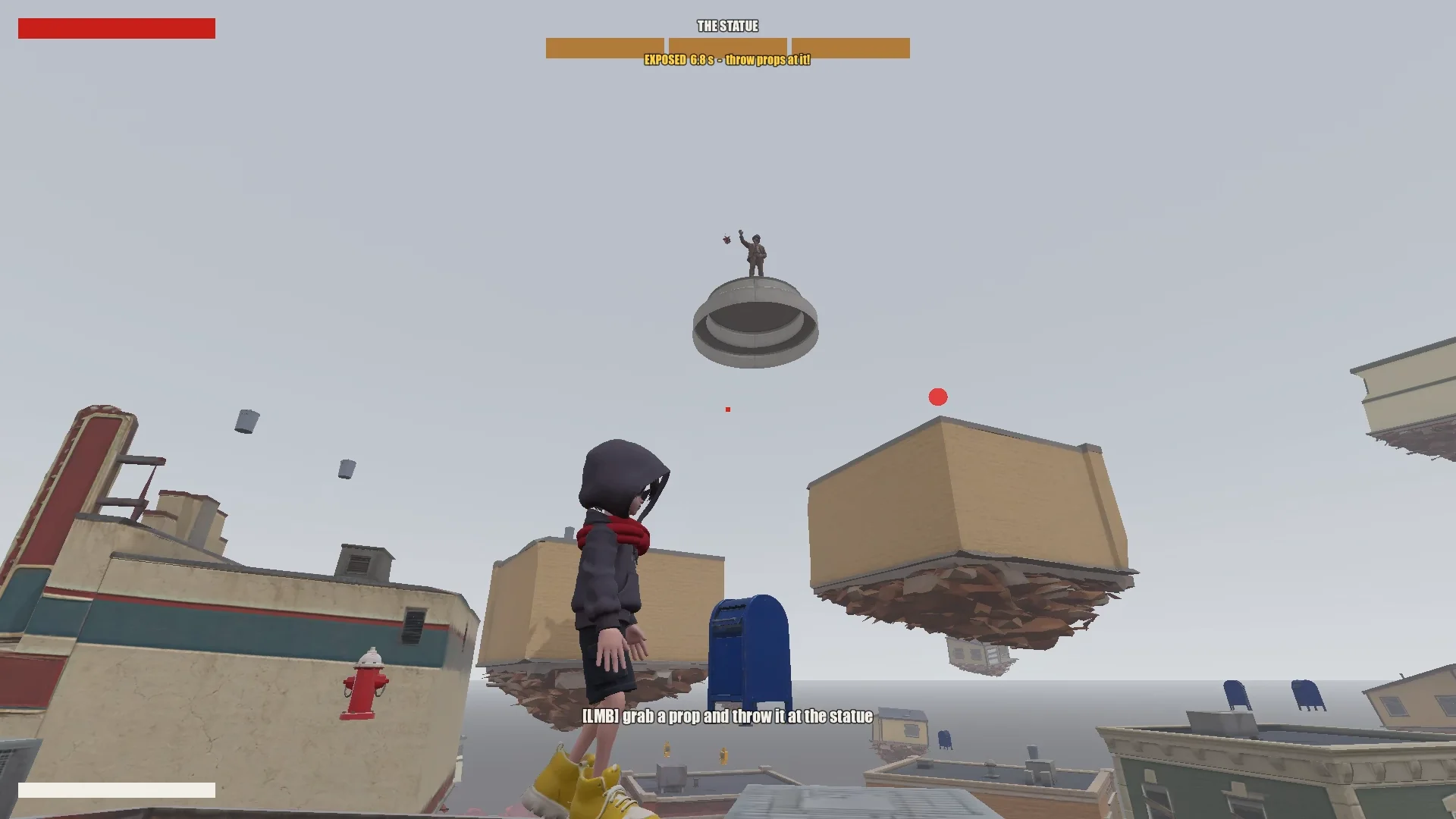
플레이어는 점프, 호버링, 스카프 도약으로 떠 있는 상점들을 타고 오릅니다. 빛나는 투사체를 패링하면 조각상의 보호막이 잠시 깨지고, 주변 물체를 던지면 조각상에 피해를 줄 수 있습니다. 세 라운드가 지나면 소년은 조각상에 다가가 봉인할 수 있습니다.
03 / 개요
도구와 프로젝트 설정하기
Claude용 프로젝트 메모리 만들기
Godot 프로젝트, 기획 문서, 콘셉트 이미지, Tripo 모델, 스크립트를 한곳에 모아 두었습니다. 루트의 CLAUDE.md에는 Claude가 세션이 바뀌어도 지켜야 할 규칙을 기록했습니다.
여기에는 다음과 같은 기본 사항을 담았습니다:
- 게임, 톤, 비주얼 방향을 설명한다.
- 스타일 통일, 원치 않는 기호나 텍스트 금지 같은 에셋 규칙을 나열한다.
- 큰 변경 전에는 먼저 계획을 요구한다.
- 프롬프트 기록을 남긴다.
- 반복되는 함정과 프로젝트 컨벤션은 발견하는 즉시 기록한다.
반복해서 필요했던 수정 사항도 같은 파일에 추가했습니다: 메시 와인딩 순서, 모델 방향, 애니메이션 이름, 스카프 도약 목표 지점 규칙. 덕분에 이후 세션에서 이를 재사용할 수 있었습니다.
Tripo CLI 설치하기
Claude를 Tripo에 연결하기 위해 Tripo CLI를 설치해 달라고 요청했습니다:
Help me install and configure Tripo CLI: npm install -g tripo-cli
Godot와 Claude 연결하기
Claude는 텍스트 기반의 Godot 씬과 GDScript를 직접 편집할 수 있었습니다. 여기에 Godot MCP를 연결하자 게임을 실행하고, 스크린샷을 찍고, 로그를 살펴보고, 입력을 시뮬레이션할 수도 있게 되었습니다.
연결은 Claude에게 현재 열린 씬과 노드 트리를 보고하게 한 뒤, MCP 포트와 프로젝트가 제 설정과 일치하는지 대조하는 방식으로 검증했습니다.
Compare the Godot MCP servers that are available right now and pick the one that fits this project best (Godot 4.7, Claude Code, editor control plus running and inspecting the game).
Explain your choice, then install it into the_red_scarf/ and configure it at project scope (.mcp.json in the project root). Turn telemetry off.
04 / 개요
아이디어를 테스트 가능한 게임으로 줄이기
먼저 기획하고, 그다음 덜어 내기
Claude의 첫 기획안은 마을, 이동, 보스 공격, 레벨 흐름까지 다뤘지만, 짧은 데모에 담기에는 페이즈와 스카프 능력이 너무 많았습니다.
I'm making a game demo with Claude, Tripo and Godot. Here's the idea:

The player is a boy in a bright red scarf, a gray hoodie, blue denim shorts and bright yellow basketball sneakers. The scarf is a supernatural object: he can hover with it, move quickly between platforms, grab objects and throw them, and use it as a whip.
The game starts on the main street of a mid-1980s American small town: one main road, houses and shops on both sides (post office, gym, diner and so on). In the central plaza stands a statue of a man in a suit whose face has been erased. It is a hostile supernatural object. When the boy arrives, it releases a shockwave and slowly rises into the sky. The houses around it are torn out of the ground and end up as floating platforms at different heights. The player jumps between them, blocks the objects the statue hurls with telekinesis, fights back, and finally reaches the statue and seals it with the scarf.

Write a short design doc in design/game_design.md: building types, the boss's attacks in two phases, the boy's attacks, defense and movement moves, and the level flow.
Show me your plan first. Ask me if anything is unclear.
이 게임다운 느낌이 남는 가장 작은 루프로 줄였습니다:
Simplify the combat:
1. The boss has only one phase.
2. Remove the scarf shield and the scarf whip.
3. New loop: the player moves across floating buildings and can only break the statue's shield by parrying its attacks (right click / RT, like a fighting-game parry). Once the shield is down, the player throws objects at it to deal damage.
전투는 보스 페이즈 하나로 줄였습니다: 패링으로 보호막을 깨고, 빈틈이 드러난 동안 물체를 던지고, 떠 있는 마을을 이동 과제로 삼습니다. 남은 동작은 모두 이 루프를 뒷받침해야 했습니다.
데이터로 마을 만들기
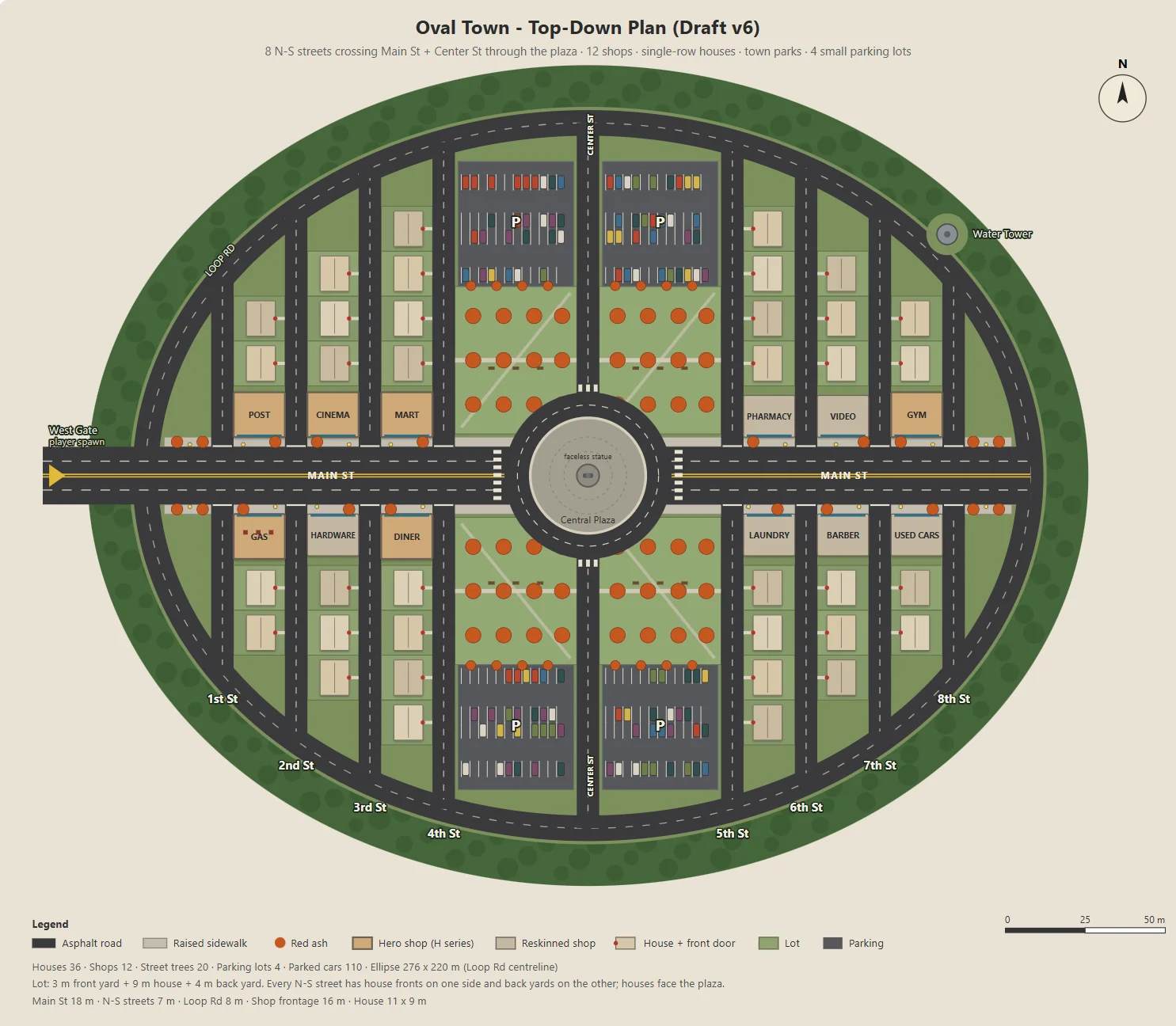
Claude는 타원형 마을의 파라미터 기반 SVG를 생성하는 Node 스크립트를 작성했습니다: Main Street, 상점 12곳, 주택가 도로, 공원, 주차장, 광장.
같은 스크립트가 Godot의 블록아웃, 건물, 도로, 가로등, 나무에 쓸 JSON도 내보냈습니다. 그래서 콘셉트 아트와 플레이 가능한 레벨이 하나의 레이아웃을 공유했습니다.
파라미터는 주차장 크기, 뒷마당 깊이, 상점 입구처럼 한 번에 하나씩만 수정해, 변경 사항마다 검토하기 쉽게 했습니다.
Here's the town I have in mind. The street grid is a grid inside an oval outline:
- The long axis of the oval is the widest street, Main St, lined with functional buildings like the post office and the gym.
- The other streets run perpendicular to Main St on both sides, lined with houses.
- The center of the oval is a round plaza; the statue stands on a concrete pedestal in the middle.
- Asphalt streets with lane markings. Raised concrete sidewalks in front of the shops, with American red ash street trees at regular intervals.

Design the town structure, fill in the details I didn't mention and improve the design.
Draw it as a top-down plan with a Node script (tools/townplan/gen_town_svg.mjs) that generates an SVG from parameters kept at the top of the file.
비주얼 방향 정하기
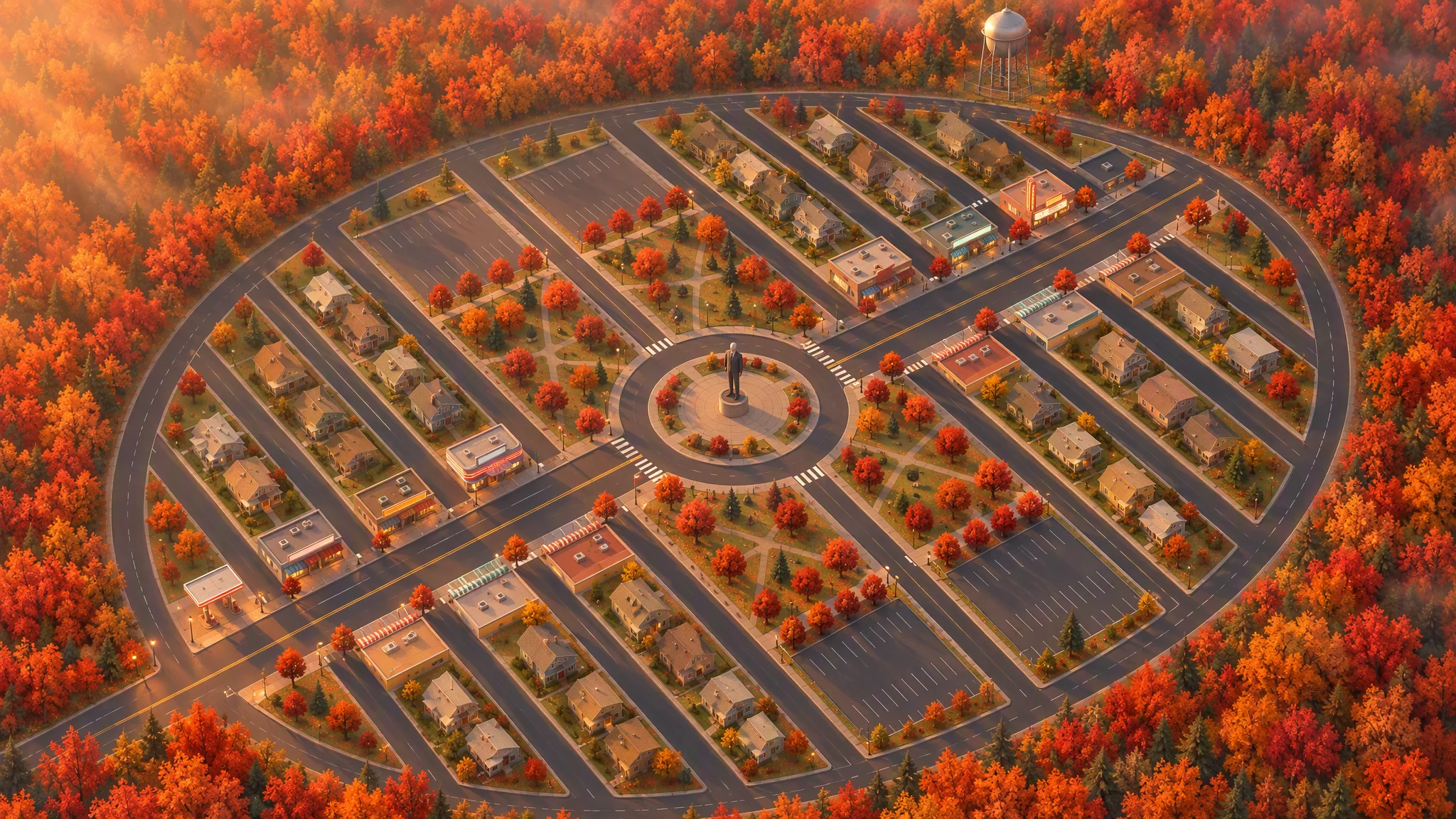
레이아웃을 엄격한 레퍼런스로 삼아 탑다운 일러스트를 만들면서 도로, 부지, 건물 윤곽, 나무, 마을 외곽선을 그대로 유지했습니다.
처음 만든 45도 시점 이미지는 기울인 지도처럼 보였습니다. 다시 생성하기 전에 레퍼런스를 로컬에서 회전시키자 설득력 있는 각도가 나왔습니다.
Strict layout reference: image[1]. Keep every road, block, building footprint, lot, park, parking lot, tree and the oval outline exactly as in image[1]. North up. Add, remove, move or resize nothing. Only restyle it as a finished top-down orthographic illustration of a quiet mid-1980s American small town in autumn.

[...town contents: main street, roundabout and statue, twelve shops seen as flat roofs only, all facing the main street, houses, parks, parking lots, red ash trees, a water tower...]

Style: stylized non-photorealistic game environment, simple hard-edged geometry, flat slightly exaggerated colors, light weathering, no grime. Warm late-afternoon sun from the west.

No vehicles, people, text, lettering, flags, or national or religious symbols. The statue has no face.
최종 평면도와 조감도를 바탕으로 Claude가 에셋 목록을 만들면서 Tripo로 만들 모델과 Godot에서 만들 오브젝트를 구분했습니다. 페이스 수 등급을 둔 덕분에 콘셉트 이미지 약 30장과 모델 약 30개를 예산 안에 맞출 수 있었습니다.
The town concept art is done. Using the final plan (v6), list every asset we need, split into "generate with Tripo" and "build in the engine". Then write a concept-image prompt for each Tripo asset in design/asset_prompts.md.
- Shops on Main St should vary more, with clearly different heights, so the opening walk has an interesting skyline.
- Split scene assets into tiers (S / A / B / C) by importance and size, give each tier a model and a triangle budget (hard cap 10,000 per asset), and estimate the total for the scene.
05 / 개요
나머지에 앞서 에셋 하나로 프로토타입 만들기
대표 건물 하나로 테스트하기
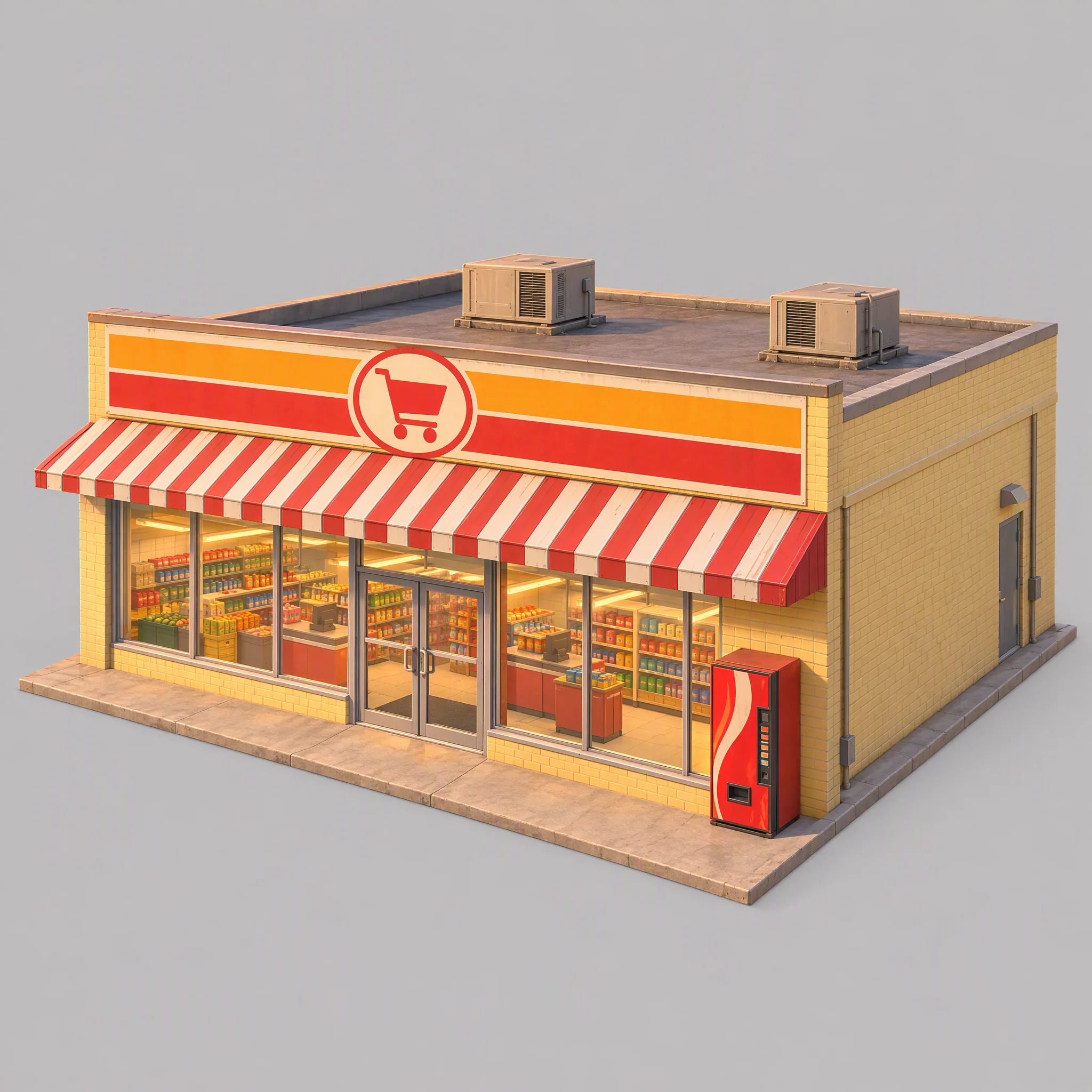
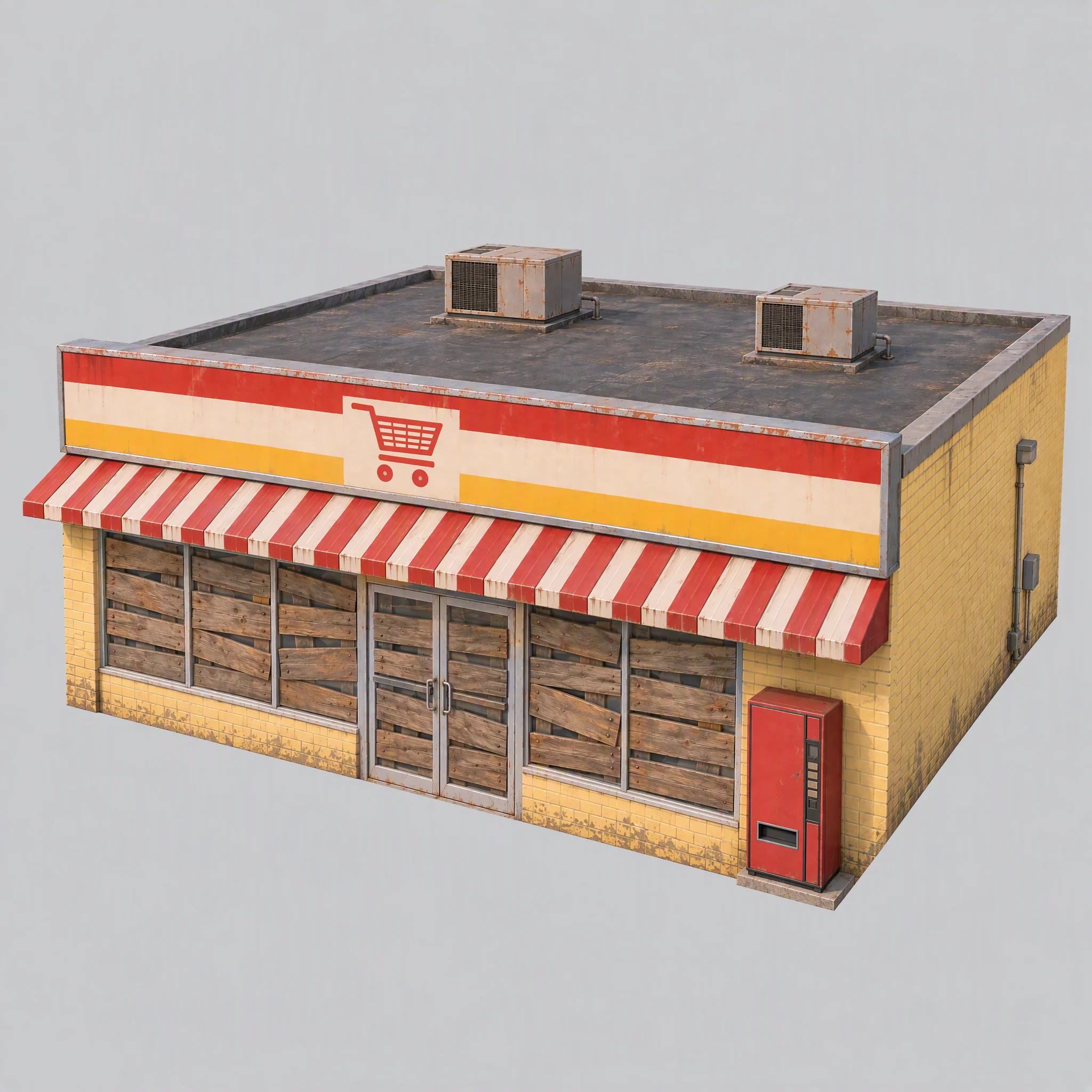
먼저 슈퍼마켓 하나로 파이프라인을 테스트하며 비주얼 스타일, 모델링 레퍼런스로서의 적합성, 알맞은 Tripo 모델 계열을 확인했습니다.
- 콘셉트 이미지가 마을의 비주얼 방향과 맞는가?
- 이미지가 깔끔한 모델링 레퍼런스가 되는가?
- 어떤 Tripo 모델 계열이 알맞은 지오메트리를 만드는가?
첫 이미지에는 진열대가 들여다보였고, 따뜻한 조명이 구워져 있었으며, 브랜드처럼 보이는 자판기와 지나치게 큰 토대가 있었습니다.
공통 규칙을 수정했습니다: 창문은 판자로 막고, 조명은 끄고, 레퍼런스 조명은 중립적인 흰색으로 하고, 토대는 벽면과 같은 면으로 맞춥니다.
Use image[1] only as a reference for color palette, materials and rendering style. Do not copy its content or camera.

A single isolated one-story small-town supermarket from the mid-1980s: a wide, low box about 16 meters wide, 14 meters deep and 5 meters tall. The front is a long row of large plate-glass windows with a pair of glass doors in the middle, under a flat red-and-white striped metal awning. Above the awning, a tall flat sign panel runs the full width of the roofline, painted with bold color bands and a simple shopping-cart pictogram, no letters. Pale yellow painted brick walls, a flat roof with two boxy rooftop AC units. A plain red vending machine stands beside the doors. All windows and glass doors are boarded up with weathered wooden planks, so no interior is visible. All lights, signs and neon tubes are switched off. The building sits on a thin flat concrete slab exactly the size of its footprint, flush with the walls on every side.

Three-quarter front view from slightly above, the whole building in frame, centered on a plain light gray background, neutral white daylight with soft even lighting and no warm tint, no cast shadows, no ground beyond the slab.

Style: simplified realism with hard-edged, clean forms, mid-1980s American, slightly saturated comic-book colors, light weathering, no grime.

No text, no letters, no logos, no flags, no national or religious symbols, no people, no vehicles
규모를 키우기 전에 모델 계열 비교하기
같은 슈퍼마켓 이미지를 쓰고 페이스 수 상한을 통제한 조건에서, P 시리즈는 더 깔끔한 하드 엣지를 만들었고 H 시리즈는 삼각형이 더 고르고 표면이 더 부드러웠습니다.
이 게임에서는 다음과 같이 선택했습니다:
- 건물, 차량, 그리고 깔끔한 하드 서피스가 어울리는 소품에는 P1.0을 쓴다.
- 조각상과 떠 있는 지면 조각 같은 유기적 형태에는 H3.1을 쓴다.
- 소년 캐릭터에는 P2.0을 쓴다. 리깅에 깔끔한 토폴로지가 필요하기 때문이다.
이는 이 게임을 위한 선택일 뿐, 보편적인 모델 순위가 아닙니다.
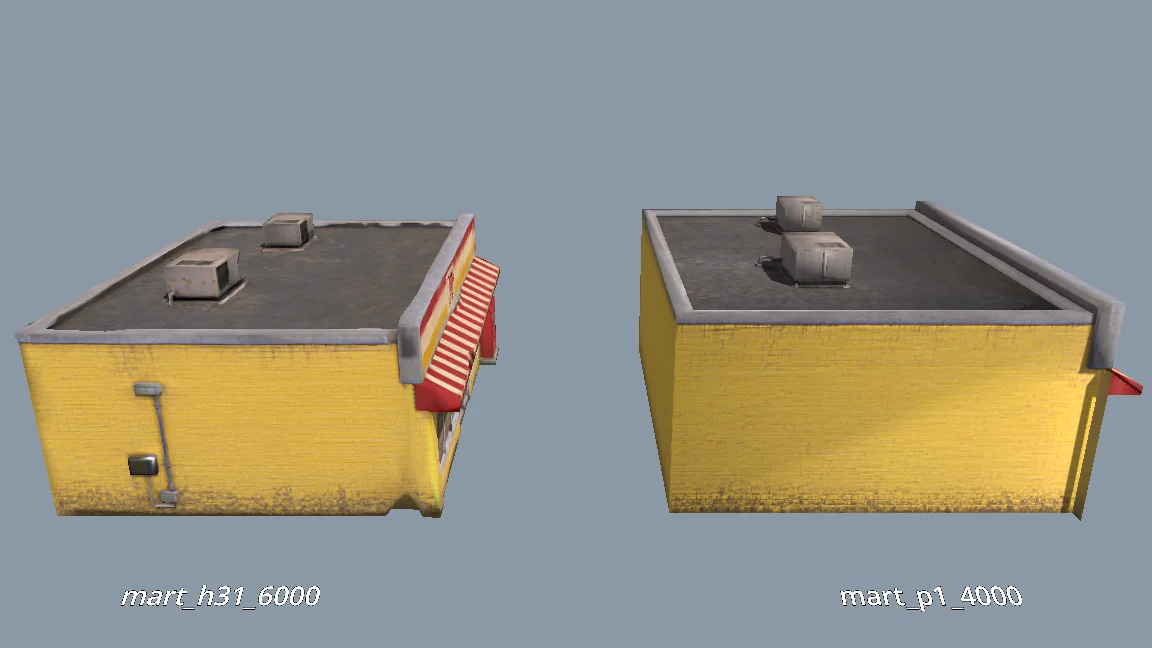
The current models are all clean and fairly flat. For performance, would P1.0 suit the buildings better than H3.1? Run a comparison: generate MART with P1.0 at 4000 faces and with H3.1 at 6000 faces, import both into a test folder, and render them side by side from the storefront, front, corner and top views (shaded and wireframe). Then tell me which one to use and why.
나머지 씬 에셋 생성하기
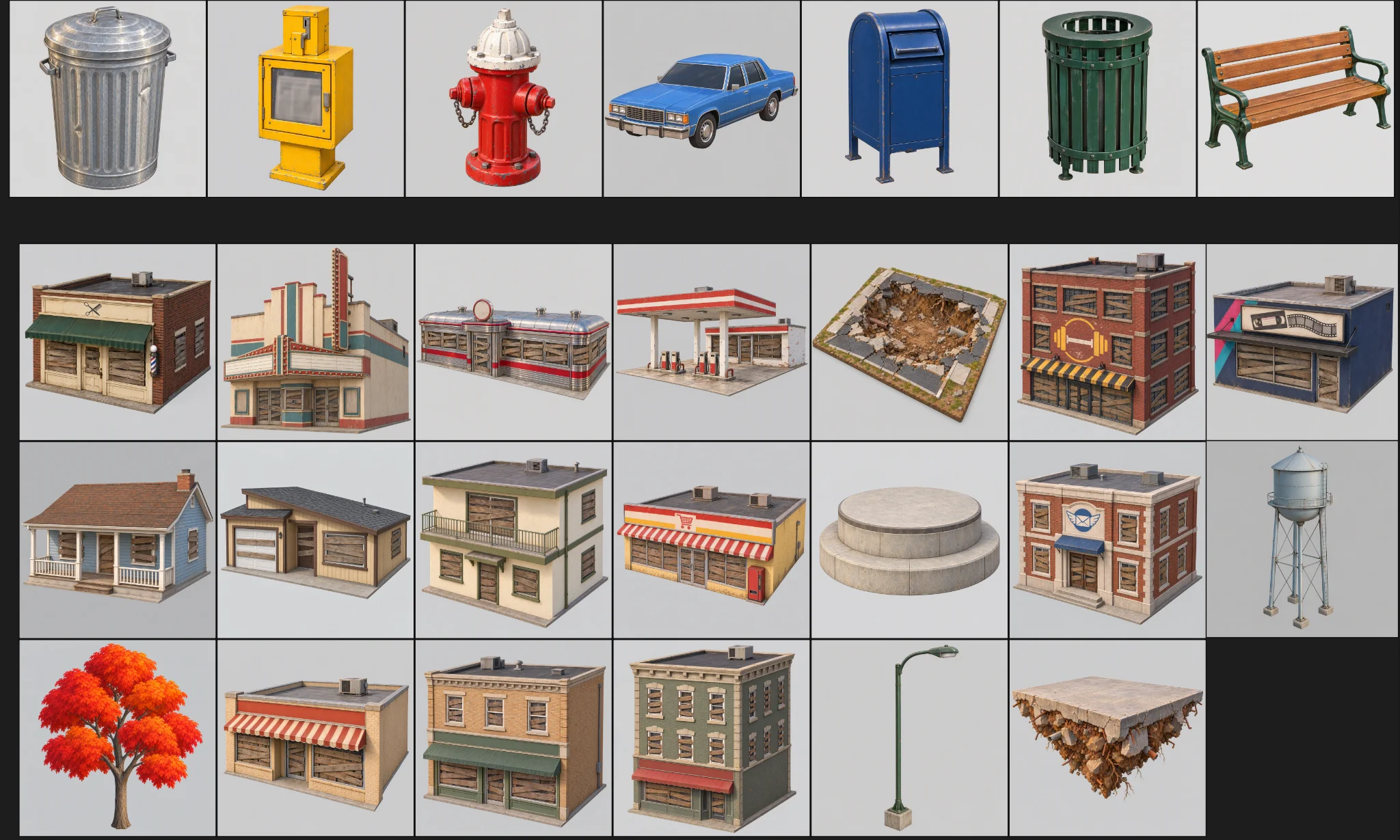
프로토타입이 검토를 통과한 뒤 나머지 에셋을 생성했습니다. 에셋마다 카테고리, 폴더, 모델 프리셋, 페이스 수 예산을 정해 두었습니다.
일괄 생성에는 세 가지 검사를 두었습니다:
Generate concept images for all remaining scene assets the same way as MART, using the prompts in design/asset_prompts.md and cpt/town_birdseye.png as the style reference.
Check balance first. Save each image under cpt/assets/<category>/.
Check every image against the checklist in asset_prompts.md (single object, clean background, no text or symbols, matches the bird's-eye style, no thin fragile parts).
Retry failed tasks individually; never rerun the whole batch.
Record progress in design/batch_checkpoint.md so we can resume if we stop halfway.
When done, list what succeeded, what failed and what needs my review.
- 모든 이미지가 단일 오브젝트인지, 배경이 깨끗한지, 의도치 않은 텍스트나 깨지기 쉬운 부품이 없는지 검사한다.
- 실패한 작업은 개별로 재시도한다.
- 진행 상황을 체크포인트 파일에 기록한다.
실패한 것은 하나씩 다시 생성했습니다: 뒷벽에 구멍이 난 주유소, 누락된 급수탑, 슈퍼마켓의 엉성한 지오메트리.
캐릭터는 따로 만들기
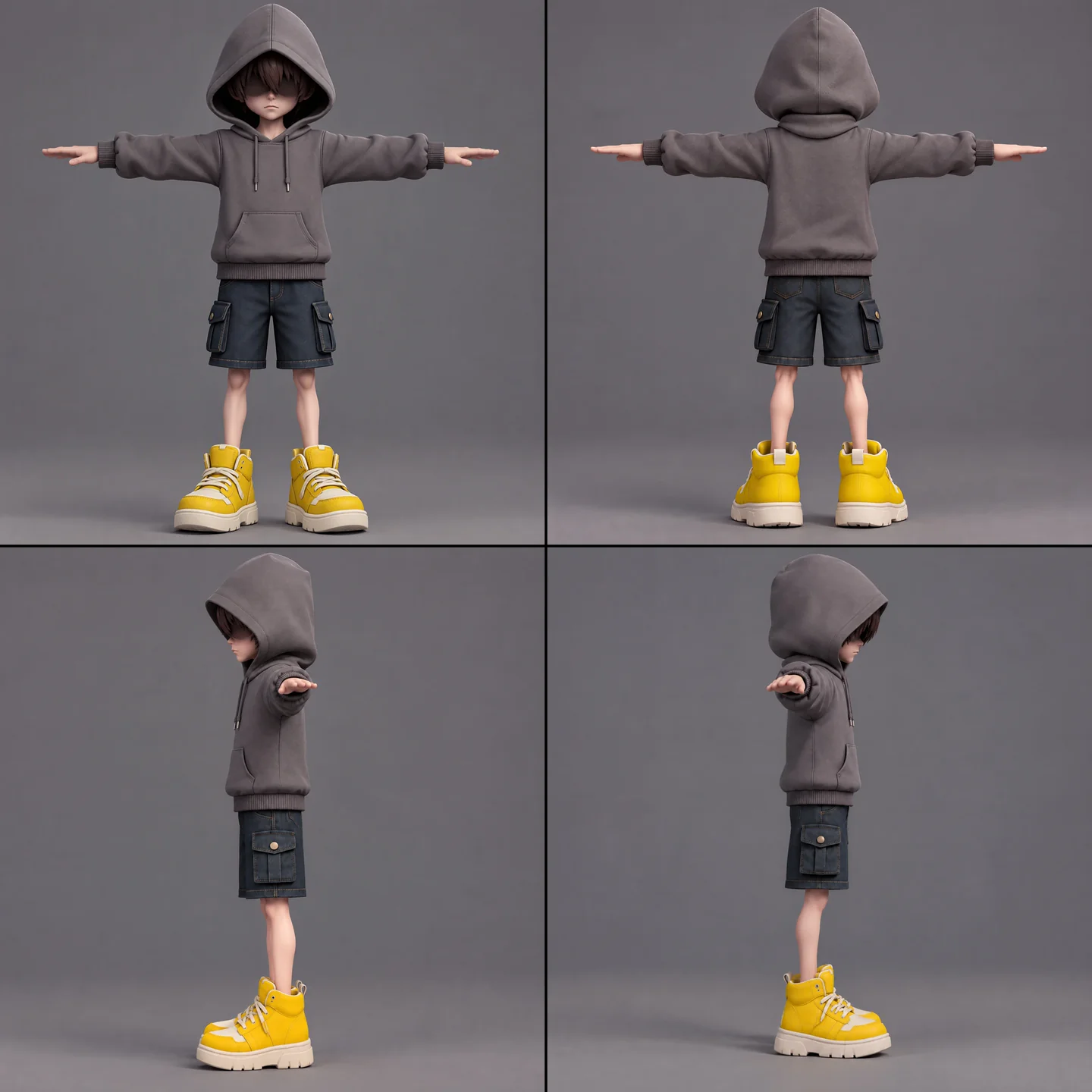
소년 캐릭터는 콘셉트 아트, 모델링, 리깅 가능 여부 검사, 리깅, 애니메이션 리타기팅을 모두 거쳐야 했습니다. 스카프는 원치 않는 스킨 웨이트를 피하고 복잡한 동작을 살리기 위해 따로 분리했습니다.
A full-body cartoon-style boy in a standard T-pose, arms extended horizontally, legs straight. He wears a gray hoodie with the hood up. His face is shrouded in shadow, eyes hidden, with only his mouth and grayish-brown bangs visible. He has a long red scarf wrapped around his neck, with both hanging ends draped down behind his back, not in front. He wears dark blue denim shorts ending above the knee so his knees are exposed, with buttoned flap pockets on both the left and right sides. He wears oversized yellow sneakers and has relatively thin legs. Cartoon character design, clean 3D model.
먼저 무료인 리깅 가능 여부 검사를 실행했습니다. 애니메이션 목록에는 대기, 걷기, 달리기, 점프, 낙하, 던지기, 패링, 스카프 도약, 피격, 패배, 봉인, 승리가 포함됐습니다. 한 번에 다섯 개가 넘는 애니메이션을 리타기팅하면 실패해서, 작은 작업 세 개로 나눠 실행한 뒤 Godot에서 합쳤습니다.
The boy model is ready at models/boy/boy_body.glb. Rig it and add the animations the demo needs. Run the free rig check first. List the animations you plan to use, mapped to Tripo presets, before generating anything.
일괄 작업에 쓰기 전에 캐릭터 뷰를 직접 확인해, 좌우가 뒤집힌 손이나 선글라스로 오인된 머리카락이 없는지 살폈습니다.
임포트와 품질 검사 표준화하기
임포트 단계에서 지나치게 부드러워 보이던 벽에 웨이티드 노멀과 하드 엣지를 적용했습니다. 텍스처 크기 제한은 에셋마다 달랐고, 소년, 스카프, 조각상, 나무는 예외로 두었습니다.
모델을 테스트 디렉터리에서 플레이 가능한 씬으로 옮기기 전에 스케일, 방향, 벽, 지붕, 불필요한 폴리곤을 확인했습니다. 실제로 쓰일 에셋은 리포트상 문제가 0건이어야 했습니다.
When I inspect the models, the normals are smoothed across every edge, so flat walls look soft and cheap. I want something like Blender's Weighted Normal modifier.
Write a Godot import hook that recomputes weighted normals on import (area-weighted, edges sharper than 30 degrees become hard edges, keep the normal map), plus a setup script that attaches the hook to a list of GLBs and limits texture size (4K, or 2K for small assets) with VRAM compression. Don't apply it to the boy, the scarf, the statue or trees.
Render before/after comparisons so I can judge the result.
06 / 개요
데모를 한 층씩 쌓아 올리기
게임플레이 블록아웃부터 시작하기
Godot 툴 스크립트가 마을 JSON을 읽어, 색을 입힌 콜리전 박스, 지면, 스폰 지점, 공중에 뜬 레이아웃을 갖춘 플레이 가능한 블록아웃을 만들었습니다. 데이터가 바뀌면 인스펙터 컨트롤과 명령줄 스크립트로 다시 빌드했습니다.
이어서 Swap In Models가 같은 위치의 박스를 Tripo 에셋으로 교체했습니다. 두 버전은 같은 레이아웃 데이터를 사용했습니다.
상점들은 올라갈 수 있는 나선을 이뤘고, 주택은 배경에 남았습니다. 리포트로 겹침, 머리 위 공간, 지붕 간격, 플랫폼 도달 가능 여부를 검사했습니다.
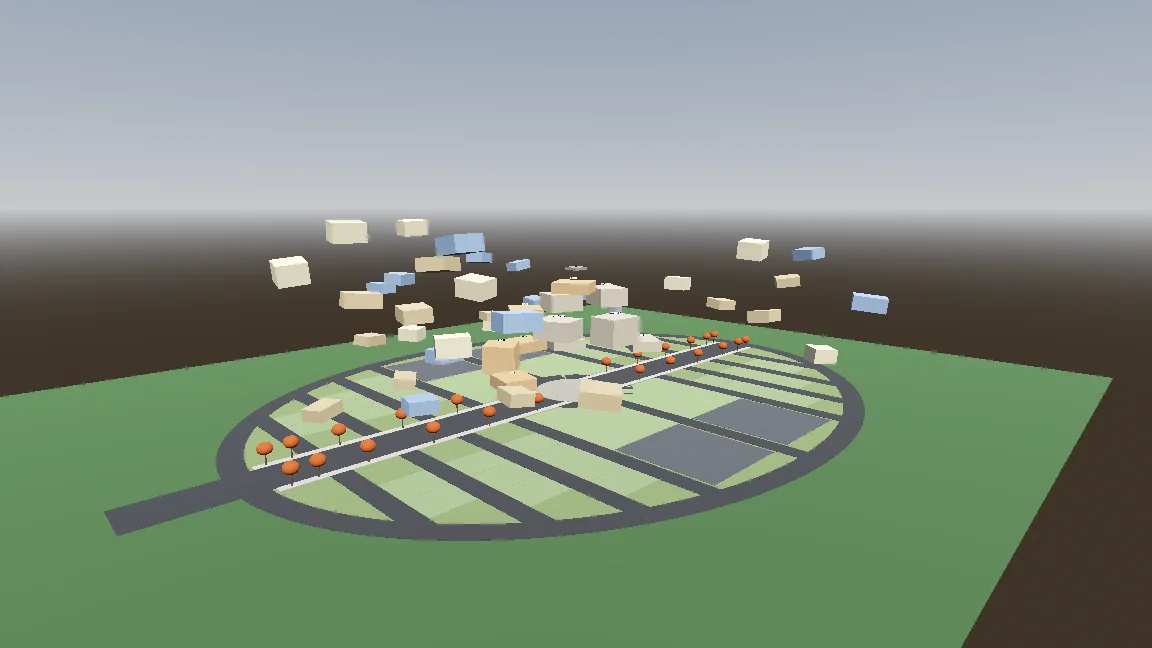
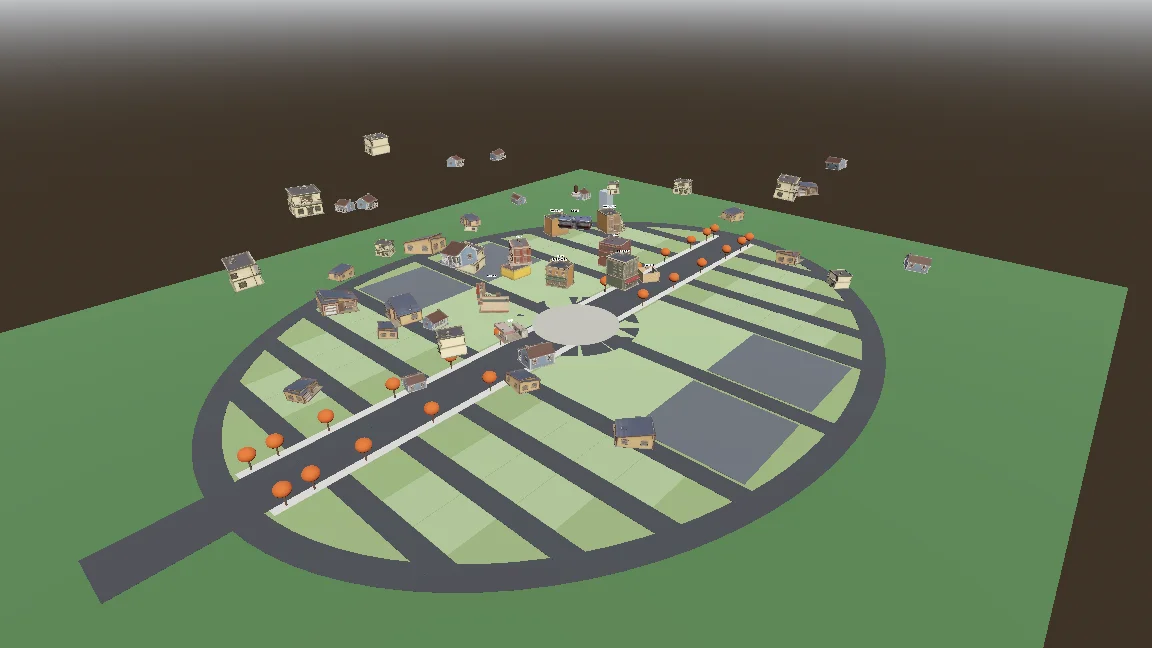
Build a gameplay-only blockout:
- Export the town plan as JSON (gen_town_svg.mjs --json) and write an @tool script (Scripts/town/town_builder.gd) that reads it and generates the ground, a colored box with collision for every shop and house (heights from the design doc), and the player spawn at the west entrance.
- Add inspector buttons: Build Town, Preview Tree, Reset To Ground, Swap In Models.
- Also add a command-line build script so you can rebuild the scene headless.
- Swap In Models replaces each box with res://Assets/Models/<model>.glb, scaled to the lot and rotated to face the street, keeping the position.
Show me screenshots from the street and from above.
이동과 프로시저럴 스카프 추가하기
컨트롤러에는 지상, 공중, 호버링, 스카프 도약 상태가 있었습니다. 노출해 둔 설정값과 스모크 테스트 덕분에 동작 하나하나를 조정하고 점검할 수 있었습니다.
Start the player controller in the blockout scene. Use the rigged boy model directly, no capsule placeholder.
- CharacterBody3D with states: ground, air, hover (hold jump midair, drains scarf energy), scarf leap.
- Third-person over-the-shoulder camera, keyboard + mouse and gamepad input maps.
- AnimationTree state machine built by a generator script (Scripts/tools/build_player_scene.gd), not by hand in the editor.
- All feel parameters exported so I can tune them in the inspector.
- An automated smoke test that spawns the player, runs, jumps, hovers and scarf leap, and saves screenshots.
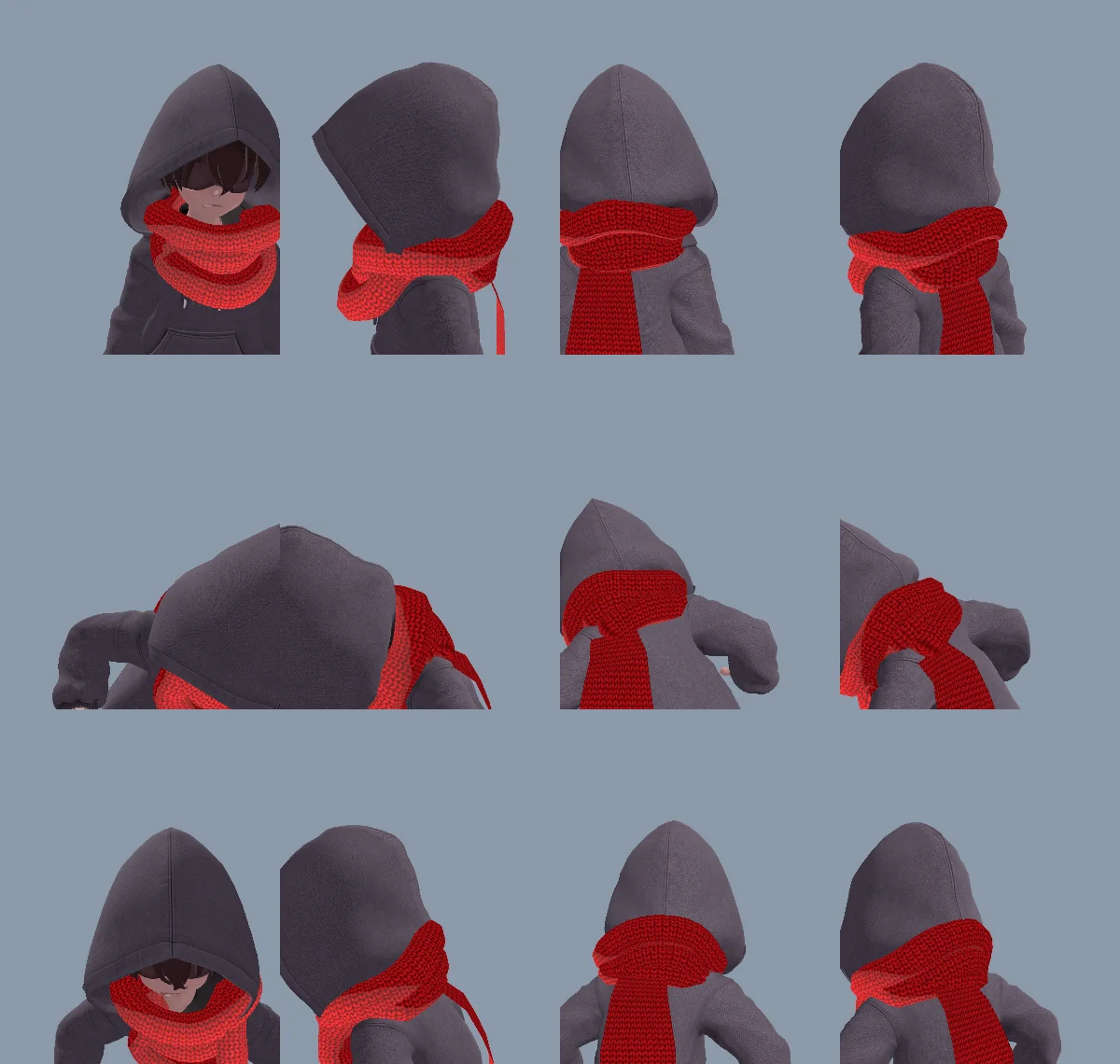
모델로 만든 목 부분 스카프가 너무 뻣뻣해 보여서, 목에 감기는 부분과 늘어지는 꼬리를 모두 코드로 생성했습니다. 같은 꼬리 하나로 매달리기, 뻗기, 잡기, 조각상 휘감기, 놓기까지 별도의 모델이나 애니메이션 없이 처리할 수 있었습니다.
처음 생성한 목 감김 부분은 삼각형 와인딩 순서와 뒤집힌 노멀 때문에 안팎이 뒤집혀 보였습니다. Claude가 메시를 고치고 원인을 CLAUDE.md에 기록했습니다.
The neck scarf looks too stiff. Try generating it procedurally instead of using the Tripo model:
- ScarfWrap: three thick, soft knitted loops around the neck, rebuilt every frame from the neck, head and spine bones, pushed out by capsules on the head, neck, chest and upper arms, fuller at the back so it fills the gap between the hood and the shoulders, with a little spring lag.
- ScarfTail: a Verlet chain hanging from the knot at the back, with thickness, stiff enough not to stretch, colliding with body capsules. Reaching out to grab props, hanging from anchors and wrapping the statue all use the same tail (reach(point) / release()).
- Both share one wool material with the red knit texture and a soft sheen at grazing angles.
Keep the per-frame cost low and tell me the measured time.
스카프 도약에 의도가 느껴지게 하기
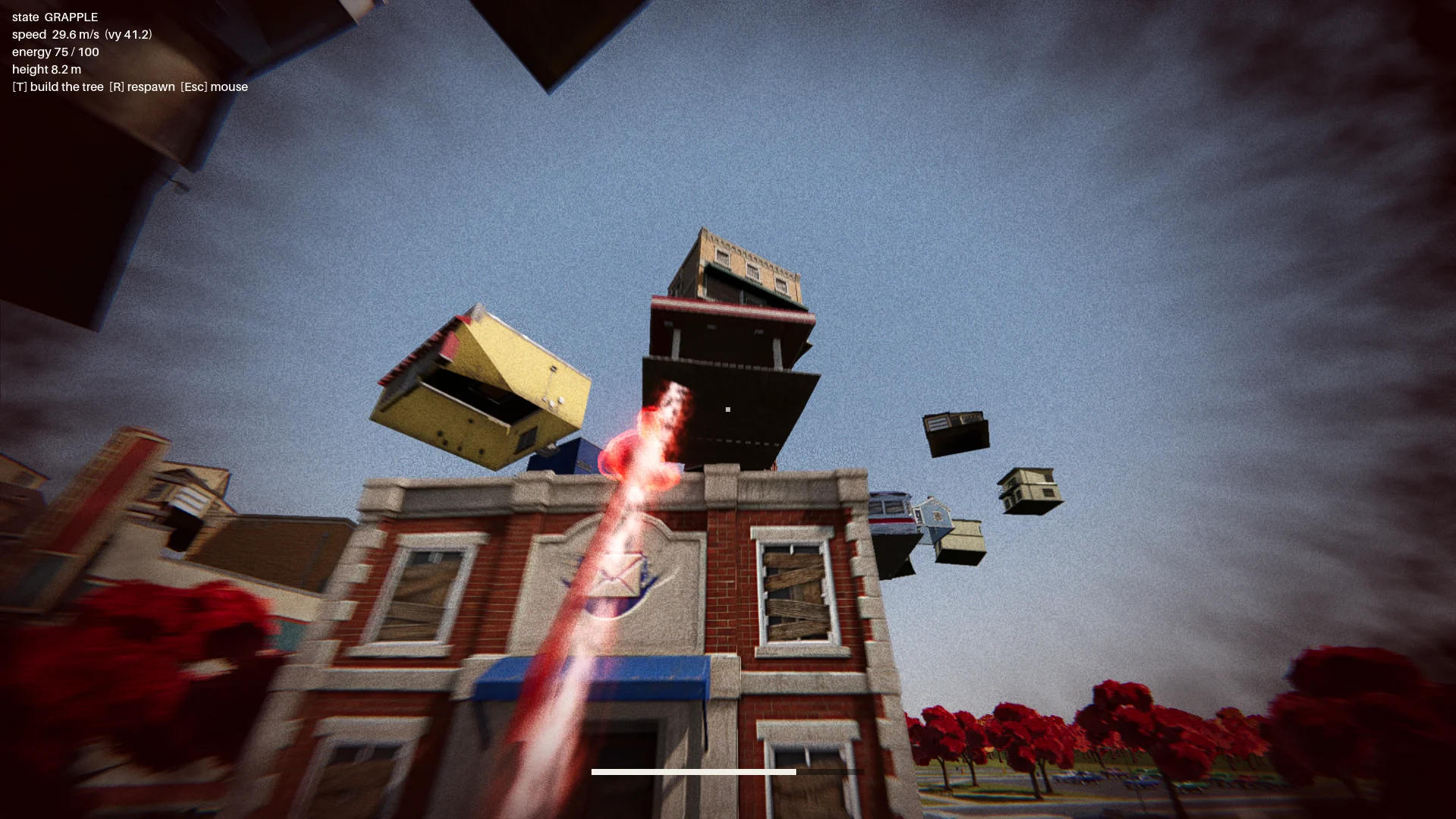
처음 만든 스카프 도약은 그래플링 훅처럼 크게 스윙했습니다. 이를 선택한 착지 지점을 향해 가속하는 방식으로 바꾸고, 움직임이 잘 읽히도록 빨간 오라, 먼지, 트레일, 착지 펄스를 더했습니다.
초기에는 차양 위의 목표 지점으로 도약하면 소년이 건물을 뚫고 지나가거나 갇혀 버릴 수 있었습니다. 그래서 착지 검사와 비행 경로 검사를 추가했습니다. 유효한 목표 지점은 다음 조건을 갖춰야 했습니다:
- 실제 지붕 가장자리 위에 있을 것;
- 위쪽에 충분한 여유 공간이 있을 것;
- 캐릭터가 설 수 있는 공간이 있을 것;
- 비행 경로가 목적지 건물을 관통하지 않을 것.
리포트는 모든 건물을 12방향에서 검사했고, 유효하지 않은 도약 지점은 0개여야 했습니다.
Change how the scarf leap feels. Right now it swings like Spider-Man. Instead, the boy knows where he's going and moves straight to the target. While moving, rotate his model so his feet point at the target, as if his feet were pulling his whole body toward it.
Drop the scarf from the scarf leap and sell the power with effects: a red aura when the scarf leap starts, a puff of dust and a small energy pulse at the start point, a trail along a small arc, then the aura fades on landing with a small shockwave at the contact point.
The speed is not constant: a little slow at first, then accelerating hard, never slowing down until it arrives.
보스전 흐름 잇기
진행 루트는 메인 메뉴, 인트로, 떠오르는 마을, 체크포인트, 세 구간으로 나뉜 보스전, 엔딩으로 구성됐습니다.
조각상은 여러 물체를 던졌고, 그중에는 패링할 수 있는 빛나는 물체도 있었습니다. 패링하면 보호막이 약 7초 동안 풀렸습니다. 이후 공격에는 부채꼴 일제 투척과 운석처럼 떨어지는 자동차가 더해졌고, 가시성 검사로 건물을 관통하는 투척은 막았습니다.
Finish all playable content for a first complete version:
- A basic main menu, pause menu and ending screen with buttons.
- The intro: "The Oval Town" title card; when the player enters the plaza, the statue shakes, lifts off its pedestal, a "The Statue" title card, then a shockwave pushes the boy back along the ground. Buildings fly up into the spiral tree. One checkpoint at the end of this sequence.
- The boss fight: shield, parry window about 0.25 s, about 7 s exposed window, damage only from throws while exposed, 3 health segments, attacks unlocked by remaining health: single throw, fan volley (only the glowing one can be parried), car meteor shower.
- Sealing: when its health reaches 0, a scarf leap point appears on the statue; scarf leap to it and press the seal button repeatedly.
- A full-flow automated test that plays the whole game with a real parry, three rounds of throws, a death and restart, the seal and the ending, saving screenshots at each stage.
Show me the plan first, then build it.
체력이 0이 되면 조각상에 스카프 도약 목표 지점이 나타났습니다. 플레이어는 봉인 버튼을 연타해 원형 게이지를 채워야 했고, 멈추면 게이지가 다시 줄어들었습니다.
07 / 개요
폴리싱, 테스트, 내보내기
씬 연출 더하기
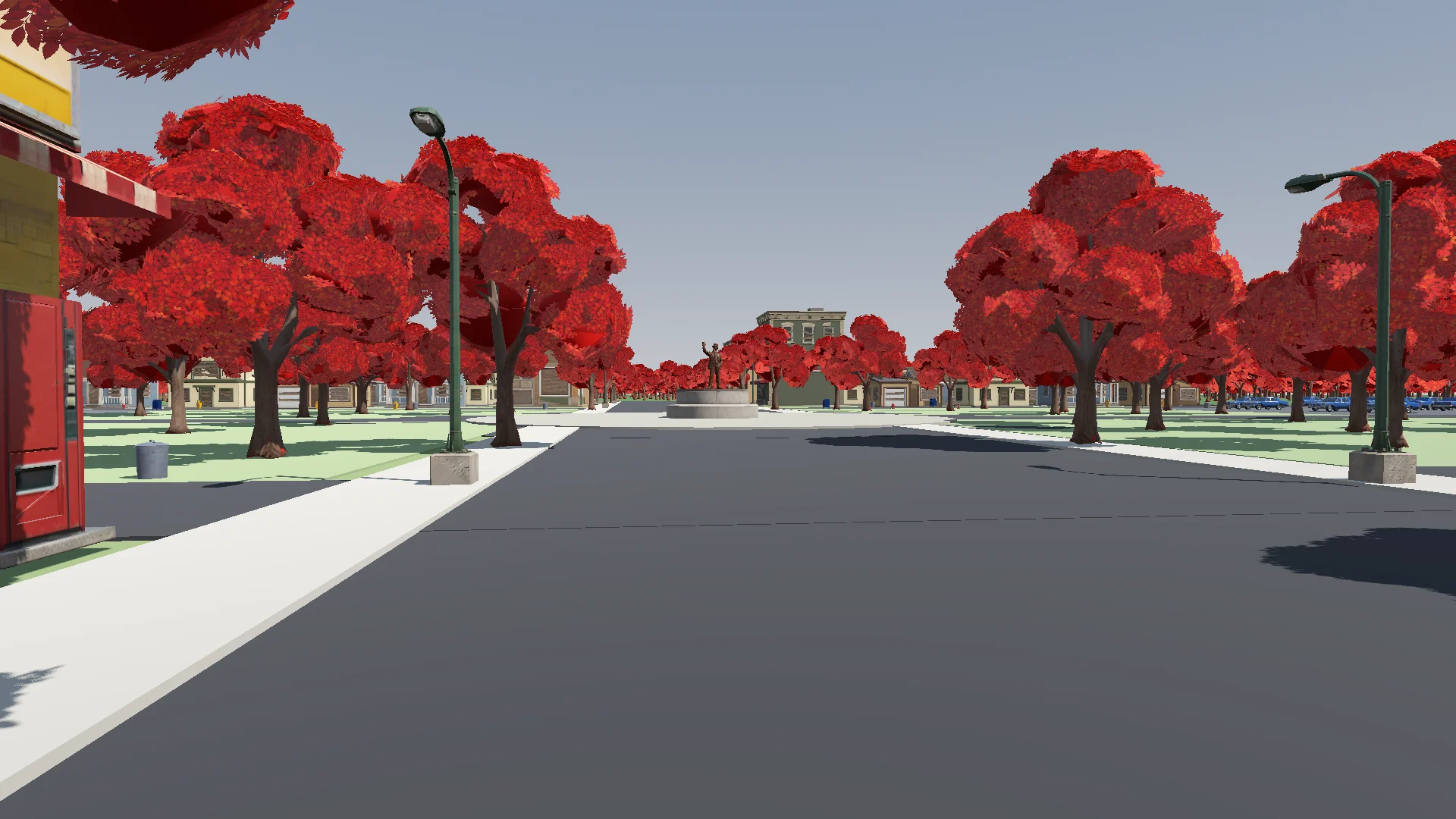
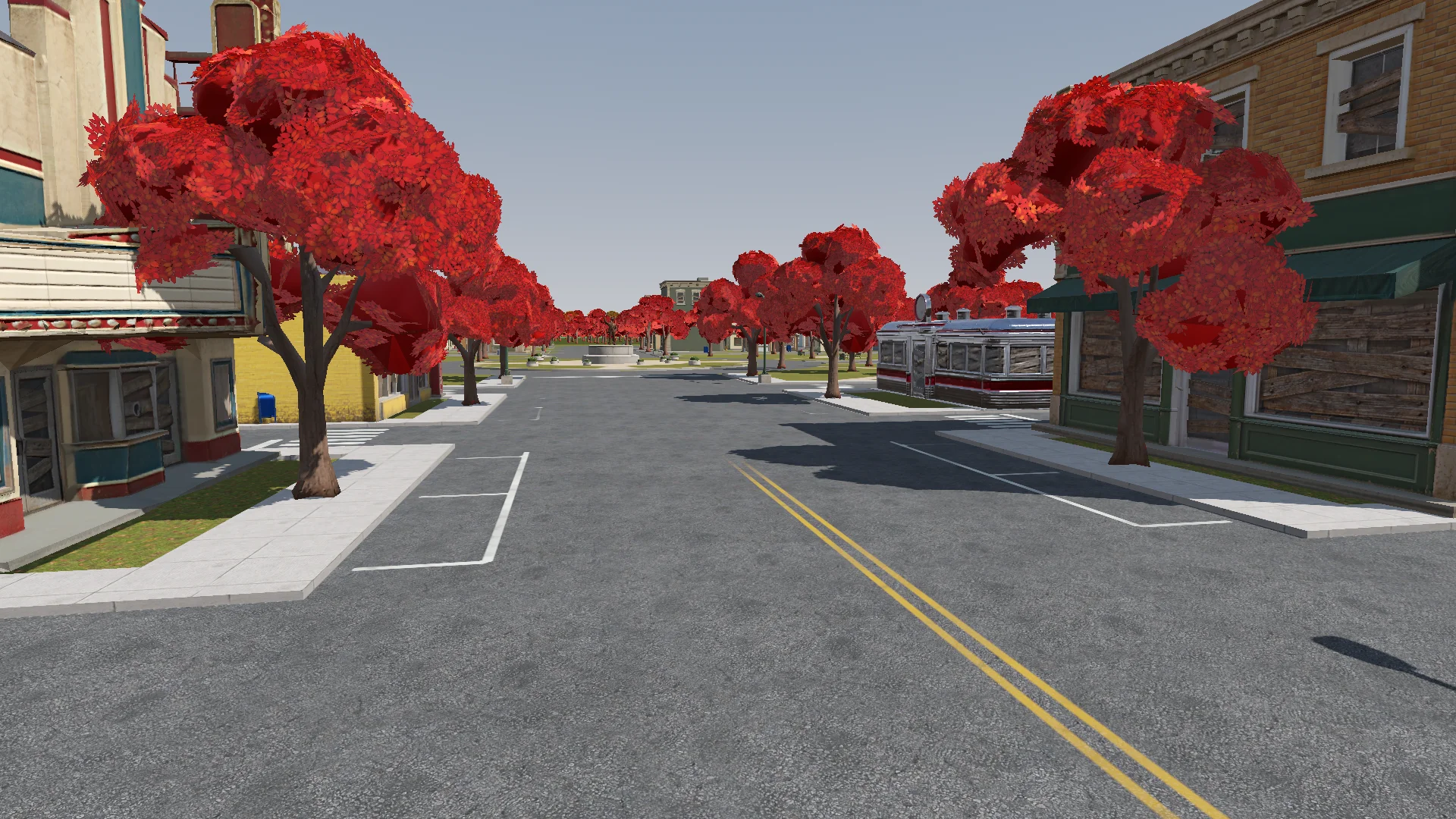
전투가 제대로 작동한 뒤 지면 디테일, 풀, 나무, 라이팅, 후처리, 이펙트를 추가했습니다. 부드러운 가산 합성 셰이더 하나로 오라, 링, 투사체, 트레일에 일관된 느낌을 주었습니다.
Polish: add the final details to the rest of the town based on the concept art (streets, parks, lane markings and so on). If details are missing or unclear, generate reference images of parts of the town first.
Street layout and lane markings should be as plausible as possible; use Tripo to generate textures if needed. The road surfaces must never flicker.
Add NPR style procedural grass on the lawns.
변경 사항은 플레이어 카메라 시점에서 확인하며 깜박이는 도로, 막힌 문, 엉뚱한 곳에 놓인 가로등이 없는지 살폈습니다.
Render with ACES tone mapping. Add post-processing: bloom, ambient occlusion, SSIL, depth of field, film grain, motion blur, chromatic aberration, FXAA, and an FSR 2 option, all in an Options menu. Bloom, AO, SSIL and DOF have Off / Low / Medium / High; FSR 2 has Off / Native AA / Quality / Balanced / Performance; motion blur, chromatic aberration and film grain are toggles.
Also add VSync and resolution.
The film grain should closely emulate Super 8 film. Godot has no built-in film grain or motion blur, so implement them as Compositor effects.
오디오와 인터페이스 피드백 추가하기
처음에는 합성 오디오로 시작했다가, 대부분을 출처를 표기한 CC0 음악과 효과음으로 교체했습니다. 알맞은 클립이 없는 곳에는 합성음을 그대로 두었습니다.
Find CC0 music and sound effects to replace the synthesized ones. Music should be synthwave / analog synth. Prefer less popular sources so the game feels unique. Where nothing fits, keep the synthesized sound. Verify the license on every page and generate a credits file.
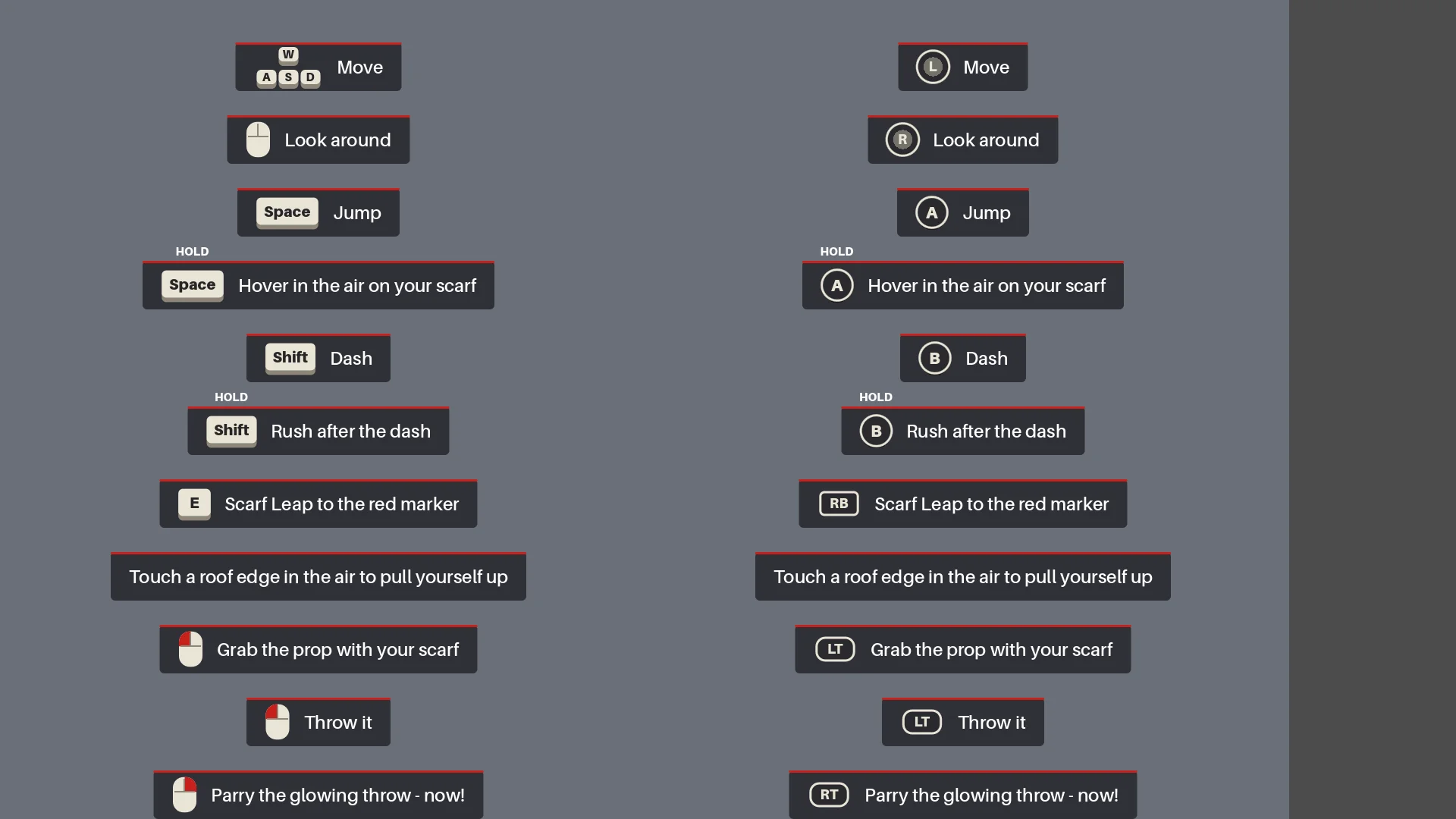
HUD는 플레이어가 각 동작을 써 볼 때까지 상황에 맞는 조작 안내를 표시했습니다. 처음 날아오는 빛나는 투척물은 잠시 시간을 느리게 만들어 패링을 가르쳐 주었습니다.
Add interactive hints the first time each move is needed (move, jump, hover, dash, rush, Scarf Leap, grab, throw, parry), for a more explicit and intuitive guide to the controls. Each hint stays until the player actually does the move, then it is ticked off.
전체 회귀 테스트 돌리기
내보내기 전에 Claude가 씬을 다시 빌드하고 리포트를 실행한 뒤, 실제 패링, 사망과 재시작, 봉인, 스크린샷 촬영까지 포함해 메뉴부터 엔딩까지 플레이했습니다.
Before we export, do a full pass:
1. Rerun every generator in order (build_blockout --float --swap, build_player_scene, build_game) and make sure the main scene is the main menu.
2. Run every report (tree_report, grapple_point_report, street_report, lamp_probe, audio_probe, skin_gap_report) and both automated tests. Everything must pass.
3. Play the game through MCP from the main menu to the ending, take screenshots at each stage and read the game log for errors and warnings.
Report: what passed, what failed, and anything I should check by hand.
전체 플레이를 통해 방향 오류, 누락된 이펙트, 그리고 이동이나 타이밍을 바꾼 뒤 체크포인트가 초기화되는 문제를 잡아냈습니다.
Export a Windows build of the game. Set up a Windows Desktop export preset for the_red_scarf (embed the PCK, the game icon, product name "The Red Scarf"). Check that the export templates for Godot 4.7.2 are installed; if not, tell me how to install them instead of guessing.
Exclude test scenes, test scripts and Assets/Models/_test/. Write a script that sets the build number and exports, run the exported exe once, and report the build size and any errors.
처음 내보낸 Windows 빌드는 1.15 GB였고 대부분이 텍스처였습니다. 쓰지 않는 에셋과 옛 모델을 지우고 노멀 맵에 용량이 더 작은 압축 방식을 적용하자 755.5 MB로 줄었습니다.
08 / 개요
다음 프로젝트에도 가져갈 것들
다음에도 반복할 워크플로는 이렇습니다:
- 의도한 결과를 설명한다.
- 작은 프로토타입을 하나 만든다.
- 실제 런타임에서 확인한다.
- 반복되는 문제는 하나하나 규칙이나 리포트로 만든다.
- 그런 다음에야 규모를 키운다.
같은 패턴도 다시 쓸 것입니다: 마을 레이아웃의 단일 소스, 에셋 일괄 생성의 체크포인트, 스카프 도약의 지오메트리 규칙, 그리고 보스전 전체 테스트.
비슷한 데모를 만든다면 캐릭터 하나, 루트 하나, 적 하나로 시작하세요. 일괄 생성 전에 대표 에셋 하나를 테스트하고, 반복되는 문제는 다시 실행할 수 있는 검사로 바꾸세요.