

01 / OVERVIEW
Overview
I started with a boy in a red scarf and a deserted 1980s American town. A faceless statue tears the buildings into the sky. The idea became a playable third-person action demo in Godot.
Claude helped plan, script, and test; Tripo supplied concept images, models, rigging, and animation. I directed the project and reviewed the assembled game in Godot.
This hands-on approach follows a vibe-gaming workflow that connects ideas, AI-assisted development, and playable testing.
Project setup:
- Engine: Godot 4.7.2, Forward+
- AI coding assistant: Claude Code
- Image generation: Tripo image generation
- 3D generation: Tripo P and H series models
- Project: The Red Scarf, a short third-person Boss-fight demo
02 / OVERVIEW
What the Finished Demo Plays Like
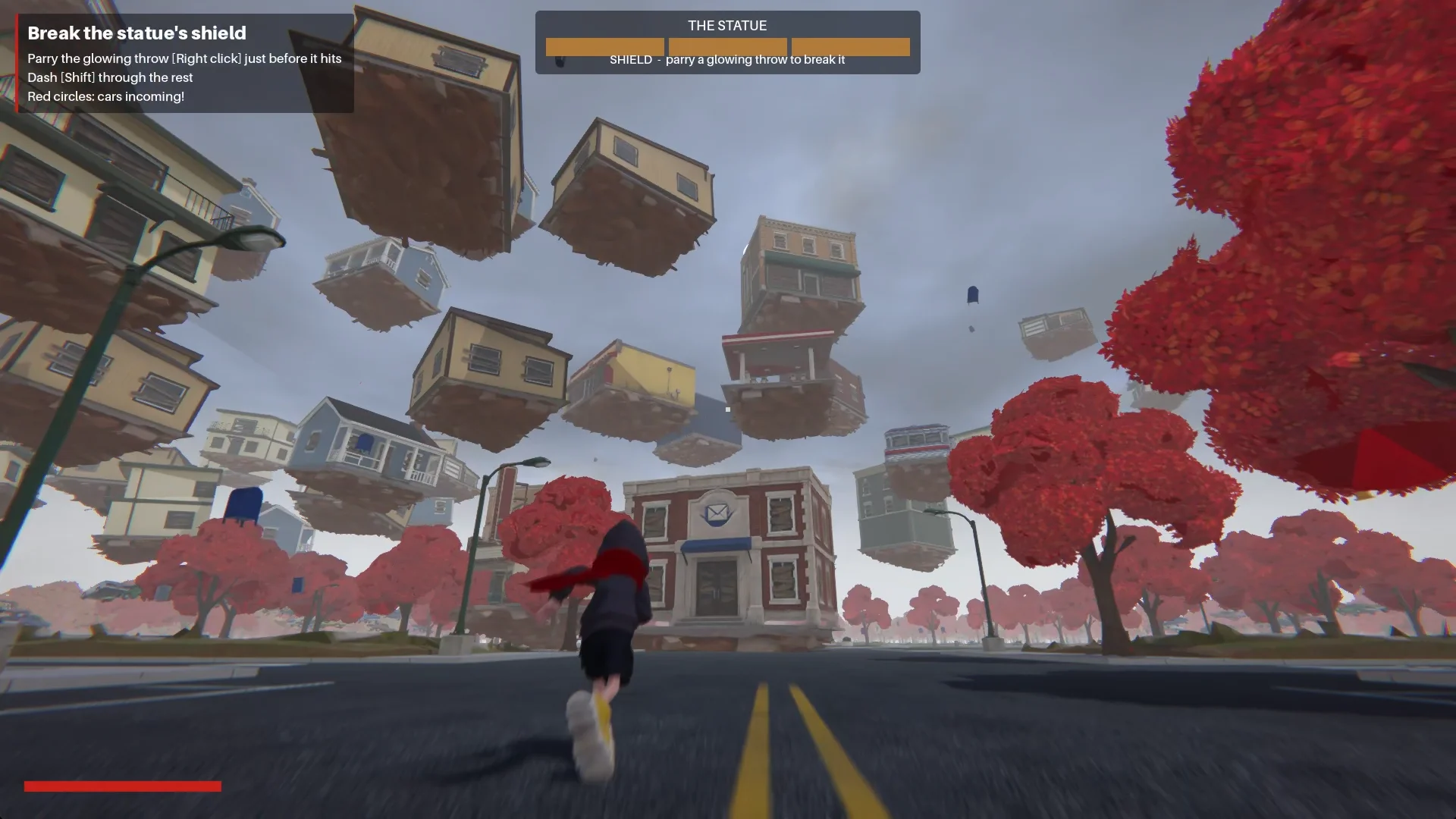
The boy enters town along Main Street. At the plaza, a faceless statue releases a shockwave and pulls the buildings into a spiral around it.
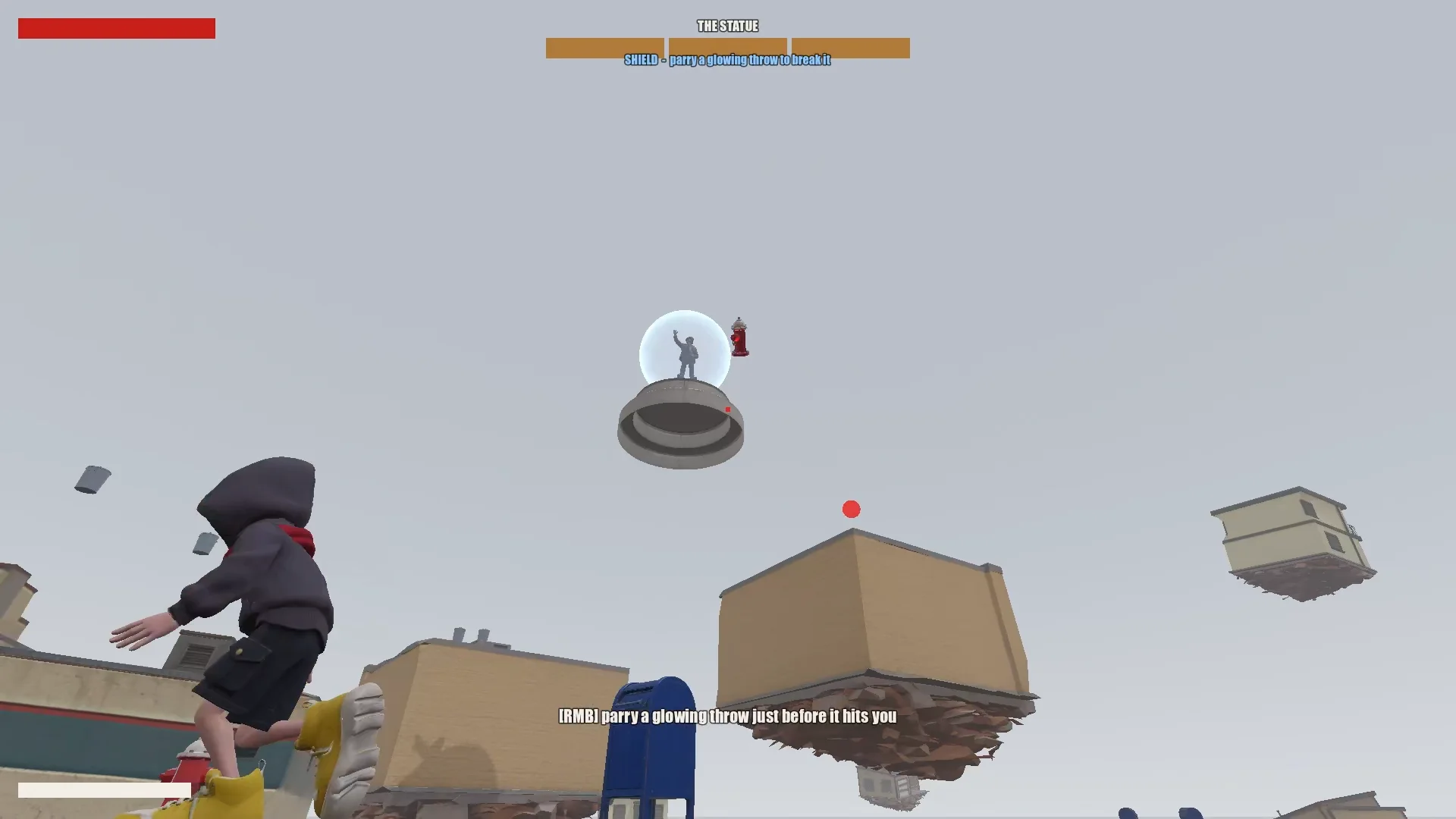
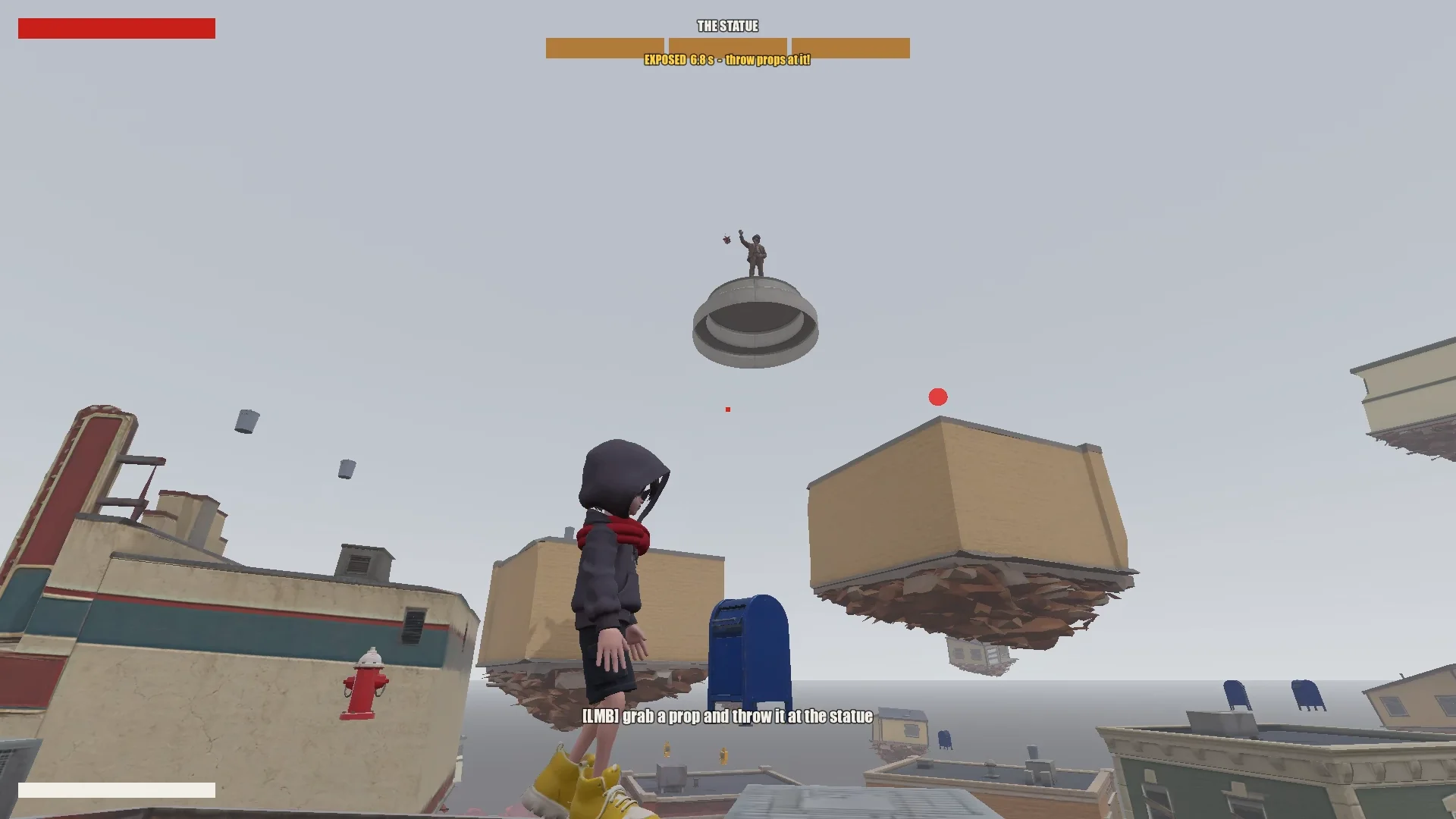
The player climbs the floating shops by jumping, hovering, and scarf leaping. Parrying a glowing projectile briefly breaks the statue’s shield; throwing nearby objects damages it. After three rounds, the boy can reach and seal the statue.
03 / OVERVIEW
Set Up the Tools and Project
Give Claude a project memory
I kept the Godot project, design documents, concepts, Tripo models, and scripts together. At the root, CLAUDE.md recorded the rules Claude should follow across sessions.
It covered the essentials:
- Describe the game, tone, and visual direction.
- List asset rules, such as consistent style and no unwanted symbols or text.
- Require a plan before large changes.
- Keep a prompt history.
- Record recurring pitfalls and project conventions as they are discovered.
I added recurring fixes to the same file: mesh winding, model orientation, animation names, and scarf-leap target rules. Later sessions could reuse them.
Install the Tripo CLI
To connect Claude to Tripo, I asked it to install the Tripo CLI:
Help me install and configure Tripo CLI: npm install -g tripo-cli
Connect Godot and Claude
Claude could edit text-based Godot scenes and GDScript directly. A Godot MCP connection let it run the game, capture screenshots, inspect logs, and simulate input.
I verified the connection by asking Claude to report the open scene and node tree, then checking the MCP port and project against my configuration.
Compare the Godot MCP servers that are available right now and pick the one that fits this project best (Godot 4.7, Claude Code, editor control plus running and inspecting the game).
Explain your choice, then install it into the_red_scarf/ and configure it at project scope (.mcp.json in the project root). Turn telemetry off.
04 / OVERVIEW
Reduce the Idea to a Testable Game
Write the design, then cut it down
Claude’s first design covered the town, movement, boss attacks, and level flow, but had too many phases and scarf abilities for a short demo.
I'm making a game demo with Claude, Tripo and Godot. Here's the idea:

The player is a boy in a bright red scarf, a gray hoodie, blue denim shorts and bright yellow basketball sneakers. The scarf is a supernatural object: he can hover with it, move quickly between platforms, grab objects and throw them, and use it as a whip.
The game starts on the main street of a mid-1980s American small town: one main road, houses and shops on both sides (post office, gym, diner and so on). In the central plaza stands a statue of a man in a suit whose face has been erased. It is a hostile supernatural object. When the boy arrives, it releases a shockwave and slowly rises into the sky. The houses around it are torn out of the ground and end up as floating platforms at different heights. The player jumps between them, blocks the objects the statue hurls with telekinesis, fights back, and finally reaches the statue and seals it with the scarf.

Write a short design doc in design/game_design.md: building types, the boss's attacks in two phases, the boy's attacks, defense and movement moves, and the level flow.
Show me your plan first. Ask me if anything is unclear.
I cut it back to the smallest loop that still felt like this game:
Simplify the combat:
1. The boss has only one phase.
2. Remove the scarf shield and the scarf whip.
3. New loop: the player moves across floating buildings and can only break the statue's shield by parrying its attacks (right click / RT, like a fighting-game parry). Once the shield is down, the player throws objects at it to deal damage.
I cut combat to one boss phase: parry to break the shield, throw objects during the exposed window, and use the floating town as the movement challenge. Every remaining move had to serve that loop.
Build the town from data
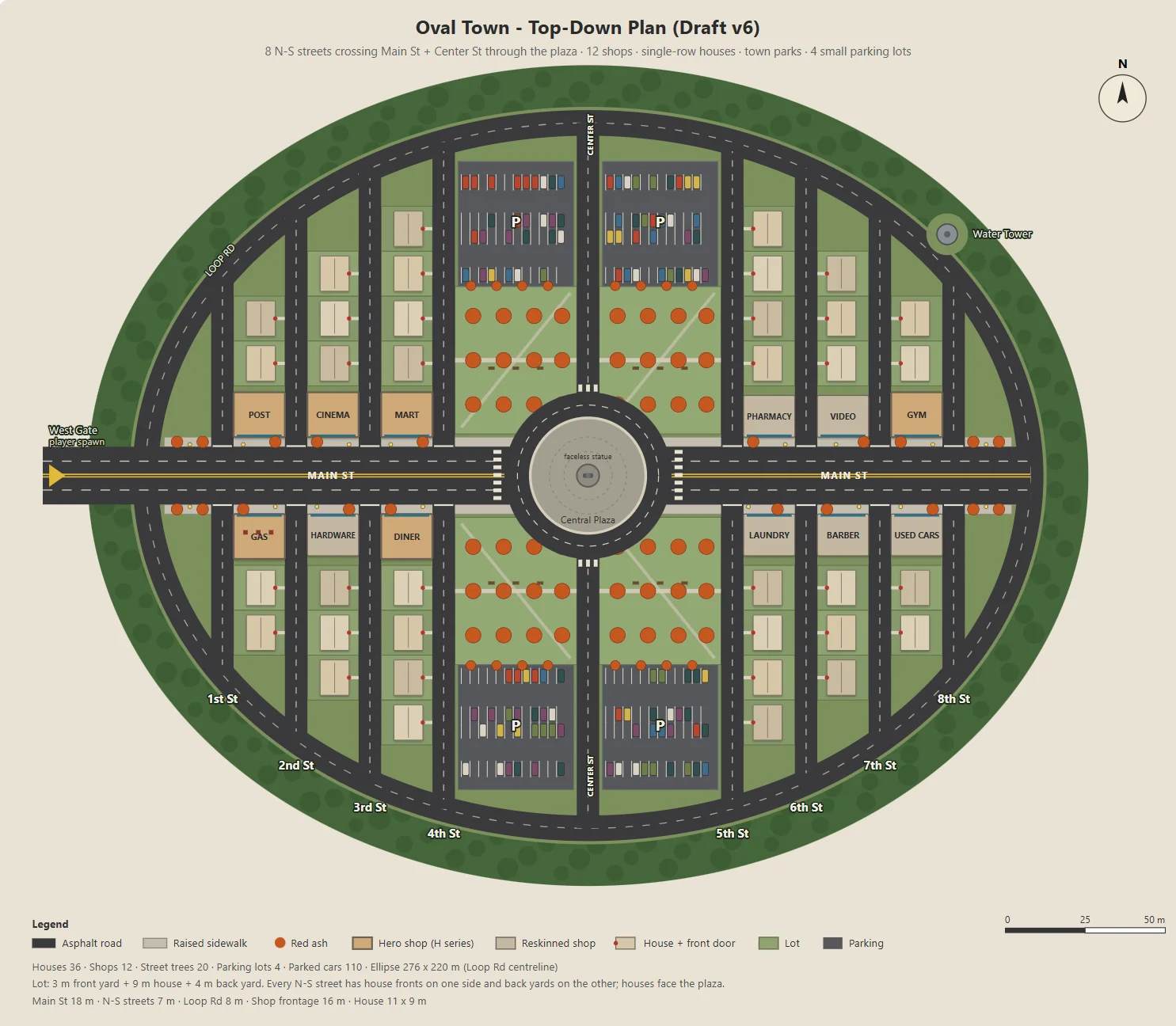
Claude wrote a Node script to generate a parameterized SVG of the oval town: Main Street, twelve shops, residential roads, parks, parking lots, and a plaza.
The same script exported JSON for Godot’s blockout, buildings, roads, lamps, and trees. Concept art and the playable level therefore shared one layout.
I revised one parameter at a time, such as parking-lot size, backyard depth, or shop entrances, so each change was easy to review.
Here's the town I have in mind. The street grid is a grid inside an oval outline:
- The long axis of the oval is the widest street, Main St, lined with functional buildings like the post office and the gym.
- The other streets run perpendicular to Main St on both sides, lined with houses.
- The center of the oval is a round plaza; the statue stands on a concrete pedestal in the middle.
- Asphalt streets with lane markings. Raised concrete sidewalks in front of the shops, with American red ash street trees at regular intervals.

Design the town structure, fill in the details I didn't mention and improve the design.
Draw it as a top-down plan with a Node script (tools/townplan/gen_town_svg.mjs) that generates an SVG from parameters kept at the top of the file.
Establish a visual direction
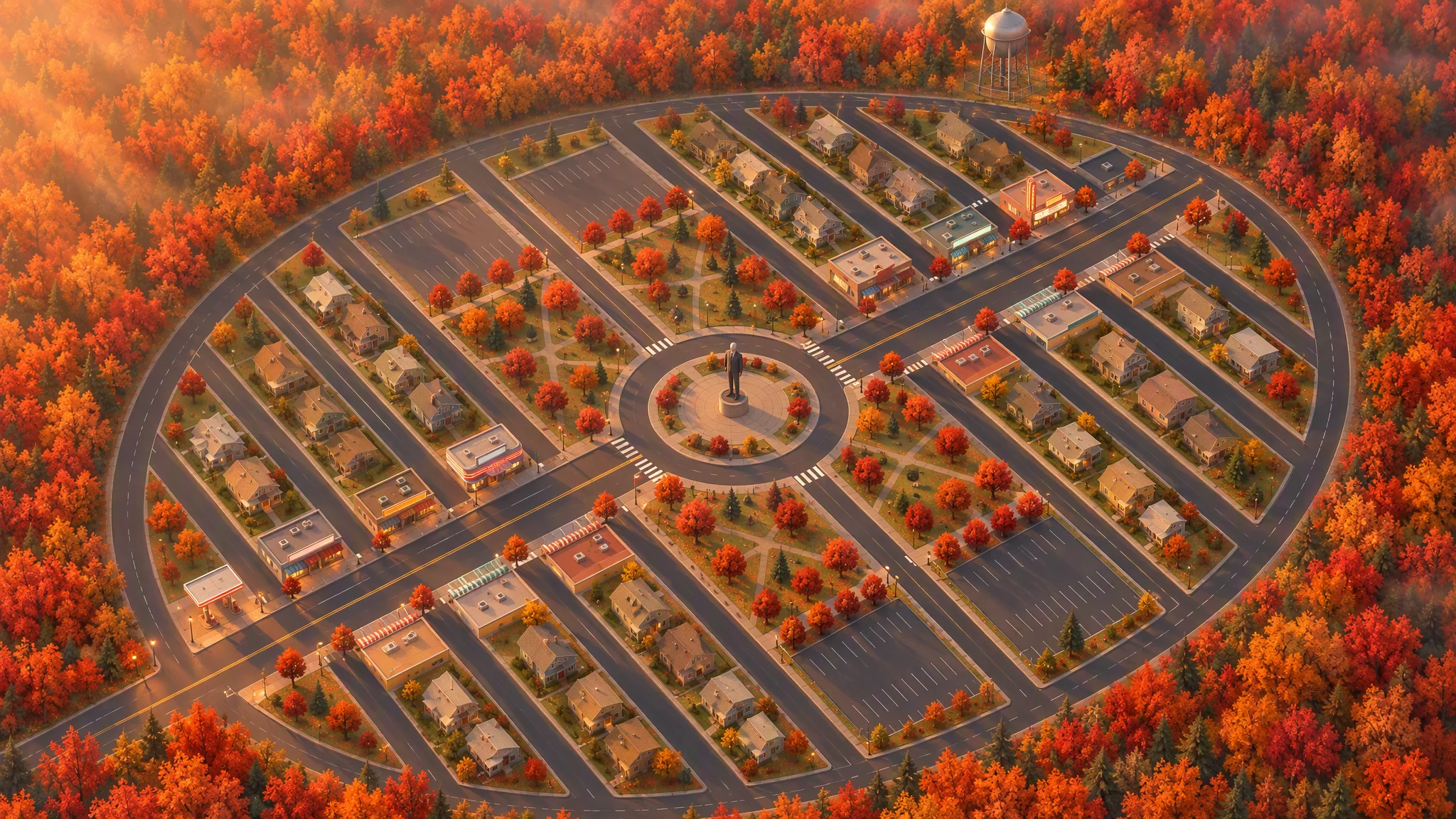
I used the layout as a strict reference for a top-down illustration, preserving roads, lots, footprints, trees, and the town outline.
The first 45-degree view looked like a tilted map. Rotating the reference locally before regenerating gave it a convincing angle.
Strict layout reference: image[1]. Keep every road, block, building footprint, lot, park, parking lot, tree and the oval outline exactly as in image[1]. North up. Add, remove, move or resize nothing. Only restyle it as a finished top-down orthographic illustration of a quiet mid-1980s American small town in autumn.

[...town contents: main street, roundabout and statue, twelve shops seen as flat roofs only, all facing the main street, houses, parks, parking lots, red ash trees, a water tower...]

Style: stylized non-photorealistic game environment, simple hard-edged geometry, flat slightly exaggerated colors, light weathering, no grime. Warm late-afternoon sun from the west.

No vehicles, people, text, lettering, flags, or national or religious symbols. The statue has no face.
From the final plan and bird’s-eye image, Claude listed the assets, separating Tripo models from objects built in Godot. Face-count tiers kept roughly thirty concepts and thirty models within budget.
The town concept art is done. Using the final plan (v6), list every asset we need, split into "generate with Tripo" and "build in the engine". Then write a concept-image prompt for each Tripo asset in design/asset_prompts.md.
- Shops on Main St should vary more, with clearly different heights, so the opening walk has an interesting skyline.
- Split scene assets into tiers (S / A / B / C) by importance and size, give each tier a model and a triangle budget (hard cap 10,000 per asset), and estimate the total for the scene.
05 / OVERVIEW
Prototype an Asset Before Making the Rest
Test one representative building
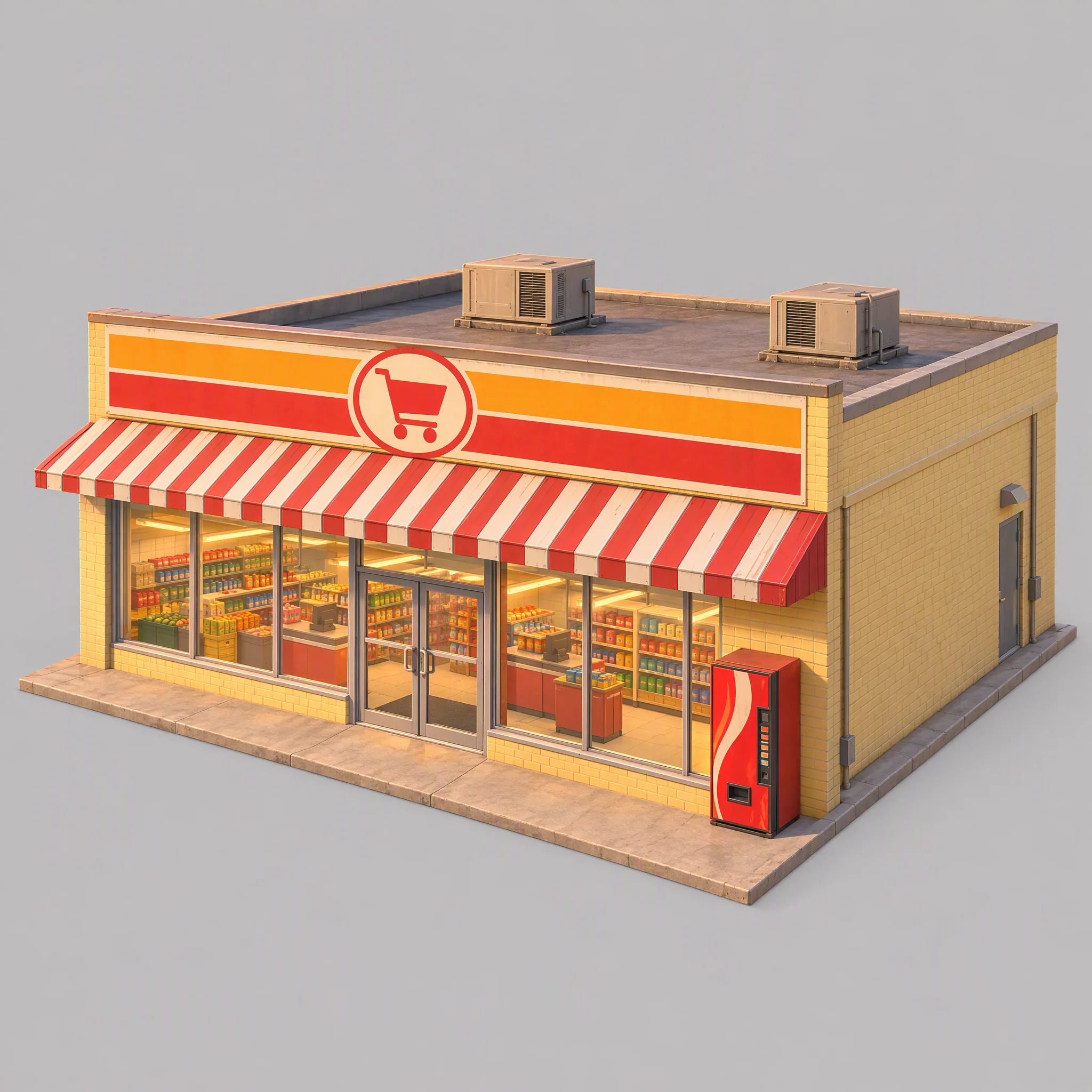
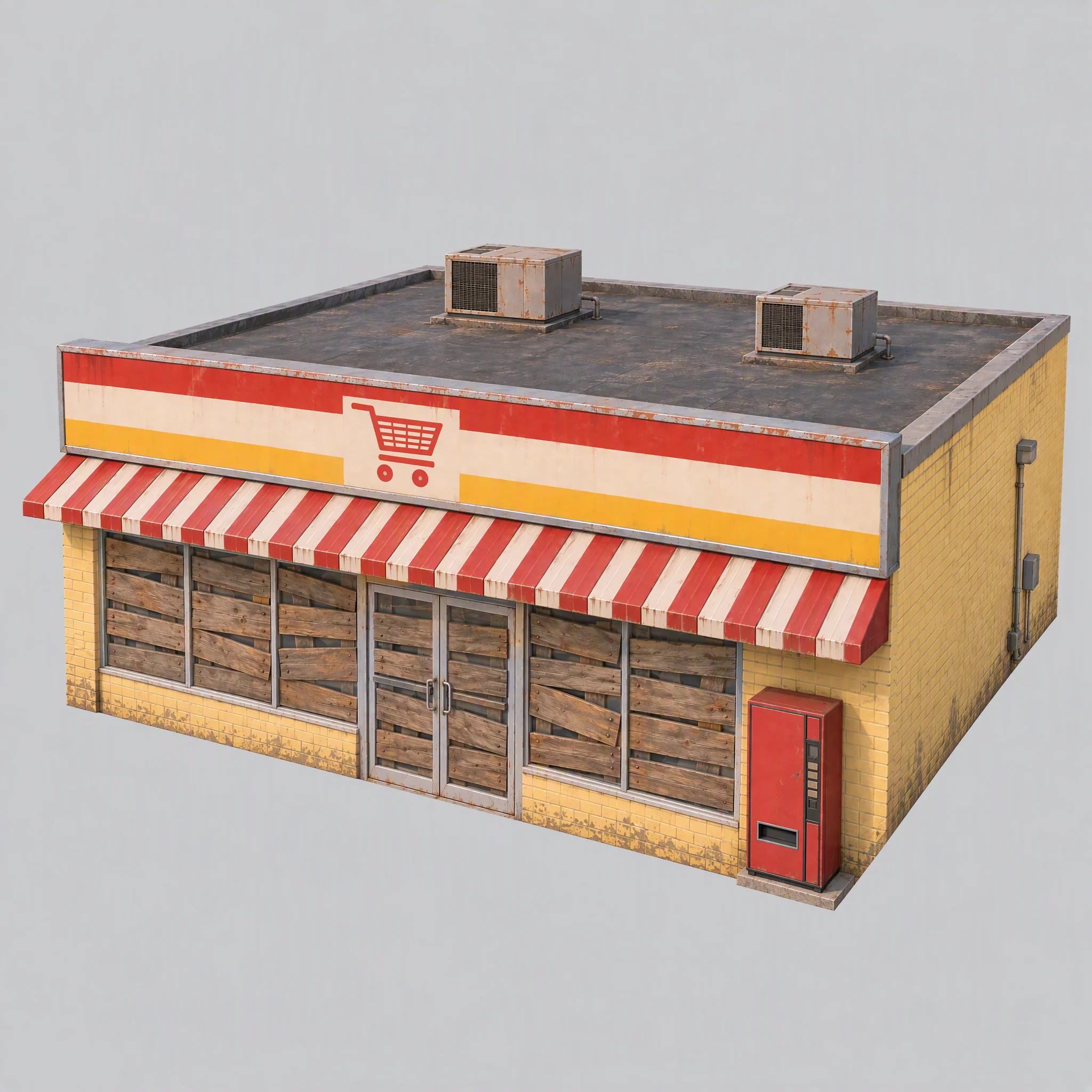
I tested the pipeline on one supermarket first, checking its visual style, suitability as a modeling reference, and the right Tripo model family.
- Does the concept image match the town's visual direction?
- Does the image provide a clean modeling reference?
- Which Tripo model family produces the right geometry?
The first image had visible shelves, baked-in warm light, a brand-like vending machine, and an oversized foundation.
I updated the shared rules: board up windows, switch off lights, use neutral white reference lighting, and keep foundations flush with the walls.
Use image[1] only as a reference for color palette, materials and rendering style. Do not copy its content or camera.

A single isolated one-story small-town supermarket from the mid-1980s: a wide, low box about 16 meters wide, 14 meters deep and 5 meters tall. The front is a long row of large plate-glass windows with a pair of glass doors in the middle, under a flat red-and-white striped metal awning. Above the awning, a tall flat sign panel runs the full width of the roofline, painted with bold color bands and a simple shopping-cart pictogram, no letters. Pale yellow painted brick walls, a flat roof with two boxy rooftop AC units. A plain red vending machine stands beside the doors. All windows and glass doors are boarded up with weathered wooden planks, so no interior is visible. All lights, signs and neon tubes are switched off. The building sits on a thin flat concrete slab exactly the size of its footprint, flush with the walls on every side.

Three-quarter front view from slightly above, the whole building in frame, centered on a plain light gray background, neutral white daylight with soft even lighting and no warm tint, no cast shadows, no ground beyond the slab.

Style: simplified realism with hard-edged, clean forms, mid-1980s American, slightly saturated comic-book colors, light weathering, no grime.

No text, no letters, no logos, no flags, no national or religious symbols, no people, no vehicles
Compare model families before scaling up
With the same supermarket image and controlled face limits, P-series produced cleaner hard edges; H-series had more even triangles and softer surfaces.
For this game, I chose:
- Use P1.0 for buildings, vehicles, and props that benefit from clean hard surfaces.
- Use H3.1 for organic forms such as the statue and floating ground pieces.
- Use P2.0 for the boy because the character needed clean topology for rigging.
This was a choice for this game, not a universal model ranking.
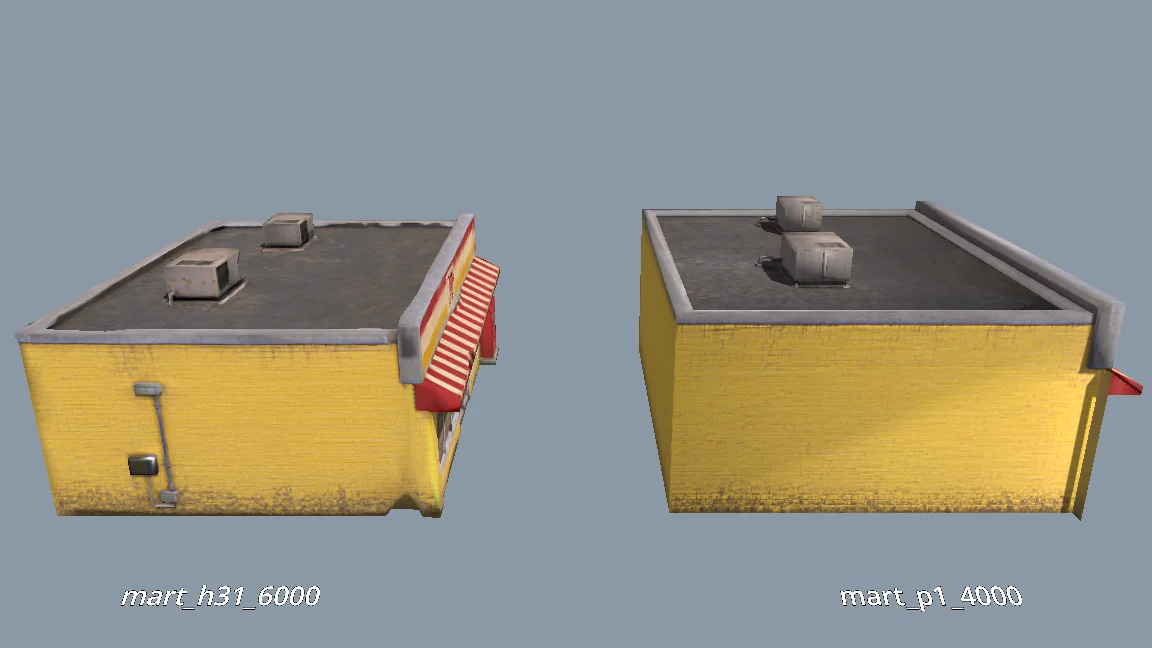
The current models are all clean and fairly flat. For performance, would P1.0 suit the buildings better than H3.1? Run a comparison: generate MART with P1.0 at 4000 faces and with H3.1 at 6000 faces, import both into a test folder, and render them side by side from the storefront, front, corner and top views (shaded and wireframe). Then tell me which one to use and why.
Generate the remaining scene assets
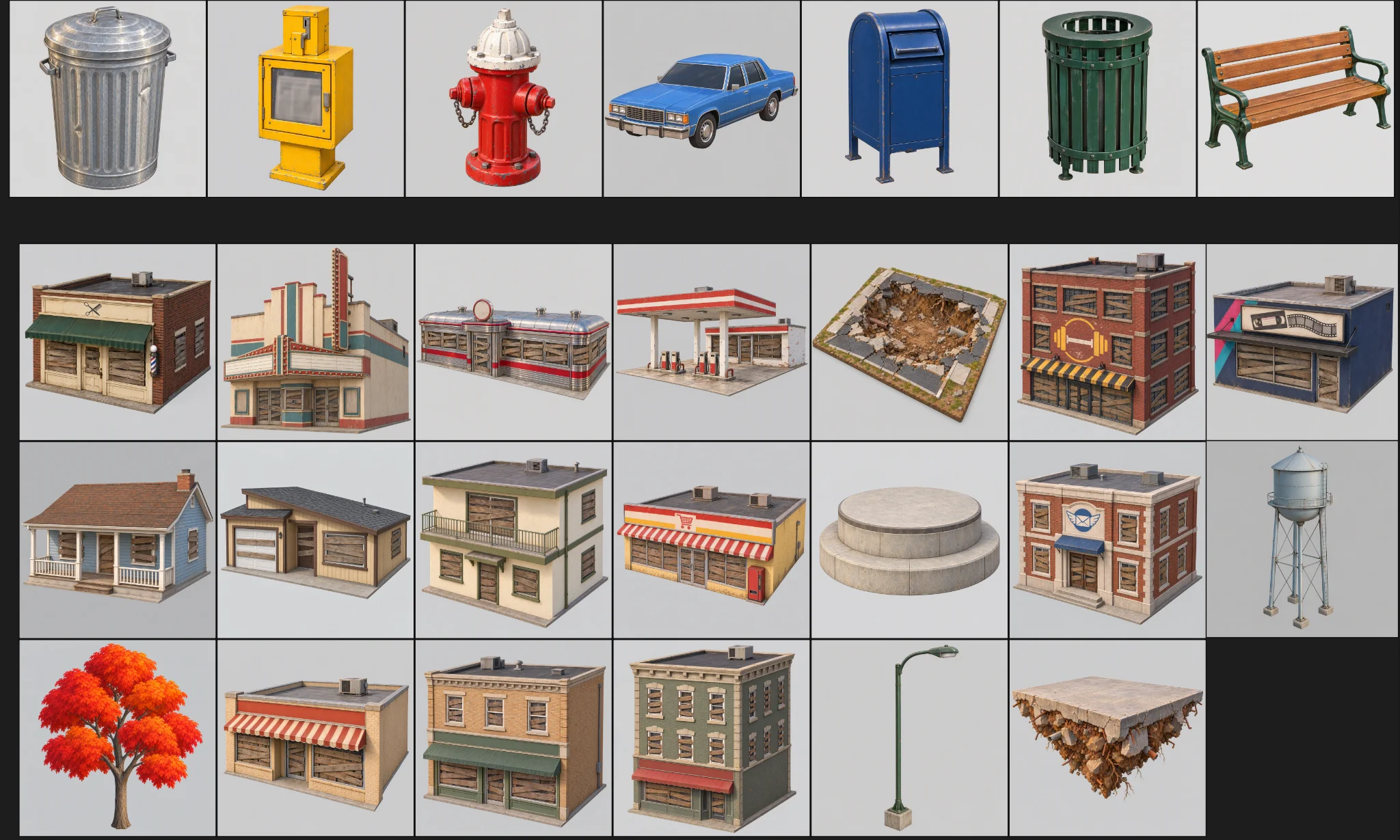
After the prototype passed review, I generated the remaining assets. Each had a category, folder, model preset, and face budget.
The batch had three checks:
Generate concept images for all remaining scene assets the same way as MART, using the prompts in design/asset_prompts.md and cpt/town_birdseye.png as the style reference.
Check balance first. Save each image under cpt/assets/<category>/.
Check every image against the checklist in asset_prompts.md (single object, clean background, no text or symbols, matches the bird's-eye style, no thin fragile parts).
Retry failed tasks individually; never rerun the whole batch.
Record progress in design/batch_checkpoint.md so we can resume if we stop halfway.
When done, list what succeeded, what failed and what needs my review.
- Check every image for a single object, clean background, no accidental text, and no fragile parts.
- Retry failed tasks individually.
- Record progress in a checkpoint file.
I regenerated individual failures: a gas station with a hole in its back wall, a missing water tower, and loose supermarket geometry.
Build the character separately
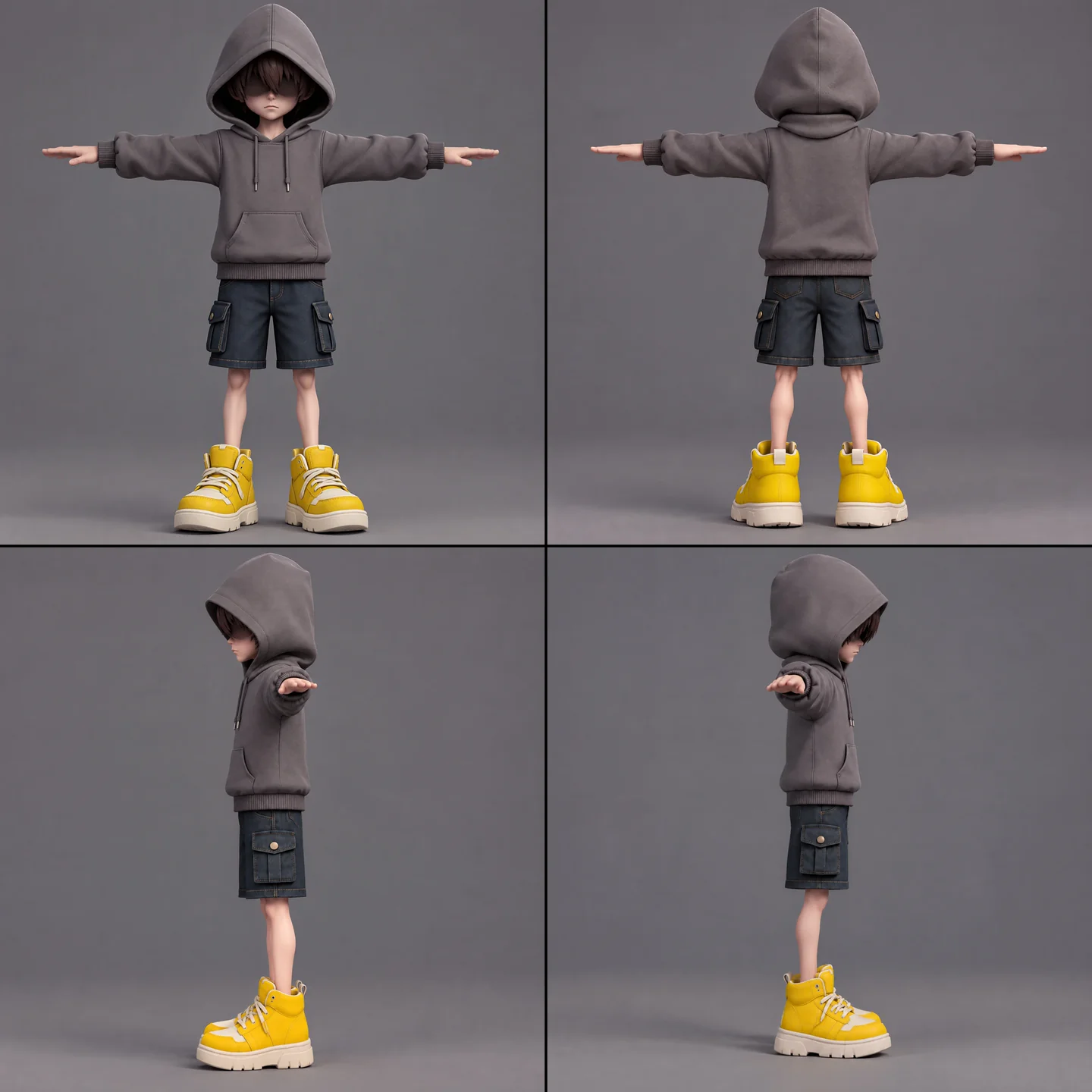
The boy needed concept art, modeling, a rig check, rigging, and animation retargeting. I kept the scarf separate to avoid unwanted skin weights and preserve its complex actions.
A full-body cartoon-style boy in a standard T-pose, arms extended horizontally, legs straight. He wears a gray hoodie with the hood up. His face is shrouded in shadow, eyes hidden, with only his mouth and grayish-brown bangs visible. He has a long red scarf wrapped around his neck, with both hanging ends draped down behind his back, not in front. He wears dark blue denim shorts ending above the knee so his knees are exposed, with buttoned flap pockets on both the left and right sides. He wears oversized yellow sneakers and has relatively thin legs. Cartoon character design, clean 3D model.
I ran the free rig check first. The animation list covered idle, walk, run, jump, fall, throw, parry, scarf leap, hit, defeat, seal, and victory. Retargeting more than five at once failed, so I used three smaller jobs and combined them in Godot.
The boy model is ready at models/boy/boy_body.glb. Rig it and add the animations the demo needs. Run the free rig check first. List the animations you plan to use, mapped to Tripo presets, before generating anything.
I checked character views manually for mirrored hands and hair mistaken for sunglasses before using them in the batch.
Standardize imports and quality checks
An import step added weighted normals and hard edges to walls that looked too soft. Texture limits varied by asset, with exceptions for the boy, scarf, statue, and trees.
I checked scale, orientation, walls, roofs, and stray polygons before moving models from the test directory into the playable scene. Production assets needed zero reported issues.
When I inspect the models, the normals are smoothed across every edge, so flat walls look soft and cheap. I want something like Blender's Weighted Normal modifier.
Write a Godot import hook that recomputes weighted normals on import (area-weighted, edges sharper than 30 degrees become hard edges, keep the normal map), plus a setup script that attaches the hook to a list of GLBs and limits texture size (4K, or 2K for small assets) with VRAM compression. Don't apply it to the boy, the scarf, the statue or trees.
Render before/after comparisons so I can judge the result.
06 / OVERVIEW
Build the Demo in Layers
Start with a gameplay blockout
A Godot tool script read the town JSON to build a playable blockout with colored collision boxes, ground, spawn point, and floating layout. Inspector controls and a command-line script rebuilt it after data changes.
Swap In Models then replaced the boxes with Tripo assets at the same positions. Both versions used the same layout data.
Shops formed the climbable spiral; houses stayed in the background. A report checked overlaps, headroom, roof spacing, and platform reachability.
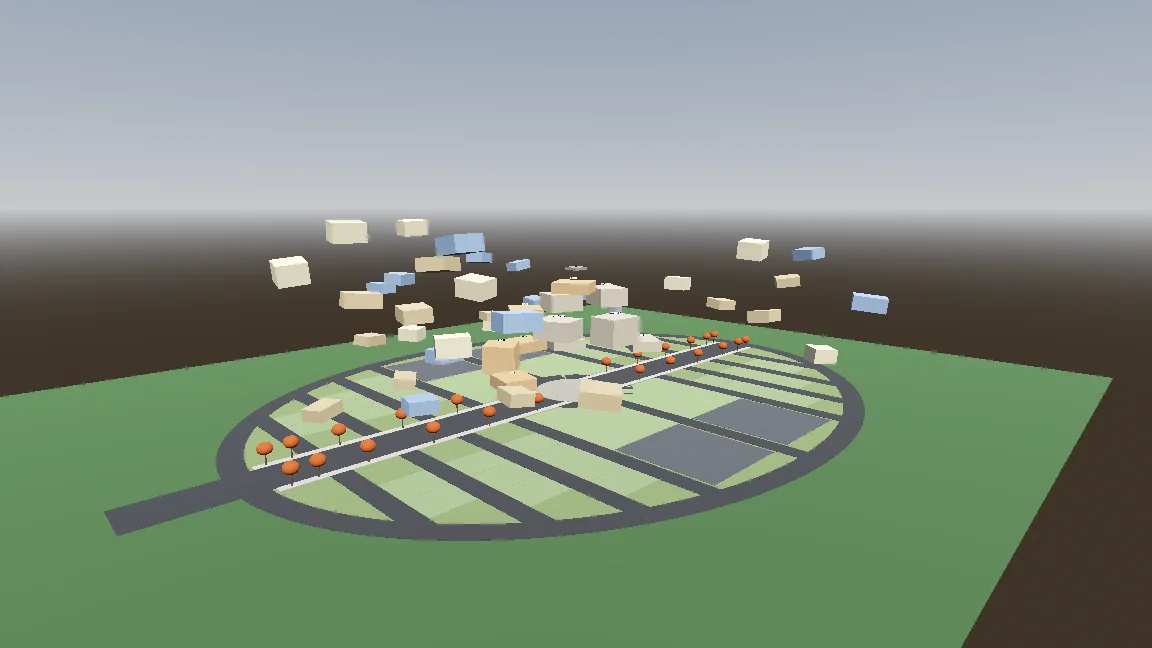
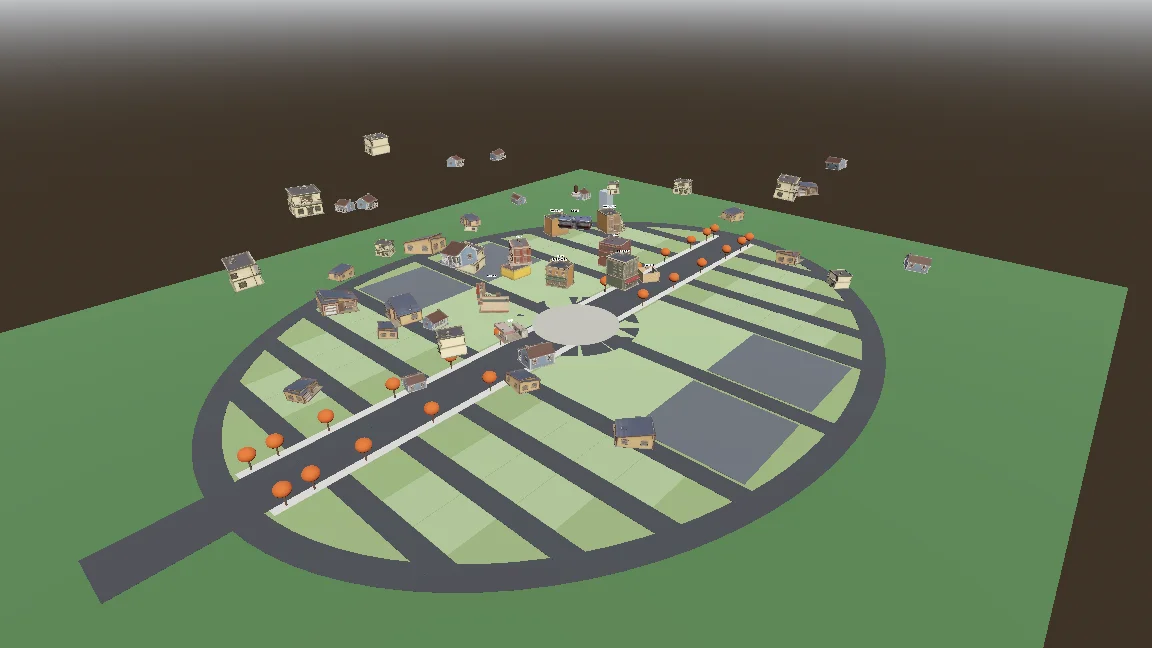
Build a gameplay-only blockout:
- Export the town plan as JSON (gen_town_svg.mjs --json) and write an @tool script (Scripts/town/town_builder.gd) that reads it and generates the ground, a colored box with collision for every shop and house (heights from the design doc), and the player spawn at the west entrance.
- Add inspector buttons: Build Town, Preview Tree, Reset To Ground, Swap In Models.
- Also add a command-line build script so you can rebuild the scene headless.
- Swap In Models replaces each box with res://Assets/Models/<model>.glb, scaled to the lot and rotated to face the street, keeping the position.
Show me screenshots from the street and from above.
Add movement and the procedural scarf
The controller had ground, air, hover, and scarf-leap states. Exposed settings and a smoke test helped tune and check each move.
Start the player controller in the blockout scene. Use the rigged boy model directly, no capsule placeholder.
- CharacterBody3D with states: ground, air, hover (hold jump midair, drains scarf energy), scarf leap.
- Third-person over-the-shoulder camera, keyboard + mouse and gamepad input maps.
- AnimationTree state machine built by a generator script (Scripts/tools/build_player_scene.gd), not by hand in the editor.
- All feel parameters exported so I can tune them in the inspector.
- An automated smoke test that spawns the player, runs, jumps, hovers and scarf leap, and saves screenshots.
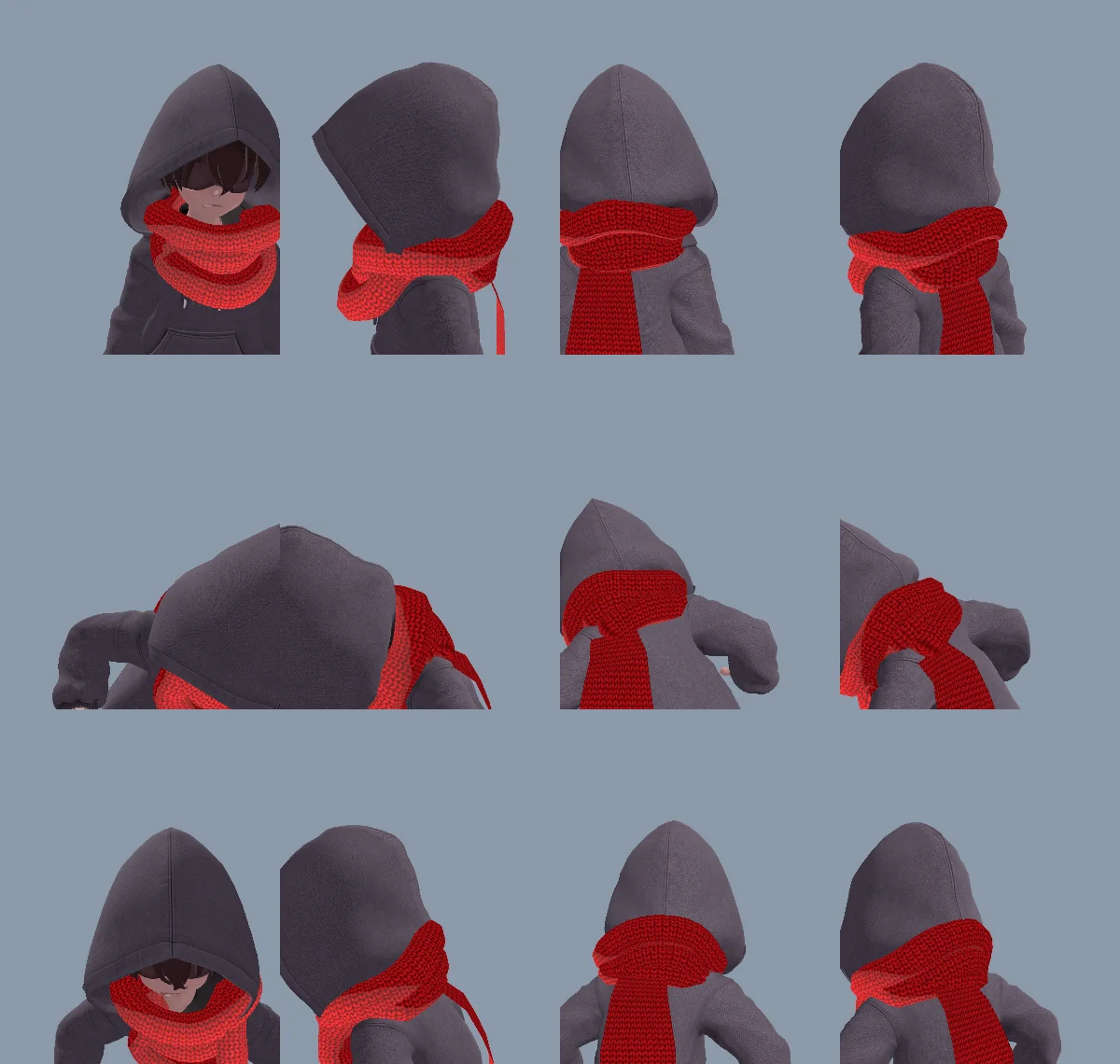
A modeled neck wrap looked too stiff, so code generated both the wrap and tail. The same tail could hang, reach, grab, wrap the statue, and release without separate models or animations.
The first wrap looked inside out because of triangle winding and flipped normals. Claude fixed the mesh and recorded the cause in CLAUDE.md.
The neck scarf looks too stiff. Try generating it procedurally instead of using the Tripo model:
- ScarfWrap: three thick, soft knitted loops around the neck, rebuilt every frame from the neck, head and spine bones, pushed out by capsules on the head, neck, chest and upper arms, fuller at the back so it fills the gap between the hood and the shoulders, with a little spring lag.
- ScarfTail: a Verlet chain hanging from the knot at the back, with thickness, stiff enough not to stretch, colliding with body capsules. Reaching out to grab props, hanging from anchors and wrapping the statue all use the same tail (reach(point) / release()).
- Both share one wool material with the red knit texture and a soft sheen at grazing angles.
Keep the per-frame cost low and tell me the measured time.
Make scarf leap feel intentional
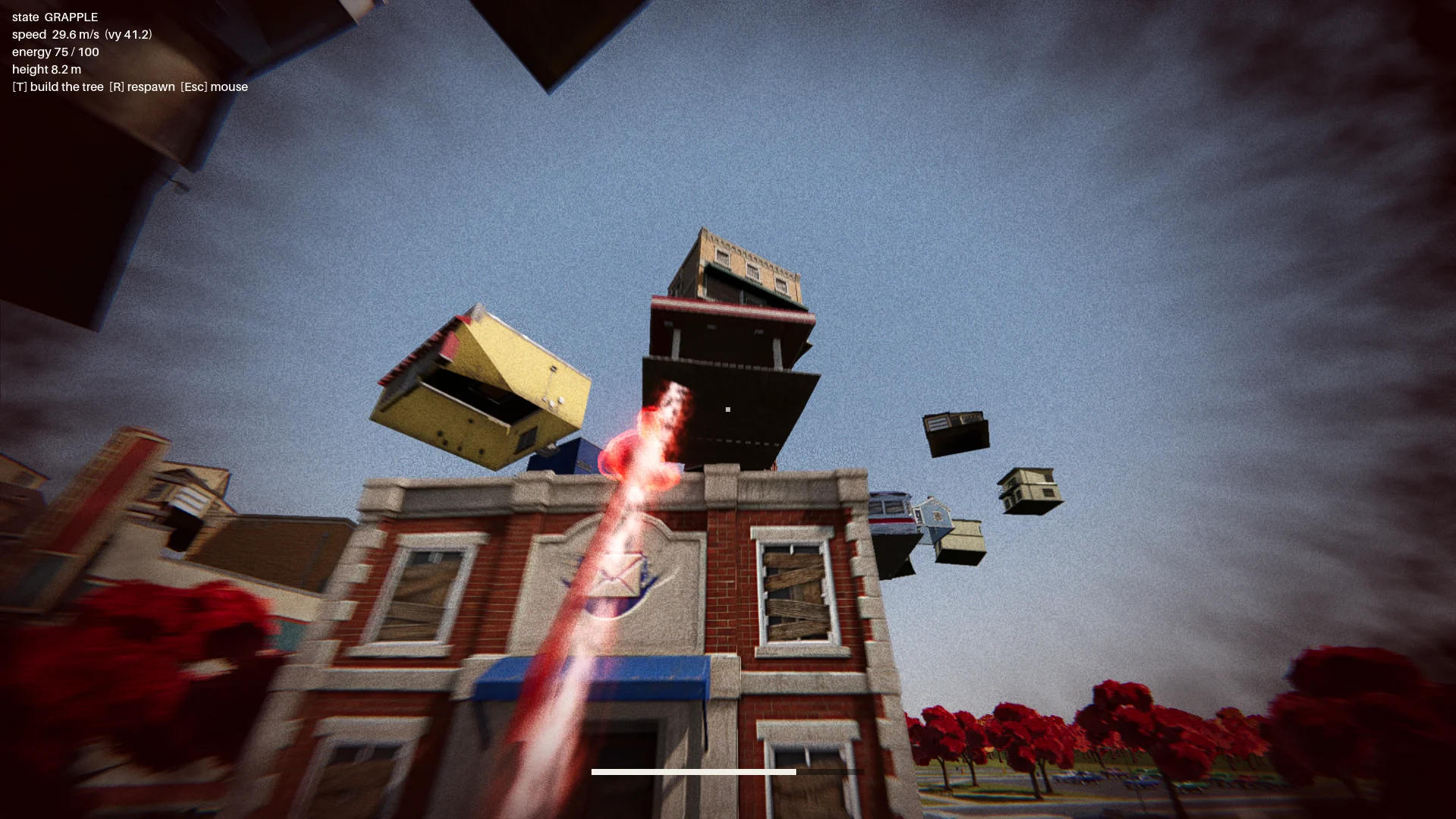
The first scarf leap swung like a grappling hook. I changed it to accelerate toward a chosen landing point, with a red aura, dust, trail, and landing pulse to make the motion readable.
Early targets on awnings could send the boy through a building or trap him. I added landing and flight-path checks. A valid target had to:
- sit on a real roof edge;
- have enough clearance above it;
- provide room for the character to stand;
- avoid a flight path through the destination building.
A report checked every building from twelve directions and required zero invalid leap points.
Change how the scarf leap feels. Right now it swings like Spider-Man. Instead, the boy knows where he's going and moves straight to the target. While moving, rotate his model so his feet point at the target, as if his feet were pulling his whole body toward it.
Drop the scarf from the scarf leap and sell the power with effects: a red aura when the scarf leap starts, a puff of dust and a small energy pulse at the start point, a trail along a small arc, then the aura fades on landing with a small shockwave at the contact point.
The speed is not constant: a little slow at first, then accelerating hard, never slowing down until it arrives.
Connect the boss fight
The route included the main menu, introduction, rising town, checkpoint, three-segment boss fight, and ending.
The statue threw objects, including a parryable glowing one. A parry opened its shield for about seven seconds. Later attacks added a fan volley and a meteor-like car, while visibility checks blocked throws through buildings.
Finish all playable content for a first complete version:
- A basic main menu, pause menu and ending screen with buttons.
- The intro: "The Oval Town" title card; when the player enters the plaza, the statue shakes, lifts off its pedestal, a "The Statue" title card, then a shockwave pushes the boy back along the ground. Buildings fly up into the spiral tree. One checkpoint at the end of this sequence.
- The boss fight: shield, parry window about 0.25 s, about 7 s exposed window, damage only from throws while exposed, 3 health segments, attacks unlocked by remaining health: single throw, fan volley (only the glowing one can be parried), car meteor shower.
- Sealing: when its health reaches 0, a scarf leap point appears on the statue; scarf leap to it and press the seal button repeatedly.
- A full-flow automated test that plays the whole game with a real parry, three rounds of throws, a death and restart, the seal and the ending, saving screenshots at each stage.
Show me the plan first, then build it.
At zero health, a scarf-leap target appeared on the statue. The player repeatedly pressed seal to fill a ring; stopping let it fall.
07 / OVERVIEW
Polish, Test, and Export
Add the scene treatment
After combat worked, I added ground detail, grass, trees, lighting, post-processing, and effects. One soft additive shader gave the aura, rings, projectiles, and trails a consistent look.
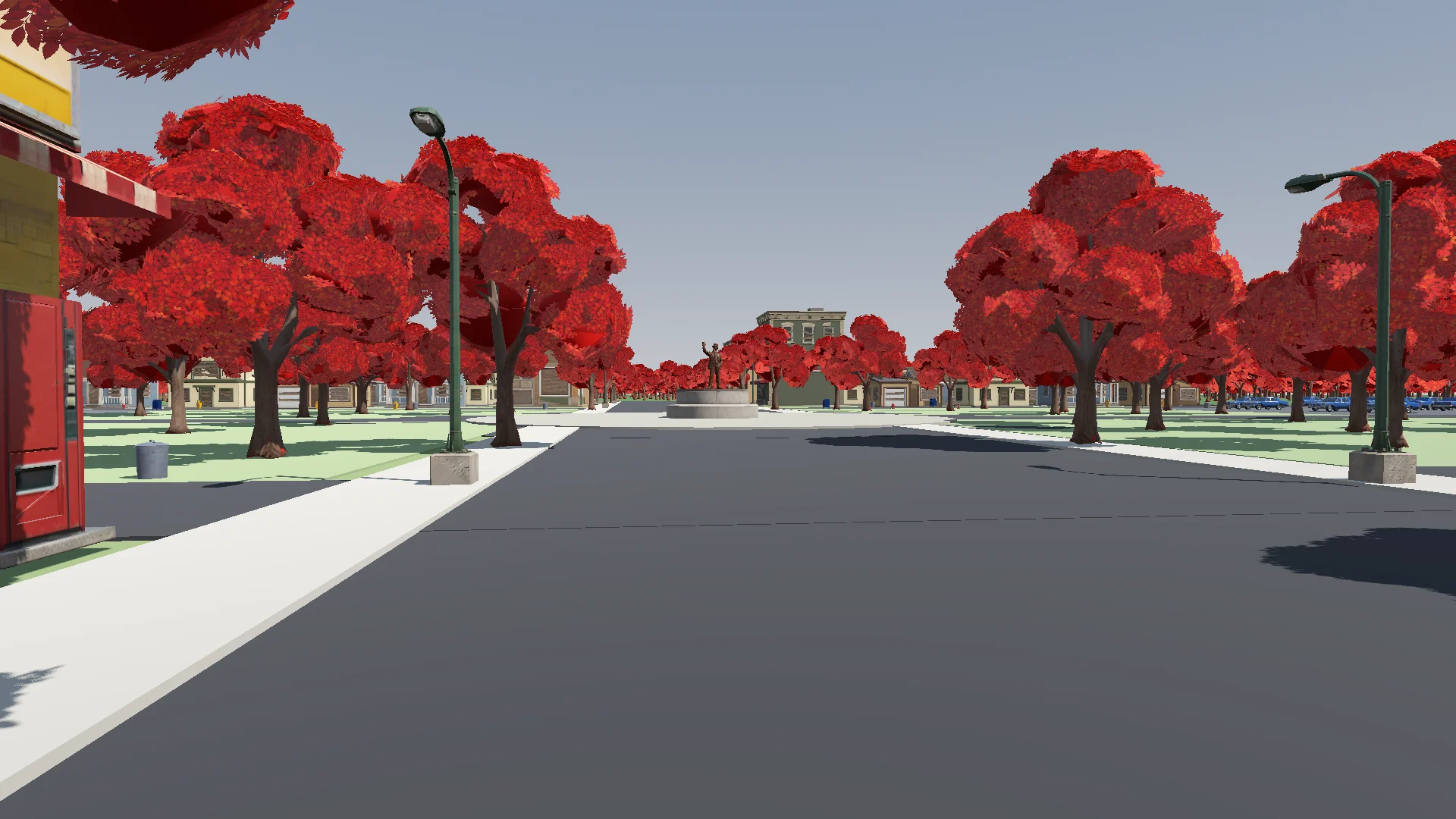
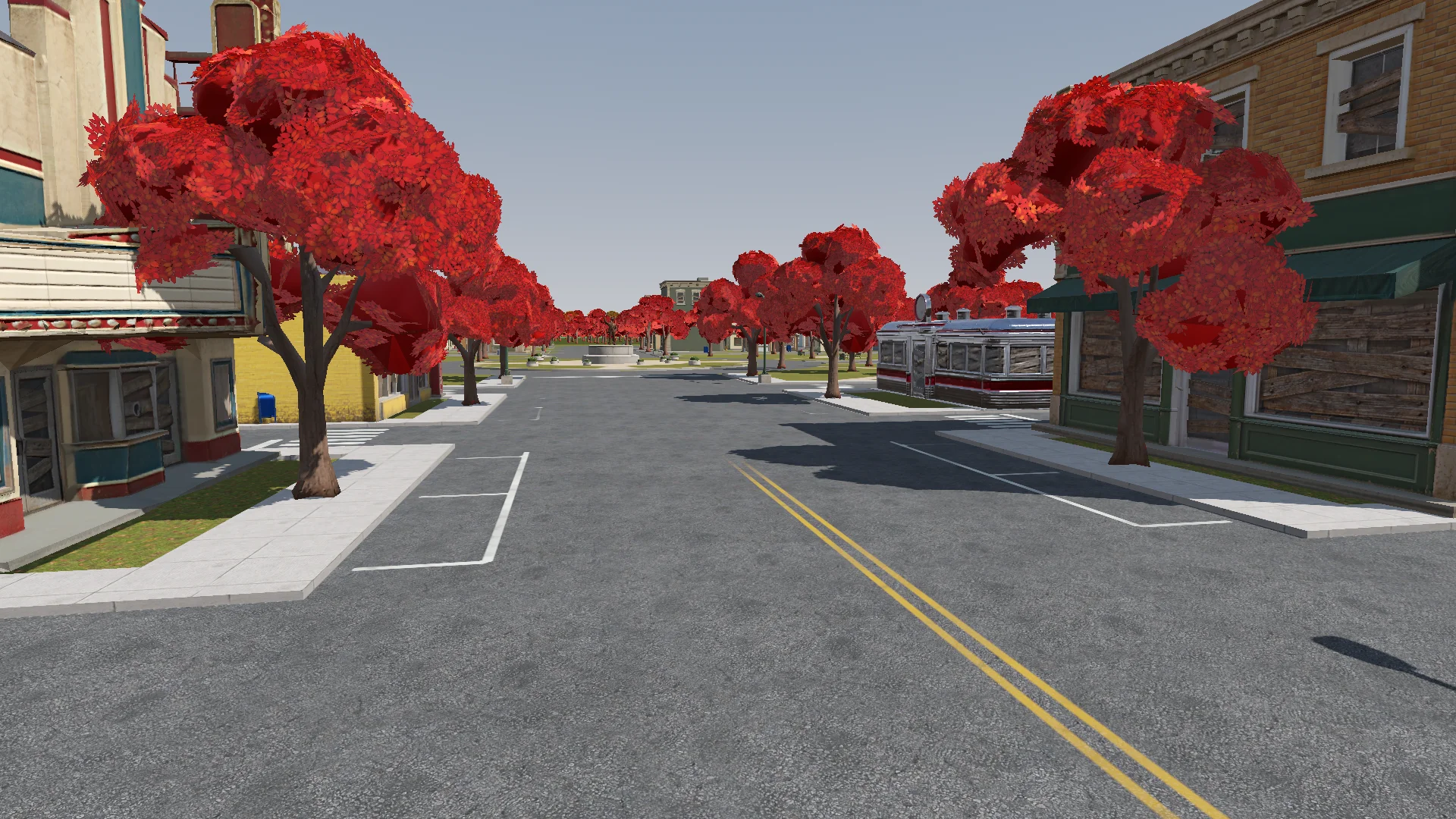
Polish: add the final details to the rest of the town based on the concept art (streets, parks, lane markings and so on). If details are missing or unclear, generate reference images of parts of the town first.
Street layout and lane markings should be as plausible as possible; use Tripo to generate textures if needed. The road surfaces must never flicker.
Add NPR style procedural grass on the lawns.
I checked changes from the player’s camera for flickering roads, blocked doors, and misplaced lamps.
Render with ACES tone mapping. Add post-processing: bloom, ambient occlusion, SSIL, depth of field, film grain, motion blur, chromatic aberration, FXAA, and an FSR 2 option, all in an Options menu. Bloom, AO, SSIL and DOF have Off / Low / Medium / High; FSR 2 has Off / Native AA / Quality / Balanced / Performance; motion blur, chromatic aberration and film grain are toggles.
Also add VSync and resolution.
The film grain should closely emulate Super 8 film. Godot has no built-in film grain or motion blur, so implement them as Compositor effects.
Add audio and interface feedback
I began with synthesized audio, then replaced most of it with credited CC0 music and effects. Synthesized sounds stayed where no suitable clip fit.
Find CC0 music and sound effects to replace the synthesized ones. Music should be synthwave / analog synth. Prefer less popular sources so the game feels unique. Where nothing fits, keep the synthesized sound. Verify the license on every page and generate a credits file.
The HUD showed context-specific controls until the player used each move. The first glowing throw briefly slowed time to teach the parry.
Add interactive hints the first time each move is needed (move, jump, hover, dash, rush, Scarf Leap, grab, throw, parry), for a more explicit and intuitive guide to the controls. Each hint stays until the player actually does the move, then it is ticked off.
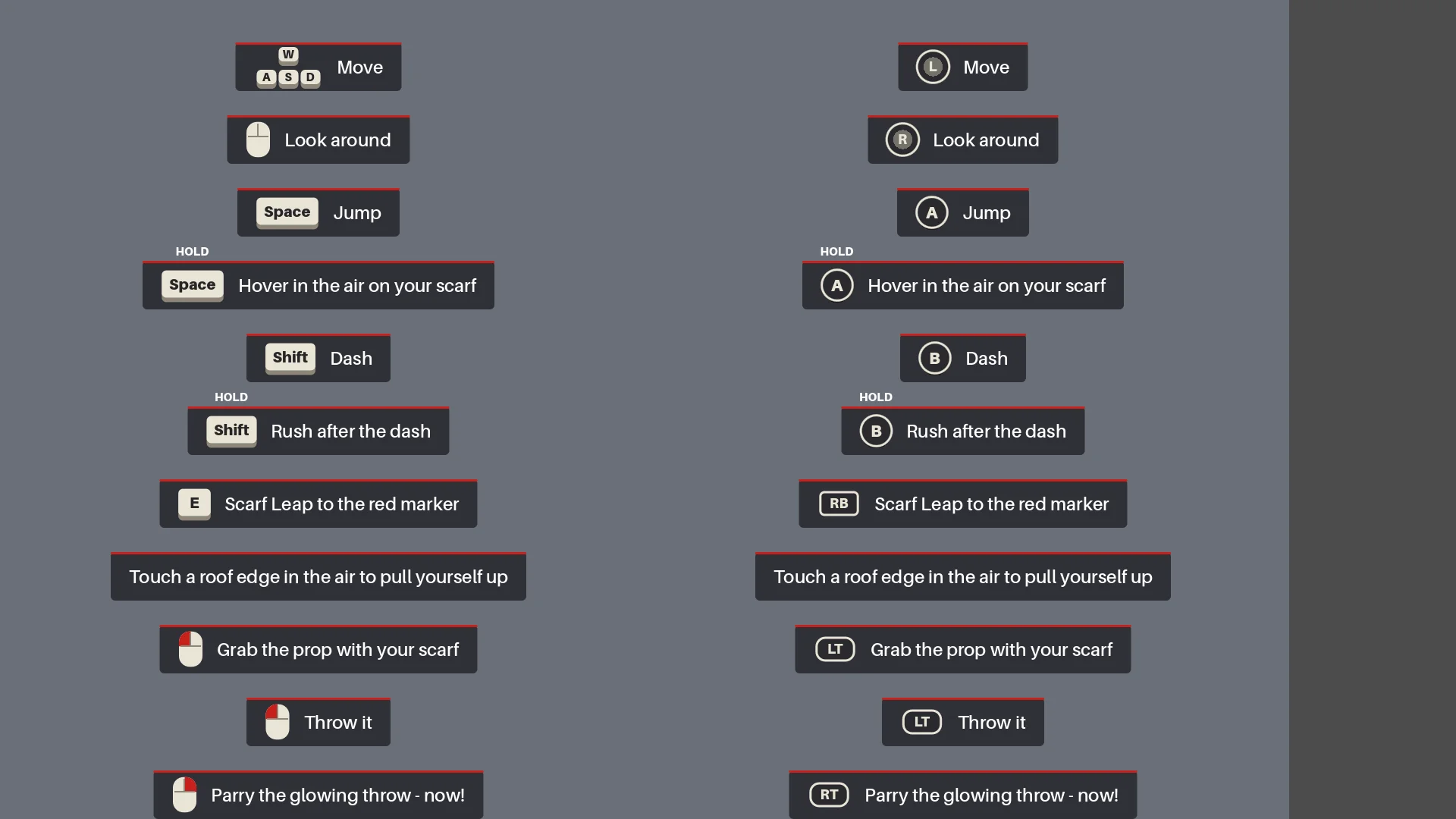
Run the full regression pass
Before export, Claude rebuilt the scenes, ran reports, and played from menu to ending, including a real parry, death and restart, sealing, and screenshots.
Before we export, do a full pass:
1. Rerun every generator in order (build_blockout --float --swap, build_player_scene, build_game) and make sure the main scene is the main menu.
2. Run every report (tree_report, grapple_point_report, street_report, lamp_probe, audio_probe, skin_gap_report) and both automated tests. Everything must pass.
3. Play the game through MCP from the main menu to the ending, take screenshots at each stage and read the game log for errors and warnings.
Report: what passed, what failed, and anything I should check by hand.
The full playthrough caught orientation errors, missing effects, and checkpoint resets after movement or timing changes.
Export a Windows build of the game. Set up a Windows Desktop export preset for the_red_scarf (embed the PCK, the game icon, product name "The Red Scarf"). Check that the export templates for Godot 4.7.2 are installed; if not, tell me how to install them instead of guessing.
Exclude test scenes, test scripts and Assets/Models/_test/. Write a script that sets the build number and exports, run the exported exe once, and report the build size and any errors.
The first Windows export was 1.15 GB, mostly textures. Removing unused assets and old models and using smaller normal-map compression brought it to 755.5 MB.
08 / OVERVIEW
What I Would Carry into the Next Project
The workflow I would repeat is:
- Describe the intended result.
- Make one small prototype.
- Inspect it in the real runtime.
- Turn each repeated problem into a rule or report.
- Only then scale up.
I would reuse the same pattern: one source for the town layout, checkpoints for asset batches, geometry rules for scarf leap, and a full boss-fight test.
For a similar demo, start with one character, one route, and one enemy. Test a representative asset before batching, and turn recurring problems into checks you can rerun.