Author: Theodore
 Try it live
 Description
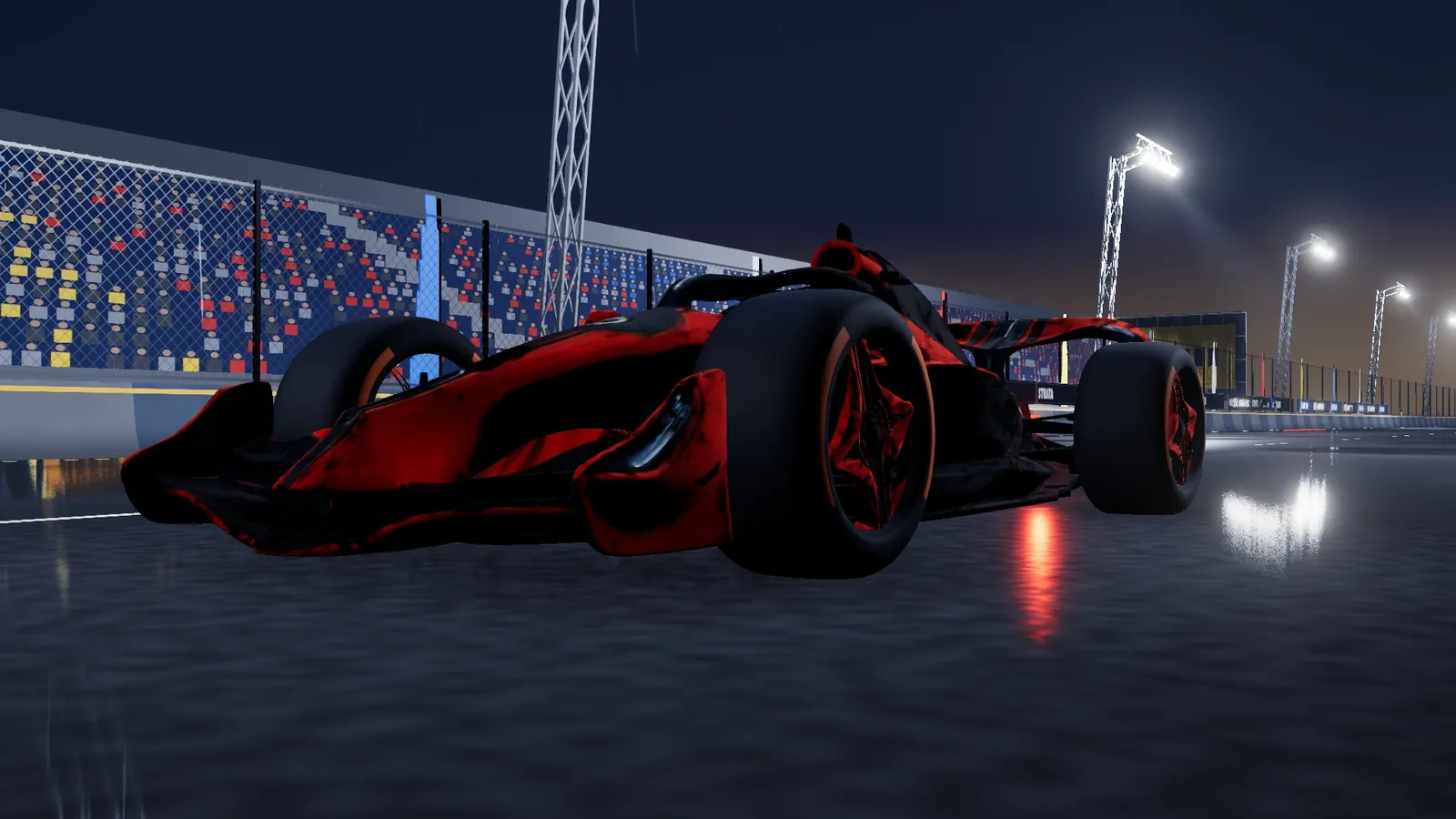
Afterglow Grand Prix is an arcade formula racer that runs right in the browser, with a six-car grid: you and five AI drivers. There are three tracks — Afterglow International at sunset (3.4 km, 14 turns), the rain-soaked Rain City Streets (2.4 km, 14 turns), and a street circuit modeled on the Singapore night race (4.9 km, 19 turns). Pick sunset, rainy night or clear night, and set the lap count and AI difficulty yourself (Easy, Normal, Hard or Extreme).
Each of the five cars in the garage handles differently: the AURUM GT is a balanced, easy pick; the AURELIA has an explosive launch and is fastest out of corners; the NERINE has the most grip and is quickest mid-corner; the DELUSION ANGEL is the drift queen and charges boost fastest; the VIRELIA has the highest top speed but heavy steering. The car-select screen has two scenes to switch between — the cars parked in a pit lane at night, or your car flat out on a floodlit track — and you can drag to spin the car around.
Every race opens with a cinematic intro: an aerial pass over the grid, a low dolly through the pack, then a close-up of your car, and you’re off when the five red lights go out. The race HUD borrows from TV coverage — a position tower, the intervals to the cars around you, and a race engineer with your predicted finish and win probability — with banners for overtakes and fastest laps, while the big trackside screens show the race live. Cross the line for the chequered flag, an orbiting camera and fireworks, then the results.
The longer you drift, the harder the kick when you let go, with sparks going from blue to orange to pink; drifting charges your boost, which pays off most on the straights; tuck in behind a car to catch its slipstream; run wide over the kerbs and the grass slows you down, gravel even more. The five AI drivers have their own personalities: one is fastest in a straight line but makes mistakes in corners, one is a cornering specialist who’s slow on the straights, and one defends hard.
Controls: W throttle, S brake / reverse, A / D steer (arrow keys work too); hold Space to drift — the longer you hold, the bigger the kick; Shift for boost, C to cycle between near chase, far chase and cockpit cameras, R to reset, M to mute, Esc / P to pause. At speed, tap S while steering to flick the car into a drift. It’s keyboard-only on desktop for now, with no touch or gamepad controls.
Chrome / Edge 113 or later (WebGPU) is recommended; browsers without WebGPU fall back to WebGL2 automatically, and the page tells you if neither is available. The first time you load a track the shaders need to compile, so it takes a little longer. The game’s interface is in English.
Cars and landmarks · Generated with Tripo
The five cars in the garage were generated with Tripo by the art team, then normalized into the format the game needs: every tyre sits at the same height and each of the four wheels is split out around its hub, so the wheels spin and steer during the race. The landmark buildings along the circuit were also generated with Tripo from reference photos, and at night the game lights up their windows and street-level shops.
To put a car on screen within seconds, every car comes in two versions: the car-select screen first loads a lightweight stand-in with about a tenth of the triangles and 512-pixel textures, while the full model downloads in the background — with the progress shown right on the car-select screen — and swaps in as soon as it’s ready. The full models use Meshopt-compressed meshes and KTX2 textures that are transcoded into the GPU’s native compressed formats on load, saving video memory.
Apart from these models, everything else in the scene — the track, barriers, grandstands, light rigs, city blocks, spectators and sky — is generated in code. Around the Singapore circuit, the city rises from the real building footprints and heights in OpenStreetMap’s open map data, with nothing invented beyond it; the brands on the trackside billboards are all made up.
How it runs in the browser
There’s no game engine: the game is built directly on three.js’s WebGPU renderer, with materials, post-processing and rain particles written as TSL nodes, so the same code switches to WebGL2 automatically in browsers without WebGPU. The whole game is a static website of about 26 MB once built, most of it car and building models.
Night racing lives on its lighting: the LED street lamps and neon signs along the track run through clustered lighting so the scene can carry a large number of point lights; the wet road gets a puddle mask, per-pixel roughness, planar reflections and rain ripples, and the rain itself is a compute-shader particle system. Post-processing stacks ambient occlusion, bloom, fog, color grading, film grain and anti-aliasing, plus a radial speed blur at high speed.
The big trackside screens are filmed live by a virtual trackside camera that leapfrogs ahead of the car it follows and pans with it, refreshing a 256×144 picture every sixth frame and overlaying a lap strip, a position tower and a driver caption; at the finish it locks onto you and shows your final position.
Graphics come in Low, Medium and High, which set the render resolution, shadow map size, ambient occlusion, road reflections and how many lights are kept. Every shader is compiled up front behind the loading screen — even the finish-line fireworks are warmed up in advance — so nothing hitches mid-race. Sound runs on Web Audio: the engine, gearshifts, tyres, wind, rain and crowd are all synthesized in real time, while the music and UI sounds are CC0 assets.