

01 / VISÃO GERAL
Visão geral
Comecei com um menino de cachecol vermelho e uma cidadezinha americana deserta dos anos 1980. Uma estátua sem rosto arranca os prédios do chão e os lança ao céu. A ideia virou uma demo jogável de ação em terceira pessoa no Godot.
O Claude ajudou a planejar, escrever os scripts e testar; o Tripo forneceu as imagens conceituais, os modelos, o rigging e a animação. Eu dirigi o projeto e revisei o jogo montado no Godot.
Essa abordagem prática segue um fluxo de trabalho de vibe gaming que conecta ideias, desenvolvimento assistido por IA e testes de jogabilidade.
Configuração do projeto:
- Motor de jogo: Godot 4.7.2, Forward+
- Assistente de programação com IA: Claude Code
- Geração de imagens: geração de imagens do Tripo
- Geração 3D: modelos das séries P e H do Tripo
- Projeto: The Red Scarf, uma breve demo de batalha de chefe em terceira pessoa
02 / VISÃO GERAL
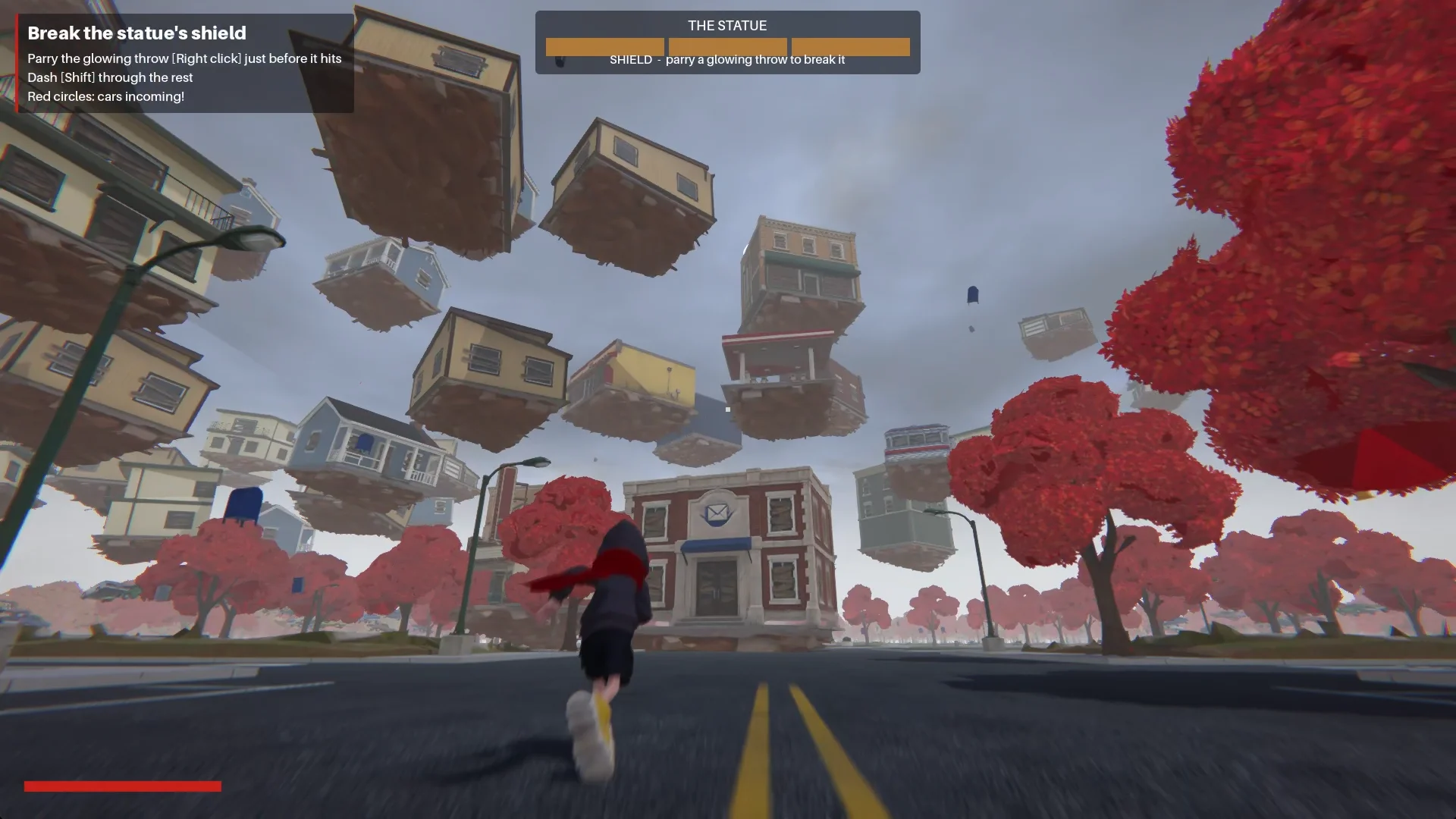
Como é jogar a demo finalizada
O menino entra na cidade pela Main Street. Na praça, uma estátua sem rosto libera uma onda de choque e puxa os prédios para uma espiral ao seu redor.
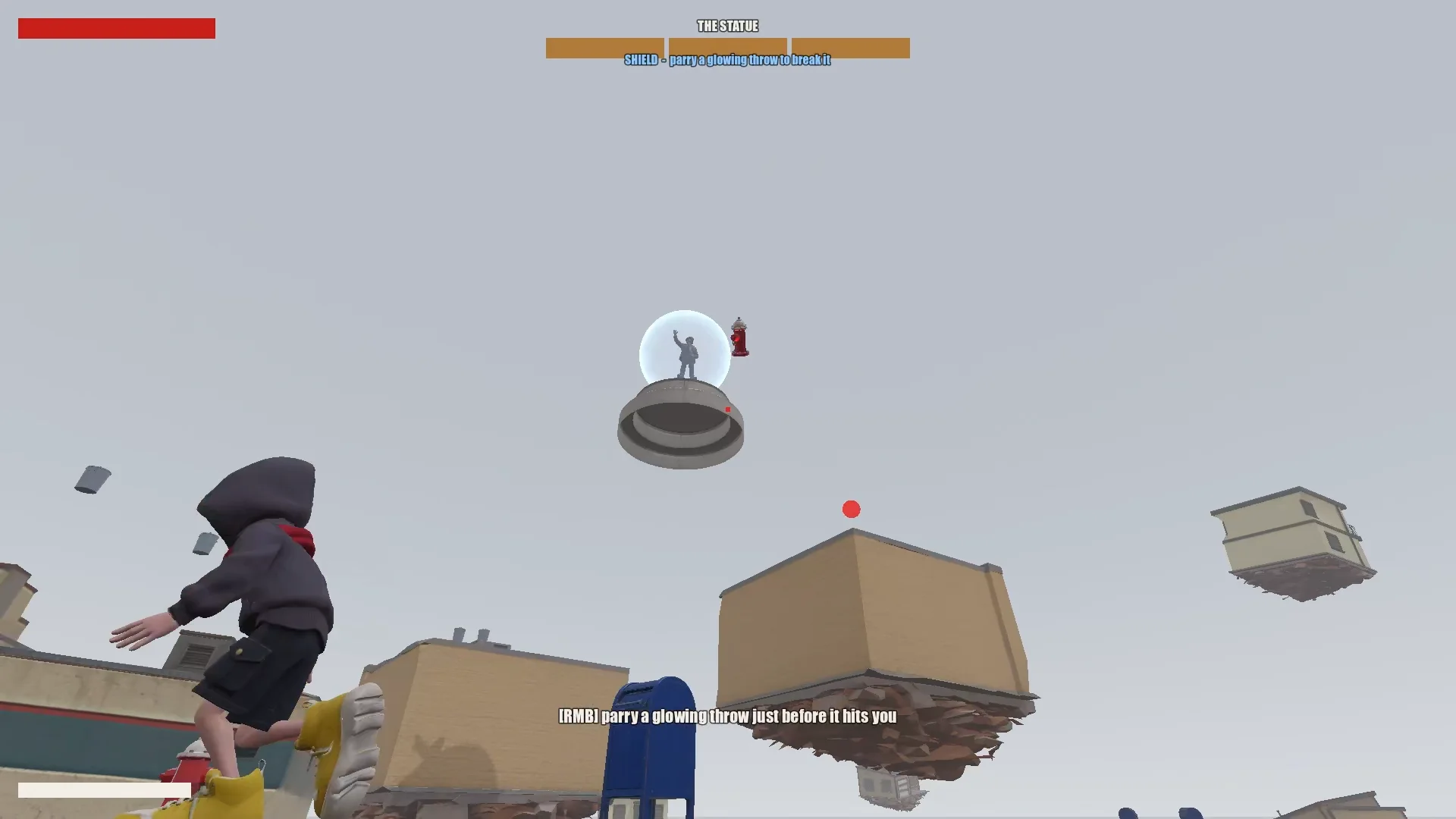
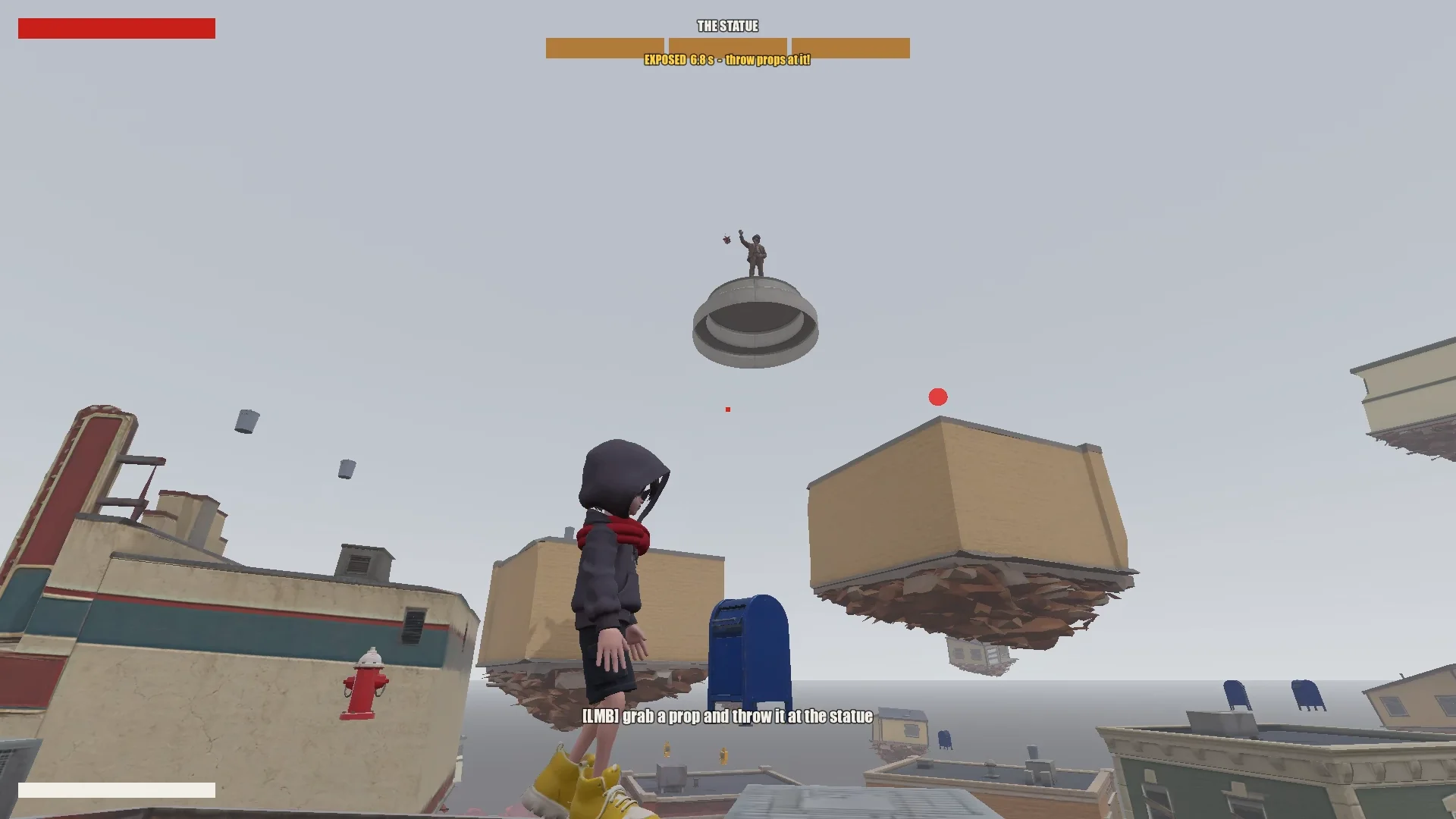
O jogador escala as lojas suspensas no ar pulando, flutuando e usando o salto com cachecol. Aparar um projétil brilhante quebra o escudo da estátua por alguns instantes; arremessar objetos próximos causa dano a ela. Depois de três rodadas, o menino consegue alcançar a estátua e selá-la.
03 / VISÃO GERAL
Configure as ferramentas e o projeto
Dê ao Claude uma memória de projeto
Mantive juntos o projeto do Godot, os documentos de design, as imagens conceituais, os modelos do Tripo e os scripts. Na raiz, o CLAUDE.md registrava as regras que o Claude deveria seguir em todas as sessões.
Ele cobria o essencial:
- Descrever o jogo, o tom e a direção visual.
- Listar as regras de assets, como estilo consistente e nada de símbolos ou textos indesejados.
- Exigir um plano antes de grandes mudanças.
- Manter um histórico de prompts.
- Registrar armadilhas recorrentes e convenções do projeto à medida que forem descobertas.
Acrescentei ao mesmo arquivo as correções recorrentes: ordem de enrolamento da malha, orientação dos modelos, nomes de animação e regras de alvo do salto com cachecol. As sessões seguintes podiam reaproveitá-las.
Instale o Tripo CLI
Para conectar o Claude ao Tripo, pedi que ele instalasse o Tripo CLI:
Help me install and configure Tripo CLI: npm install -g tripo-cli
Conecte o Godot e o Claude
O Claude conseguia editar diretamente as cenas do Godot em formato de texto e o GDScript. Uma conexão via Godot MCP permitia que ele rodasse o jogo, fizesse capturas de tela, inspecionasse logs e simulasse entradas.
Verifiquei a conexão pedindo ao Claude que informasse a cena aberta e a árvore de nós e, em seguida, conferindo a porta do MCP e o projeto com a minha configuração.
Compare the Godot MCP servers that are available right now and pick the one that fits this project best (Godot 4.7, Claude Code, editor control plus running and inspecting the game).
Explain your choice, then install it into the_red_scarf/ and configure it at project scope (.mcp.json in the project root). Turn telemetry off.
04 / VISÃO GERAL
Reduza a ideia a um jogo testável
Escreva o design e depois enxugue-o
O primeiro design do Claude cobria a cidade, a movimentação, os ataques do chefe e o fluxo do nível, mas tinha fases e habilidades do cachecol demais para uma demo curta.
I'm making a game demo with Claude, Tripo and Godot. Here's the idea:

The player is a boy in a bright red scarf, a gray hoodie, blue denim shorts and bright yellow basketball sneakers. The scarf is a supernatural object: he can hover with it, move quickly between platforms, grab objects and throw them, and use it as a whip.
The game starts on the main street of a mid-1980s American small town: one main road, houses and shops on both sides (post office, gym, diner and so on). In the central plaza stands a statue of a man in a suit whose face has been erased. It is a hostile supernatural object. When the boy arrives, it releases a shockwave and slowly rises into the sky. The houses around it are torn out of the ground and end up as floating platforms at different heights. The player jumps between them, blocks the objects the statue hurls with telekinesis, fights back, and finally reaches the statue and seals it with the scarf.

Write a short design doc in design/game_design.md: building types, the boss's attacks in two phases, the boy's attacks, defense and movement moves, and the level flow.
Show me your plan first. Ask me if anything is unclear.
Enxuguei o design até o menor loop que ainda tivesse a cara deste jogo:
Simplify the combat:
1. The boss has only one phase.
2. Remove the scarf shield and the scarf whip.
3. New loop: the player moves across floating buildings and can only break the statue's shield by parrying its attacks (right click / RT, like a fighting-game parry). Once the shield is down, the player throws objects at it to deal damage.
Reduzi o combate a uma única fase de chefe: aparar para quebrar o escudo, arremessar objetos durante a janela de vulnerabilidade e usar a cidade flutuante como desafio de movimentação. Cada movimento que sobrou precisava servir a esse loop.
Construa a cidade a partir de dados
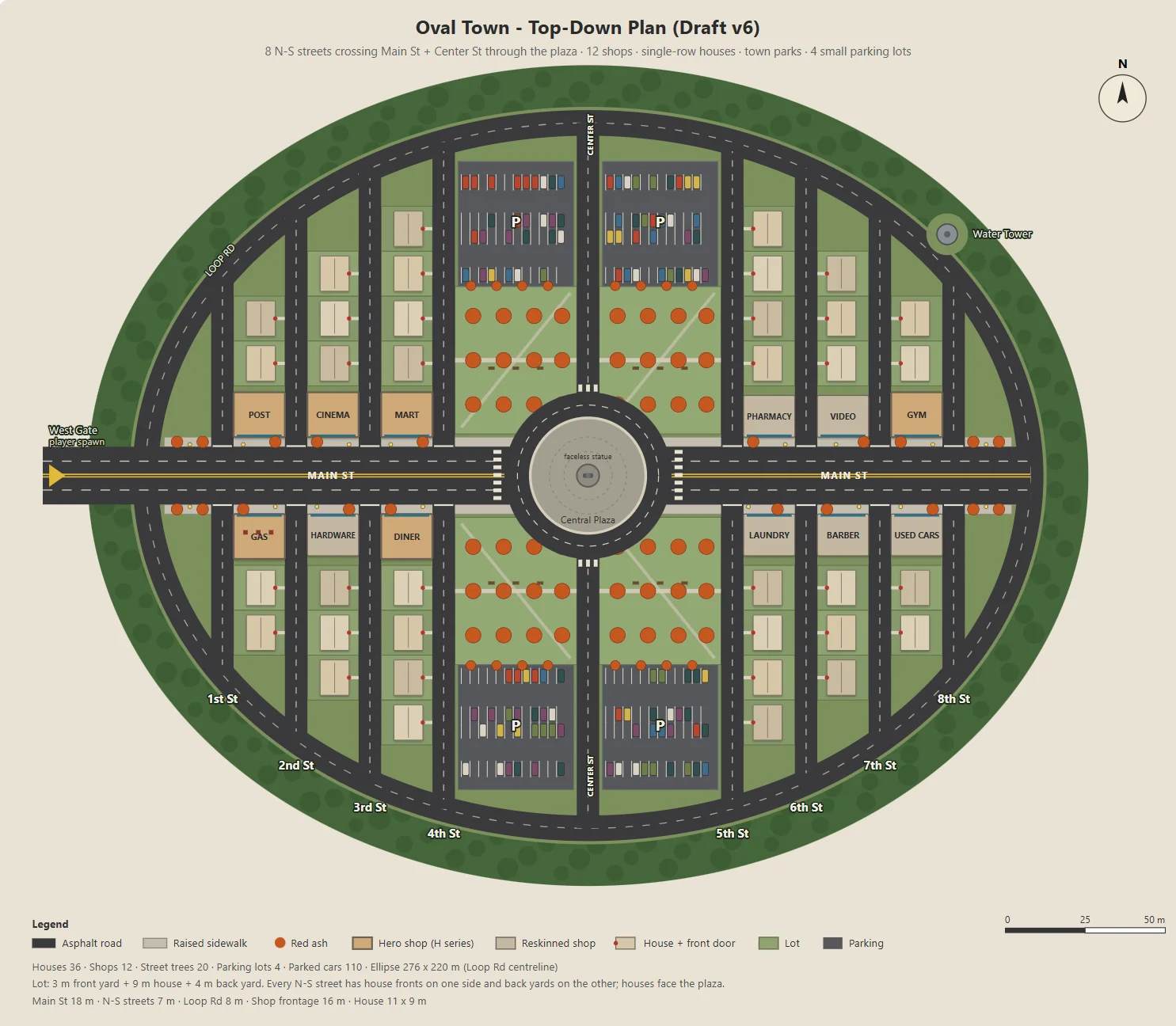
O Claude escreveu um script Node para gerar um SVG parametrizado da cidade oval: a Main Street, doze lojas, ruas residenciais, parques, estacionamentos e uma praça.
O mesmo script exportava JSON para o blockout, os prédios, as ruas, os postes e as árvores do Godot. Por isso, a arte conceitual e o nível jogável compartilhavam um só layout.
Ajustei um parâmetro por vez, como o tamanho dos estacionamentos, a profundidade dos quintais ou as entradas das lojas, para que cada mudança fosse fácil de revisar.
Here's the town I have in mind. The street grid is a grid inside an oval outline:
- The long axis of the oval is the widest street, Main St, lined with functional buildings like the post office and the gym.
- The other streets run perpendicular to Main St on both sides, lined with houses.
- The center of the oval is a round plaza; the statue stands on a concrete pedestal in the middle.
- Asphalt streets with lane markings. Raised concrete sidewalks in front of the shops, with American red ash street trees at regular intervals.

Design the town structure, fill in the details I didn't mention and improve the design.
Draw it as a top-down plan with a Node script (tools/townplan/gen_town_svg.mjs) that generates an SVG from parameters kept at the top of the file.
Defina uma direção visual
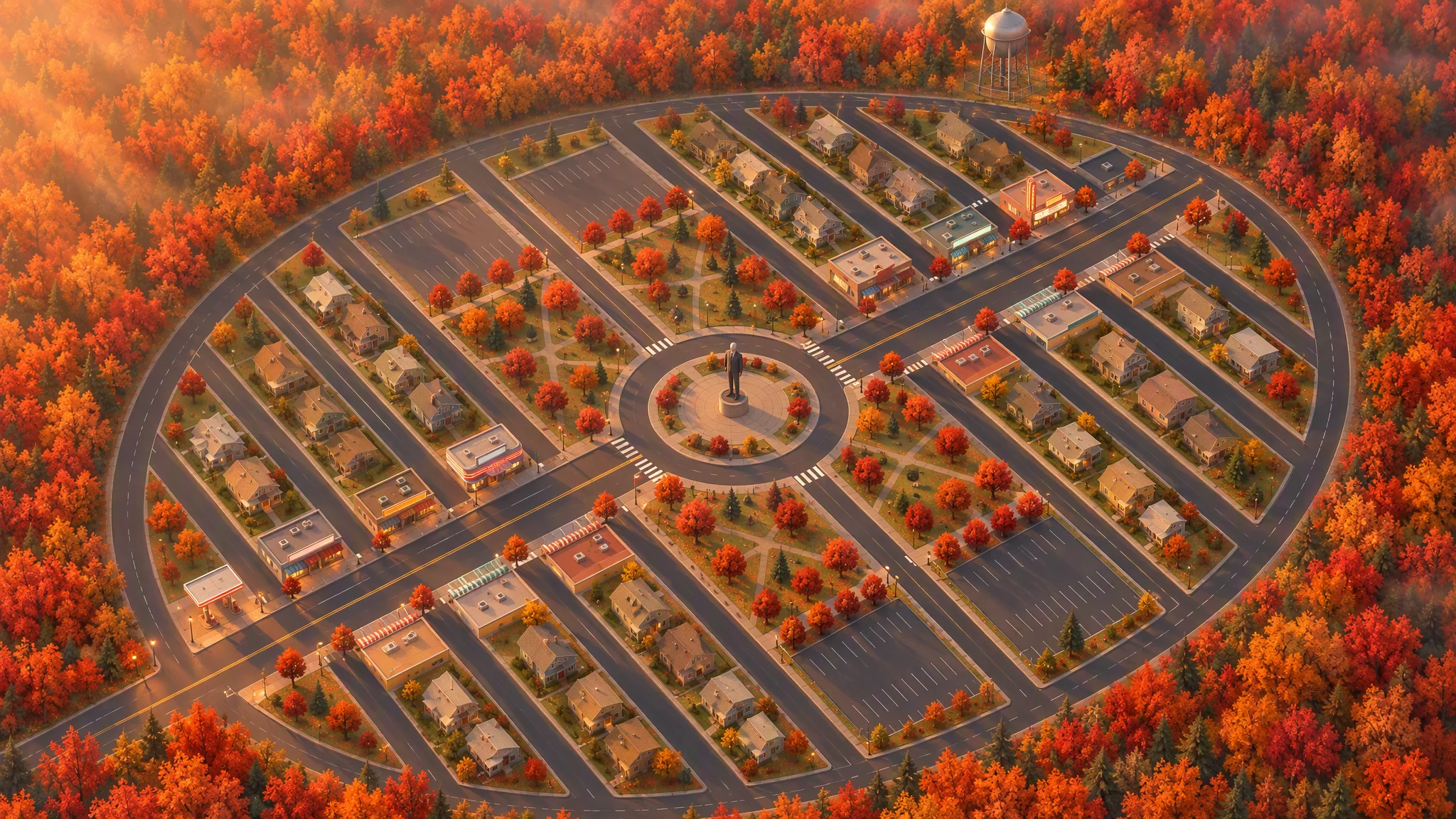
Usei o layout como referência rigorosa para uma ilustração em vista superior, preservando ruas, lotes, contornos dos prédios, árvores e o perímetro da cidade.
A primeira vista em 45 graus parecia um mapa inclinado. Girar a referência localmente antes de gerar de novo deu à imagem um ângulo convincente.
Strict layout reference: image[1]. Keep every road, block, building footprint, lot, park, parking lot, tree and the oval outline exactly as in image[1]. North up. Add, remove, move or resize nothing. Only restyle it as a finished top-down orthographic illustration of a quiet mid-1980s American small town in autumn.

[...town contents: main street, roundabout and statue, twelve shops seen as flat roofs only, all facing the main street, houses, parks, parking lots, red ash trees, a water tower...]

Style: stylized non-photorealistic game environment, simple hard-edged geometry, flat slightly exaggerated colors, light weathering, no grime. Warm late-afternoon sun from the west.

No vehicles, people, text, lettering, flags, or national or religious symbols. The statue has no face.
A partir da planta final e da imagem em vista aérea, o Claude listou os assets, separando os modelos do Tripo dos objetos construídos no Godot. Faixas de contagem de faces mantiveram cerca de trinta imagens conceituais e trinta modelos dentro do orçamento.
The town concept art is done. Using the final plan (v6), list every asset we need, split into "generate with Tripo" and "build in the engine". Then write a concept-image prompt for each Tripo asset in design/asset_prompts.md.
- Shops on Main St should vary more, with clearly different heights, so the opening walk has an interesting skyline.
- Split scene assets into tiers (S / A / B / C) by importance and size, give each tier a model and a triangle budget (hard cap 10,000 per asset), and estimate the total for the scene.
05 / VISÃO GERAL
Prototipe um asset antes de fazer o resto
Teste um prédio representativo
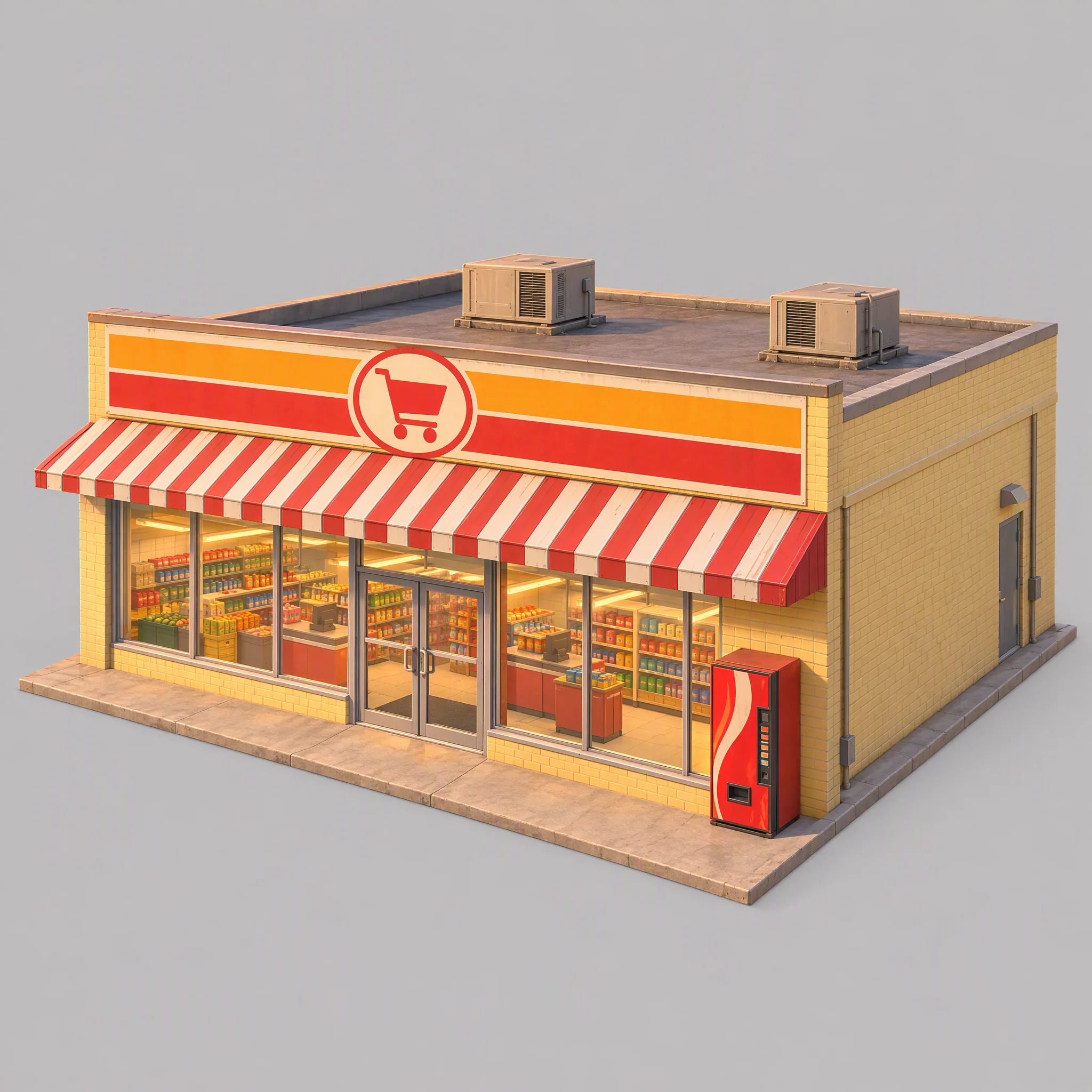
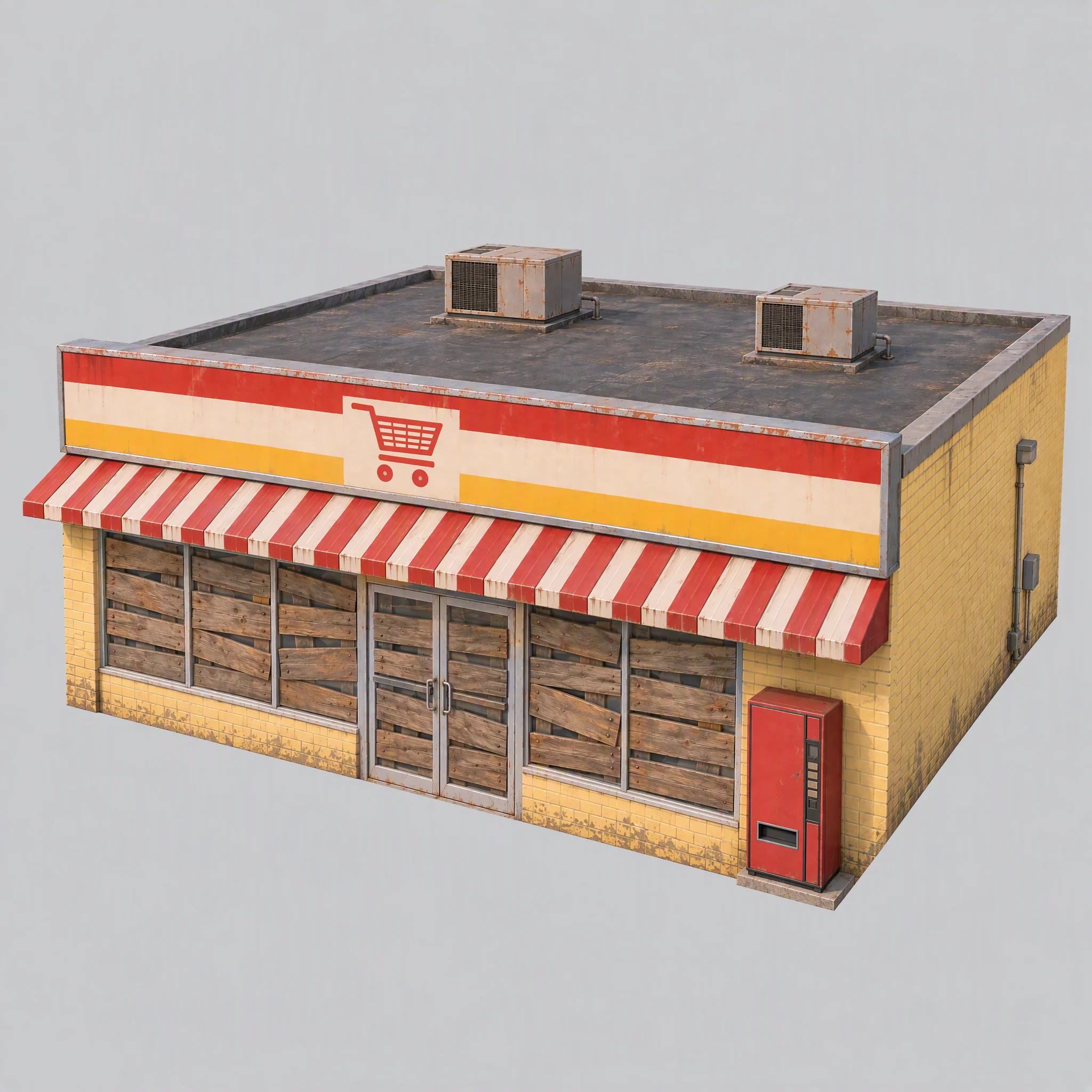
Testei o pipeline primeiro com um supermercado, verificando o estilo visual, a adequação como referência de modelagem e a família de modelos do Tripo mais indicada.
- A imagem conceitual combina com a direção visual da cidade?
- A imagem oferece uma referência de modelagem limpa?
- Qual família de modelos do Tripo produz a geometria certa?
A primeira imagem tinha prateleiras visíveis, iluminação quente já incorporada, uma máquina de venda automática com cara de marca e uma fundação grande demais.
Atualizei as regras compartilhadas: tapar as janelas com tábuas, apagar as luzes, usar iluminação de referência branca e neutra e manter as fundações rentes às paredes.
Use image[1] only as a reference for color palette, materials and rendering style. Do not copy its content or camera.

A single isolated one-story small-town supermarket from the mid-1980s: a wide, low box about 16 meters wide, 14 meters deep and 5 meters tall. The front is a long row of large plate-glass windows with a pair of glass doors in the middle, under a flat red-and-white striped metal awning. Above the awning, a tall flat sign panel runs the full width of the roofline, painted with bold color bands and a simple shopping-cart pictogram, no letters. Pale yellow painted brick walls, a flat roof with two boxy rooftop AC units. A plain red vending machine stands beside the doors. All windows and glass doors are boarded up with weathered wooden planks, so no interior is visible. All lights, signs and neon tubes are switched off. The building sits on a thin flat concrete slab exactly the size of its footprint, flush with the walls on every side.

Three-quarter front view from slightly above, the whole building in frame, centered on a plain light gray background, neutral white daylight with soft even lighting and no warm tint, no cast shadows, no ground beyond the slab.

Style: simplified realism with hard-edged, clean forms, mid-1980s American, slightly saturated comic-book colors, light weathering, no grime.

No text, no letters, no logos, no flags, no national or religious symbols, no people, no vehicles
Compare famílias de modelos antes de escalar
Com a mesma imagem do supermercado e limites de faces controlados, a série P produziu arestas duras mais limpas; a série H teve triângulos mais uniformes e superfícies mais suaves.
Para este jogo, escolhi:
- Usar P1.0 para prédios, veículos e props que se beneficiam de superfícies rígidas e limpas.
- Usar H3.1 para formas orgânicas, como a estátua e os pedaços de terreno flutuante.
- Usar P2.0 para o menino, porque o personagem precisava de uma topologia limpa para o rigging.
Essa foi uma escolha para este jogo, não um ranking universal de modelos.
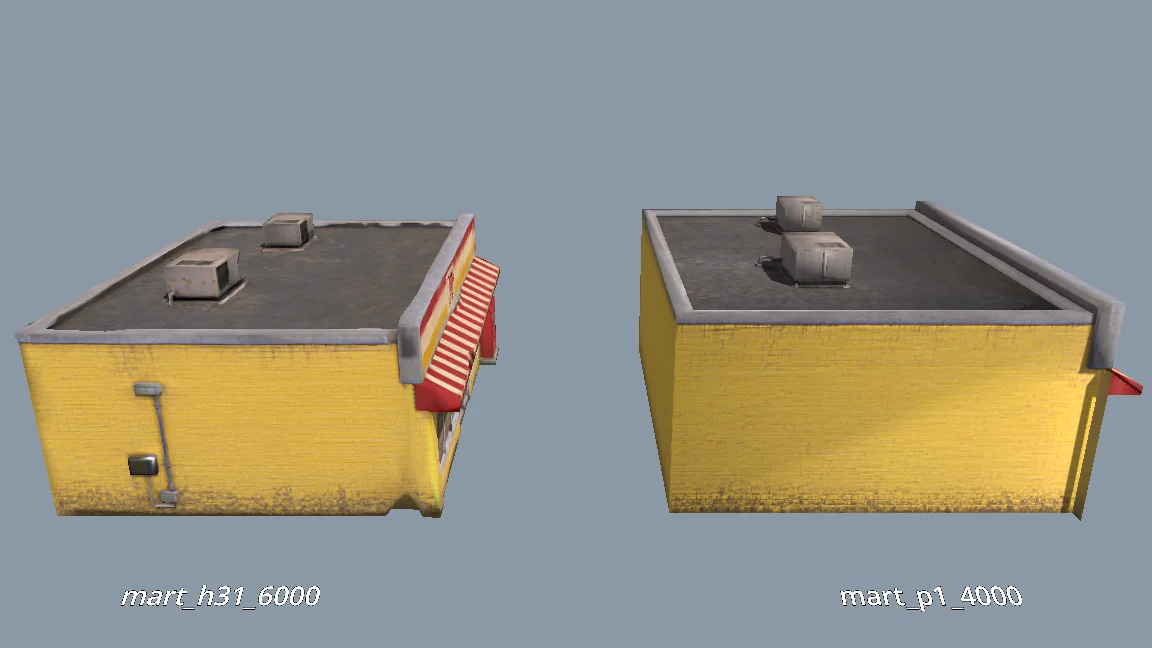
The current models are all clean and fairly flat. For performance, would P1.0 suit the buildings better than H3.1? Run a comparison: generate MART with P1.0 at 4000 faces and with H3.1 at 6000 faces, import both into a test folder, and render them side by side from the storefront, front, corner and top views (shaded and wireframe). Then tell me which one to use and why.
Gere os demais assets da cena
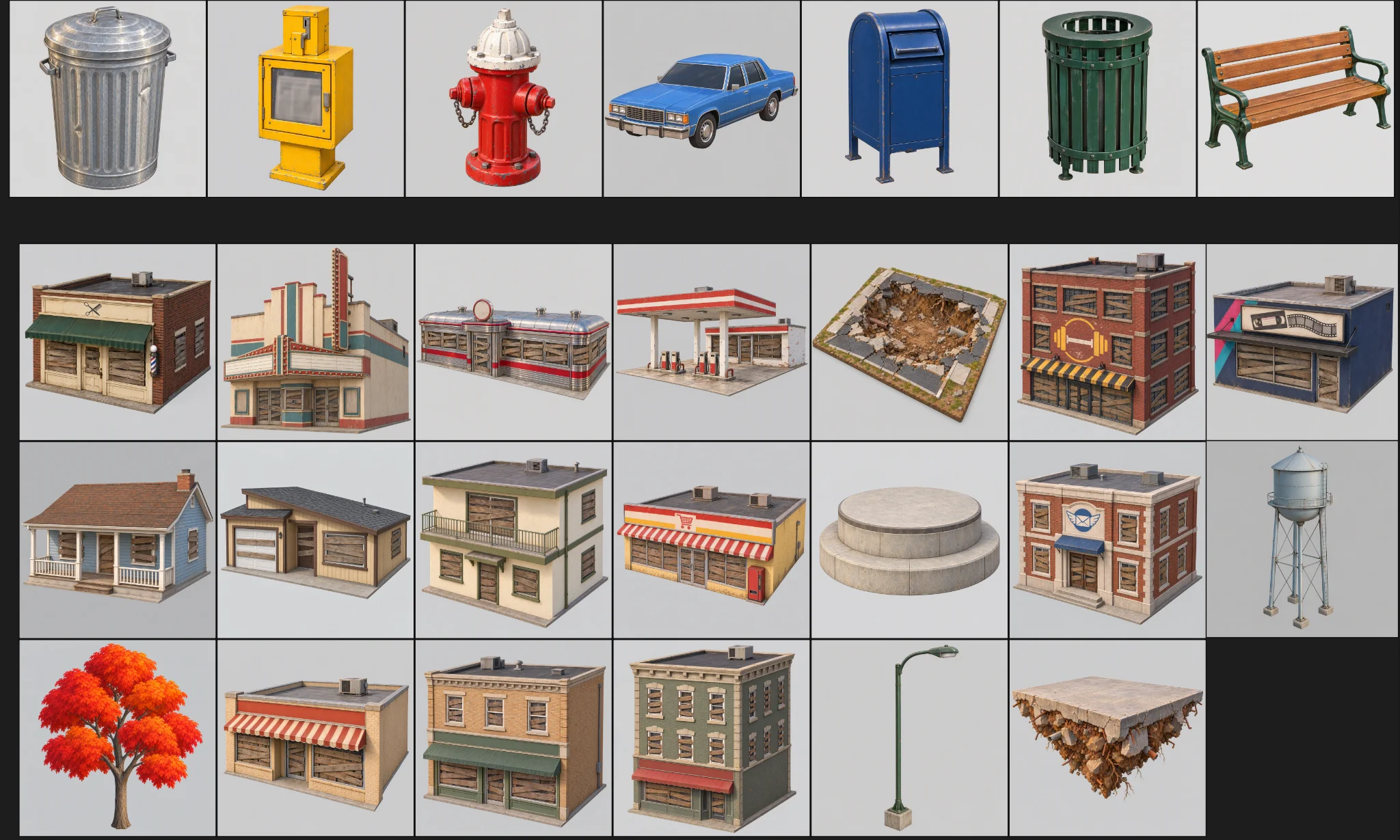
Depois que o protótipo foi aprovado na revisão, gerei os demais assets. Cada um tinha categoria, pasta, preset de modelo e orçamento de faces.
O lote tinha três verificações:
Generate concept images for all remaining scene assets the same way as MART, using the prompts in design/asset_prompts.md and cpt/town_birdseye.png as the style reference.
Check balance first. Save each image under cpt/assets/<category>/.
Check every image against the checklist in asset_prompts.md (single object, clean background, no text or symbols, matches the bird's-eye style, no thin fragile parts).
Retry failed tasks individually; never rerun the whole batch.
Record progress in design/batch_checkpoint.md so we can resume if we stop halfway.
When done, list what succeeded, what failed and what needs my review.
- Verificar se cada imagem tinha um único objeto, fundo limpo, nenhum texto acidental e nenhuma parte frágil.
- Refazer individualmente as tarefas que falharam.
- Registrar o progresso em um arquivo de checkpoint.
Regenerei as falhas uma a uma: um posto de gasolina com um buraco na parede dos fundos, uma caixa-d’água ausente e a geometria solta do supermercado.
Crie o personagem separadamente
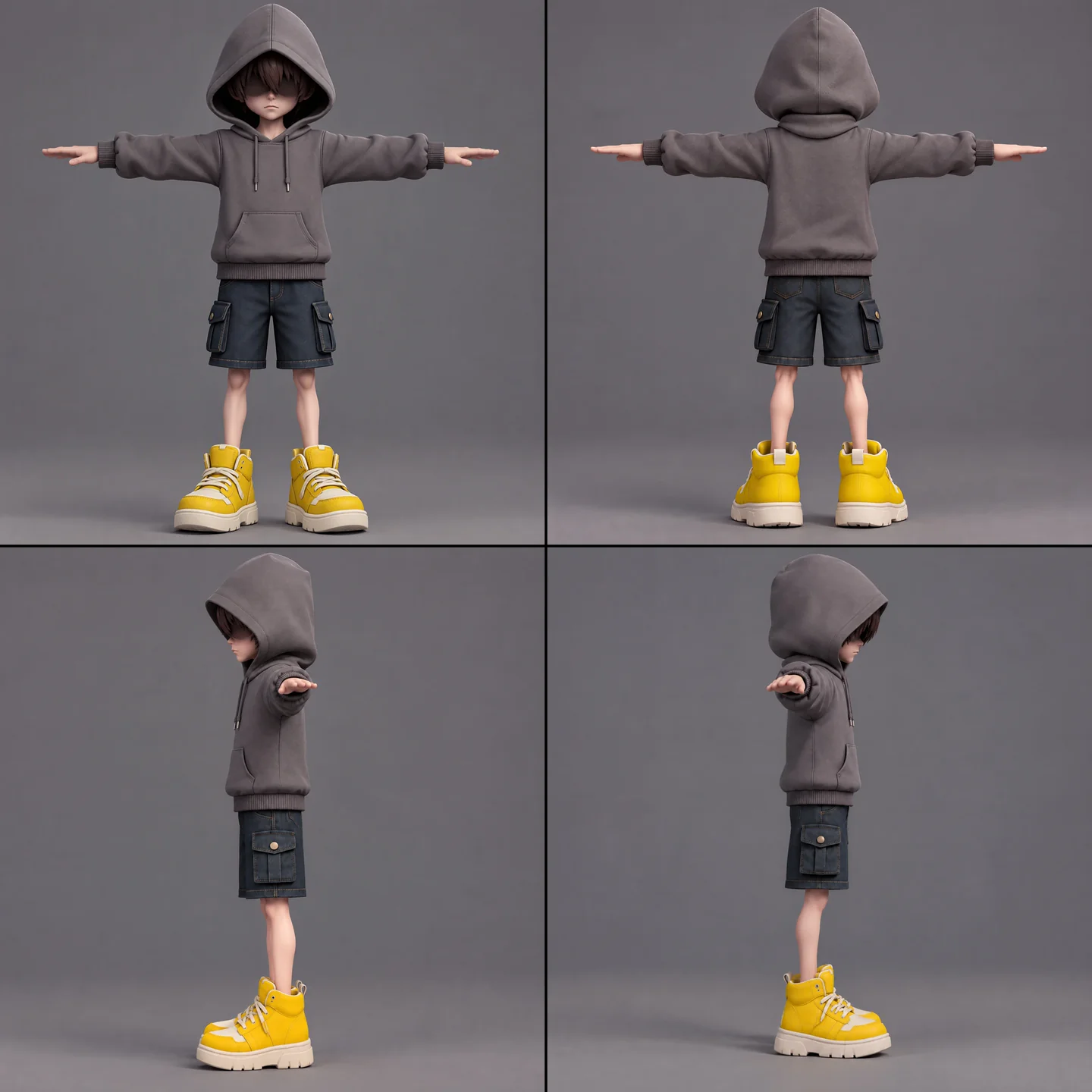
O menino precisava de arte conceitual, modelagem, verificação de rig, rigging e retargeting de animação. Mantive o cachecol separado para evitar pesos de skin indesejados e preservar suas ações complexas.
A full-body cartoon-style boy in a standard T-pose, arms extended horizontally, legs straight. He wears a gray hoodie with the hood up. His face is shrouded in shadow, eyes hidden, with only his mouth and grayish-brown bangs visible. He has a long red scarf wrapped around his neck, with both hanging ends draped down behind his back, not in front. He wears dark blue denim shorts ending above the knee so his knees are exposed, with buttoned flap pockets on both the left and right sides. He wears oversized yellow sneakers and has relatively thin legs. Cartoon character design, clean 3D model.
Primeiro, rodei a verificação de rig gratuita. A lista de animações incluía repouso, caminhada, corrida, pulo, queda, arremesso, aparada, salto com cachecol, golpe sofrido, derrota, selamento e vitória. Fazer o retargeting de mais de cinco de uma vez falhava, então usei três tarefas menores e as combinei no Godot.
The boy model is ready at models/boy/boy_body.glb. Rig it and add the animations the demo needs. Run the free rig check first. List the animations you plan to use, mapped to Tripo presets, before generating anything.
Antes de usá-las no lote, verifiquei manualmente as vistas do personagem em busca de mãos espelhadas e de cabelo confundido com óculos escuros.
Padronize as importações e as verificações de qualidade
Uma etapa de importação adicionou normais ponderadas e arestas duras às paredes que pareciam suaves demais. Os limites de textura variavam por asset, com exceções para o menino, o cachecol, a estátua e as árvores.
Verifiquei escala, orientação, paredes, telhados e polígonos soltos antes de mover os modelos do diretório de testes para a cena jogável. Os assets de produção precisavam ter zero problemas relatados.
When I inspect the models, the normals are smoothed across every edge, so flat walls look soft and cheap. I want something like Blender's Weighted Normal modifier.
Write a Godot import hook that recomputes weighted normals on import (area-weighted, edges sharper than 30 degrees become hard edges, keep the normal map), plus a setup script that attaches the hook to a list of GLBs and limits texture size (4K, or 2K for small assets) with VRAM compression. Don't apply it to the boy, the scarf, the statue or trees.
Render before/after comparisons so I can judge the result.
06 / VISÃO GERAL
Construa a demo em camadas
Comece com um blockout de gameplay
Um script de ferramenta do Godot lia o JSON da cidade para construir um blockout jogável com caixas de colisão coloridas, chão, ponto de spawn e o layout flutuante. Controles no Inspetor e um script de linha de comando o reconstruíam após mudanças nos dados.
Em seguida, o Swap In Models substituiu as caixas por assets do Tripo nas mesmas posições. As duas versões usavam os mesmos dados de layout.
As lojas formavam a espiral escalável; as casas ficavam ao fundo. Um relatório verificava sobreposições, altura livre, espaçamento entre telhados e se as plataformas eram alcançáveis.
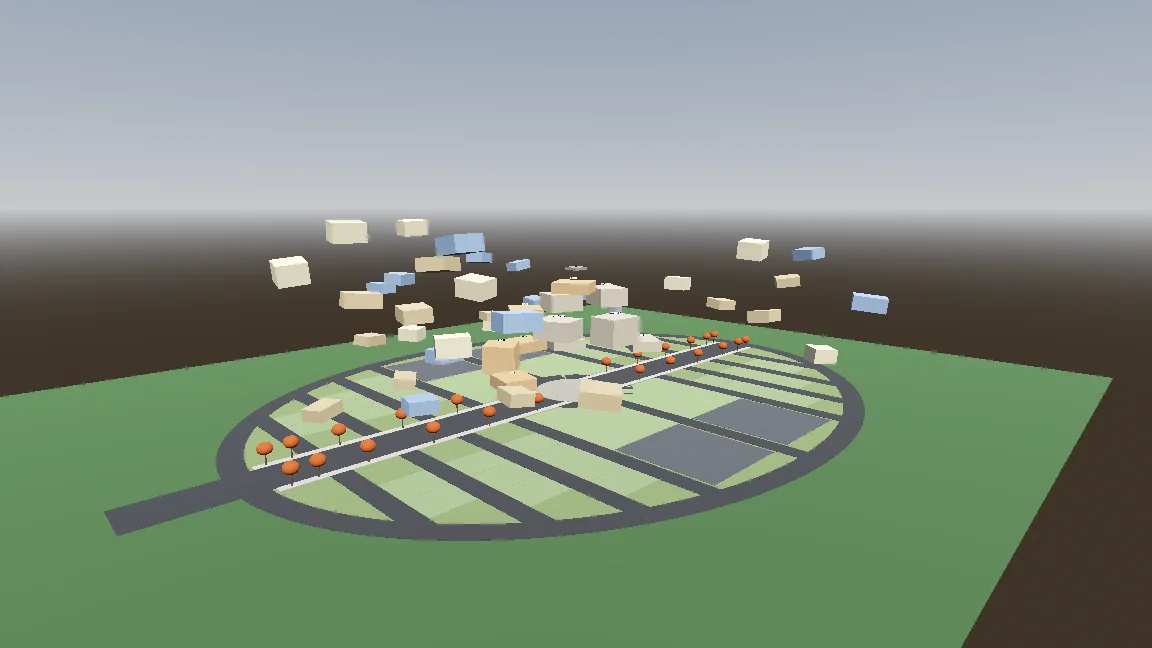
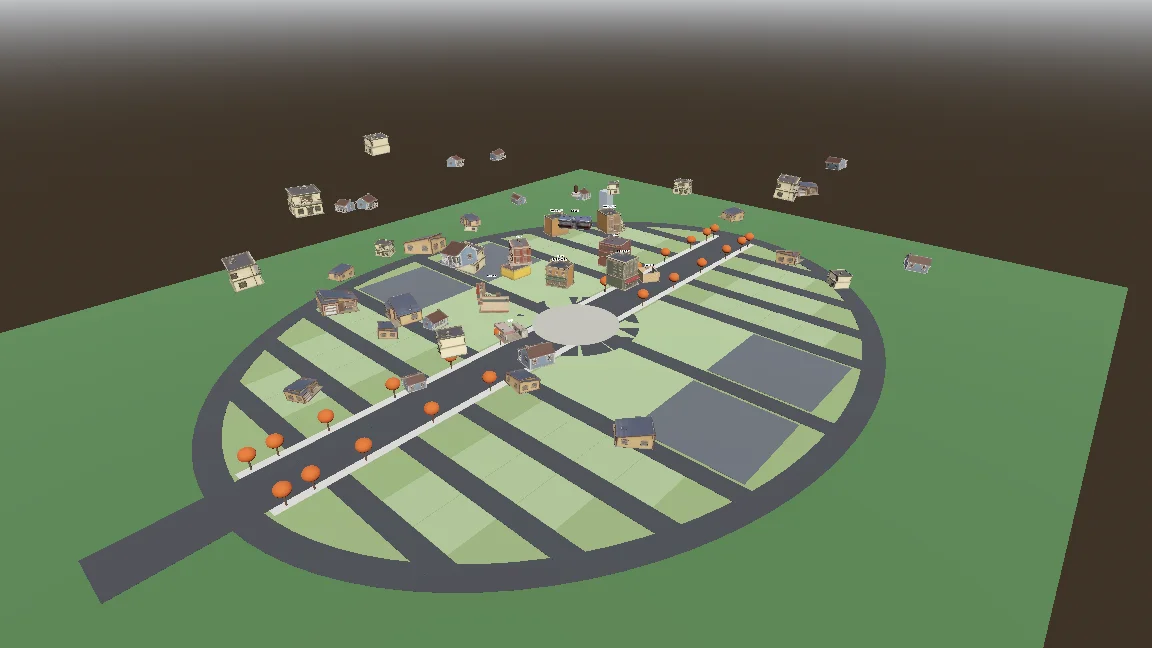
Build a gameplay-only blockout:
- Export the town plan as JSON (gen_town_svg.mjs --json) and write an @tool script (Scripts/town/town_builder.gd) that reads it and generates the ground, a colored box with collision for every shop and house (heights from the design doc), and the player spawn at the west entrance.
- Add inspector buttons: Build Town, Preview Tree, Reset To Ground, Swap In Models.
- Also add a command-line build script so you can rebuild the scene headless.
- Swap In Models replaces each box with res://Assets/Models/<model>.glb, scaled to the lot and rotated to face the street, keeping the position.
Show me screenshots from the street and from above.
Adicione a movimentação e o cachecol procedural
O controlador tinha estados de chão, ar, flutuação e salto com cachecol. Parâmetros expostos e um teste de fumaça ajudaram a ajustar e verificar cada movimento.
Start the player controller in the blockout scene. Use the rigged boy model directly, no capsule placeholder.
- CharacterBody3D with states: ground, air, hover (hold jump midair, drains scarf energy), scarf leap.
- Third-person over-the-shoulder camera, keyboard + mouse and gamepad input maps.
- AnimationTree state machine built by a generator script (Scripts/tools/build_player_scene.gd), not by hand in the editor.
- All feel parameters exported so I can tune them in the inspector.
- An automated smoke test that spawns the player, runs, jumps, hovers and scarf leap, and saves screenshots.
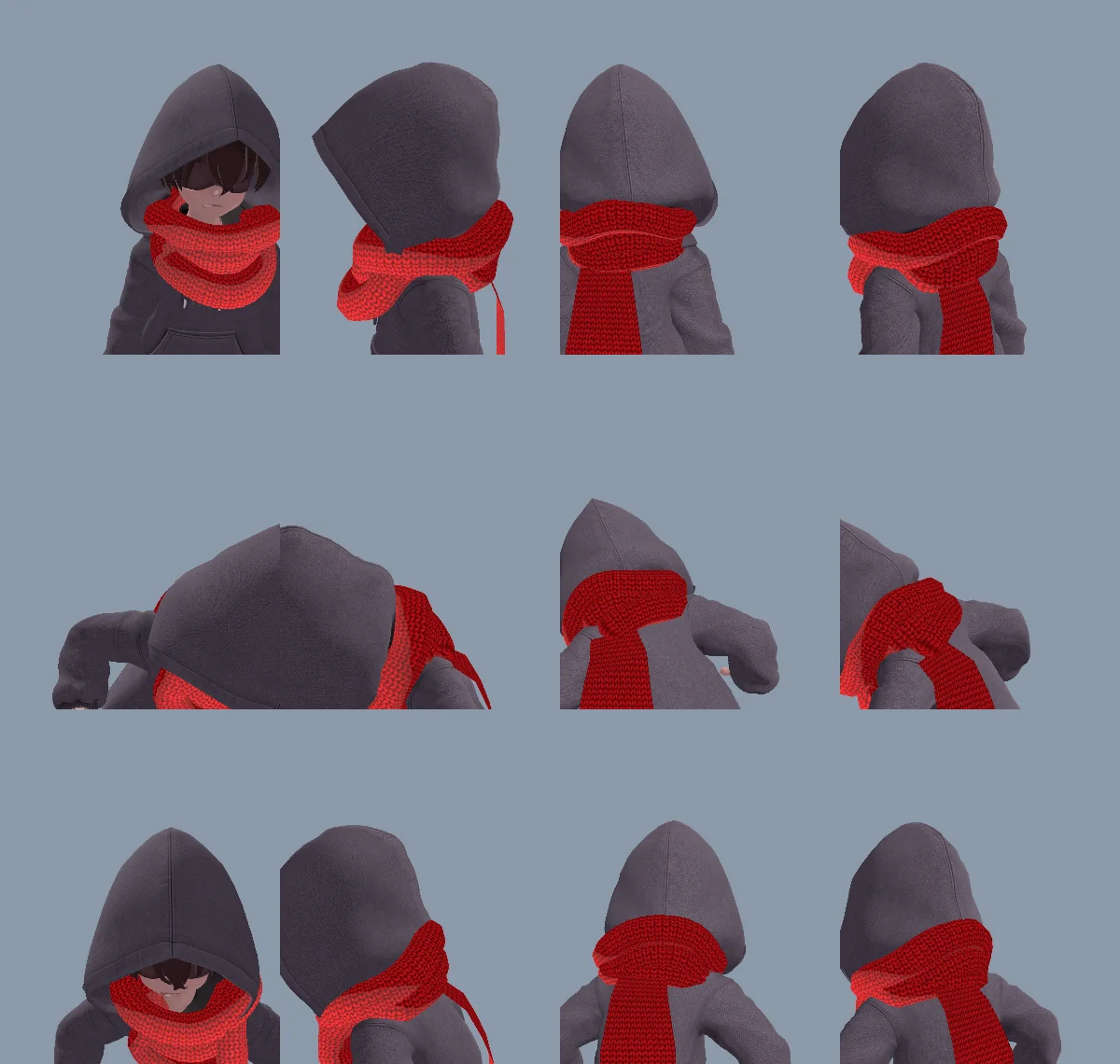
A volta do cachecol no pescoço, quando modelada, parecia rígida demais, então o código passou a gerar tanto a volta quanto a ponta. A mesma ponta podia ficar pendurada, se esticar, agarrar, envolver a estátua e soltar, sem modelos ou animações à parte.
A primeira volta parecia estar do avesso por causa da ordem de enrolamento dos triângulos e de normais invertidas. O Claude corrigiu a malha e registrou a causa no CLAUDE.md.
The neck scarf looks too stiff. Try generating it procedurally instead of using the Tripo model:
- ScarfWrap: three thick, soft knitted loops around the neck, rebuilt every frame from the neck, head and spine bones, pushed out by capsules on the head, neck, chest and upper arms, fuller at the back so it fills the gap between the hood and the shoulders, with a little spring lag.
- ScarfTail: a Verlet chain hanging from the knot at the back, with thickness, stiff enough not to stretch, colliding with body capsules. Reaching out to grab props, hanging from anchors and wrapping the statue all use the same tail (reach(point) / release()).
- Both share one wool material with the red knit texture and a soft sheen at grazing angles.
Keep the per-frame cost low and tell me the measured time.
Faça o salto com cachecol parecer intencional
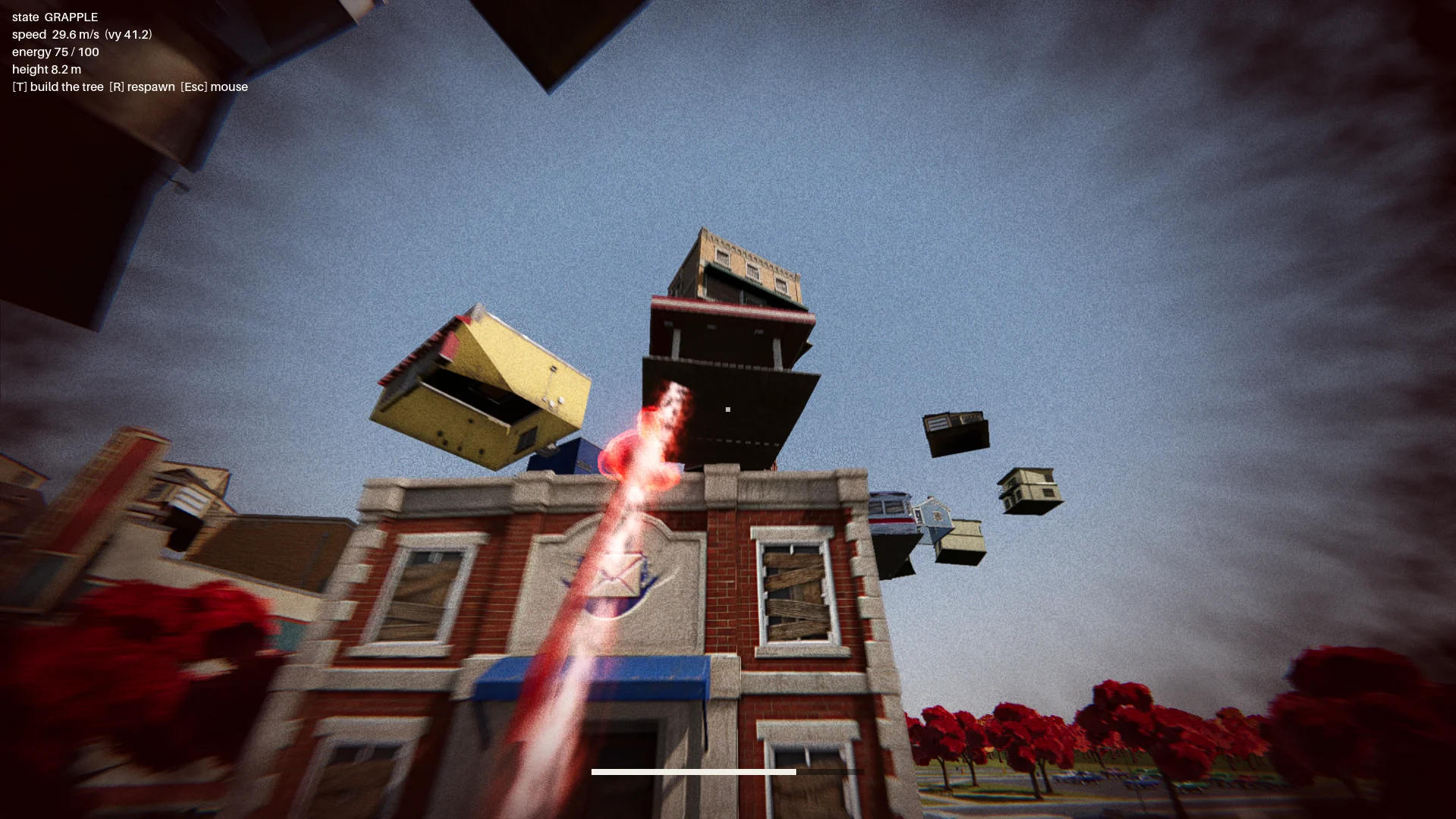
O primeiro salto com cachecol balançava como um gancho de escalada. Alterei-o para acelerar rumo a um ponto de pouso escolhido, com aura vermelha, poeira, rastro e um pulso ao pousar, para deixar o movimento legível.
Os primeiros alvos, em toldos, podiam fazer o menino atravessar um prédio ou deixá-lo preso. Adicionei verificações de pouso e de trajetória de voo. Um alvo válido precisava:
- ficar na borda de um telhado de verdade;
- ter espaço livre suficiente acima dele;
- oferecer espaço para o personagem ficar de pé;
- evitar uma trajetória de voo que atravessasse o prédio de destino.
Um relatório verificava cada prédio de doze direções e exigia zero pontos de salto inválidos.
Change how the scarf leap feels. Right now it swings like Spider-Man. Instead, the boy knows where he's going and moves straight to the target. While moving, rotate his model so his feet point at the target, as if his feet were pulling his whole body toward it.
Drop the scarf from the scarf leap and sell the power with effects: a red aura when the scarf leap starts, a puff of dust and a small energy pulse at the start point, a trail along a small arc, then the aura fades on landing with a small shockwave at the contact point.
The speed is not constant: a little slow at first, then accelerating hard, never slowing down until it arrives.
Monte a batalha de chefe
O percurso incluía o menu principal, a introdução, a cidade se erguendo, o checkpoint, a batalha de chefe em três segmentos e o final.
A estátua arremessava objetos, entre eles um brilhante que podia ser aparado. Uma aparada abria seu escudo por cerca de sete segundos. Ataques posteriores acrescentaram uma rajada em leque e um carro que caía como um meteoro, enquanto verificações de visibilidade impediam arremessos através dos prédios.
Finish all playable content for a first complete version:
- A basic main menu, pause menu and ending screen with buttons.
- The intro: "The Oval Town" title card; when the player enters the plaza, the statue shakes, lifts off its pedestal, a "The Statue" title card, then a shockwave pushes the boy back along the ground. Buildings fly up into the spiral tree. One checkpoint at the end of this sequence.
- The boss fight: shield, parry window about 0.25 s, about 7 s exposed window, damage only from throws while exposed, 3 health segments, attacks unlocked by remaining health: single throw, fan volley (only the glowing one can be parried), car meteor shower.
- Sealing: when its health reaches 0, a scarf leap point appears on the statue; scarf leap to it and press the seal button repeatedly.
- A full-flow automated test that plays the whole game with a real parry, three rounds of throws, a death and restart, the seal and the ending, saving screenshots at each stage.
Show me the plan first, then build it.
Com a vida zerada, um alvo de salto com cachecol aparecia na estátua. O jogador apertava repetidamente o botão de selar para encher um anel; se parasse, o anel esvaziava.
07 / VISÃO GERAL
Dê o polimento, teste e exporte
Adicione o tratamento visual da cena
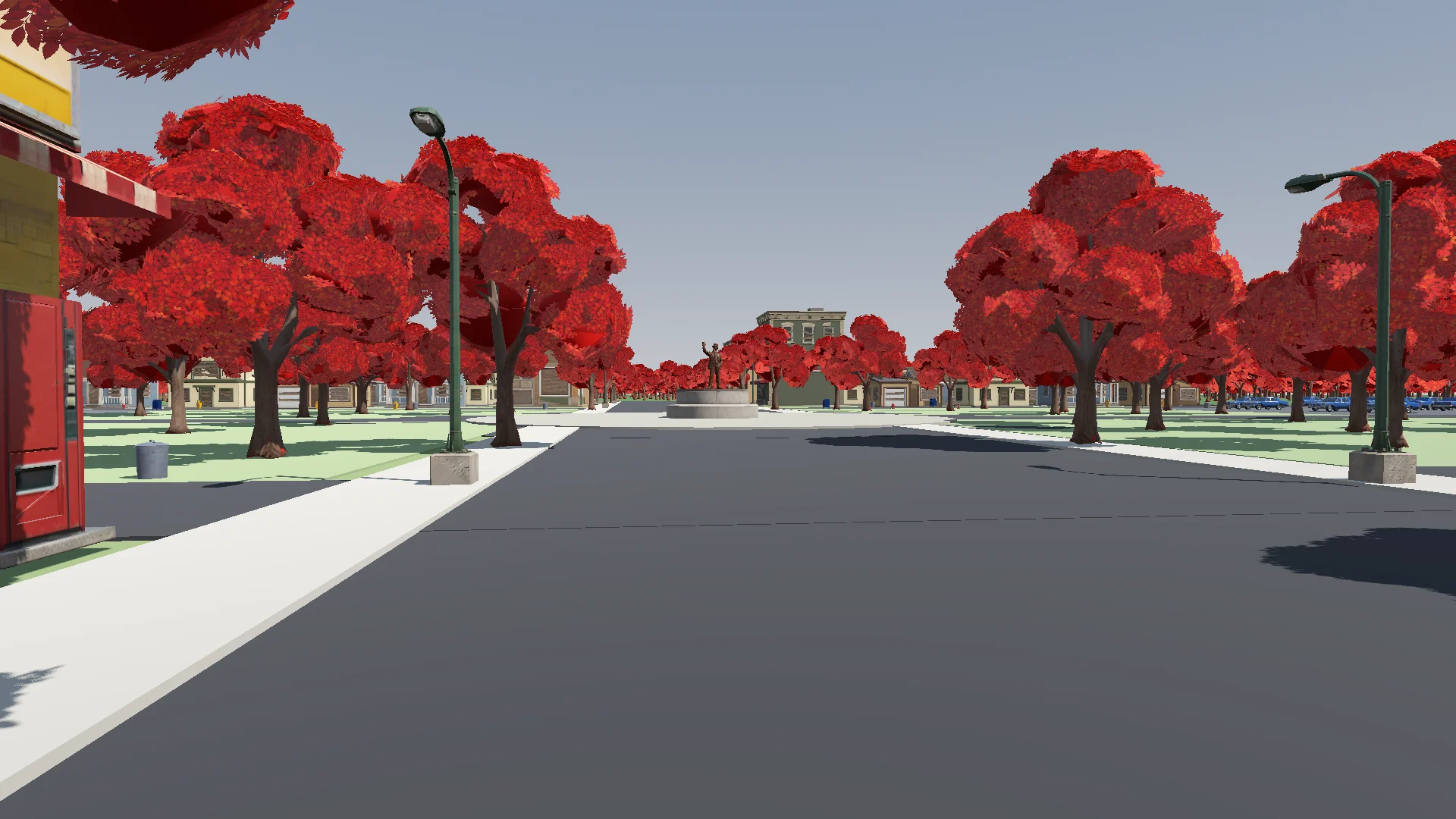
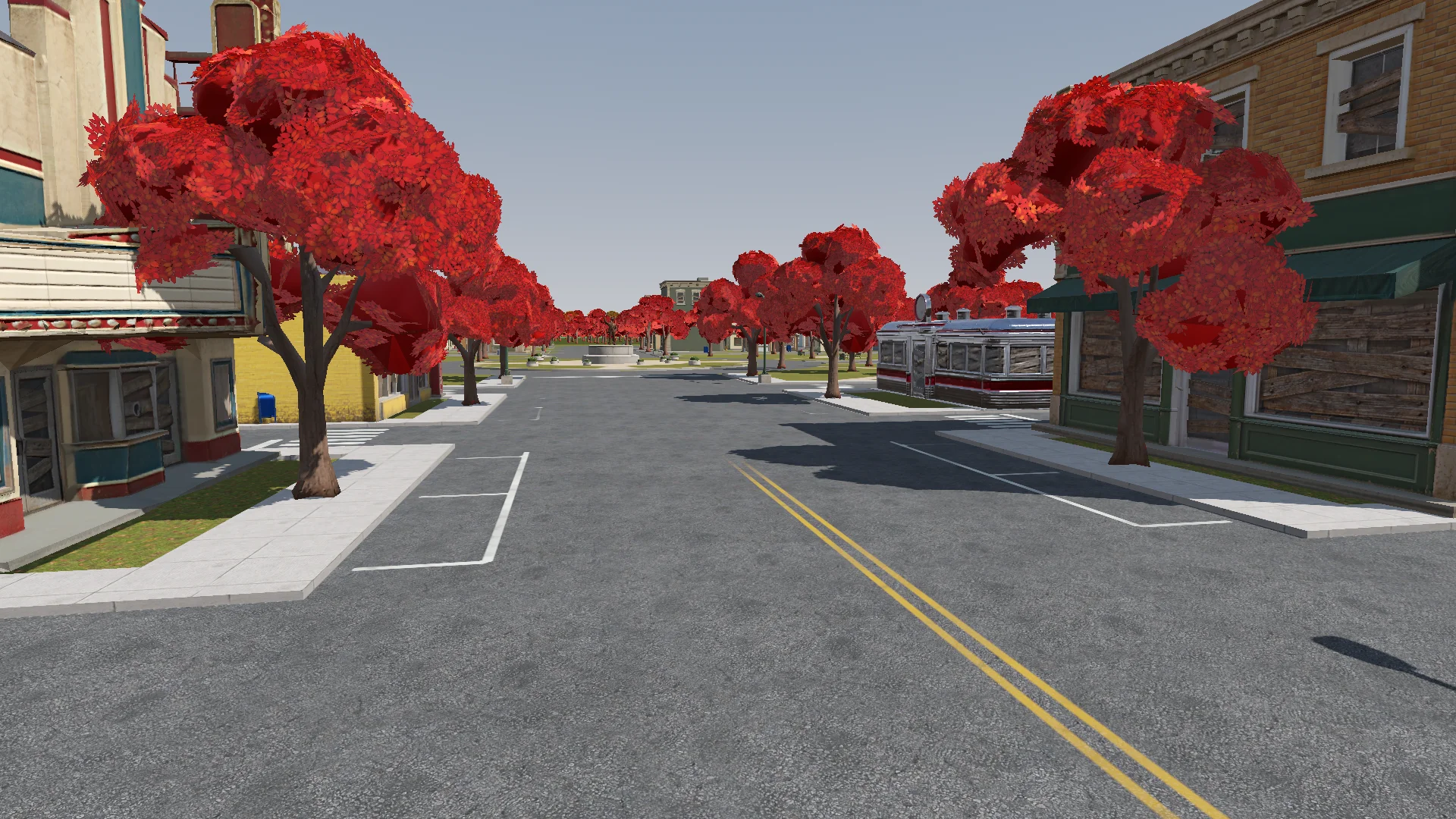
Depois que o combate funcionou, adicionei detalhes no chão, grama, árvores, iluminação, pós-processamento e efeitos. Um único shader aditivo suave deu à aura, aos anéis, aos projéteis e aos rastros uma aparência consistente.
Polish: add the final details to the rest of the town based on the concept art (streets, parks, lane markings and so on). If details are missing or unclear, generate reference images of parts of the town first.
Street layout and lane markings should be as plausible as possible; use Tripo to generate textures if needed. The road surfaces must never flicker.
Add NPR style procedural grass on the lawns.
Conferi as mudanças pela câmera do jogador em busca de ruas piscando, portas bloqueadas e postes fora do lugar.
Render with ACES tone mapping. Add post-processing: bloom, ambient occlusion, SSIL, depth of field, film grain, motion blur, chromatic aberration, FXAA, and an FSR 2 option, all in an Options menu. Bloom, AO, SSIL and DOF have Off / Low / Medium / High; FSR 2 has Off / Native AA / Quality / Balanced / Performance; motion blur, chromatic aberration and film grain are toggles.
Also add VSync and resolution.
The film grain should closely emulate Super 8 film. Godot has no built-in film grain or motion blur, so implement them as Compositor effects.
Adicione áudio e feedback de interface
Comecei com áudio sintetizado e depois substituí a maior parte por músicas e efeitos CC0 devidamente creditados. Os sons sintetizados ficaram onde nenhum clipe adequado se encaixava.
Find CC0 music and sound effects to replace the synthesized ones. Music should be synthwave / analog synth. Prefer less popular sources so the game feels unique. Where nothing fits, keep the synthesized sound. Verify the license on every page and generate a credits file.
O HUD mostrava os controles conforme o contexto até que o jogador usasse cada movimento. O primeiro arremesso brilhante desacelerava o tempo por um instante para ensinar a aparada.
Add interactive hints the first time each move is needed (move, jump, hover, dash, rush, Scarf Leap, grab, throw, parry), for a more explicit and intuitive guide to the controls. Each hint stays until the player actually does the move, then it is ticked off.
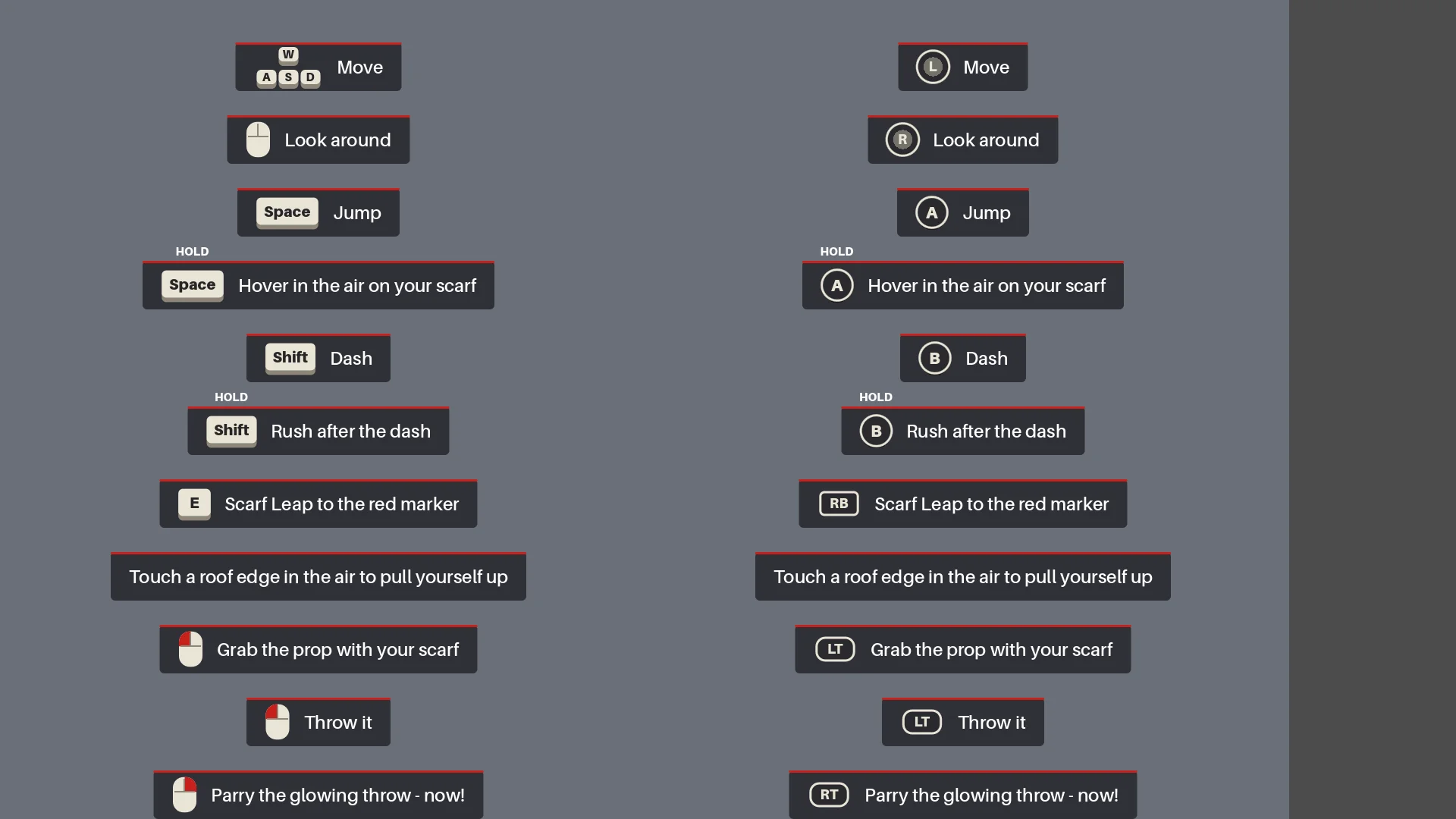
Faça a rodada completa de testes de regressão
Antes da exportação, o Claude reconstruiu as cenas, rodou os relatórios e jogou do menu ao final, incluindo uma aparada de verdade, morte e reinício, o selamento e capturas de tela.
Before we export, do a full pass:
1. Rerun every generator in order (build_blockout --float --swap, build_player_scene, build_game) and make sure the main scene is the main menu.
2. Run every report (tree_report, grapple_point_report, street_report, lamp_probe, audio_probe, skin_gap_report) and both automated tests. Everything must pass.
3. Play the game through MCP from the main menu to the ending, take screenshots at each stage and read the game log for errors and warnings.
Report: what passed, what failed, and anything I should check by hand.
A partida completa detectou erros de orientação, efeitos ausentes e checkpoints redefinidos após mudanças de movimentação ou de timing.
Export a Windows build of the game. Set up a Windows Desktop export preset for the_red_scarf (embed the PCK, the game icon, product name "The Red Scarf"). Check that the export templates for Godot 4.7.2 are installed; if not, tell me how to install them instead of guessing.
Exclude test scenes, test scripts and Assets/Models/_test/. Write a script that sets the build number and exports, run the exported exe once, and report the build size and any errors.
A primeira exportação para Windows tinha 1,15 GB, a maior parte em texturas. Remover assets não usados e modelos antigos e usar uma compressão mais compacta para os mapas de normais reduziu o tamanho para 755,5 MB.
08 / VISÃO GERAL
O que eu levaria para o próximo projeto
O fluxo de trabalho que eu repetiria é:
- Descrever o resultado pretendido.
- Fazer um pequeno protótipo.
- Inspecioná-lo no runtime real.
- Transformar cada problema repetido em uma regra ou um relatório.
- Só então escalar.
Eu reaproveitaria o mesmo padrão: uma única fonte para o layout da cidade, checkpoints para os lotes de assets, regras geométricas para o salto com cachecol e um teste completo da batalha de chefe.
Para uma demo parecida, comece com um personagem, um percurso e um inimigo. Teste um asset representativo antes de produzir em lote e transforme problemas recorrentes em verificações que você possa executar de novo.