

01 / GENEL BAKIŞ
Genel bakış
İşe kırmızı atkılı bir çocukla ve 1980'lerin ıssız bir Amerikan kasabasıyla başladım. Yüzü olmayan bir heykel binaları yerinden söküp göğe savuruyor. Bu fikir, Godot'da oynanabilir bir üçüncü şahıs aksiyon demosuna dönüştü.
Claude planlamaya, script yazmaya ve teste yardım etti; Tripo ise konsept görsellerini, modelleri, rigging'i ve animasyonu sağladı. Projeyi ben yönettim ve bir araya getirilen oyunu Godot'da inceledim.
Bu uygulamalı yaklaşım; fikirleri, yapay zekâ destekli geliştirmeyi ve oynayarak test etmeyi birbirine bağlayan bir vibe gaming iş akışını izliyor.
Proje kurulumu:
- Motor: Godot 4.7.2, Forward+
- Yapay zekâ kodlama asistanı: Claude Code
- Görsel üretimi: Tripo görsel üretimi
- 3D üretim: Tripo P ve H serisi modeller
- Proje: The Red Scarf, kısa bir üçüncü şahıs boss savaşı demosu
02 / GENEL BAKIŞ
Bitmiş demonun oynanışı
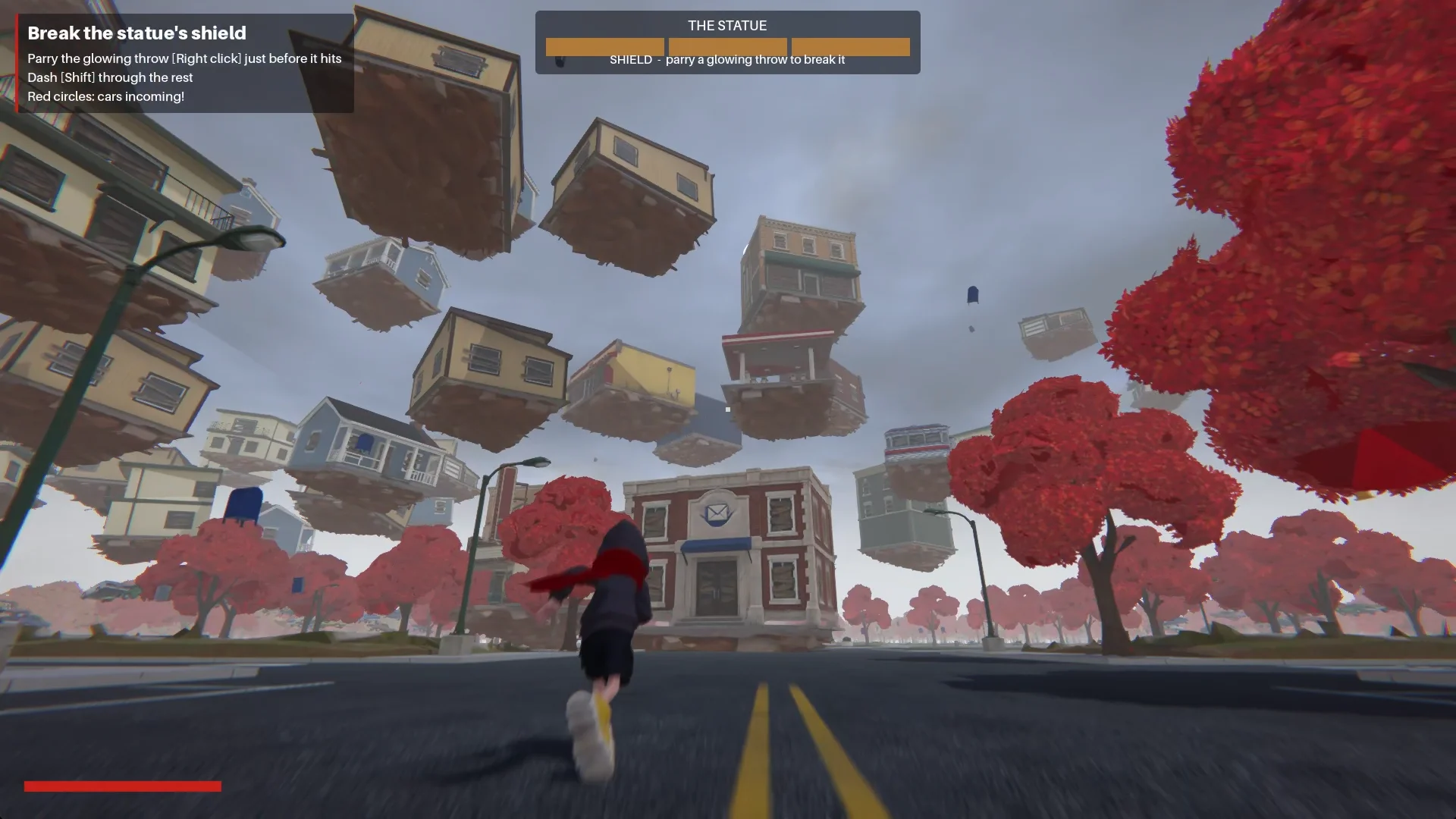
Çocuk kasabaya Main Street üzerinden giriyor. Meydanda yüzü olmayan bir heykel şok dalgası salıyor ve binaları kendine çekip etrafında bir sarmal oluşturuyor.
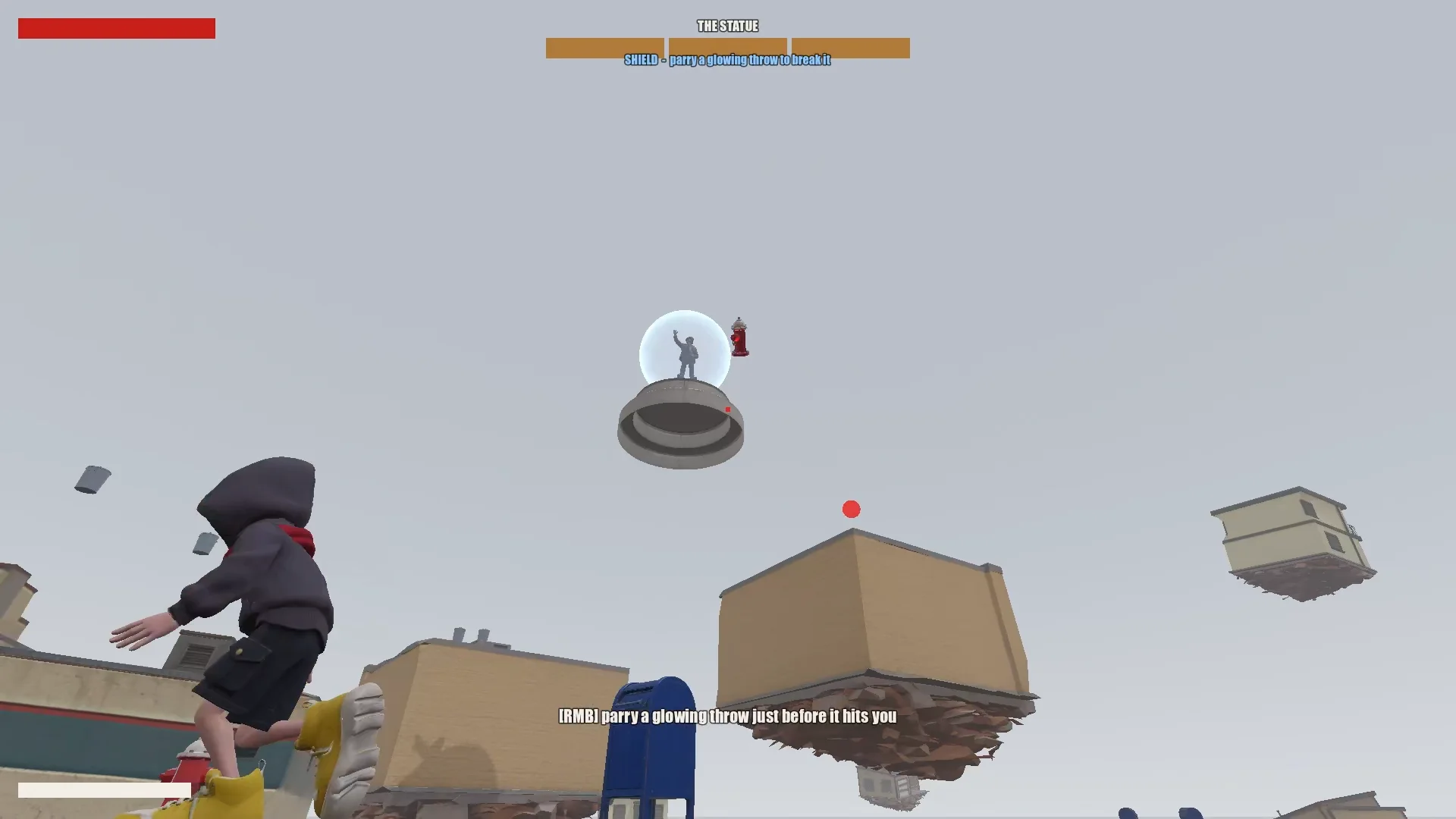
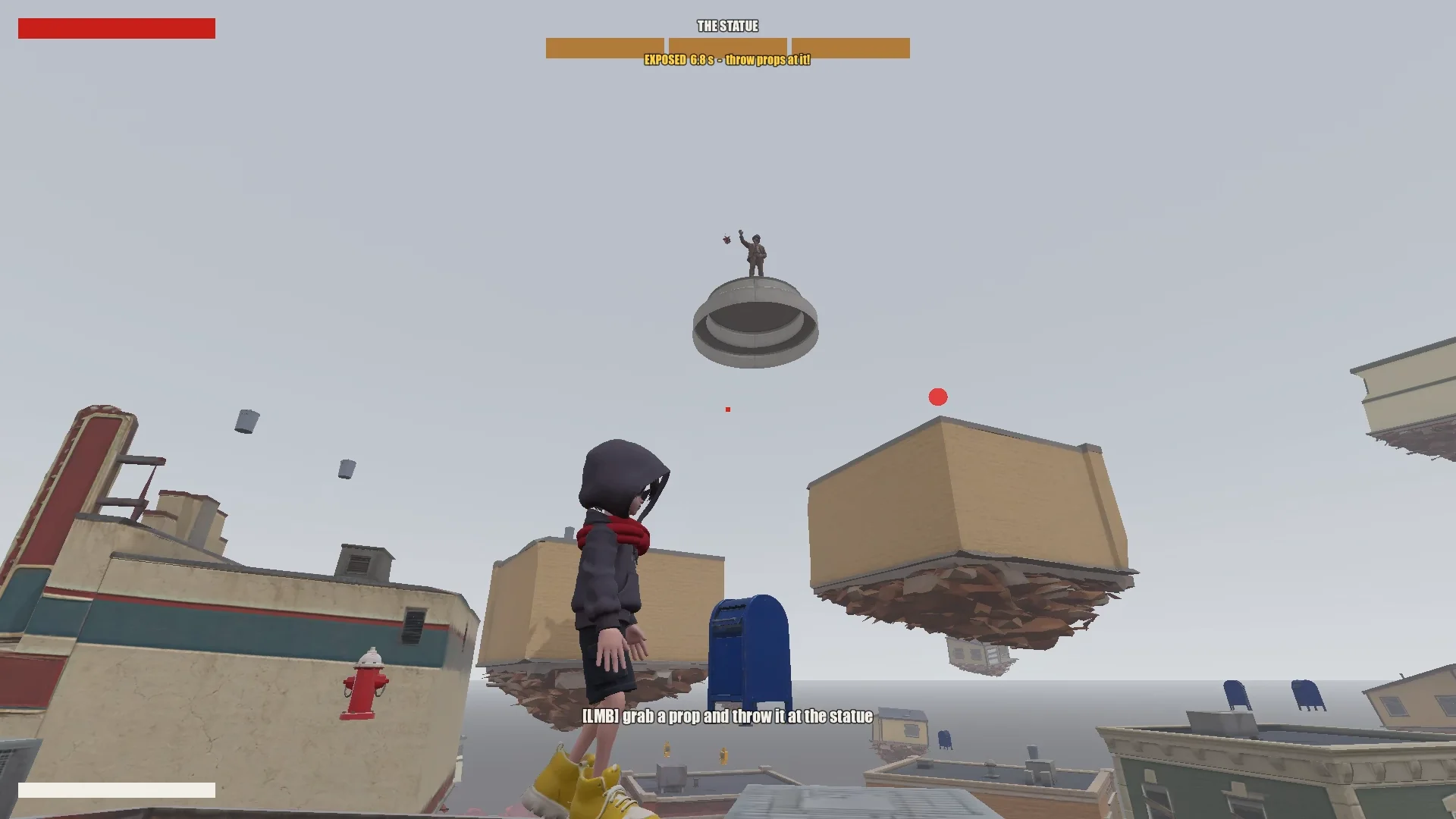
Oyuncu zıplayarak, süzülerek ve atkıyla sıçrayarak havada yüzen dükkânlara tırmanıyor. Parlayan bir mermiyi savuşturmak heykelin kalkanını kısa süreliğine kırıyor; yakındaki nesneleri fırlatmak ise ona hasar veriyor. Üç turun sonunda çocuk heykele ulaşıp onu mühürleyebiliyor.
03 / GENEL BAKIŞ
Araçları ve projeyi kur
Claude'a bir proje hafızası ver
Godot projesini, tasarım belgelerini, konsept görsellerini, Tripo modellerini ve script'leri bir arada tuttum. Kök dizindeki CLAUDE.md dosyası, Claude'un oturumlar boyunca uyması gereken kuralları kaydediyordu.
Dosya şu temel noktaları kapsıyordu:
- Oyunu, tonu ve görsel çizgiyi tarif et.
- Tutarlı stil ve istenmeyen sembol ya da yazı olmaması gibi asset kurallarını listele.
- Büyük değişikliklerden önce plan yapılmasını şart koş.
- Bir prompt geçmişi tut.
- Tekrar eden tuzakları ve proje kurallarını keşfedildikçe kaydet.
Tekrar eden düzeltmeleri de aynı dosyaya ekledim: mesh sarım yönü, model yönelimi, animasyon adları ve atkıyla sıçrama hedefi kuralları. Sonraki oturumlar bunları yeniden kullanabildi.
Tripo CLI'ı kur
Claude'u Tripo'ya bağlamak için ondan Tripo CLI'ı kurmasını istedim:
Help me install and configure Tripo CLI: npm install -g tripo-cli
Godot ile Claude'u bağla
Claude, metin tabanlı Godot sahnelerini ve GDScript'i doğrudan düzenleyebiliyordu. Bir Godot MCP bağlantısı sayesinde oyunu çalıştırabiliyor, ekran görüntüsü alabiliyor, log kayıtlarını inceleyebiliyor ve girdi simüle edebiliyordu.
Bağlantıyı doğrulamak için Claude'dan açık sahneyi ve düğüm ağacını bildirmesini istedim, ardından MCP portunu ve projeyi kendi yapılandırmamla karşılaştırdım.
Compare the Godot MCP servers that are available right now and pick the one that fits this project best (Godot 4.7, Claude Code, editor control plus running and inspecting the game).
Explain your choice, then install it into the_red_scarf/ and configure it at project scope (.mcp.json in the project root). Turn telemetry off.
04 / GENEL BAKIŞ
Fikri test edilebilir bir oyuna indirge
Tasarımı yaz, sonra buda
Claude'un ilk tasarımı kasabayı, hareketi, boss saldırılarını ve bölüm akışını kapsıyordu; ancak kısa bir demo için çok fazla aşama ve atkı yeteneği içeriyordu.
I'm making a game demo with Claude, Tripo and Godot. Here's the idea:

The player is a boy in a bright red scarf, a gray hoodie, blue denim shorts and bright yellow basketball sneakers. The scarf is a supernatural object: he can hover with it, move quickly between platforms, grab objects and throw them, and use it as a whip.
The game starts on the main street of a mid-1980s American small town: one main road, houses and shops on both sides (post office, gym, diner and so on). In the central plaza stands a statue of a man in a suit whose face has been erased. It is a hostile supernatural object. When the boy arrives, it releases a shockwave and slowly rises into the sky. The houses around it are torn out of the ground and end up as floating platforms at different heights. The player jumps between them, blocks the objects the statue hurls with telekinesis, fights back, and finally reaches the statue and seals it with the scarf.

Write a short design doc in design/game_design.md: building types, the boss's attacks in two phases, the boy's attacks, defense and movement moves, and the level flow.
Show me your plan first. Ask me if anything is unclear.
Tasarımı, hâlâ bu oyun gibi hissettiren en küçük döngüye kadar budadım:
Simplify the combat:
1. The boss has only one phase.
2. Remove the scarf shield and the scarf whip.
3. New loop: the player moves across floating buildings and can only break the statue's shield by parrying its attacks (right click / RT, like a fighting-game parry). Once the shield is down, the player throws objects at it to deal damage.
Dövüşü tek bir boss aşamasına indirdim: kalkanı kırmak için savuştur, boss açık verdiği sırada nesne fırlat ve havada yüzen kasabayı hareket zorluğu olarak kullan. Geriye kalan her hareket bu döngüye hizmet etmek zorundaydı.
Kasabayı veriden oluştur
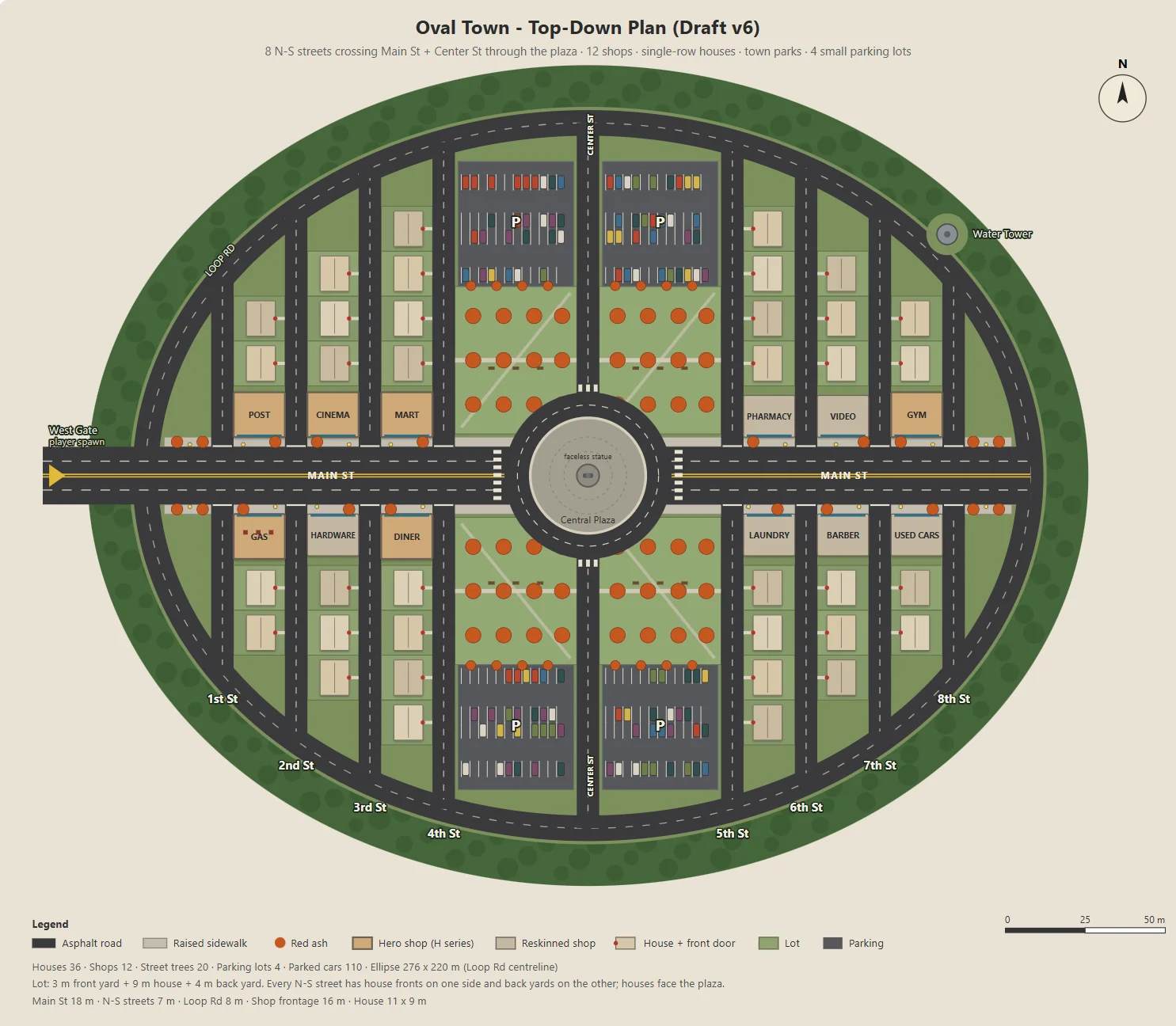
Claude, oval kasabanın parametrik bir SVG'sini üretmek için bir Node script'i yazdı: Main Street, on iki dükkân, mahalle yolları, parklar, otoparklar ve bir meydan.
Aynı script, Godot'daki blockout, binalar, yollar, lambalar ve ağaçlar için JSON da dışa aktardı. Böylece konsept görselleri ile oynanabilir bölüm tek bir yerleşimi paylaştı.
Otopark boyutu, arka bahçe derinliği ya da dükkân girişleri gibi parametreleri teker teker değiştirdim; böylece her değişikliği incelemek kolaydı.
Here's the town I have in mind. The street grid is a grid inside an oval outline:
- The long axis of the oval is the widest street, Main St, lined with functional buildings like the post office and the gym.
- The other streets run perpendicular to Main St on both sides, lined with houses.
- The center of the oval is a round plaza; the statue stands on a concrete pedestal in the middle.
- Asphalt streets with lane markings. Raised concrete sidewalks in front of the shops, with American red ash street trees at regular intervals.

Design the town structure, fill in the details I didn't mention and improve the design.
Draw it as a top-down plan with a Node script (tools/townplan/gen_town_svg.mjs) that generates an SVG from parameters kept at the top of the file.
Bir görsel çizgi belirle
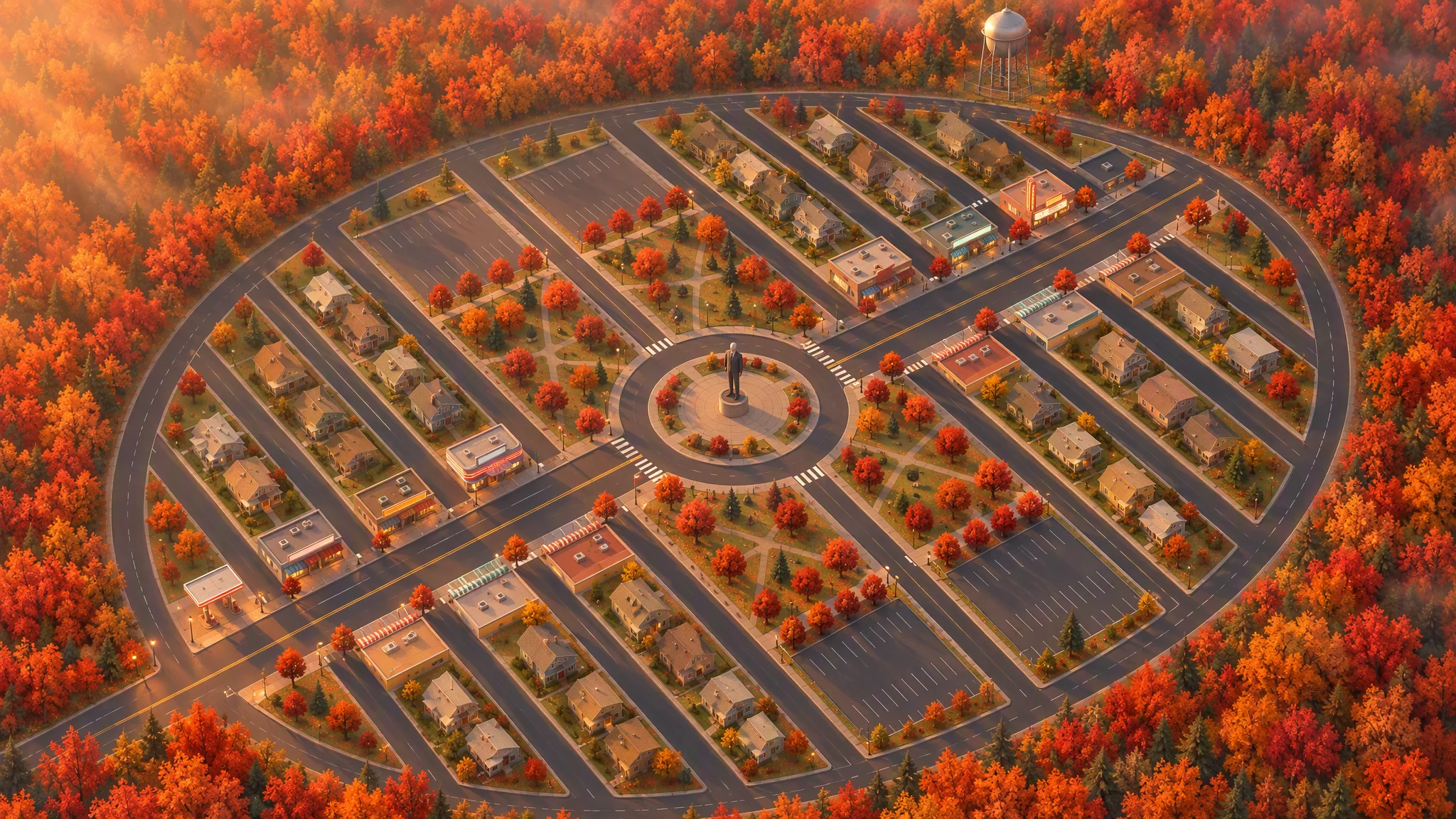
Yerleşimi, tepeden bakışlı bir illüstrasyon için katı bir referans olarak kullandım; yolları, parselleri, bina taban izlerini, ağaçları ve kasabanın dış hattını korudum.
İlk 45 derecelik görünüm eğik bir haritaya benziyordu. Yeniden üretmeden önce referansı yerel olarak döndürmek, görsele inandırıcı bir açı kazandırdı.
Strict layout reference: image[1]. Keep every road, block, building footprint, lot, park, parking lot, tree and the oval outline exactly as in image[1]. North up. Add, remove, move or resize nothing. Only restyle it as a finished top-down orthographic illustration of a quiet mid-1980s American small town in autumn.

[...town contents: main street, roundabout and statue, twelve shops seen as flat roofs only, all facing the main street, houses, parks, parking lots, red ash trees, a water tower...]

Style: stylized non-photorealistic game environment, simple hard-edged geometry, flat slightly exaggerated colors, light weathering, no grime. Warm late-afternoon sun from the west.

No vehicles, people, text, lettering, flags, or national or religious symbols. The statue has no face.
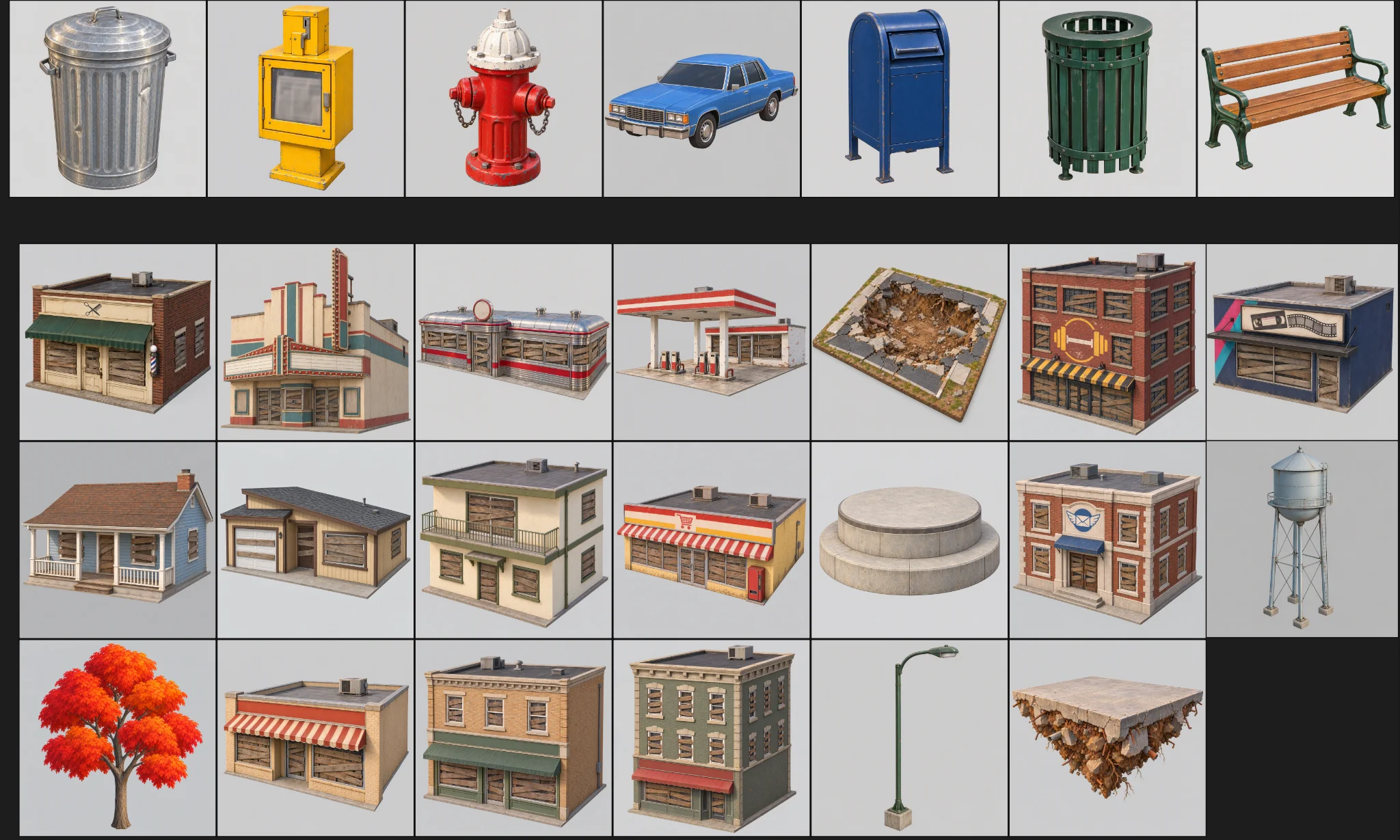
Claude, son plandan ve kuşbakışı görselden yola çıkarak asset'leri listeledi ve Tripo modellerini Godot'da kurulan nesnelerden ayırdı. Yüzey sayısı kademeleri sayesinde yaklaşık otuz konsept görseli ve otuz model bütçe içinde kaldı.
The town concept art is done. Using the final plan (v6), list every asset we need, split into "generate with Tripo" and "build in the engine". Then write a concept-image prompt for each Tripo asset in design/asset_prompts.md.
- Shops on Main St should vary more, with clearly different heights, so the opening walk has an interesting skyline.
- Split scene assets into tiers (S / A / B / C) by importance and size, give each tier a model and a triangle budget (hard cap 10,000 per asset), and estimate the total for the scene.
05 / GENEL BAKIŞ
Gerisini yapmadan önce bir asset'in prototipini çıkar
Temsili bir binayı test et
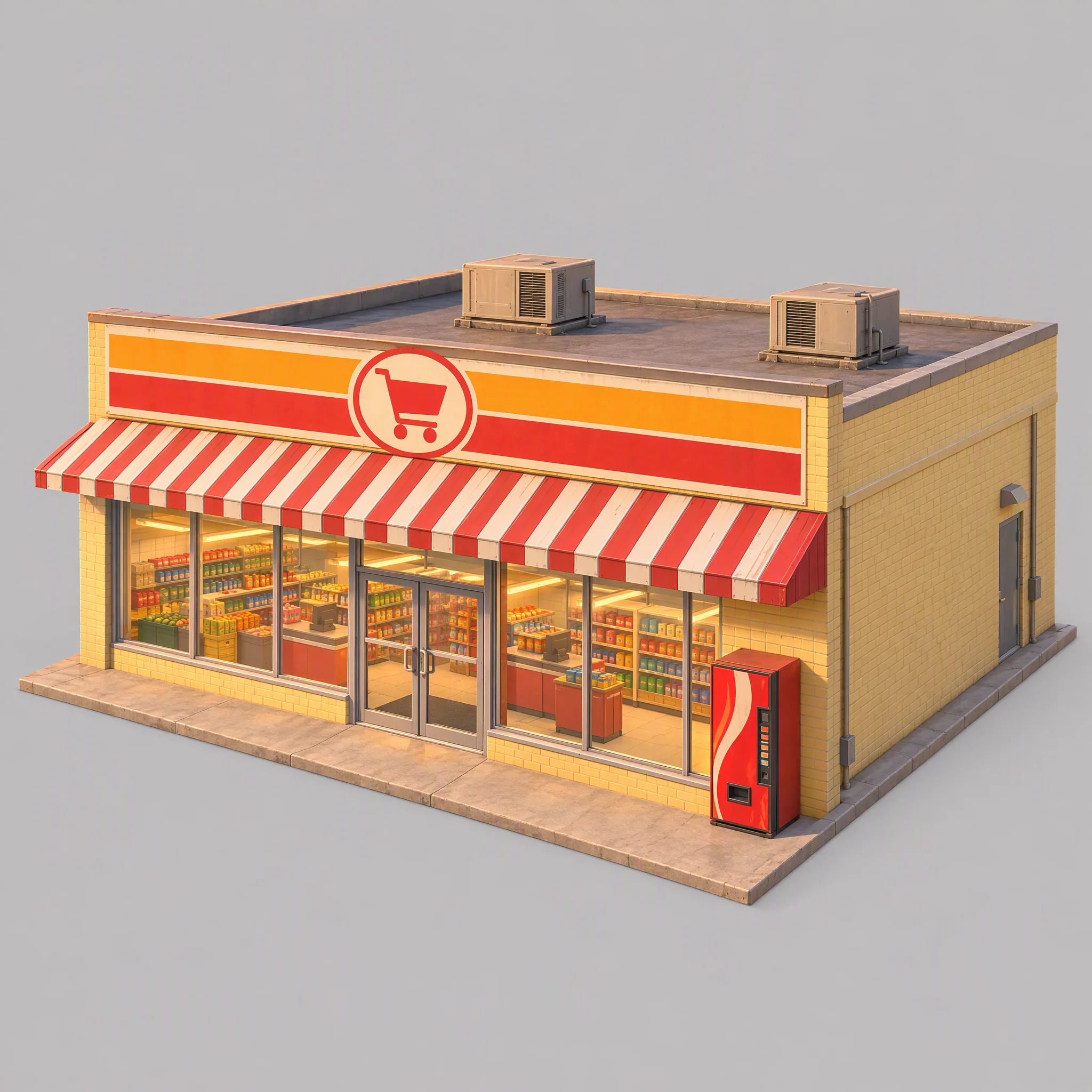
Üretim hattını önce tek bir süpermarket üzerinde test ettim; görsel stilini, modelleme referansı olarak uygunluğunu ve hangi Tripo model ailesinin doğru seçim olduğunu kontrol ettim.
- Konsept görseli kasabanın görsel çizgisine uyuyor mu?
- Görsel temiz bir modelleme referansı sunuyor mu?
- Doğru geometriyi hangi Tripo model ailesi üretiyor?
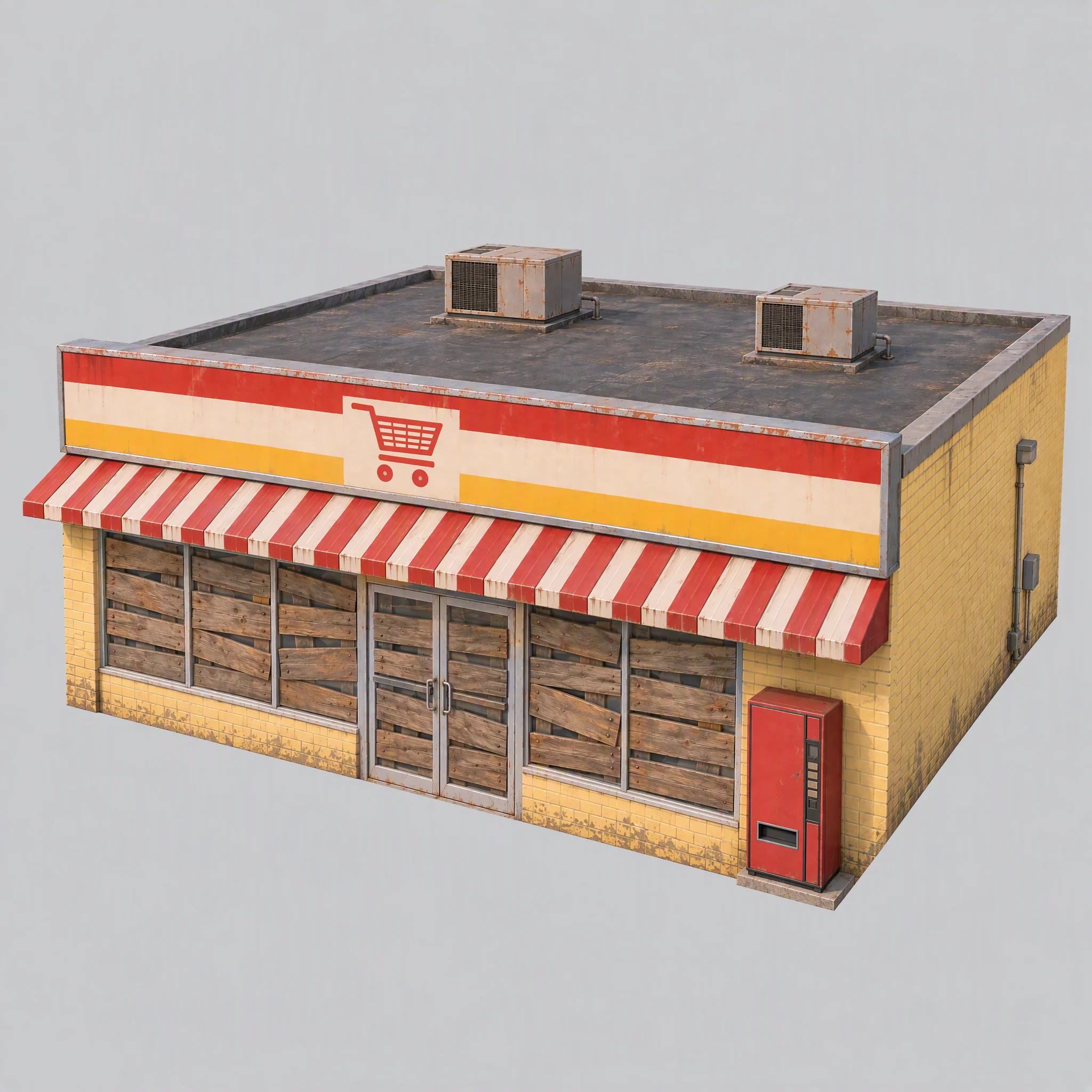
İlk görselde görünür raflar, görüntüye işlenmiş sıcak bir ışık, marka izlenimi veren bir otomat ve fazla büyük bir temel vardı.
Ortak kuralları güncelledim: pencereleri tahtayla kapat, ışıkları söndür, nötr beyaz referans aydınlatması kullan ve temelleri duvarlarla aynı hizada tut.
Use image[1] only as a reference for color palette, materials and rendering style. Do not copy its content or camera.

A single isolated one-story small-town supermarket from the mid-1980s: a wide, low box about 16 meters wide, 14 meters deep and 5 meters tall. The front is a long row of large plate-glass windows with a pair of glass doors in the middle, under a flat red-and-white striped metal awning. Above the awning, a tall flat sign panel runs the full width of the roofline, painted with bold color bands and a simple shopping-cart pictogram, no letters. Pale yellow painted brick walls, a flat roof with two boxy rooftop AC units. A plain red vending machine stands beside the doors. All windows and glass doors are boarded up with weathered wooden planks, so no interior is visible. All lights, signs and neon tubes are switched off. The building sits on a thin flat concrete slab exactly the size of its footprint, flush with the walls on every side.

Three-quarter front view from slightly above, the whole building in frame, centered on a plain light gray background, neutral white daylight with soft even lighting and no warm tint, no cast shadows, no ground beyond the slab.

Style: simplified realism with hard-edged, clean forms, mid-1980s American, slightly saturated comic-book colors, light weathering, no grime.

No text, no letters, no logos, no flags, no national or religious symbols, no people, no vehicles
Üretimi büyütmeden önce model ailelerini karşılaştır
Aynı süpermarket görseli ve kontrollü yüzey sayısı sınırlarıyla P serisi daha temiz sert kenarlar üretti; H serisinin üçgenleri ise daha düzgün dağılmıştı ve yüzeyleri daha yumuşaktı.
Bu oyun için şunları seçtim:
- Temiz, sert yüzeylerden fayda gören binalar, araçlar ve prop'lar için P1.0 kullan.
- Heykel ve havada yüzen zemin parçaları gibi organik formlar için H3.1 kullan.
- Çocuk için P2.0 kullan; çünkü karakterin rigging için temiz topolojiye ihtiyacı vardı.
Bu, evrensel bir model sıralaması değil, bu oyuna özgü bir tercihti.
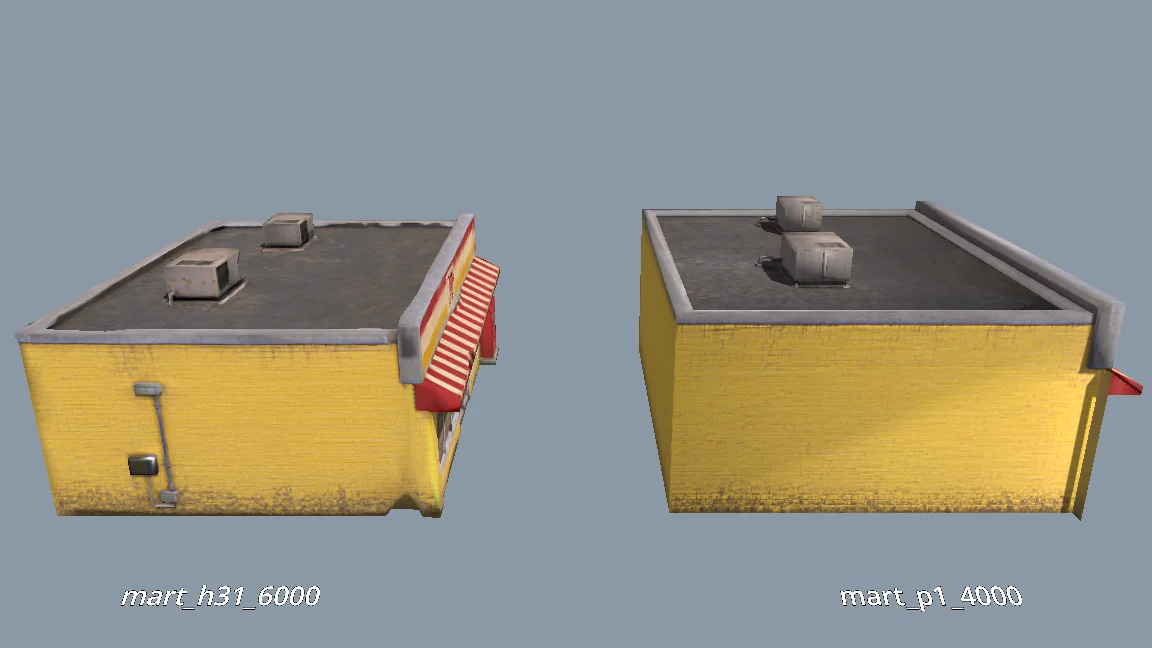
The current models are all clean and fairly flat. For performance, would P1.0 suit the buildings better than H3.1? Run a comparison: generate MART with P1.0 at 4000 faces and with H3.1 at 6000 faces, import both into a test folder, and render them side by side from the storefront, front, corner and top views (shaded and wireframe). Then tell me which one to use and why.
Kalan sahne asset'lerini üret
Prototip incelemeden geçtikten sonra kalan asset'leri ürettim. Her birinin bir kategorisi, klasörü, model ön ayarı ve yüzey bütçesi vardı.
Toplu üretimde üç kontrol vardı:
Generate concept images for all remaining scene assets the same way as MART, using the prompts in design/asset_prompts.md and cpt/town_birdseye.png as the style reference.
Check balance first. Save each image under cpt/assets/<category>/.
Check every image against the checklist in asset_prompts.md (single object, clean background, no text or symbols, matches the bird's-eye style, no thin fragile parts).
Retry failed tasks individually; never rerun the whole batch.
Record progress in design/batch_checkpoint.md so we can resume if we stop halfway.
When done, list what succeeded, what failed and what needs my review.
- Her görselin tek bir nesne içerdiğini, arka planının temiz olduğunu, kazara eklenmiş yazı ve kırılgan parça barındırmadığını kontrol et.
- Başarısız görevleri tek tek yeniden dene.
- İlerlemeyi bir kontrol noktası dosyasına kaydet.
Başarısız olanları tek tek yeniden ürettim: arka duvarında delik olan bir benzin istasyonu, eksik kalan bir su kulesi ve dağınık süpermarket geometrisi.
Karakteri ayrı hazırla
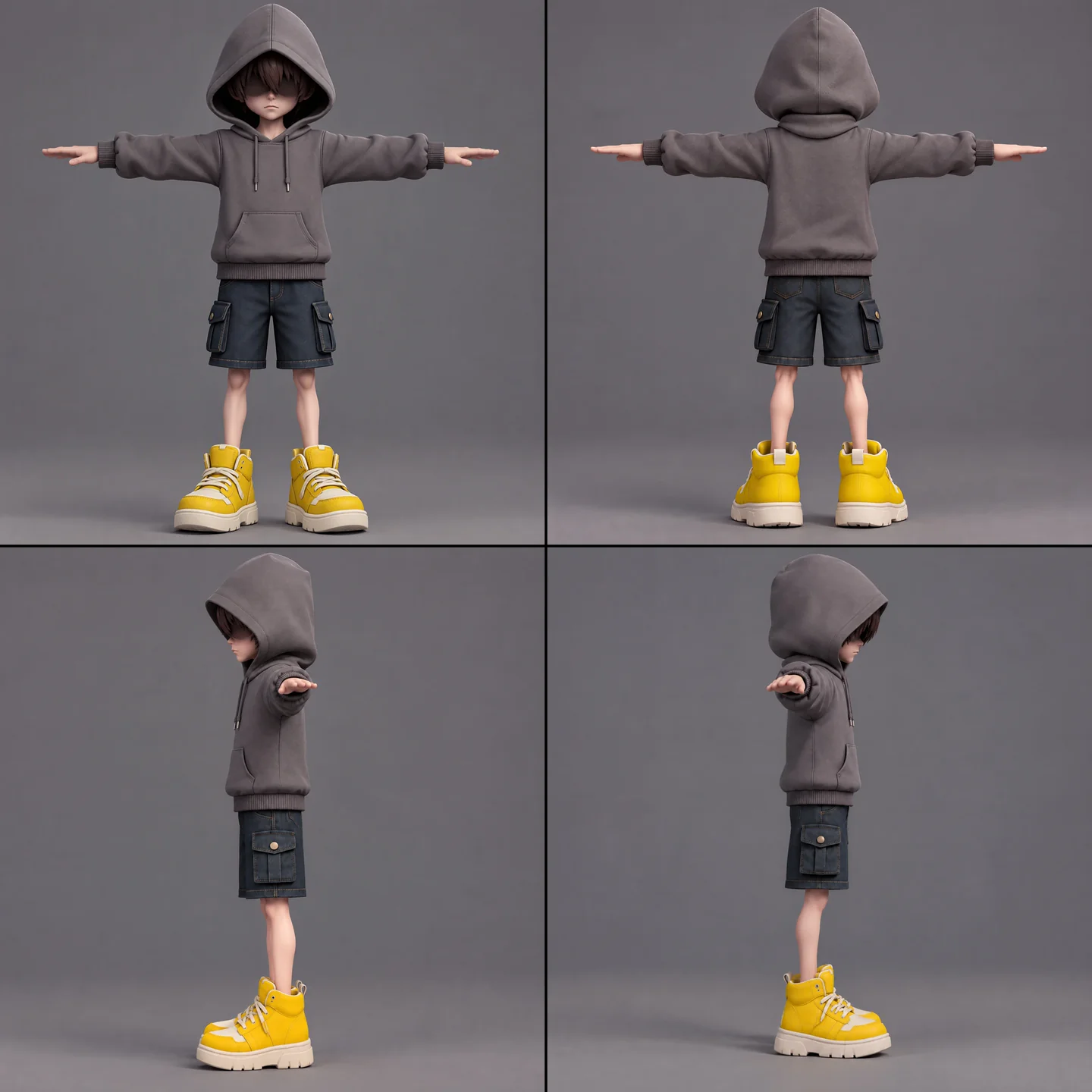
Çocuk için konsept görseli, modelleme, rig kontrolü, rigging ve animasyon retargeting'i gerekiyordu. İstenmeyen skin ağırlıklarını önlemek ve atkının karmaşık hareketlerini koruyabilmek için onu ayrı tuttum.
A full-body cartoon-style boy in a standard T-pose, arms extended horizontally, legs straight. He wears a gray hoodie with the hood up. His face is shrouded in shadow, eyes hidden, with only his mouth and grayish-brown bangs visible. He has a long red scarf wrapped around his neck, with both hanging ends draped down behind his back, not in front. He wears dark blue denim shorts ending above the knee so his knees are exposed, with buttoned flap pockets on both the left and right sides. He wears oversized yellow sneakers and has relatively thin legs. Cartoon character design, clean 3D model.
Önce ücretsiz rig kontrolünü çalıştırdım. Animasyon listesi bekleme, yürüme, koşma, zıplama, düşme, fırlatma, savuşturma, atkıyla sıçrama, darbe alma, yenilgi, mühürleme ve zafer animasyonlarını kapsıyordu. Aynı anda beşten fazlasını retarget etmek başarısız oldu; bu yüzden işi üç küçük göreve bölüp sonuçları Godot'da birleştirdim.
The boy model is ready at models/boy/boy_body.glb. Rig it and add the animations the demo needs. Run the free rig check first. List the animations you plan to use, mapped to Tripo presets, before generating anything.
Karakter görünümlerini toplu üretimde kullanmadan önce aynalanmış eller ve güneş gözlüğü sanılan saçlar açısından elle kontrol ettim.
İçe aktarmaları ve kalite kontrollerini standartlaştır
Bir içe aktarma adımı, fazla yumuşak görünen duvarlara ağırlıklı normaller ve sert kenarlar ekledi. Doku sınırları asset'e göre değişiyordu; çocuk, atkı, heykel ve ağaçlar için istisnalar vardı.
Modelleri test dizininden oynanabilir sahneye taşımadan önce ölçeği, yönelimi, duvarları, çatıları ve başıboş poligonları kontrol ettim. Üretim asset'lerinde raporlanan sorun sayısı sıfır olmalıydı.
When I inspect the models, the normals are smoothed across every edge, so flat walls look soft and cheap. I want something like Blender's Weighted Normal modifier.
Write a Godot import hook that recomputes weighted normals on import (area-weighted, edges sharper than 30 degrees become hard edges, keep the normal map), plus a setup script that attaches the hook to a list of GLBs and limits texture size (4K, or 2K for small assets) with VRAM compression. Don't apply it to the boy, the scarf, the statue or trees.
Render before/after comparisons so I can judge the result.
06 / GENEL BAKIŞ
Demoyu katman katman inşa et
Bir oynanış blockout'uyla başla
Bir Godot araç script'i, kasabanın JSON verisini okuyarak renkli çarpışma kutuları, zemin, doğma noktası ve havada yüzen yerleşimden oluşan oynanabilir bir blockout kurdu. Veri değiştiğinde Inspector'daki kontroller ve bir komut satırı script'i blockout'u yeniden kuruyordu.
Ardından Swap In Models düğmesi kutuları aynı konumlarda Tripo asset'leriyle değiştirdi. İki sürüm de aynı yerleşim verisini kullanıyordu.
Dükkânlar tırmanılabilir sarmalı oluşturdu, evler ise arka planda kaldı. Bir rapor çakışmaları, baş üstü boşluğunu, çatılar arası mesafeyi ve platformlara erişilebilirliği denetledi.
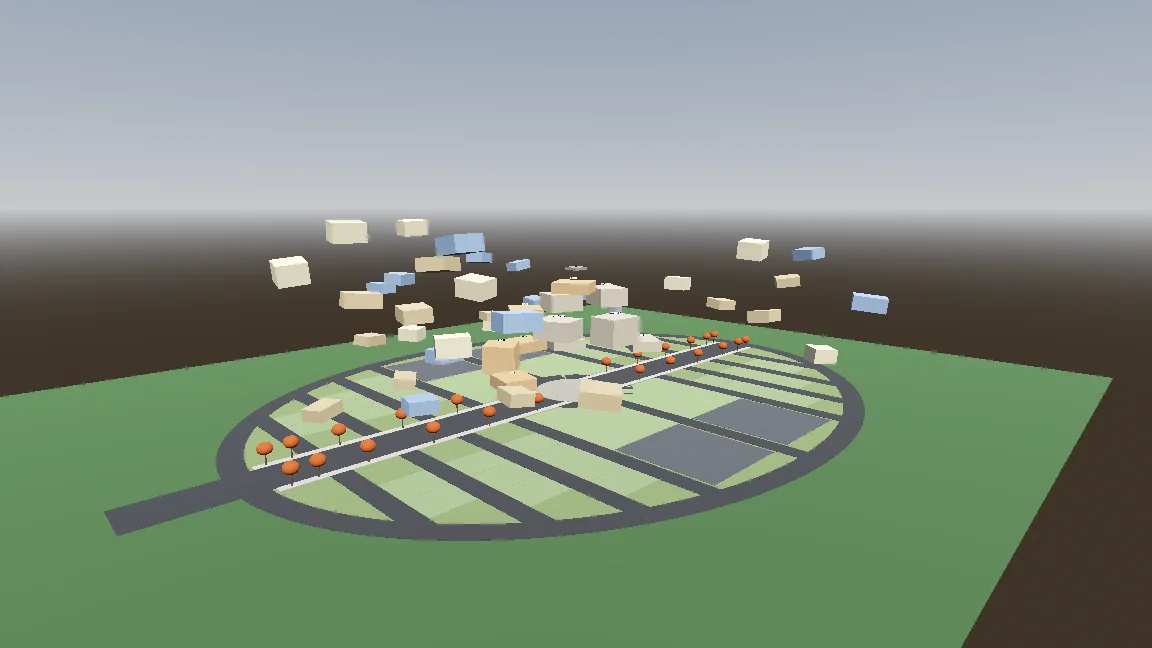
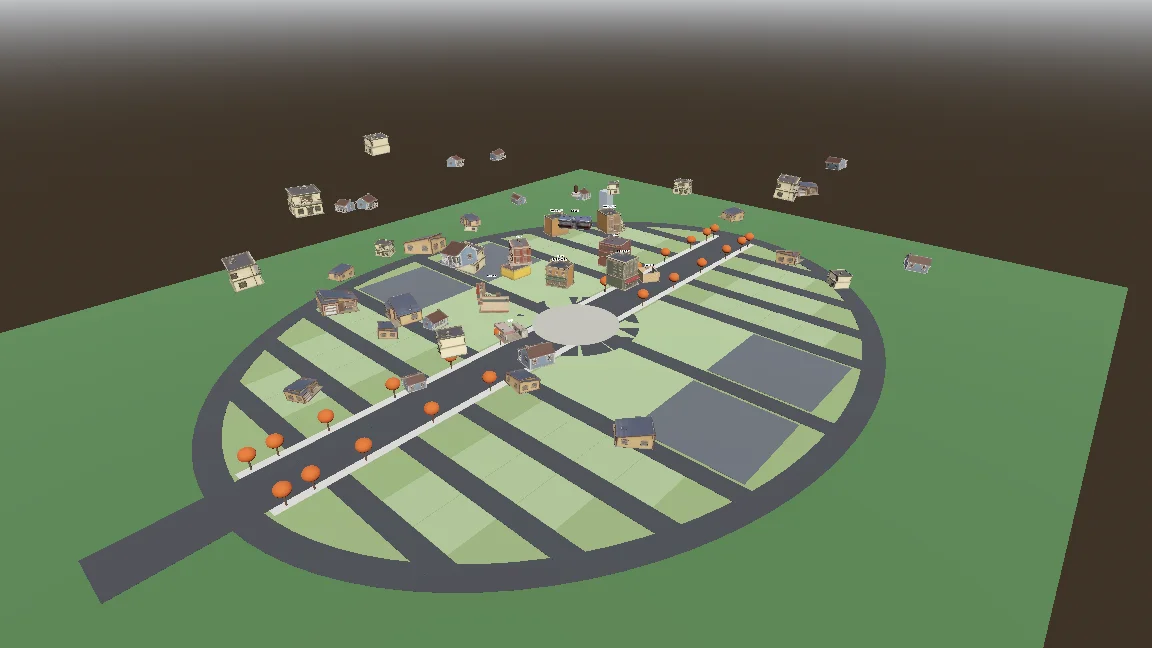
Build a gameplay-only blockout:
- Export the town plan as JSON (gen_town_svg.mjs --json) and write an @tool script (Scripts/town/town_builder.gd) that reads it and generates the ground, a colored box with collision for every shop and house (heights from the design doc), and the player spawn at the west entrance.
- Add inspector buttons: Build Town, Preview Tree, Reset To Ground, Swap In Models.
- Also add a command-line build script so you can rebuild the scene headless.
- Swap In Models replaces each box with res://Assets/Models/<model>.glb, scaled to the lot and rotated to face the street, keeping the position.
Show me screenshots from the street and from above.
Hareketi ve prosedürel atkıyı ekle
Karakter kontrolcüsünün zemin, hava, süzülme ve atkıyla sıçrama durumları vardı. Düzenlenebilir hâle getirilen ayarlar ve bir smoke testi, her hareketin ince ayarını yapmaya ve kontrol etmeye yardımcı oldu.
Start the player controller in the blockout scene. Use the rigged boy model directly, no capsule placeholder.
- CharacterBody3D with states: ground, air, hover (hold jump midair, drains scarf energy), scarf leap.
- Third-person over-the-shoulder camera, keyboard + mouse and gamepad input maps.
- AnimationTree state machine built by a generator script (Scripts/tools/build_player_scene.gd), not by hand in the editor.
- All feel parameters exported so I can tune them in the inspector.
- An automated smoke test that spawns the player, runs, jumps, hovers and scarf leap, and saves screenshots.
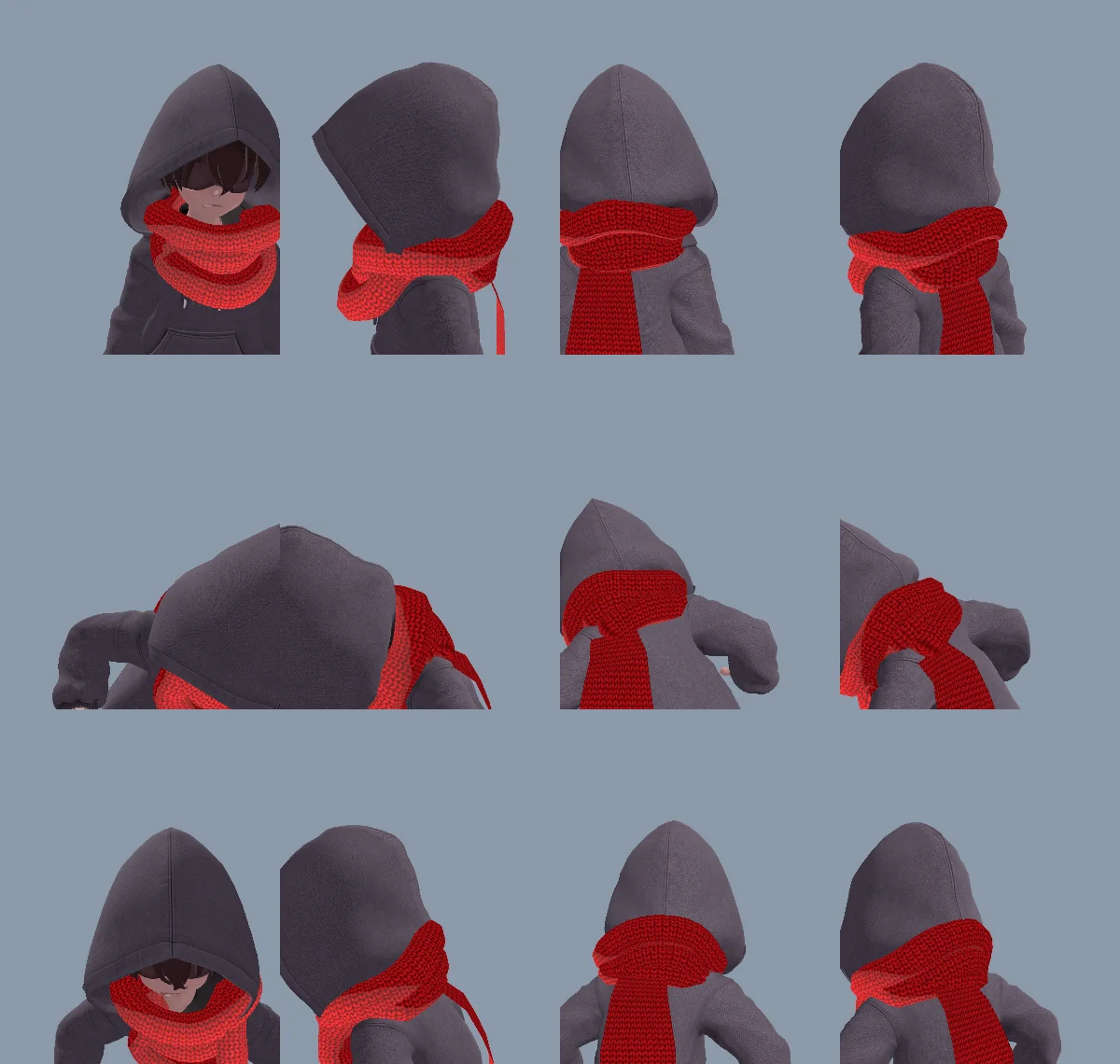
Modellenmiş bir boyun sargısı fazla sert görünüyordu; bu yüzden hem sargı hem de atkının ucu kodla üretildi. Aynı uç, ayrı model ya da animasyon gerekmeden sarkabiliyor, uzanabiliyor, kavrayabiliyor, heykele dolanabiliyor ve bırakabiliyordu.
İlk sargı, üçgen sarım yönü ve ters dönmüş normaller yüzünden içi dışına çıkmış gibi görünüyordu. Claude mesh'i düzeltti ve nedeni CLAUDE.md dosyasına kaydetti.
The neck scarf looks too stiff. Try generating it procedurally instead of using the Tripo model:
- ScarfWrap: three thick, soft knitted loops around the neck, rebuilt every frame from the neck, head and spine bones, pushed out by capsules on the head, neck, chest and upper arms, fuller at the back so it fills the gap between the hood and the shoulders, with a little spring lag.
- ScarfTail: a Verlet chain hanging from the knot at the back, with thickness, stiff enough not to stretch, colliding with body capsules. Reaching out to grab props, hanging from anchors and wrapping the statue all use the same tail (reach(point) / release()).
- Both share one wool material with the red knit texture and a soft sheen at grazing angles.
Keep the per-frame cost low and tell me the measured time.
Atkıyla sıçramaya bilinçli bir hamle hissi ver
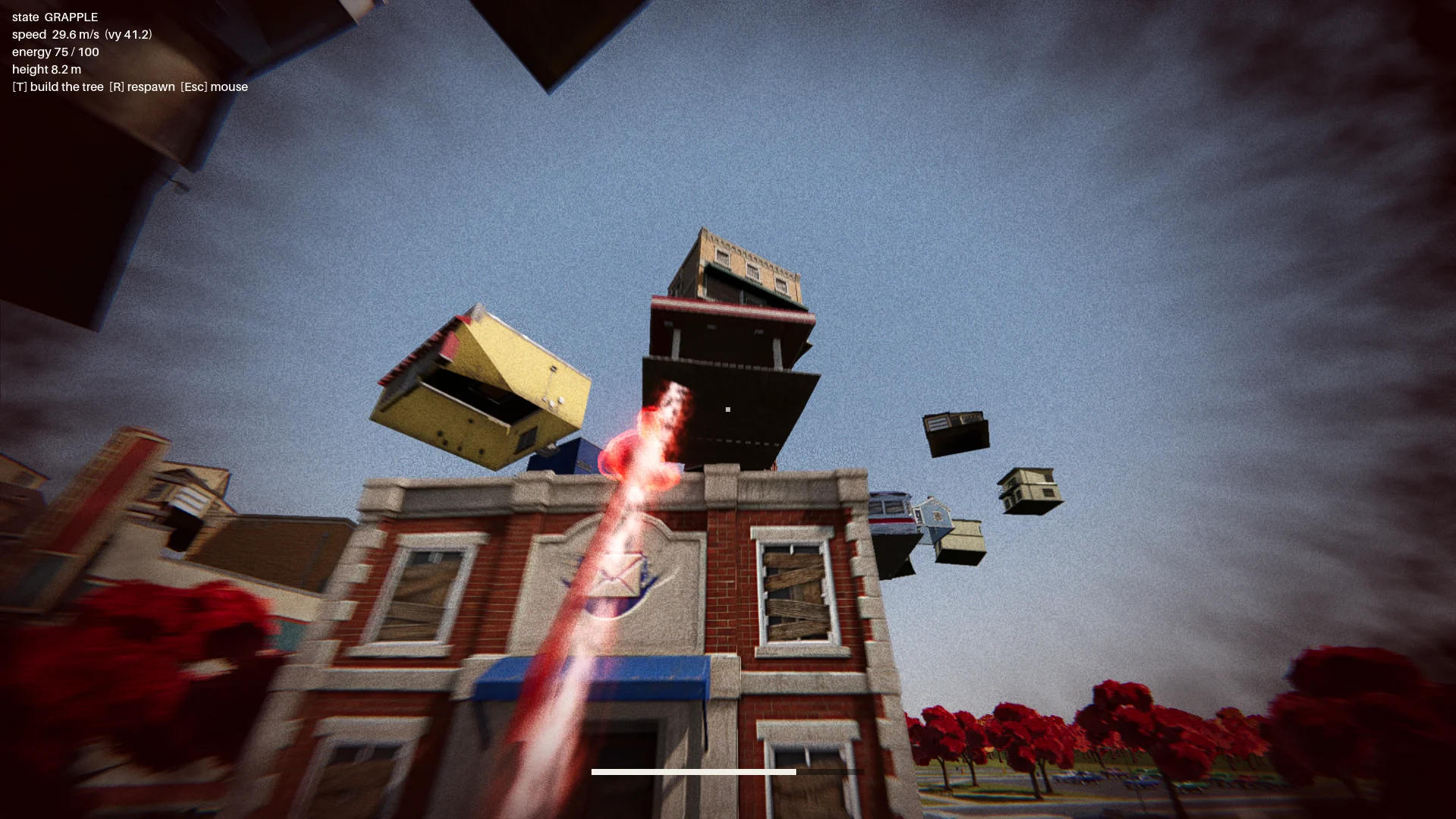
Atkıyla sıçramanın ilk hâli kancalı halat gibi salınıyordu. Onu seçilen bir iniş noktasına doğru hızlanacak şekilde değiştirdim; hareketi okunabilir kılmak için kırmızı bir aura, toz, hareket izi ve iniş dalgası ekledim.
Başlarda tentelerin üzerine konan hedefler çocuğu bir binanın içinden geçirebiliyor ya da bir yere sıkıştırabiliyordu. İniş ve uçuş yolu kontrolleri ekledim. Geçerli bir hedef:
- gerçek bir çatı kenarında olmalıydı;
- üstünde yeterli boşluk bulunmalıydı;
- karakterin üzerinde durabileceği kadar yer sunmalıydı;
- hedef binanın içinden geçen bir uçuş yolu gerektirmemeliydi.
Bir rapor her binayı on iki yönden denetledi ve geçersiz sıçrama noktası sayısının sıfır olmasını şart koştu.
Change how the scarf leap feels. Right now it swings like Spider-Man. Instead, the boy knows where he's going and moves straight to the target. While moving, rotate his model so his feet point at the target, as if his feet were pulling his whole body toward it.
Drop the scarf from the scarf leap and sell the power with effects: a red aura when the scarf leap starts, a puff of dust and a small energy pulse at the start point, a trail along a small arc, then the aura fades on landing with a small shockwave at the contact point.
The speed is not constant: a little slow at first, then accelerating hard, never slowing down until it arrives.
Boss savaşını bir araya getir
Rota ana menüyü, girişi, göğe yükselen kasabayı, kontrol noktasını, üç turlu boss savaşını ve finali içeriyordu.
Heykel nesneler fırlatıyordu; bunlardan biri savuşturulabilen, parlayan bir nesneydi. Bir savuşturma, heykelin kalkanını yaklaşık yedi saniyeliğine açıyordu. Sonraki saldırılara yelpaze biçiminde bir yaylım atışı ve meteor gibi düşen bir araba eklendi; görünürlük kontrolleri de binaların içinden geçen atışları engelliyordu.
Finish all playable content for a first complete version:
- A basic main menu, pause menu and ending screen with buttons.
- The intro: "The Oval Town" title card; when the player enters the plaza, the statue shakes, lifts off its pedestal, a "The Statue" title card, then a shockwave pushes the boy back along the ground. Buildings fly up into the spiral tree. One checkpoint at the end of this sequence.
- The boss fight: shield, parry window about 0.25 s, about 7 s exposed window, damage only from throws while exposed, 3 health segments, attacks unlocked by remaining health: single throw, fan volley (only the glowing one can be parried), car meteor shower.
- Sealing: when its health reaches 0, a scarf leap point appears on the statue; scarf leap to it and press the seal button repeatedly.
- A full-flow automated test that plays the whole game with a real parry, three rounds of throws, a death and restart, the seal and the ending, saving screenshots at each stage.
Show me the plan first, then build it.
Heykelin canı sıfıra indiğinde üzerinde bir atkıyla sıçrama hedefi beliriyordu. Oyuncu bir halkayı doldurmak için mühürleme tuşuna art arda basıyordu; basmayı bırakınca halka geri boşalıyordu.
07 / GENEL BAKIŞ
Cilala, test et ve dışa aktar
Sahneye görsel işçilik kat
Dövüş çalışır hâle geldikten sonra zemin detayı, çimen, ağaçlar, aydınlatma, son işleme ve efektler ekledim. Tek bir yumuşak additive shader sayesinde aura, halkalar, mermiler ve hareket izleri tutarlı bir görünüme kavuştu.
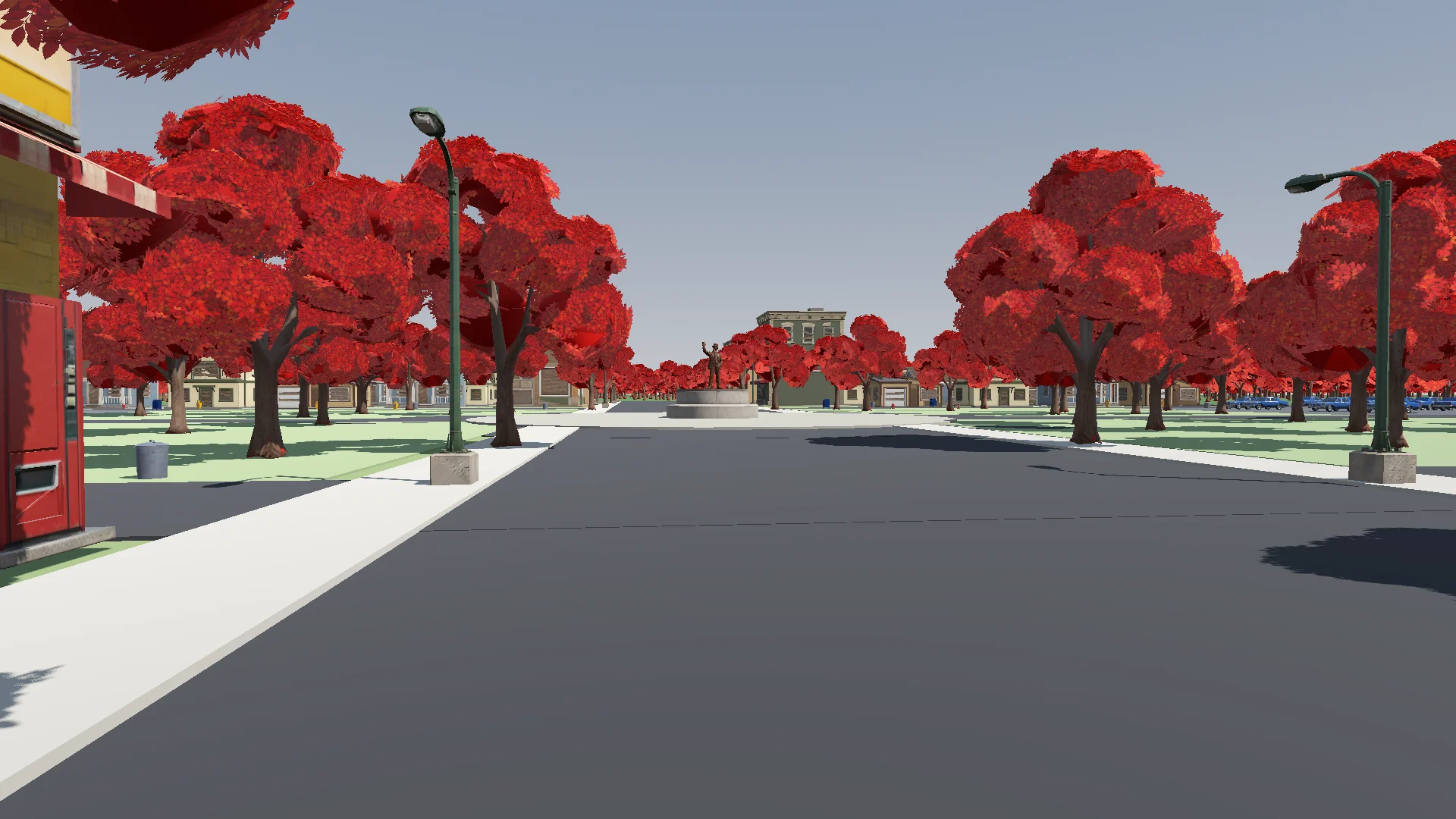
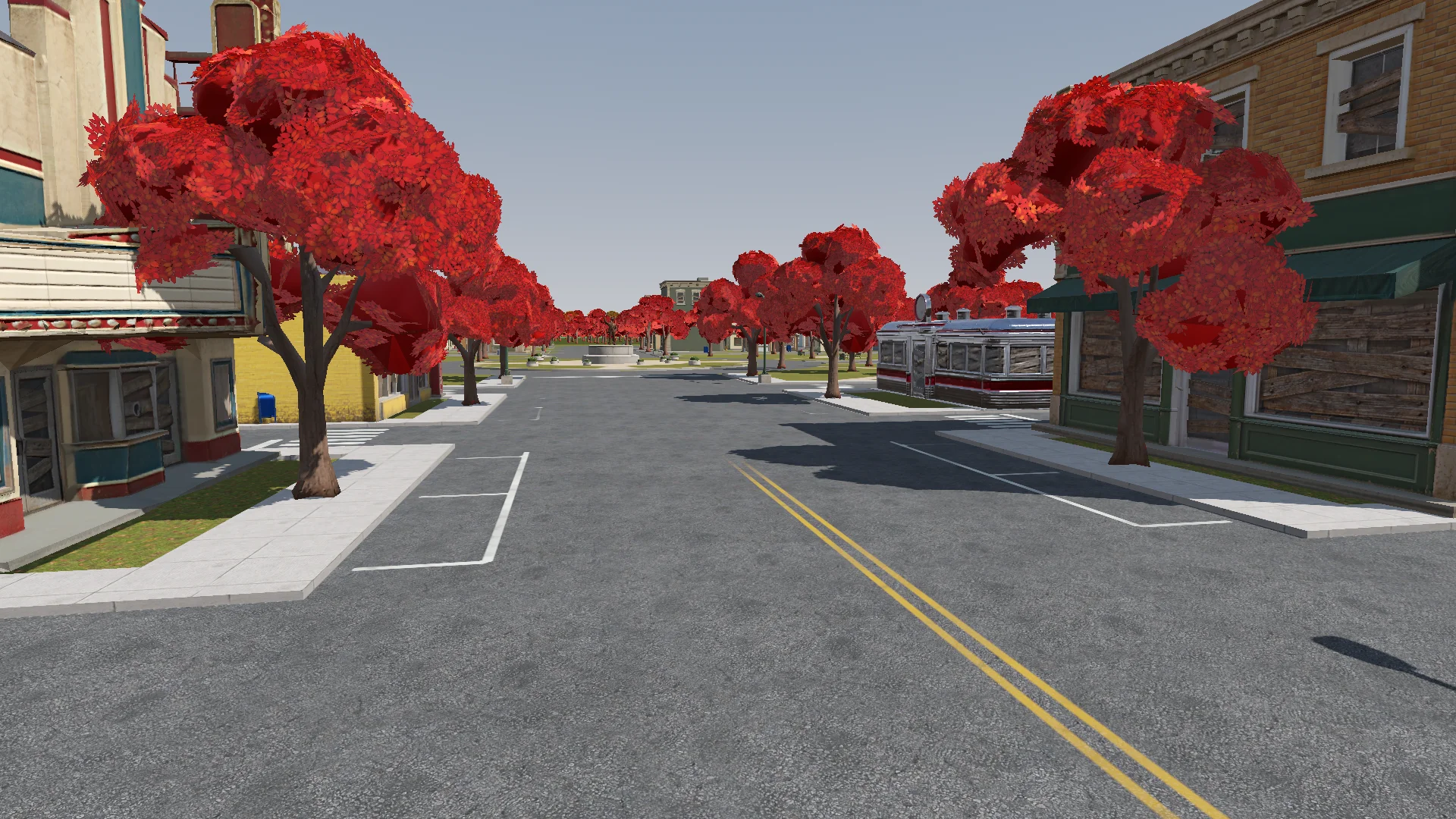
Polish: add the final details to the rest of the town based on the concept art (streets, parks, lane markings and so on). If details are missing or unclear, generate reference images of parts of the town first.
Street layout and lane markings should be as plausible as possible; use Tripo to generate textures if needed. The road surfaces must never flicker.
Add NPR style procedural grass on the lawns.
Değişiklikleri oyuncu kamerasından kontrol ederek titreyen yolları, önü kapanmış kapıları ve yanlış yere konmuş lambaları aradım.
Render with ACES tone mapping. Add post-processing: bloom, ambient occlusion, SSIL, depth of field, film grain, motion blur, chromatic aberration, FXAA, and an FSR 2 option, all in an Options menu. Bloom, AO, SSIL and DOF have Off / Low / Medium / High; FSR 2 has Off / Native AA / Quality / Balanced / Performance; motion blur, chromatic aberration and film grain are toggles.
Also add VSync and resolution.
The film grain should closely emulate Super 8 film. Godot has no built-in film grain or motion blur, so implement them as Compositor effects.
Ses ve arayüz geri bildirimi ekle
İşe sentezlenmiş seslerle başladım, sonra çoğunu kaynağı belirtilmiş CC0 müzik ve efektlerle değiştirdim. Uygun bir klip bulunamayan yerlerde sentezlenmiş sesler kaldı.
Find CC0 music and sound effects to replace the synthesized ones. Music should be synthwave / analog synth. Prefer less popular sources so the game feels unique. Where nothing fits, keep the synthesized sound. Verify the license on every page and generate a credits file.
HUD, oyuncu her hareketi kullanana kadar duruma özel kontrol ipuçları gösteriyordu. İlk parlayan atış, savuşturmayı öğretmek için zamanı kısa süreliğine yavaşlatıyordu.
Add interactive hints the first time each move is needed (move, jump, hover, dash, rush, Scarf Leap, grab, throw, parry), for a more explicit and intuitive guide to the controls. Each hint stays until the player actually does the move, then it is ticked off.
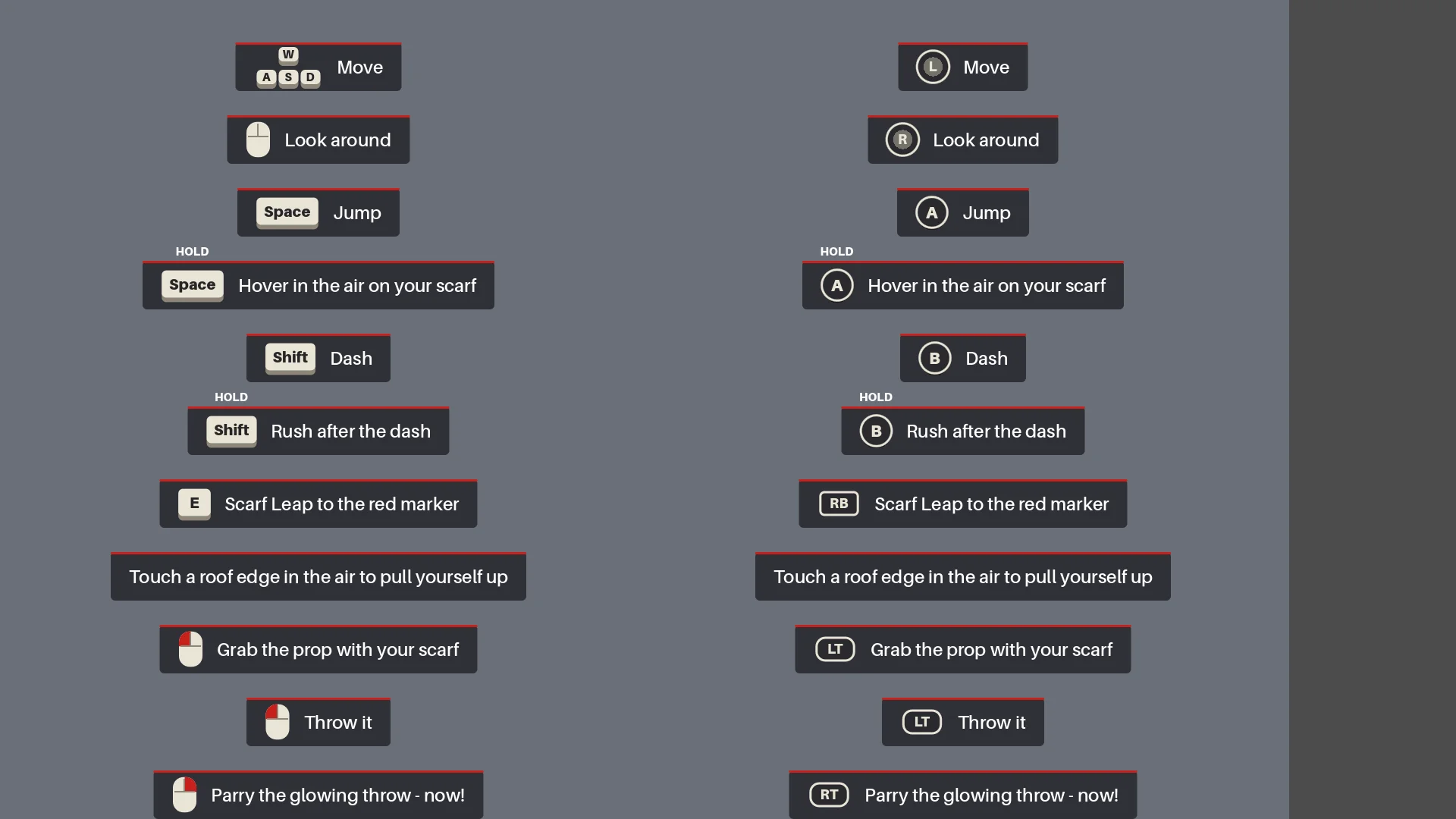
Tam bir regresyon turu çalıştır
Dışa aktarmadan önce Claude sahneleri yeniden kurdu, raporları çalıştırdı ve menüden finale kadar oynadı; buna gerçek bir savuşturma, ölüp yeniden başlama, mühürleme ve ekran görüntüleri de dahildi.
Before we export, do a full pass:
1. Rerun every generator in order (build_blockout --float --swap, build_player_scene, build_game) and make sure the main scene is the main menu.
2. Run every report (tree_report, grapple_point_report, street_report, lamp_probe, audio_probe, skin_gap_report) and both automated tests. Everything must pass.
3. Play the game through MCP from the main menu to the ending, take screenshots at each stage and read the game log for errors and warnings.
Report: what passed, what failed, and anything I should check by hand.
Baştan sona oynanış, hareket ya da zamanlama değişikliklerinden sonra ortaya çıkan yönelim hatalarını, eksik efektleri ve kontrol noktası sıfırlanmalarını yakaladı.
Export a Windows build of the game. Set up a Windows Desktop export preset for the_red_scarf (embed the PCK, the game icon, product name "The Red Scarf"). Check that the export templates for Godot 4.7.2 are installed; if not, tell me how to install them instead of guessing.
Exclude test scenes, test scripts and Assets/Models/_test/. Write a script that sets the build number and exports, run the exported exe once, and report the build size and any errors.
İlk Windows dışa aktarımı 1,15 GB tutuyordu ve bunun büyük kısmı dokulardı. Kullanılmayan asset'leri ve eski modelleri kaldırıp normal haritaları için daha küçük boyutlu bir sıkıştırma kullanınca boyut 755,5 MB'a indi.
08 / GENEL BAKIŞ
Bir sonraki projeye taşıyacaklarım
Tekrarlayacağım iş akışı şu:
- Hedeflenen sonucu tarif et.
- Küçük bir prototip yap.
- Onu gerçek çalışma ortamında incele.
- Tekrar eden her sorunu bir kurala ya da rapora dönüştür.
- Ancak ondan sonra üretimi büyüt.
Aynı kalıbı yeniden kullanırdım: kasaba yerleşimi için tek bir kaynak, asset partileri için kontrol noktaları, atkıyla sıçrama için geometri kuralları ve eksiksiz bir boss savaşı testi.
Benzer bir demo için tek bir karakter, tek bir rota ve tek bir düşmanla başla. Toplu üretime geçmeden önce temsili bir asset'i test et ve tekrar eden sorunları yeniden çalıştırabileceğin kontrollere dönüştür.