

01 / ÜBERBLICK
Überblick
Ich begann mit einem Jungen im roten Schal und einer verlassenen amerikanischen Kleinstadt der 1980er-Jahre. Eine gesichtslose Statue reißt die Gebäude in den Himmel. Aus der Idee wurde in Godot eine spielbare Third-Person-Action-Demo.
Claude half beim Planen, Skripten und Testen; Tripo lieferte Konzeptbilder, Modelle, Rigging und Animation. Ich leitete das Projekt und begutachtete das zusammengesetzte Spiel in Godot.
Dieses praxisnahe Vorgehen folgt einem Vibe-Gaming-Workflow, der Ideen, KI-gestützte Entwicklung und Playtesting verbindet.
Projekt-Setup:
- Game-Engine: Godot 4.7.2, Forward+
- KI-Coding-Assistent: Claude Code
- Bildgenerierung: Tripo-Bildgenerierung
- 3D-Generierung: Tripo-Modelle der P- und H-Serie
- Projekt: The Red Scarf, eine kurze Third-Person-Demo mit Bosskampf
02 / ÜBERBLICK
So spielt sich die fertige Demo
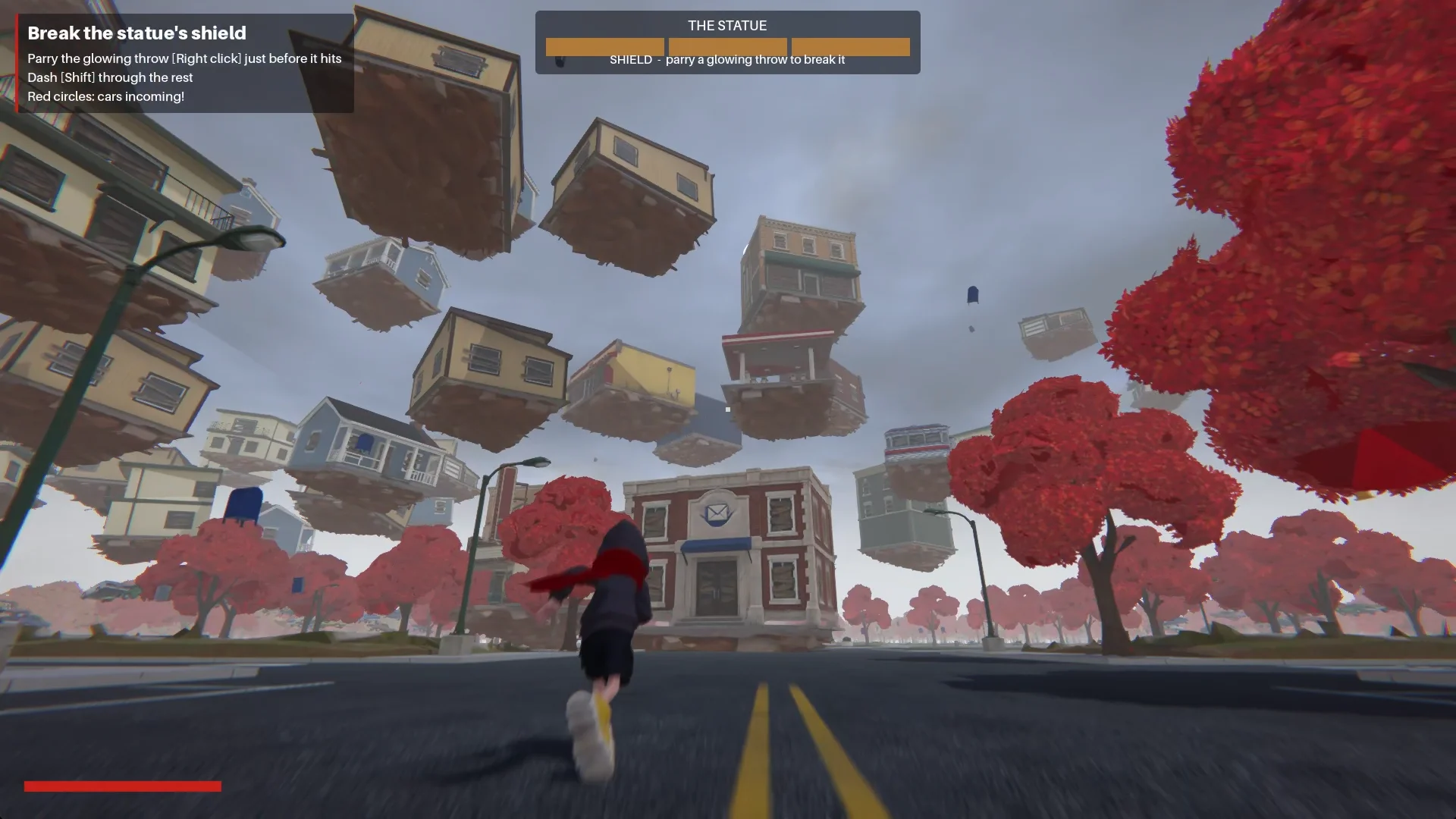
Der Junge betritt die Stadt über die Main Street. Auf dem Stadtplatz setzt eine gesichtslose Statue eine Schockwelle frei und zieht die Gebäude in eine Spirale um sich herum.
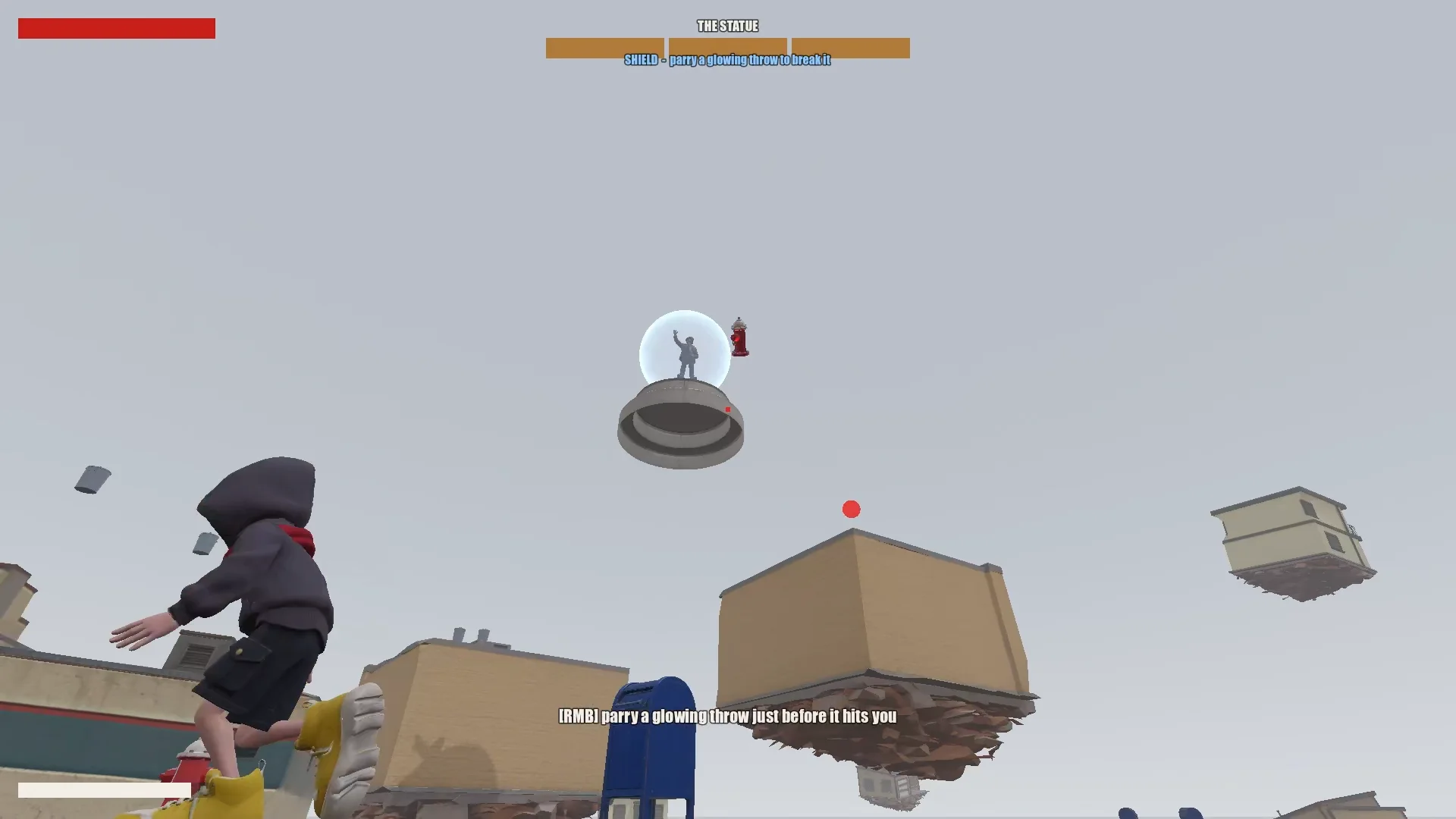
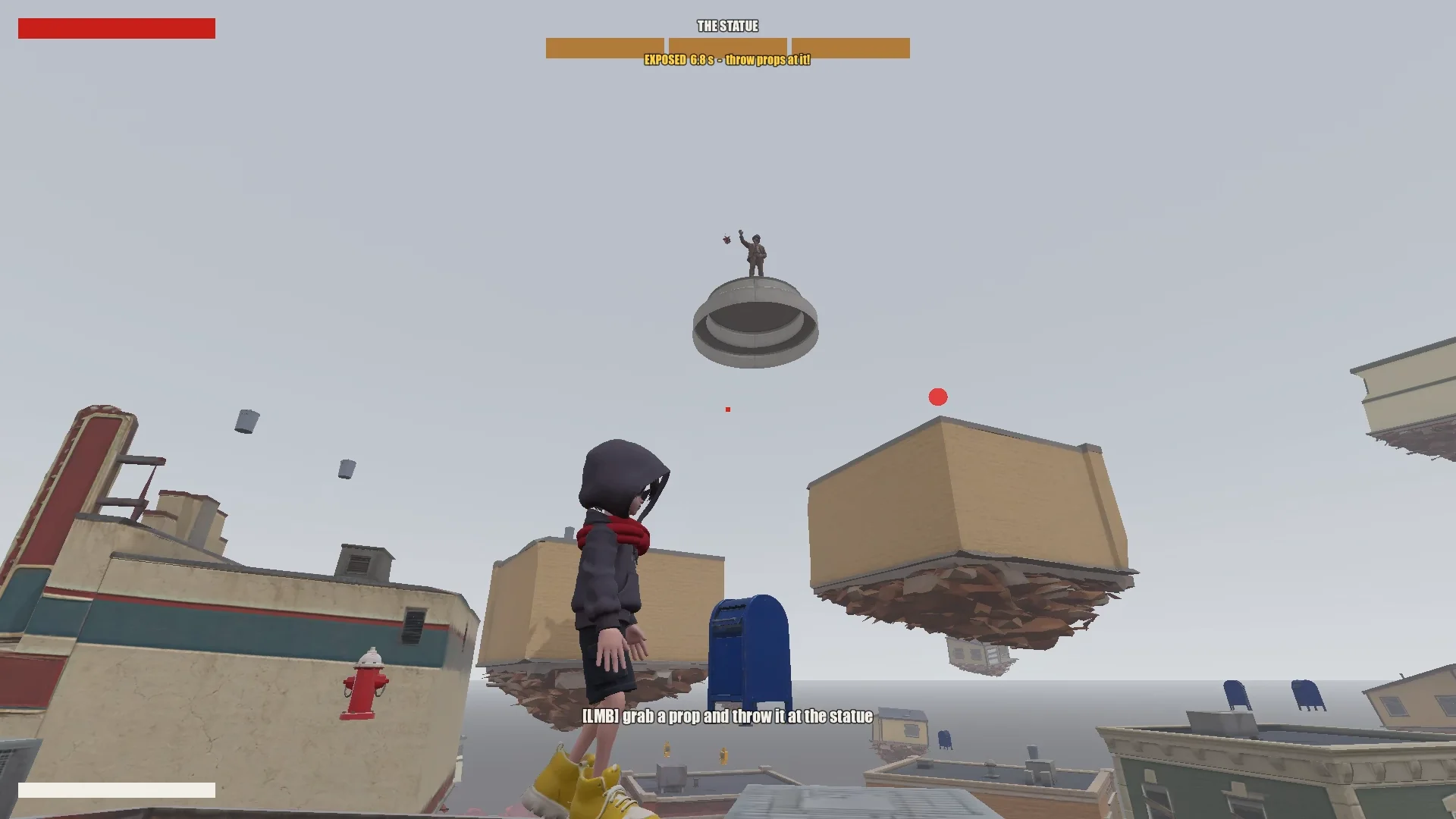
Der Spieler erklimmt die schwebenden Läden, indem er springt, schwebt und Schalsprünge einsetzt. Pariert er ein leuchtendes Projektil, bricht der Schild der Statue kurzzeitig auf; wirft er herumliegende Objekte nach ihr, nimmt sie Schaden. Nach drei Runden kann der Junge die Statue erreichen und versiegeln.
03 / ÜBERBLICK
Tools und Projekt einrichten
Claude ein Projektgedächtnis geben
Ich bewahrte das Godot-Projekt, Designdokumente, Konzeptbilder, Tripo-Modelle und Skripte an einem Ort auf. Im Stammverzeichnis hielt CLAUDE.md die Regeln fest, die Claude sitzungsübergreifend befolgen sollte.
Die Datei deckte das Wesentliche ab:
- Spiel, Tonalität und visuelle Richtung beschreiben.
- Asset-Regeln auflisten, etwa einen einheitlichen Stil und keine unerwünschten Symbole oder Texte.
- Vor großen Änderungen einen Plan verlangen.
- Einen Prompt-Verlauf führen.
- Wiederkehrende Fallstricke und Projektkonventionen festhalten, sobald sie auftauchen.
Wiederkehrende Korrekturen ergänzte ich in derselben Datei: Vertex-Reihenfolge im Mesh, Modellausrichtung, Animationsnamen und Regeln für Schalsprung-Ziele. Spätere Sitzungen konnten sie wiederverwenden.
Tripo CLI installieren
Um Claude mit Tripo zu verbinden, ließ ich es Tripo CLI installieren:
Help me install and configure Tripo CLI: npm install -g tripo-cli
Godot und Claude verbinden
Claude konnte textbasierte Godot-Szenen und GDScript direkt bearbeiten. Über eine Verbindung mit Godot MCP konnte es das Spiel starten, Screenshots aufnehmen, Logs einsehen und Eingaben simulieren.
Die Verbindung überprüfte ich, indem ich mir von Claude die geöffnete Szene und den Node-Baum melden ließ und anschließend MCP-Port und Projekt mit meiner Konfiguration abglich.
Compare the Godot MCP servers that are available right now and pick the one that fits this project best (Godot 4.7, Claude Code, editor control plus running and inspecting the game).
Explain your choice, then install it into the_red_scarf/ and configure it at project scope (.mcp.json in the project root). Turn telemetry off.
04 / ÜBERBLICK
Die Idee auf ein testbares Spiel reduzieren
Erst den Entwurf schreiben, dann kürzen
Claudes erster Entwurf umfasste Stadt, Bewegung, Bossangriffe und Levelablauf, hatte für eine kurze Demo aber zu viele Phasen und Schalfähigkeiten.
I'm making a game demo with Claude, Tripo and Godot. Here's the idea:

The player is a boy in a bright red scarf, a gray hoodie, blue denim shorts and bright yellow basketball sneakers. The scarf is a supernatural object: he can hover with it, move quickly between platforms, grab objects and throw them, and use it as a whip.
The game starts on the main street of a mid-1980s American small town: one main road, houses and shops on both sides (post office, gym, diner and so on). In the central plaza stands a statue of a man in a suit whose face has been erased. It is a hostile supernatural object. When the boy arrives, it releases a shockwave and slowly rises into the sky. The houses around it are torn out of the ground and end up as floating platforms at different heights. The player jumps between them, blocks the objects the statue hurls with telekinesis, fights back, and finally reaches the statue and seals it with the scarf.

Write a short design doc in design/game_design.md: building types, the boss's attacks in two phases, the boy's attacks, defense and movement moves, and the level flow.
Show me your plan first. Ask me if anything is unclear.
Ich kürzte ihn auf den kleinsten Gameplay-Loop zusammen, der sich noch nach diesem Spiel anfühlte:
Simplify the combat:
1. The boss has only one phase.
2. Remove the scarf shield and the scarf whip.
3. New loop: the player moves across floating buildings and can only break the statue's shield by parrying its attacks (right click / RT, like a fighting-game parry). Once the shield is down, the player throws objects at it to deal damage.
Den Kampf reduzierte ich auf eine einzige Bossphase: parieren, um den Schild zu brechen, Objekte werfen, solange der Boss ungeschützt ist, und die schwebende Stadt als Bewegungsherausforderung nutzen. Jede verbleibende Aktion musste diesem Loop dienen.
Die Stadt aus Daten bauen
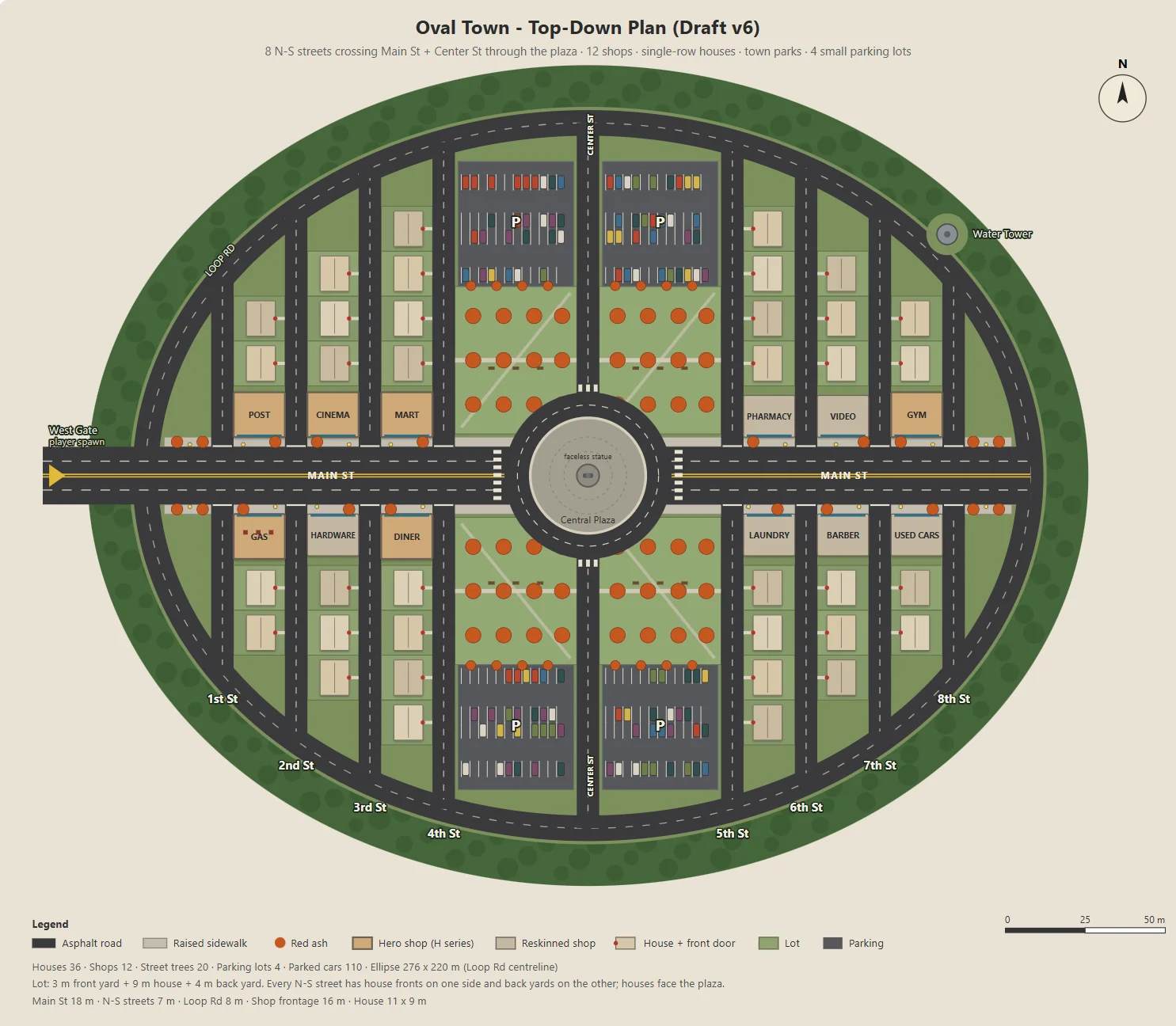
Claude schrieb ein Node-Skript, das ein parametrisiertes SVG der ovalen Stadt erzeugte: Main Street, zwölf Läden, Wohnstraßen, Parks, Parkplätze und ein Stadtplatz.
Dasselbe Skript exportierte JSON für Blockout, Gebäude, Straßen, Laternen und Bäume in Godot. Konzeptbilder und spielbares Level teilten sich daher ein Layout.
Ich änderte jeweils nur einen Parameter, etwa die Parkplatzgröße, die Gartentiefe oder die Ladeneingänge, damit sich jede Änderung leicht nachvollziehen ließ.
Here's the town I have in mind. The street grid is a grid inside an oval outline:
- The long axis of the oval is the widest street, Main St, lined with functional buildings like the post office and the gym.
- The other streets run perpendicular to Main St on both sides, lined with houses.
- The center of the oval is a round plaza; the statue stands on a concrete pedestal in the middle.
- Asphalt streets with lane markings. Raised concrete sidewalks in front of the shops, with American red ash street trees at regular intervals.

Design the town structure, fill in the details I didn't mention and improve the design.
Draw it as a top-down plan with a Node script (tools/townplan/gen_town_svg.mjs) that generates an SVG from parameters kept at the top of the file.
Eine visuelle Richtung festlegen
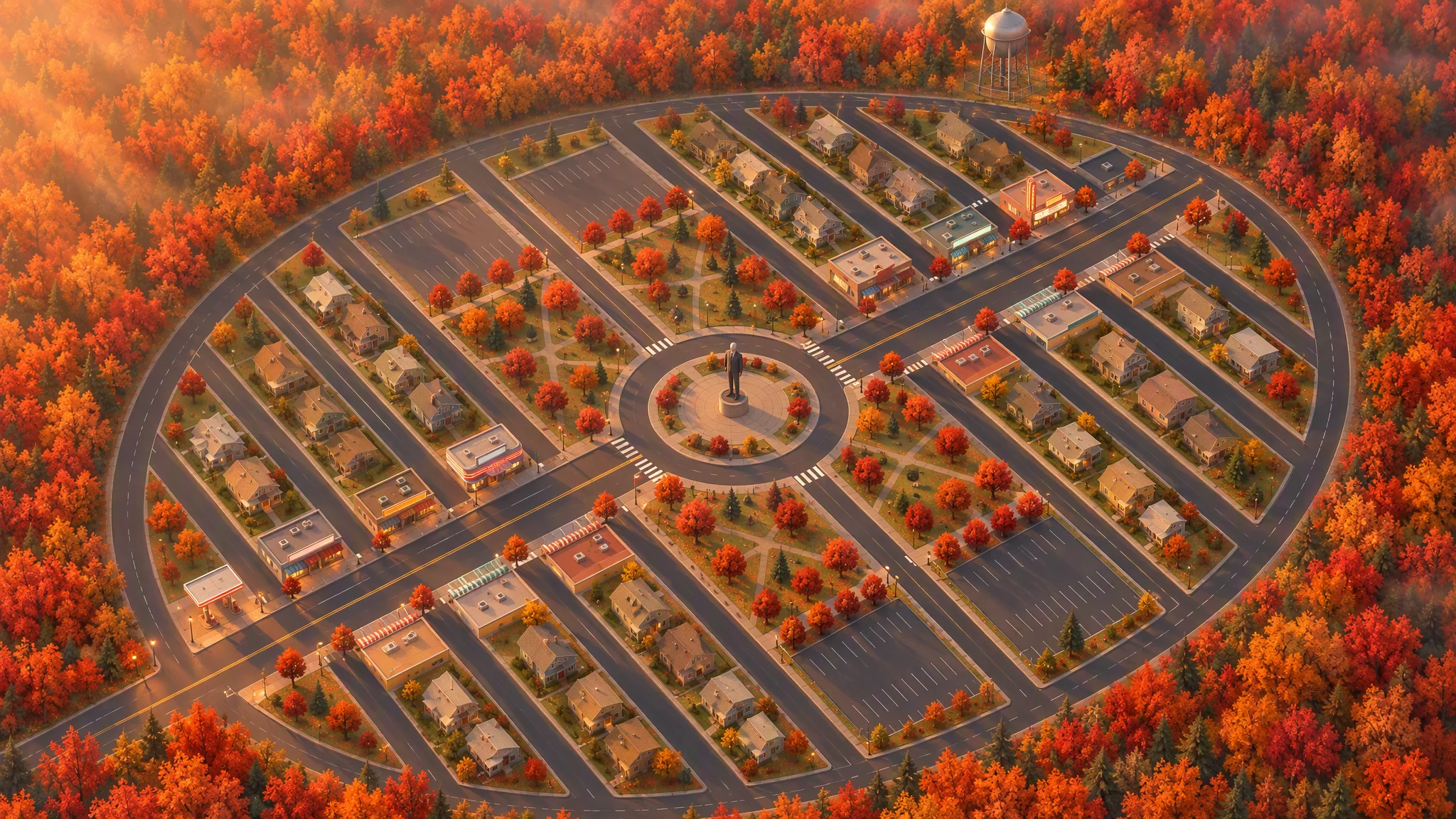
Das Layout nutzte ich als strikte Vorlage für eine Illustration in Draufsicht; Straßen, Grundstücke, Grundrisse, Bäume und der Umriss der Stadt blieben dabei erhalten.
Die erste 45-Grad-Ansicht sah aus wie eine gekippte Karte. Indem ich die Referenz vor dem Neugenerieren lokal drehte, bekam das Bild einen überzeugenden Blickwinkel.
Strict layout reference: image[1]. Keep every road, block, building footprint, lot, park, parking lot, tree and the oval outline exactly as in image[1]. North up. Add, remove, move or resize nothing. Only restyle it as a finished top-down orthographic illustration of a quiet mid-1980s American small town in autumn.

[...town contents: main street, roundabout and statue, twelve shops seen as flat roofs only, all facing the main street, houses, parks, parking lots, red ash trees, a water tower...]

Style: stylized non-photorealistic game environment, simple hard-edged geometry, flat slightly exaggerated colors, light weathering, no grime. Warm late-afternoon sun from the west.

No vehicles, people, text, lettering, flags, or national or religious symbols. The statue has no face.
Aus dem finalen Plan und dem Bild in Vogelperspektive erstellte Claude die Asset-Liste und trennte dabei Tripo-Modelle von in Godot gebauten Objekten. Stufen für die Polygonzahl hielten rund dreißig Konzeptbilder und dreißig Modelle im Budget.
The town concept art is done. Using the final plan (v6), list every asset we need, split into "generate with Tripo" and "build in the engine". Then write a concept-image prompt for each Tripo asset in design/asset_prompts.md.
- Shops on Main St should vary more, with clearly different heights, so the opening walk has an interesting skyline.
- Split scene assets into tiers (S / A / B / C) by importance and size, give each tier a model and a triangle budget (hard cap 10,000 per asset), and estimate the total for the scene.
05 / ÜBERBLICK
Ein Asset als Prototyp bauen, bevor der Rest entsteht
Ein repräsentatives Gebäude testen
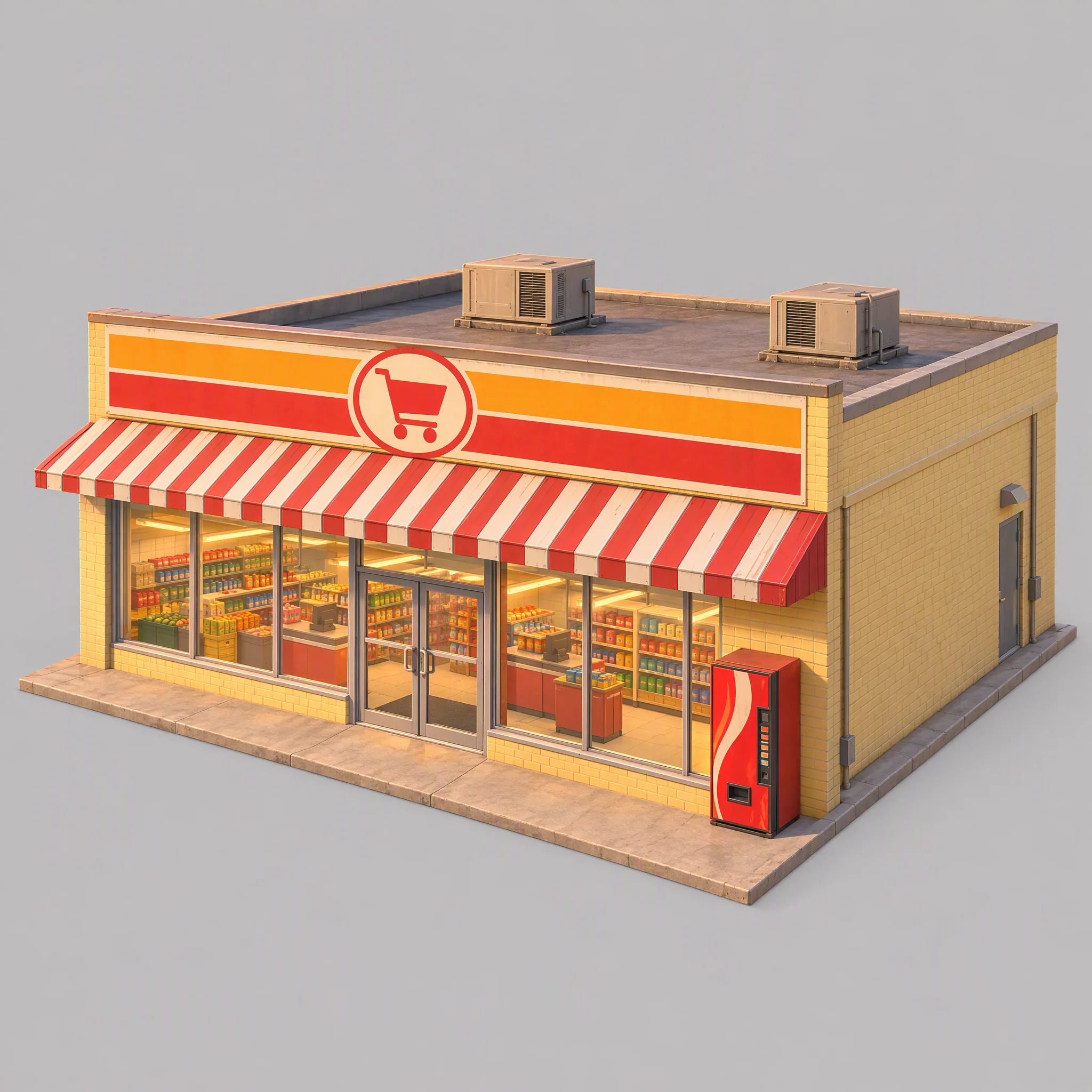
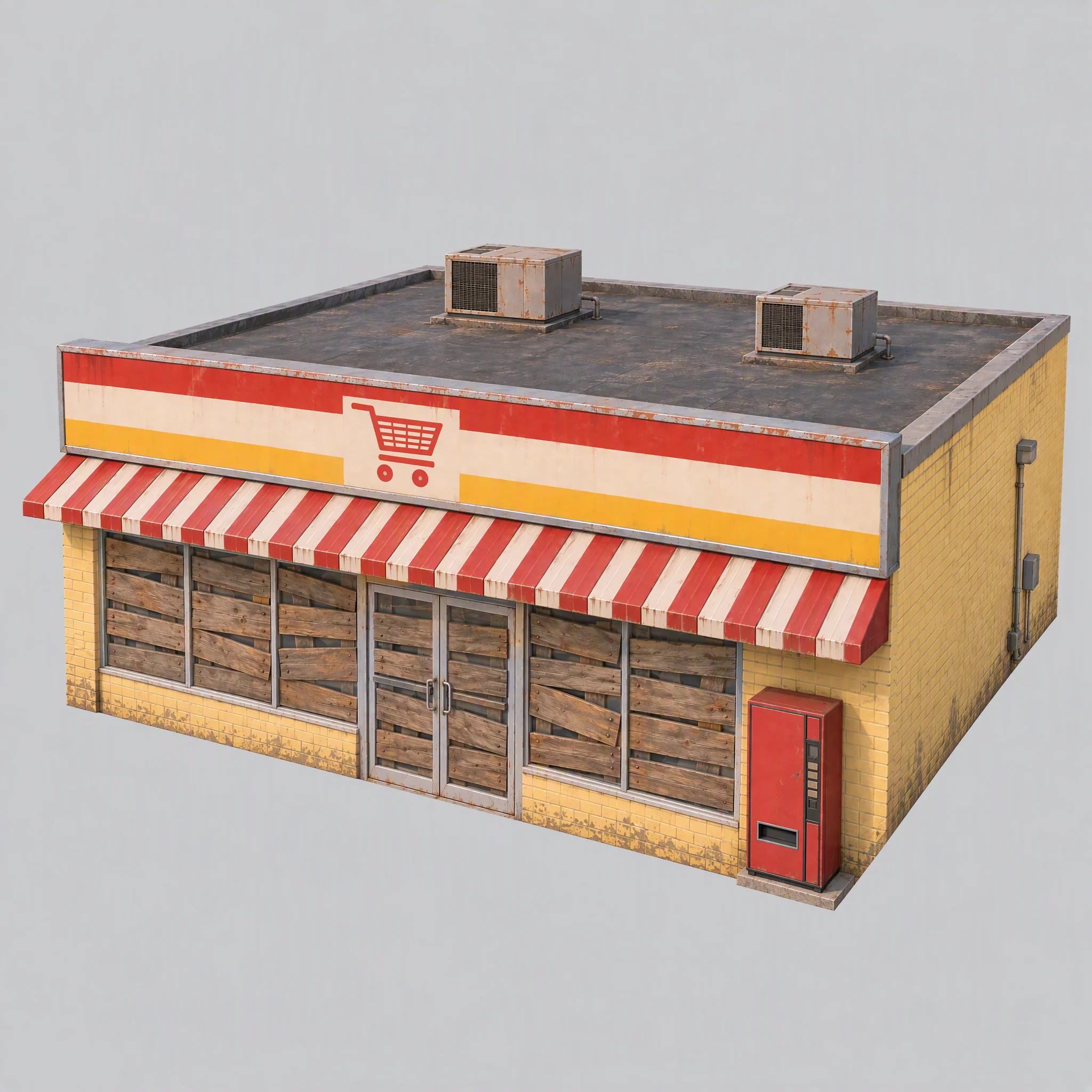
Ich testete die Pipeline zuerst an einem einzigen Supermarkt und prüfte dabei den visuellen Stil, die Eignung als Modellierungsreferenz und die passende Tripo-Modellfamilie.
- Passt das Konzeptbild zur visuellen Richtung der Stadt?
- Liefert das Bild eine saubere Modellierungsreferenz?
- Welche Tripo-Modellfamilie erzeugt die passende Geometrie?
Im ersten Bild waren Regale zu sehen, dazu eingebranntes warmes Licht, ein markenähnlich gestalteter Verkaufsautomat und ein übergroßes Fundament.
Ich passte die gemeinsamen Regeln an: Fenster mit Brettern vernageln, Lichter ausschalten, neutrales weißes Referenzlicht verwenden und Fundamente bündig mit den Wänden abschließen lassen.
Use image[1] only as a reference for color palette, materials and rendering style. Do not copy its content or camera.

A single isolated one-story small-town supermarket from the mid-1980s: a wide, low box about 16 meters wide, 14 meters deep and 5 meters tall. The front is a long row of large plate-glass windows with a pair of glass doors in the middle, under a flat red-and-white striped metal awning. Above the awning, a tall flat sign panel runs the full width of the roofline, painted with bold color bands and a simple shopping-cart pictogram, no letters. Pale yellow painted brick walls, a flat roof with two boxy rooftop AC units. A plain red vending machine stands beside the doors. All windows and glass doors are boarded up with weathered wooden planks, so no interior is visible. All lights, signs and neon tubes are switched off. The building sits on a thin flat concrete slab exactly the size of its footprint, flush with the walls on every side.

Three-quarter front view from slightly above, the whole building in frame, centered on a plain light gray background, neutral white daylight with soft even lighting and no warm tint, no cast shadows, no ground beyond the slab.

Style: simplified realism with hard-edged, clean forms, mid-1980s American, slightly saturated comic-book colors, light weathering, no grime.

No text, no letters, no logos, no flags, no national or religious symbols, no people, no vehicles
Modellfamilien vor dem Skalieren vergleichen
Mit demselben Supermarktbild und kontrollierten Polygonlimits lieferte die P-Serie sauberere harte Kanten; die H-Serie hatte gleichmäßigere Dreiecke und weichere Oberflächen.
Für dieses Spiel legte ich fest:
- P1.0 für Gebäude, Fahrzeuge und Props verwenden, die von sauberen harten Oberflächen profitieren.
- H3.1 für organische Formen wie die Statue und die schwebenden Bodenstücke verwenden.
- P2.0 für den Jungen verwenden, weil die Figur für das Rigging eine saubere Topologie brauchte.
Das war eine Entscheidung für dieses Spiel, kein allgemeingültiges Modell-Ranking.
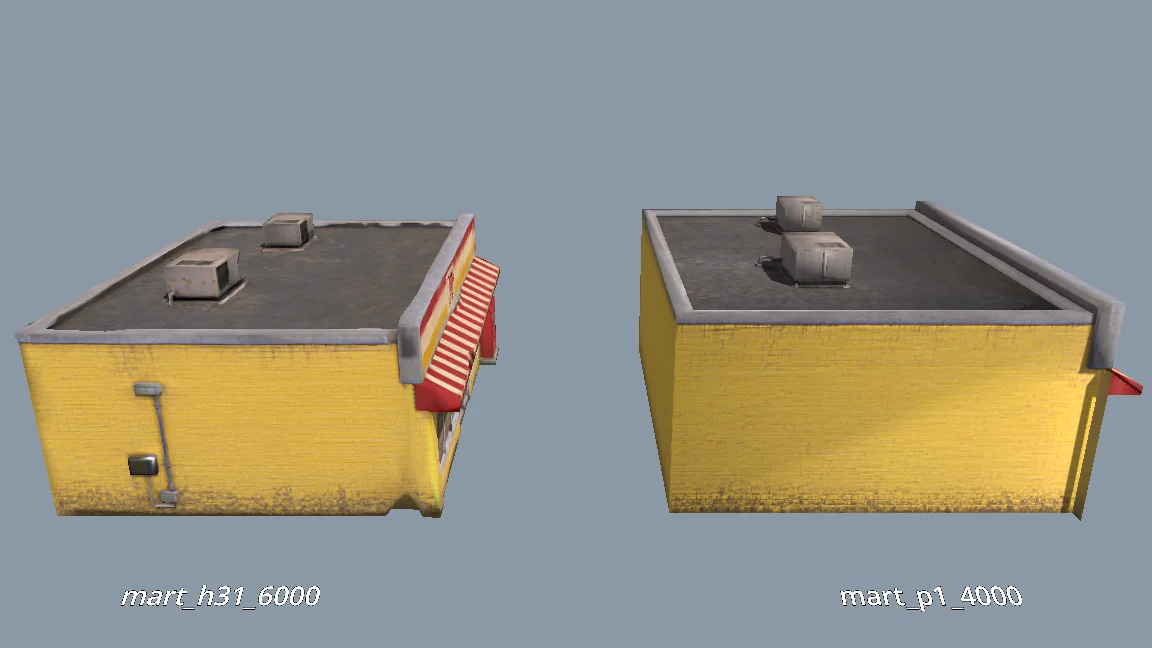
The current models are all clean and fairly flat. For performance, would P1.0 suit the buildings better than H3.1? Run a comparison: generate MART with P1.0 at 4000 faces and with H3.1 at 6000 faces, import both into a test folder, and render them side by side from the storefront, front, corner and top views (shaded and wireframe). Then tell me which one to use and why.
Die übrigen Szenen-Assets generieren
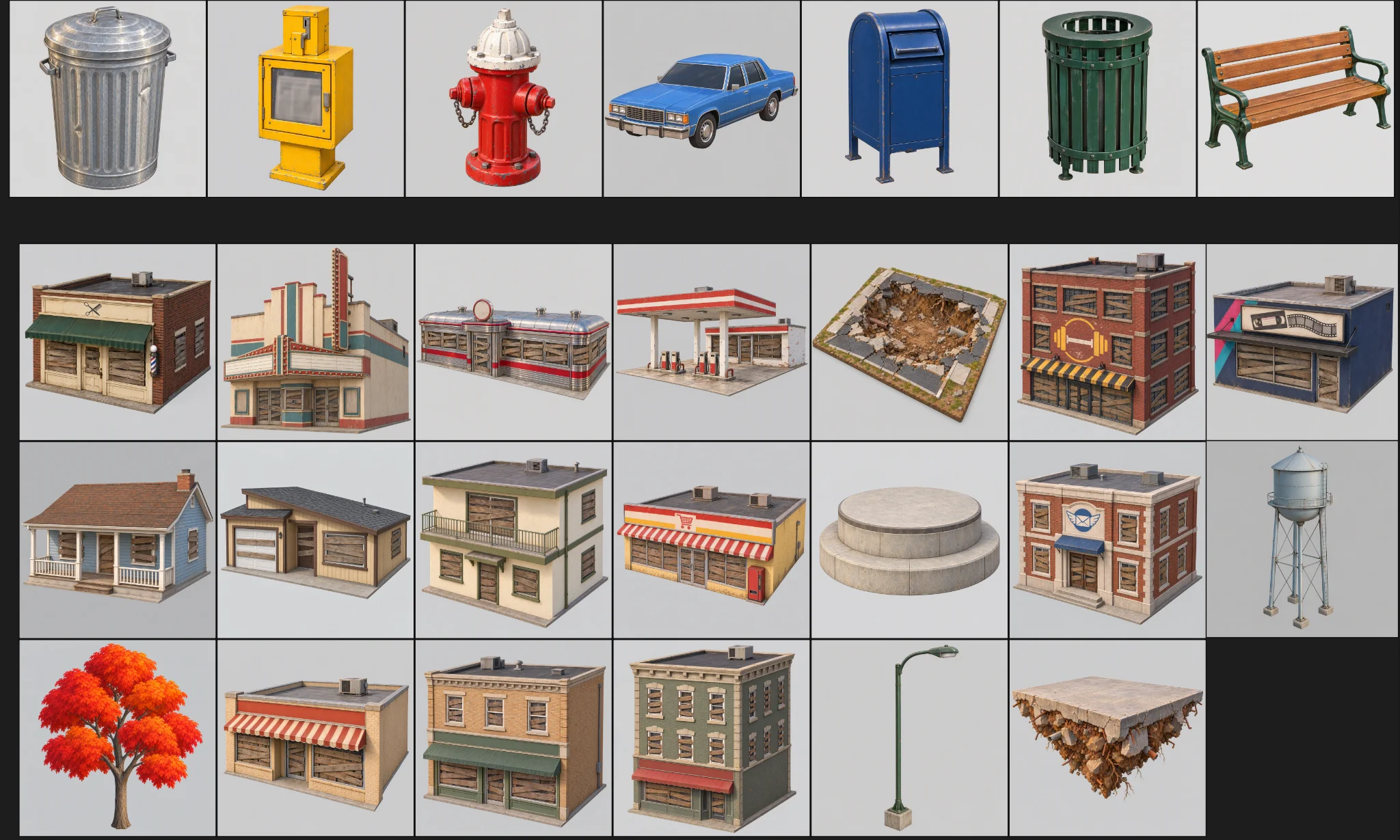
Nachdem der Prototyp die Prüfung bestanden hatte, generierte ich die übrigen Assets. Jedes hatte eine Kategorie, einen Ordner, ein Modell-Preset und ein Polygonbudget.
Der Batch umfasste drei Prüfungen:
Generate concept images for all remaining scene assets the same way as MART, using the prompts in design/asset_prompts.md and cpt/town_birdseye.png as the style reference.
Check balance first. Save each image under cpt/assets/<category>/.
Check every image against the checklist in asset_prompts.md (single object, clean background, no text or symbols, matches the bird's-eye style, no thin fragile parts).
Retry failed tasks individually; never rerun the whole batch.
Record progress in design/batch_checkpoint.md so we can resume if we stop halfway.
When done, list what succeeded, what failed and what needs my review.
- Jedes Bild prüfen: genau ein Objekt, sauberer Hintergrund, kein versehentlicher Text, keine fragilen Teile.
- Fehlgeschlagene Aufgaben einzeln wiederholen.
- Den Fortschritt in einer Checkpoint-Datei festhalten.
Einzelne Fehlschläge generierte ich neu: eine Tankstelle mit einem Loch in der Rückwand, einen fehlenden Wasserturm und lose Geometrie am Supermarkt.
Die Figur separat bauen
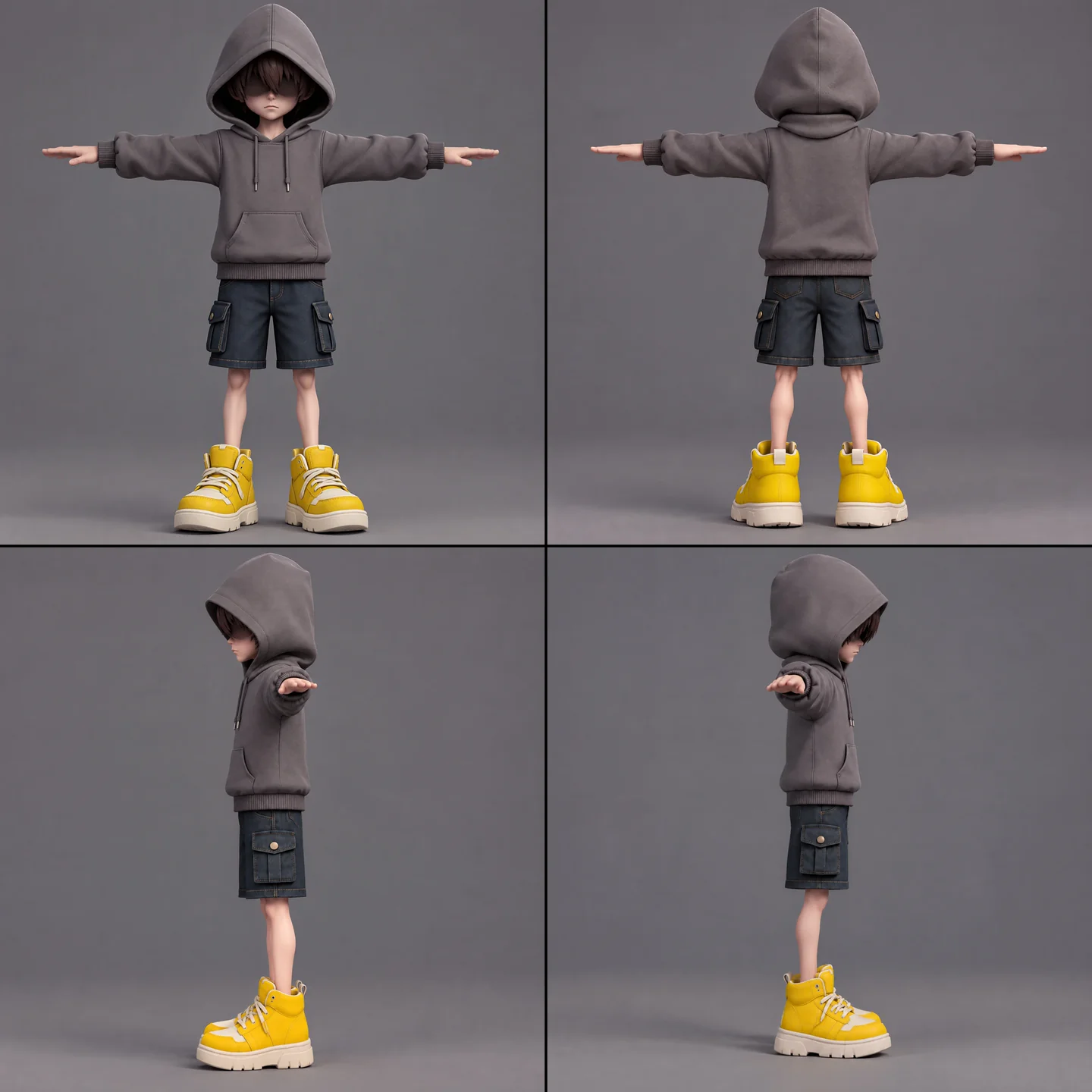
Der Junge brauchte Konzeptbilder, Modellierung, eine Prüfung der Riggabilität, Rigging und Animations-Retargeting. Den Schal hielt ich getrennt, um unerwünschte Skin-Weights zu vermeiden und seine komplexen Aktionen zu erhalten.
A full-body cartoon-style boy in a standard T-pose, arms extended horizontally, legs straight. He wears a gray hoodie with the hood up. His face is shrouded in shadow, eyes hidden, with only his mouth and grayish-brown bangs visible. He has a long red scarf wrapped around his neck, with both hanging ends draped down behind his back, not in front. He wears dark blue denim shorts ending above the knee so his knees are exposed, with buttoned flap pockets on both the left and right sides. He wears oversized yellow sneakers and has relatively thin legs. Cartoon character design, clean 3D model.
Zuerst ließ ich die kostenlose Prüfung der Riggabilität laufen. Die Animationsliste umfasste Idle, Gehen, Rennen, Springen, Fallen, Werfen, Parieren, Schalsprung, Treffer, Niederlage, Versiegeln und Sieg. Das Retargeting von mehr als fünf Animationen auf einmal schlug fehl, also verteilte ich sie auf drei kleinere Jobs und führte diese in Godot zusammen.
The boy model is ready at models/boy/boy_body.glb. Rig it and add the animations the demo needs. Run the free rig check first. List the animations you plan to use, mapped to Tripo presets, before generating anything.
Bevor ich die Ansichten der Figur im Batch verwendete, prüfte ich sie von Hand auf gespiegelte Hände und auf Haare, die als Sonnenbrille fehlgedeutet worden waren.
Importe und Qualitätsprüfungen vereinheitlichen
Ein Importschritt versah Wände, die zu weich wirkten, mit gewichteten Normalen und harten Kanten. Die Texturlimits hingen vom Asset ab, mit Ausnahmen für den Jungen, den Schal, die Statue und die Bäume.
Bevor ich Modelle aus dem Testverzeichnis in die spielbare Szene übernahm, prüfte ich Maßstab, Ausrichtung, Wände, Dächer und verirrte Polygone. Für Produktions-Assets galt: null gemeldete Probleme.
When I inspect the models, the normals are smoothed across every edge, so flat walls look soft and cheap. I want something like Blender's Weighted Normal modifier.
Write a Godot import hook that recomputes weighted normals on import (area-weighted, edges sharper than 30 degrees become hard edges, keep the normal map), plus a setup script that attaches the hook to a list of GLBs and limits texture size (4K, or 2K for small assets) with VRAM compression. Don't apply it to the boy, the scarf, the statue or trees.
Render before/after comparisons so I can judge the result.
06 / ÜBERBLICK
Die Demo in Schichten aufbauen
Mit einem Gameplay-Blockout beginnen
Ein Godot-Tool-Skript las die JSON-Daten der Stadt ein und baute daraus ein spielbares Blockout mit farbigen Kollisionsboxen, Boden, Spawnpunkt und schwebendem Layout. Nach Datenänderungen bauten Steuerelemente im Inspektor und ein Kommandozeilen-Skript es neu auf.
Swap In Models ersetzte die Boxen dann an denselben Positionen durch Tripo-Assets. Beide Versionen nutzten dieselben Layoutdaten.
Die Läden bildeten die erkletterbare Spirale; Wohnhäuser blieben im Hintergrund. Ein Prüfbericht kontrollierte Überschneidungen, Kopffreiheit, Dachabstände und die Erreichbarkeit der Plattformen.
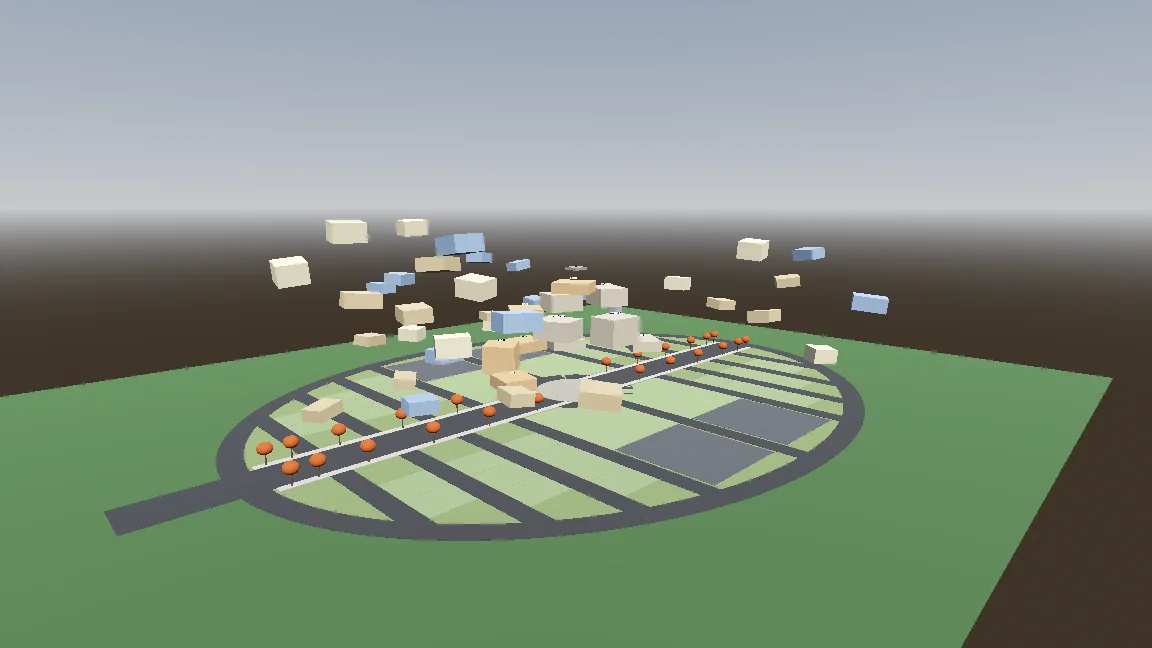
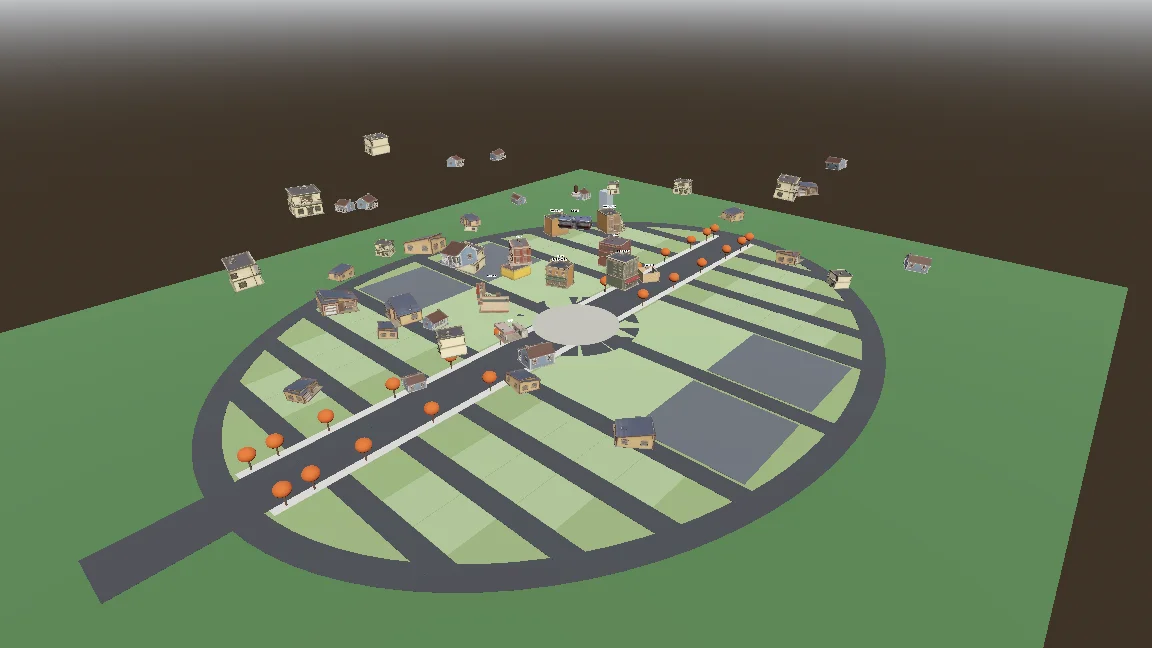
Build a gameplay-only blockout:
- Export the town plan as JSON (gen_town_svg.mjs --json) and write an @tool script (Scripts/town/town_builder.gd) that reads it and generates the ground, a colored box with collision for every shop and house (heights from the design doc), and the player spawn at the west entrance.
- Add inspector buttons: Build Town, Preview Tree, Reset To Ground, Swap In Models.
- Also add a command-line build script so you can rebuild the scene headless.
- Swap In Models replaces each box with res://Assets/Models/<model>.glb, scaled to the lot and rotated to face the street, keeping the position.
Show me screenshots from the street and from above.
Bewegung und den prozeduralen Schal hinzufügen
Der Controller hatte Zustände für Boden, Luft, Schweben und Schalsprung. Frei einstellbare Parameter und ein Smoke-Test halfen, jede Bewegung abzustimmen und zu prüfen.
Start the player controller in the blockout scene. Use the rigged boy model directly, no capsule placeholder.
- CharacterBody3D with states: ground, air, hover (hold jump midair, drains scarf energy), scarf leap.
- Third-person over-the-shoulder camera, keyboard + mouse and gamepad input maps.
- AnimationTree state machine built by a generator script (Scripts/tools/build_player_scene.gd), not by hand in the editor.
- All feel parameters exported so I can tune them in the inspector.
- An automated smoke test that spawns the player, runs, jumps, hovers and scarf leap, and saves screenshots.
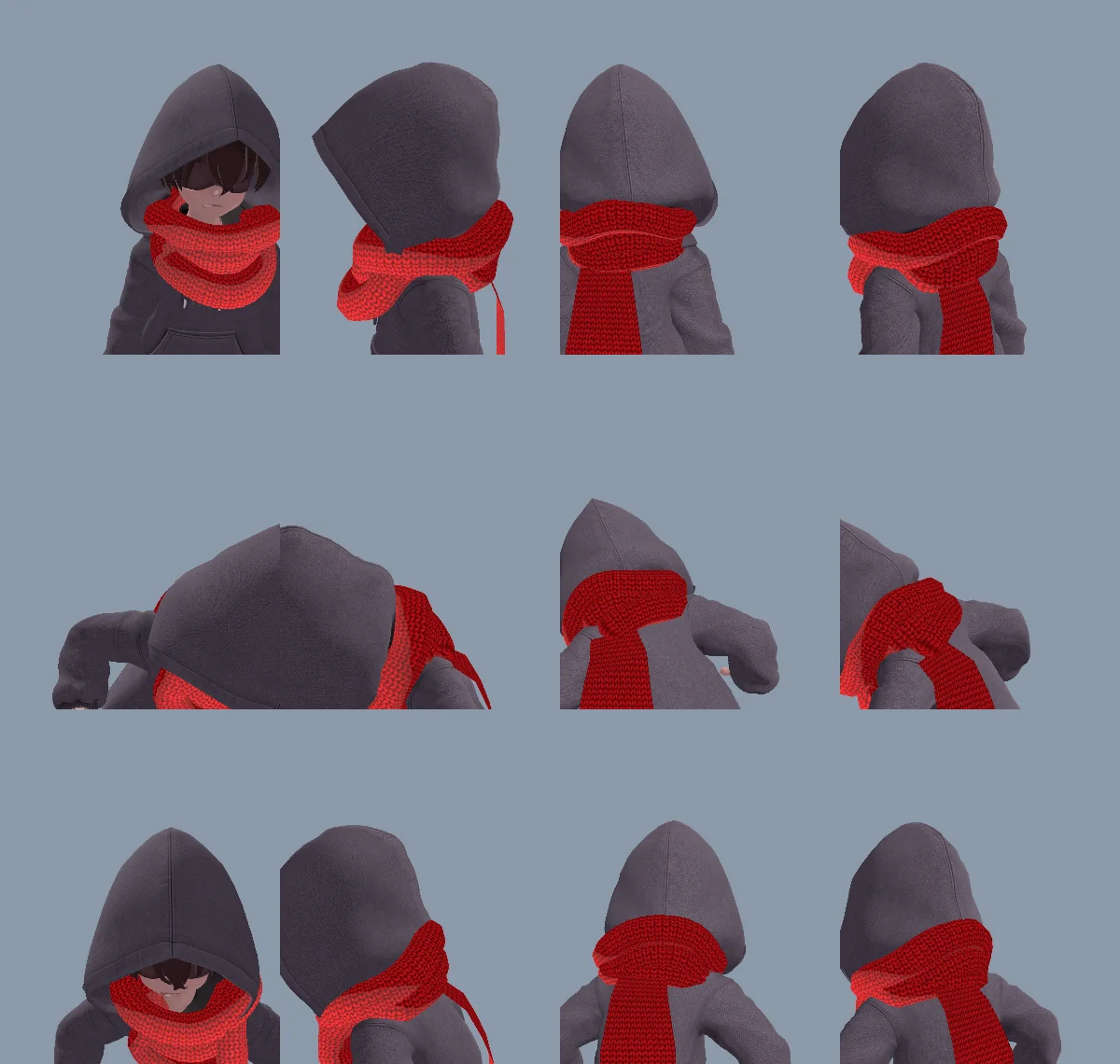
Eine modellierte Halswicklung wirkte zu steif, daher entstanden sowohl die Wicklung als auch das Schalende per Code. Dasselbe Schalende konnte herabhängen, sich ausstrecken, zugreifen, die Statue umschlingen und loslassen – ohne separate Modelle oder Animationen.
Die erste Wicklung wirkte wegen der Vertex-Reihenfolge der Dreiecke und umgedrehter Normalen wie auf links gedreht. Claude reparierte das Mesh und hielt die Ursache in CLAUDE.md fest.
The neck scarf looks too stiff. Try generating it procedurally instead of using the Tripo model:
- ScarfWrap: three thick, soft knitted loops around the neck, rebuilt every frame from the neck, head and spine bones, pushed out by capsules on the head, neck, chest and upper arms, fuller at the back so it fills the gap between the hood and the shoulders, with a little spring lag.
- ScarfTail: a Verlet chain hanging from the knot at the back, with thickness, stiff enough not to stretch, colliding with body capsules. Reaching out to grab props, hanging from anchors and wrapping the statue all use the same tail (reach(point) / release()).
- Both share one wool material with the red knit texture and a soft sheen at grazing angles.
Keep the per-frame cost low and tell me the measured time.
Den Schalsprung zielgerichtet wirken lassen
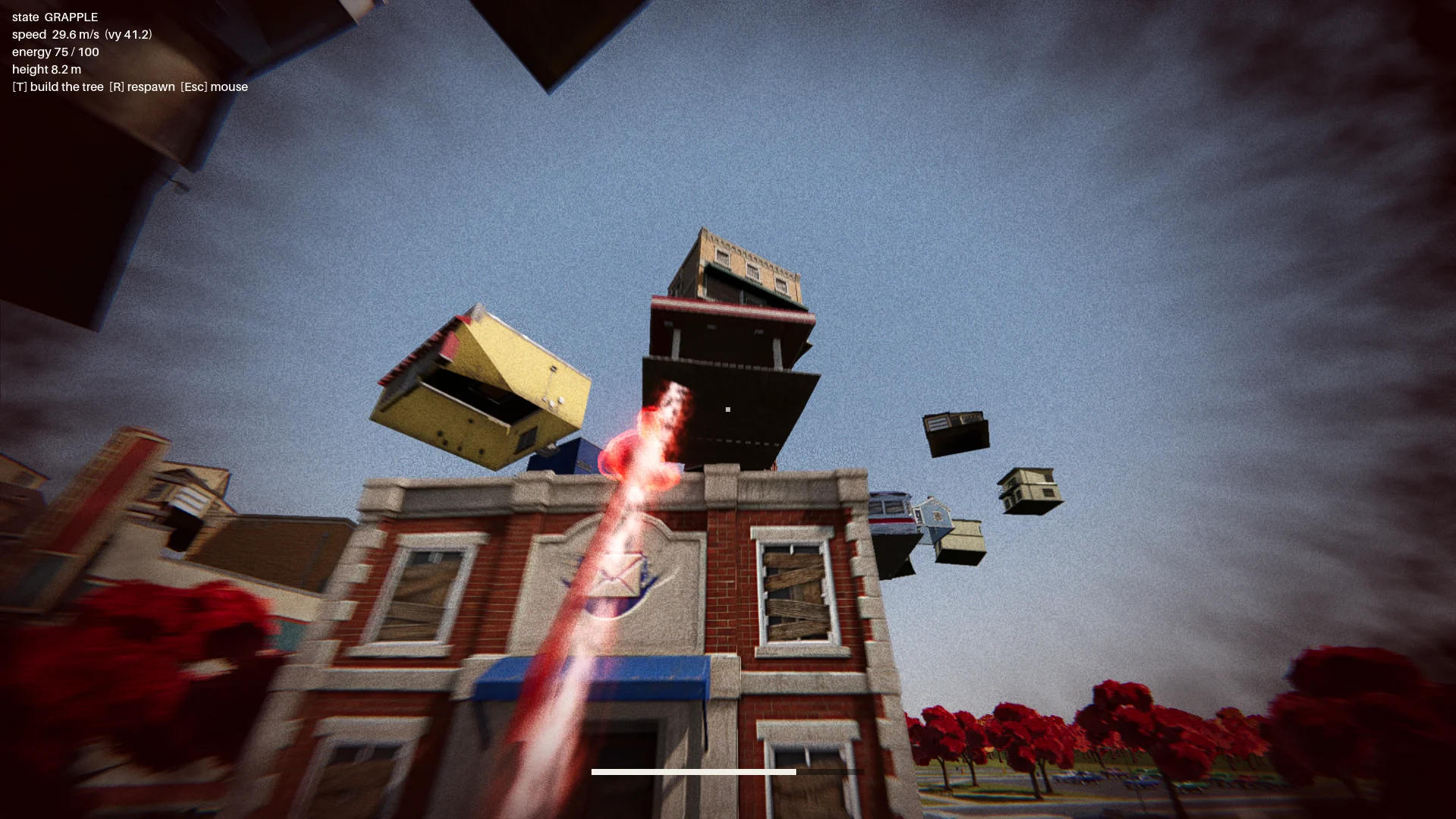
Der erste Schalsprung schwang wie an einem Greifhaken. Ich änderte ihn zu einer Beschleunigung in Richtung eines gewählten Landepunkts – mit roter Aura, Staub, Schweif und Landepuls, damit die Bewegung lesbar wird.
Die ersten Ziele auf Markisen konnten den Jungen durch ein Gebäude schicken oder ihn feststecken lassen. Ich ergänzte Prüfungen für Landung und Flugbahn. Ein gültiges Ziel musste:
- auf einer echten Dachkante liegen;
- genug Freiraum darüber haben;
- der Figur Platz zum Stehen bieten;
- eine Flugbahn durch das Zielgebäude vermeiden.
Ein Prüfbericht kontrollierte jedes Gebäude aus zwölf Richtungen und verlangte null ungültige Sprungpunkte.
Change how the scarf leap feels. Right now it swings like Spider-Man. Instead, the boy knows where he's going and moves straight to the target. While moving, rotate his model so his feet point at the target, as if his feet were pulling his whole body toward it.
Drop the scarf from the scarf leap and sell the power with effects: a red aura when the scarf leap starts, a puff of dust and a small energy pulse at the start point, a trail along a small arc, then the aura fades on landing with a small shockwave at the contact point.
The speed is not constant: a little slow at first, then accelerating hard, never slowing down until it arrives.
Den Bosskampf zusammenfügen
Die Route führte vom Hauptmenü über das Intro, die aufsteigende Stadt, einen Checkpoint und den dreiteiligen Bosskampf bis zum Ende.
Die Statue warf Objekte, darunter ein leuchtendes, das sich parieren ließ. Eine Parade öffnete ihren Schild für etwa sieben Sekunden. Spätere Angriffe brachten eine Fächersalve und ein Auto, das wie ein Meteor einschlug, während Sichtbarkeitsprüfungen Würfe durch Gebäude hindurch verhinderten.
Finish all playable content for a first complete version:
- A basic main menu, pause menu and ending screen with buttons.
- The intro: "The Oval Town" title card; when the player enters the plaza, the statue shakes, lifts off its pedestal, a "The Statue" title card, then a shockwave pushes the boy back along the ground. Buildings fly up into the spiral tree. One checkpoint at the end of this sequence.
- The boss fight: shield, parry window about 0.25 s, about 7 s exposed window, damage only from throws while exposed, 3 health segments, attacks unlocked by remaining health: single throw, fan volley (only the glowing one can be parried), car meteor shower.
- Sealing: when its health reaches 0, a scarf leap point appears on the statue; scarf leap to it and press the seal button repeatedly.
- A full-flow automated test that plays the whole game with a real parry, three rounds of throws, a death and restart, the seal and the ending, saving screenshots at each stage.
Show me the plan first, then build it.
Bei null Lebenspunkten erschien auf der Statue ein Schalsprung-Ziel. Der Spieler drückte wiederholt auf Versiegeln, um einen Ring zu füllen; hörte er auf, leerte sich der Ring wieder.
07 / ÜBERBLICK
Polieren, testen und exportieren
Die Szene visuell ausarbeiten
Als der Kampf funktionierte, ergänzte ich Bodendetails, Gras, Bäume, Beleuchtung, Postprocessing und Effekte. Ein einziger weicher additiver Shader gab Aura, Ringen, Projektilen und Schweifen einen einheitlichen Look.
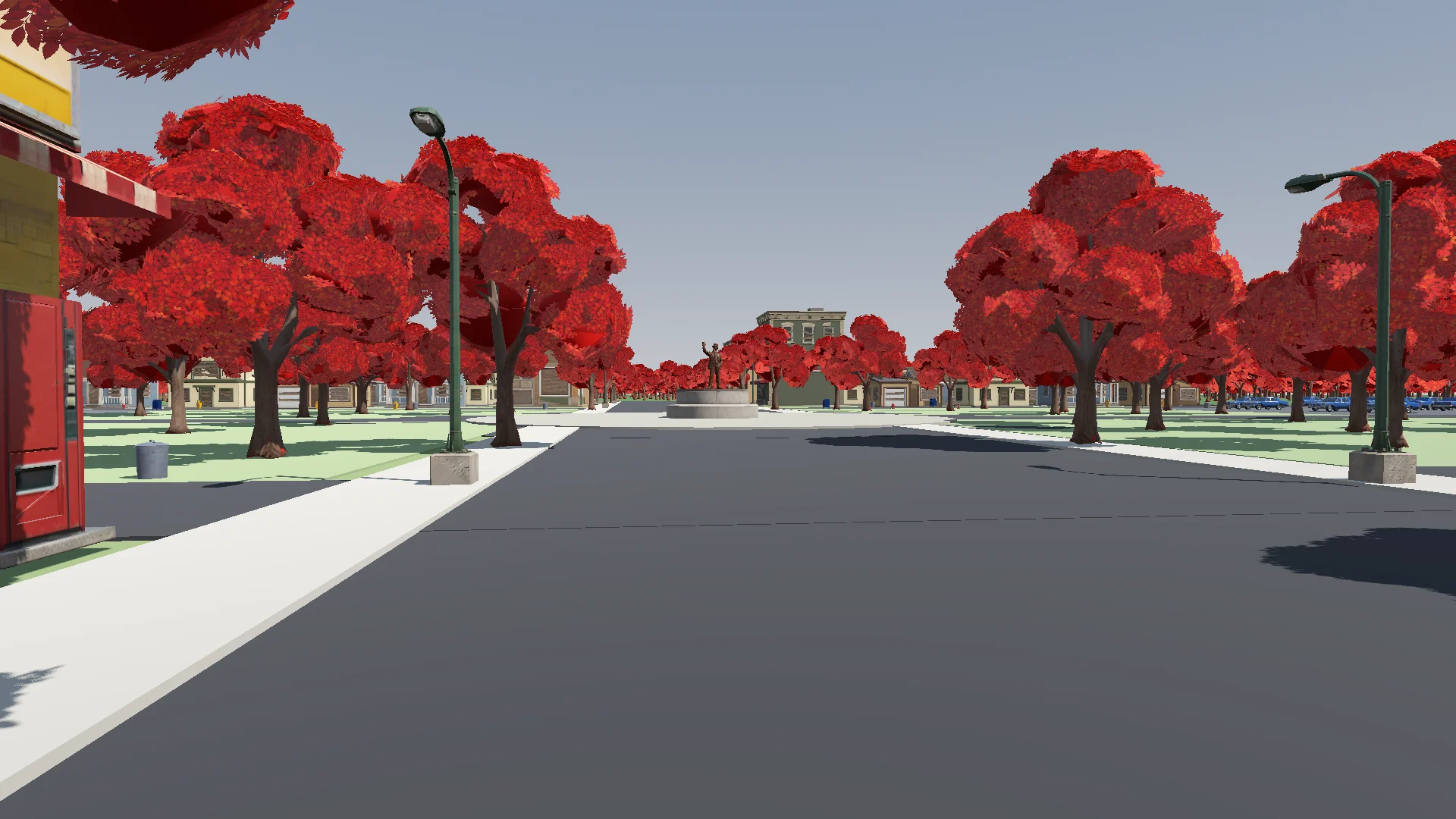
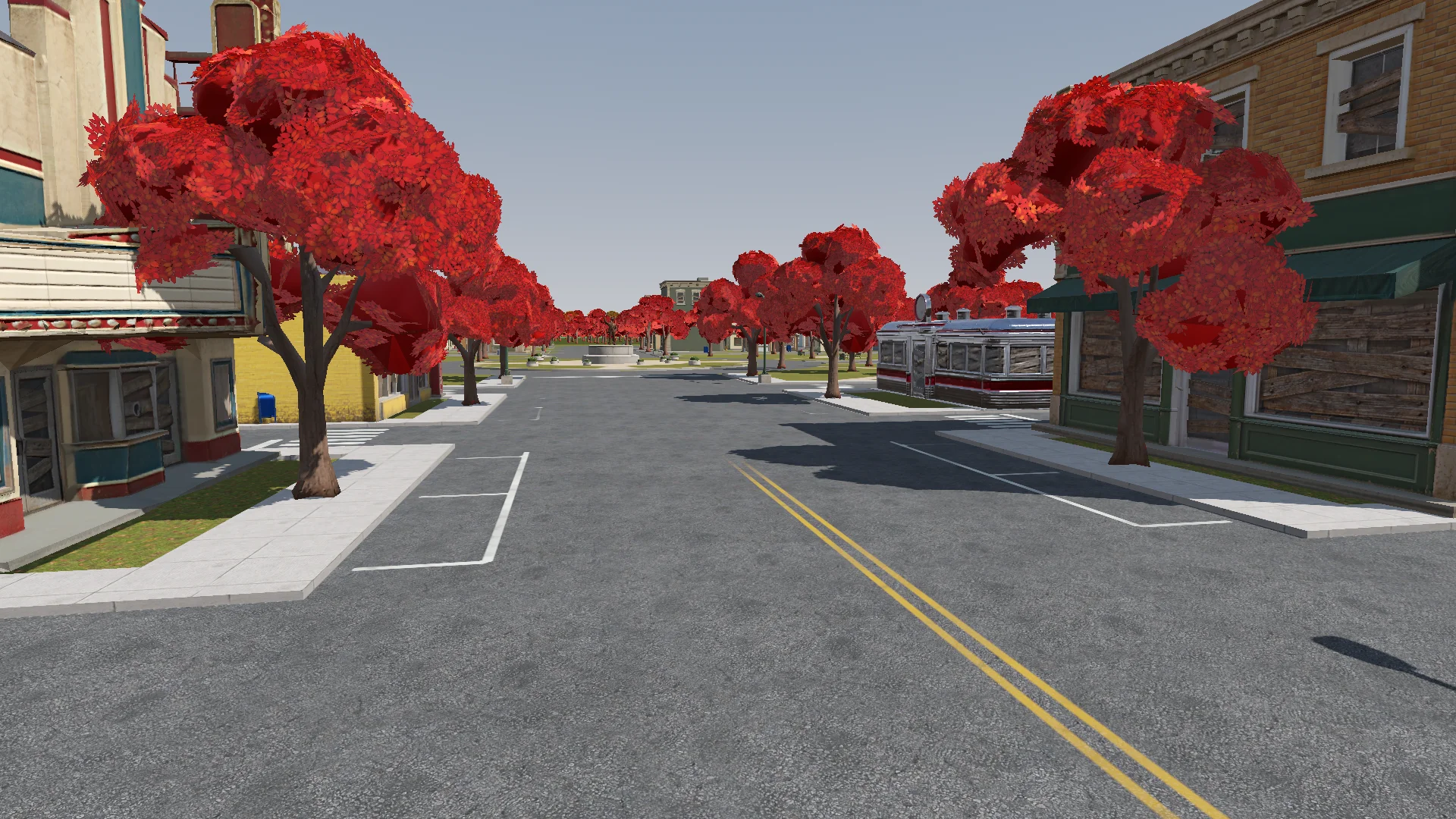
Polish: add the final details to the rest of the town based on the concept art (streets, parks, lane markings and so on). If details are missing or unclear, generate reference images of parts of the town first.
Street layout and lane markings should be as plausible as possible; use Tripo to generate textures if needed. The road surfaces must never flicker.
Add NPR style procedural grass on the lawns.
Änderungen prüfte ich aus der Spielerkamera auf flackernde Straßen, versperrte Türen und falsch platzierte Laternen.
Render with ACES tone mapping. Add post-processing: bloom, ambient occlusion, SSIL, depth of field, film grain, motion blur, chromatic aberration, FXAA, and an FSR 2 option, all in an Options menu. Bloom, AO, SSIL and DOF have Off / Low / Medium / High; FSR 2 has Off / Native AA / Quality / Balanced / Performance; motion blur, chromatic aberration and film grain are toggles.
Also add VSync and resolution.
The film grain should closely emulate Super 8 film. Godot has no built-in film grain or motion blur, so implement them as Compositor effects.
Audio und Interface-Feedback ergänzen
Ich begann mit synthetisiertem Audio und ersetzte das meiste davon später durch CC0-Musik und -Effekte mit Quellenangabe. Synthetische Sounds blieben dort, wo kein passender Clip zu finden war.
Find CC0 music and sound effects to replace the synthesized ones. Music should be synthwave / analog synth. Prefer less popular sources so the game feels unique. Where nothing fits, keep the synthesized sound. Verify the license on every page and generate a credits file.
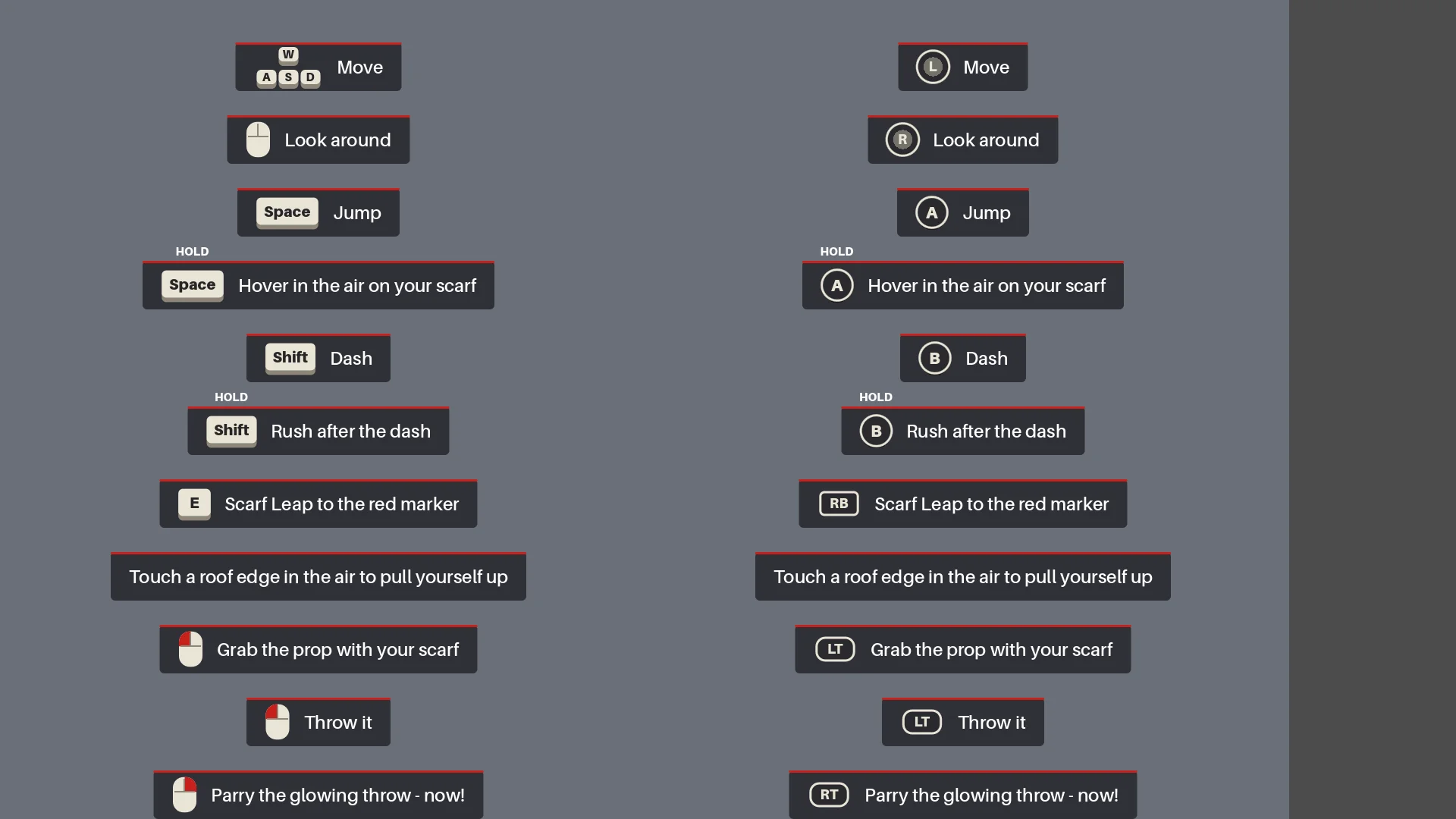
Das HUD zeigte kontextbezogene Steuerungshinweise, bis der Spieler die jeweilige Aktion genutzt hatte. Der erste leuchtende Wurf verlangsamte kurz die Zeit, um das Parieren beizubringen.
Add interactive hints the first time each move is needed (move, jump, hover, dash, rush, Scarf Leap, grab, throw, parry), for a more explicit and intuitive guide to the controls. Each hint stays until the player actually does the move, then it is ticked off.
Den vollständigen Regressionstest durchführen
Vor dem Export baute Claude die Szenen neu, ließ die Prüfberichte laufen und spielte vom Menü bis zum Ende – einschließlich einer echten Parade, Tod und Neustart, der Versiegelung und Screenshots.
Before we export, do a full pass:
1. Rerun every generator in order (build_blockout --float --swap, build_player_scene, build_game) and make sure the main scene is the main menu.
2. Run every report (tree_report, grapple_point_report, street_report, lamp_probe, audio_probe, skin_gap_report) and both automated tests. Everything must pass.
3. Play the game through MCP from the main menu to the ending, take screenshots at each stage and read the game log for errors and warnings.
Report: what passed, what failed, and anything I should check by hand.
Der komplette Durchlauf deckte Ausrichtungsfehler, fehlende Effekte und zurückgesetzte Checkpoints nach Änderungen an Bewegung oder Timing auf.
Export a Windows build of the game. Set up a Windows Desktop export preset for the_red_scarf (embed the PCK, the game icon, product name "The Red Scarf"). Check that the export templates for Godot 4.7.2 are installed; if not, tell me how to install them instead of guessing.
Exclude test scenes, test scripts and Assets/Models/_test/. Write a script that sets the build number and exports, run the exported exe once, and report the build size and any errors.
Der erste Windows-Export war 1,15 GB groß, überwiegend Texturen. Durch das Entfernen ungenutzter Assets und alter Modelle sowie eine platzsparendere Normal-Map-Kompression schrumpfte er auf 755,5 MB.
08 / ÜBERBLICK
Was ich ins nächste Projekt mitnehmen würde
Diesen Workflow würde ich wiederholen:
- Das gewünschte Ergebnis beschreiben.
- Einen kleinen Prototyp bauen.
- Ihn in der echten Laufzeitumgebung prüfen.
- Jedes wiederkehrende Problem in eine Regel oder einen Prüfbericht verwandeln.
- Erst dann skalieren.
Dasselbe Muster würde ich wiederverwenden: eine einzige Quelle für das Stadtlayout, Checkpoints für Asset-Batches, Geometrieregeln für den Schalsprung und einen vollständigen Test des Bosskampfs.
Fang bei einer ähnlichen Demo mit einer Figur, einer Route und einem Gegner an. Teste ein repräsentatives Asset, bevor du im Batch generierst, und mach aus wiederkehrenden Problemen Prüfungen, die du erneut ausführen kannst.