

01 / RESUMEN
Resumen
Partí de un niño con una bufanda roja y de un pueblo estadounidense desierto de la década de 1980. Una estatua sin rostro arranca los edificios y los lanza al cielo. La idea se convirtió en una demo jugable de acción en tercera persona hecha con Godot.
Claude ayudó a planificar, escribir scripts y probar; Tripo aportó las imágenes conceptuales, los modelos, el rigging y la animación. Yo dirigí el proyecto y revisé en Godot el juego ensamblado.
Este enfoque práctico sigue un flujo de trabajo de vibe gaming que conecta las ideas, el desarrollo asistido por IA y las pruebas de juego.
Configuración del proyecto:
- Motor: Godot 4.7.2, Forward+
- Asistente de programación con IA: Claude Code
- Generación de imágenes: generación de imágenes de Tripo
- Generación 3D: modelos de las series P y H de Tripo
- Proyecto: The Red Scarf, una breve demo de combate contra un jefe en tercera persona
02 / RESUMEN
Así se juega la demo terminada
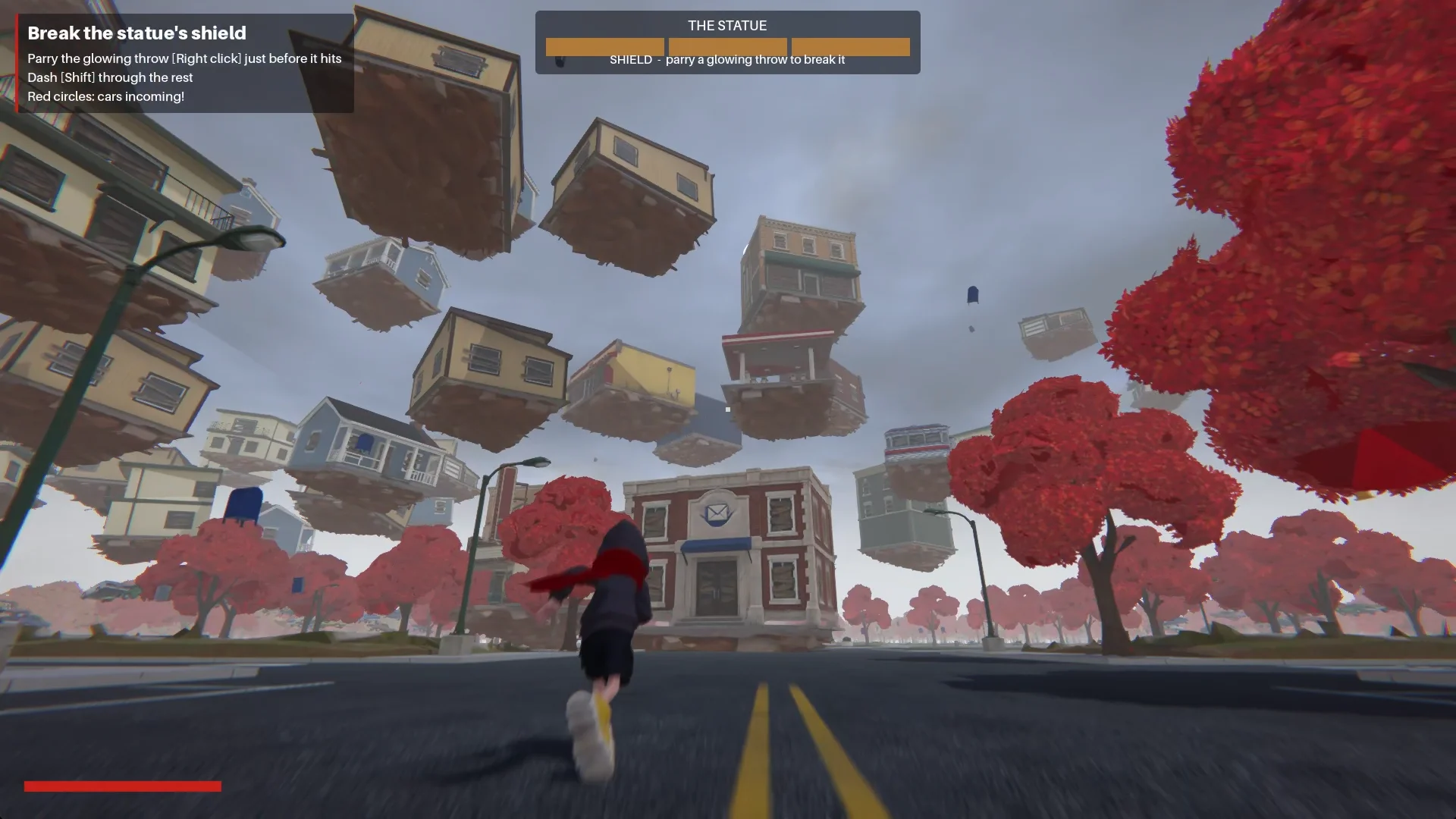
El niño entra en el pueblo por Main Street. En la plaza, una estatua sin rostro libera una onda de choque y arrastra los edificios hasta formar una espiral a su alrededor.
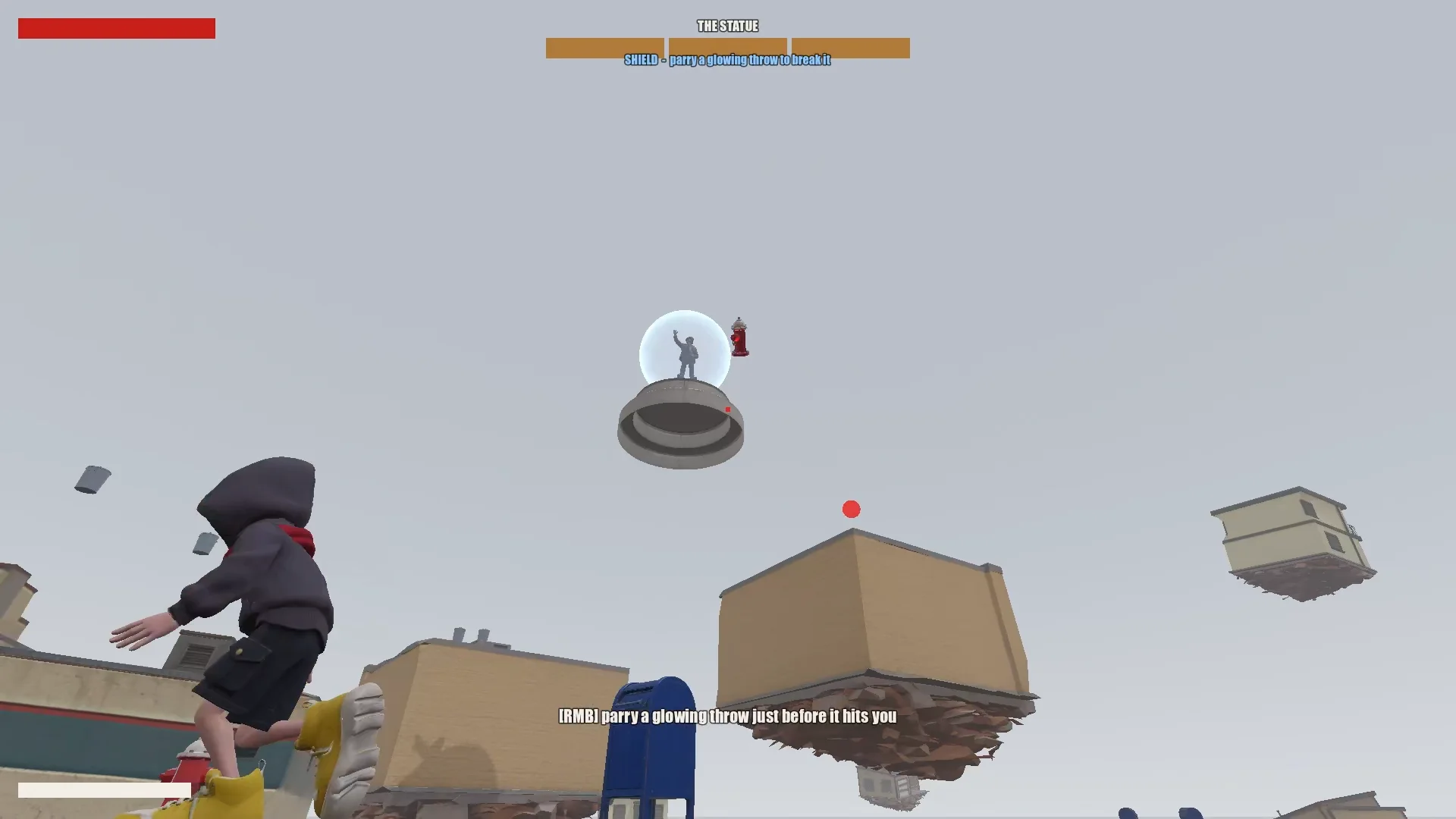
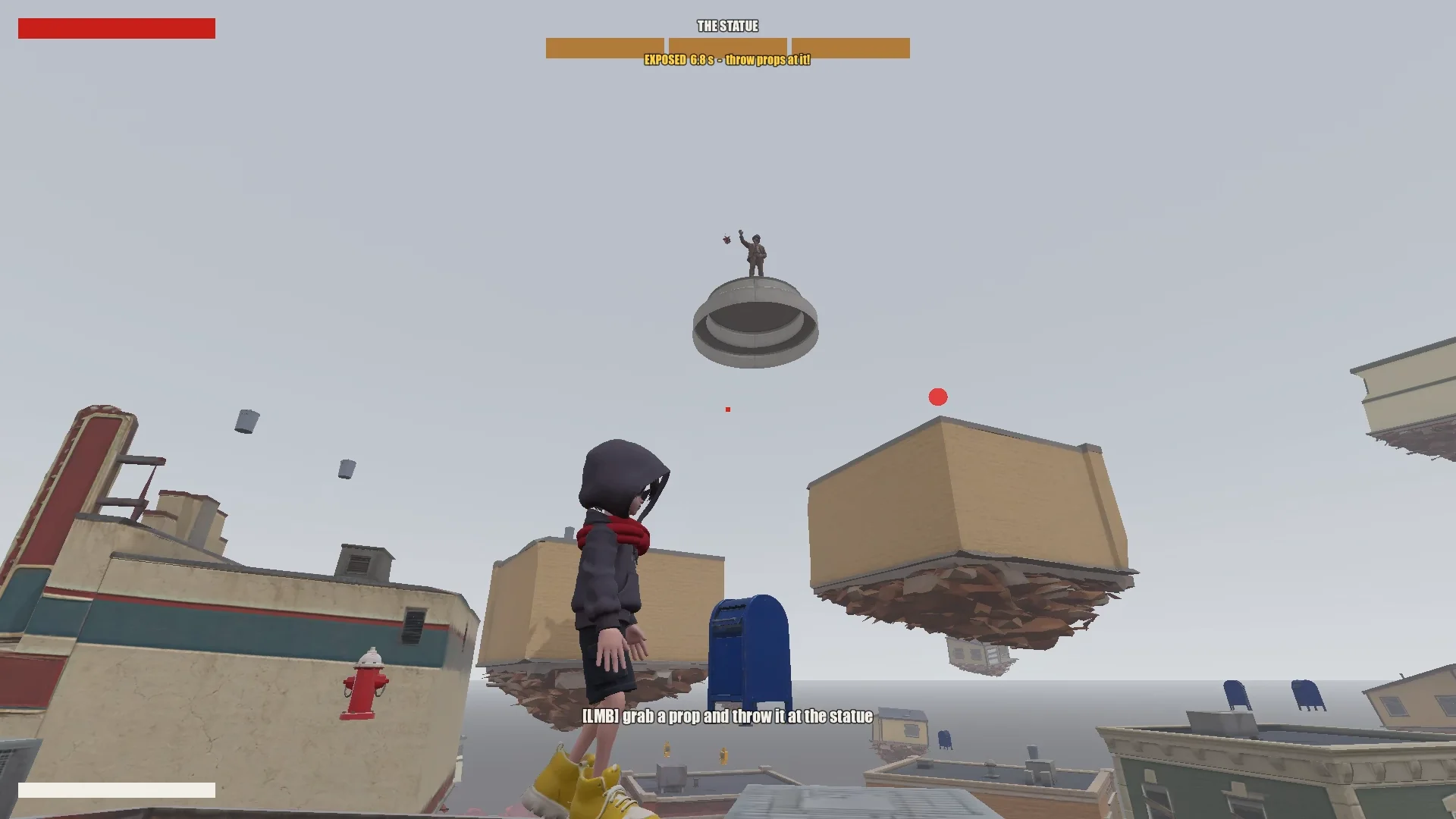
El jugador trepa por las tiendas flotantes saltando, planeando y usando el salto con bufanda. Desviar un proyectil luminoso rompe por un momento el escudo de la estatua; lanzarle objetos cercanos le hace daño. Tras tres rondas, el niño puede alcanzar la estatua y sellarla.
03 / RESUMEN
Configura las herramientas y el proyecto
Dale a Claude una memoria de proyecto
Mantuve juntos el proyecto de Godot, los documentos de diseño, las imágenes conceptuales, los modelos de Tripo y los scripts. En la raíz, CLAUDE.md recogía las reglas que Claude debía seguir de una sesión a otra.
Cubría lo esencial:
- Describir el juego, el tono y la dirección visual.
- Enumerar las reglas de los assets, como mantener un estilo coherente y evitar símbolos o texto no deseados.
- Exigir un plan antes de los cambios grandes.
- Mantener un historial de prompts.
- Anotar los escollos recurrentes y las convenciones del proyecto a medida que se descubren.
Añadí al mismo archivo las correcciones recurrentes: el orden de los vértices de la malla, la orientación de los modelos, los nombres de las animaciones y las reglas de objetivos del salto con bufanda. Las sesiones posteriores podían reutilizarlas.
Instala Tripo CLI
Para conectar Claude con Tripo, le pedí que instalara Tripo CLI:
Help me install and configure Tripo CLI: npm install -g tripo-cli
Conecta Godot y Claude
Claude podía editar directamente las escenas de Godot en formato de texto y los scripts en GDScript. Una conexión con Godot MCP le permitía ejecutar el juego, hacer capturas de pantalla, revisar los logs y simular entradas.
Verifiqué la conexión pidiéndole a Claude que me indicara la escena abierta y el árbol de nodos, y cotejando después el puerto de MCP y el proyecto con mi configuración.
Compare the Godot MCP servers that are available right now and pick the one that fits this project best (Godot 4.7, Claude Code, editor control plus running and inspecting the game).
Explain your choice, then install it into the_red_scarf/ and configure it at project scope (.mcp.json in the project root). Turn telemetry off.
04 / RESUMEN
Reduce la idea a un juego que se pueda probar
Escribe el diseño y luego recórtalo
El primer diseño de Claude abarcaba el pueblo, el movimiento, los ataques del jefe y el flujo del nivel, pero tenía demasiadas fases y habilidades de la bufanda para una demo corta.
I'm making a game demo with Claude, Tripo and Godot. Here's the idea:

The player is a boy in a bright red scarf, a gray hoodie, blue denim shorts and bright yellow basketball sneakers. The scarf is a supernatural object: he can hover with it, move quickly between platforms, grab objects and throw them, and use it as a whip.
The game starts on the main street of a mid-1980s American small town: one main road, houses and shops on both sides (post office, gym, diner and so on). In the central plaza stands a statue of a man in a suit whose face has been erased. It is a hostile supernatural object. When the boy arrives, it releases a shockwave and slowly rises into the sky. The houses around it are torn out of the ground and end up as floating platforms at different heights. The player jumps between them, blocks the objects the statue hurls with telekinesis, fights back, and finally reaches the statue and seals it with the scarf.

Write a short design doc in design/game_design.md: building types, the boss's attacks in two phases, the boy's attacks, defense and movement moves, and the level flow.
Show me your plan first. Ask me if anything is unclear.
Lo reduje al bucle mínimo que todavía se sintiera como este juego:
Simplify the combat:
1. The boss has only one phase.
2. Remove the scarf shield and the scarf whip.
3. New loop: the player moves across floating buildings and can only break the statue's shield by parrying its attacks (right click / RT, like a fighting-game parry). Once the shield is down, the player throws objects at it to deal damage.
Dejé el combate en una sola fase del jefe: desviar para romper el escudo, lanzar objetos durante la ventana de vulnerabilidad y usar el pueblo flotante como desafío de movimiento. Cada movimiento que quedó tenía que estar al servicio de ese bucle.
Construye el pueblo a partir de datos
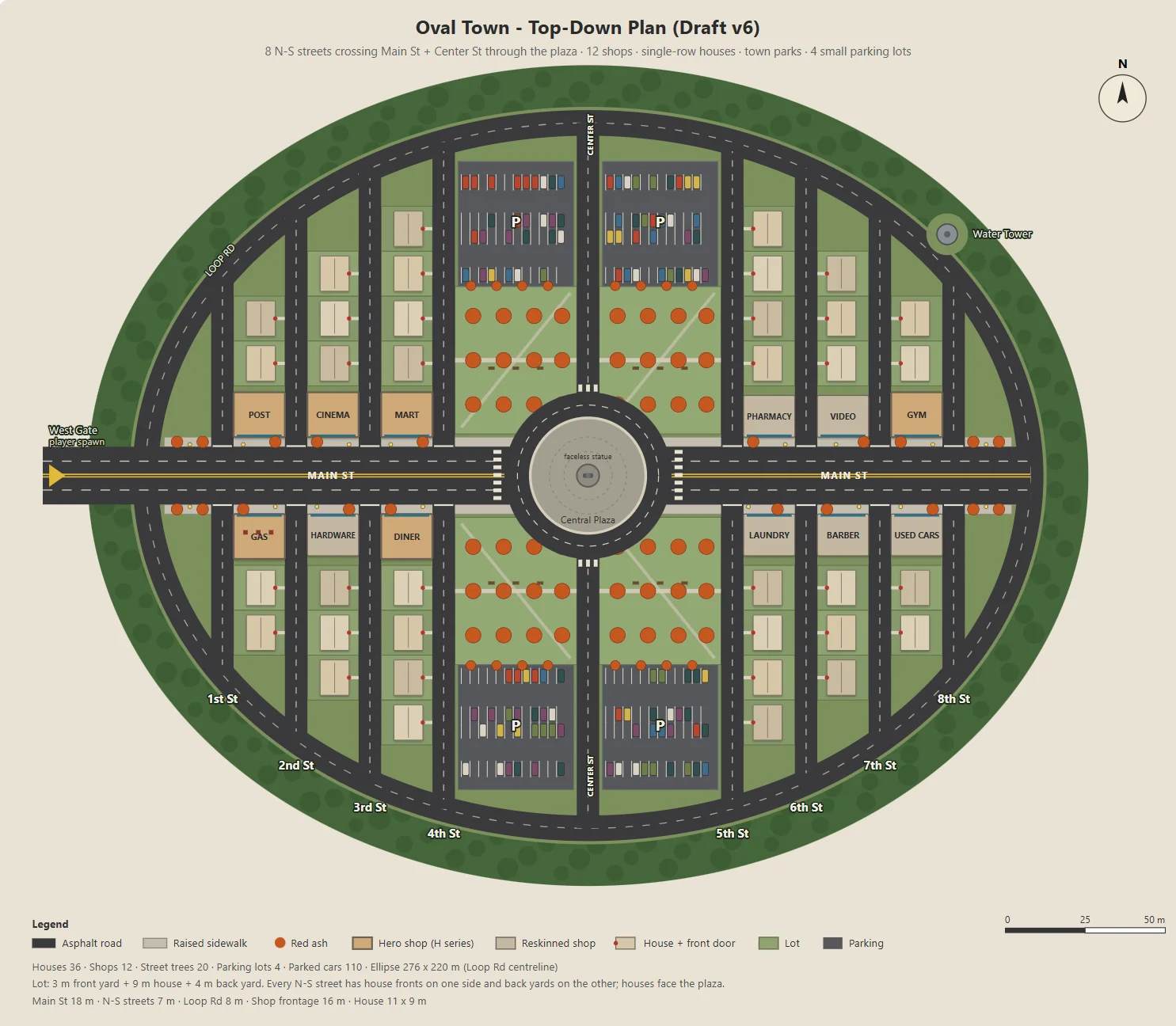
Claude escribió un script de Node para generar un SVG parametrizado del pueblo ovalado: Main Street, doce tiendas, calles residenciales, parques, estacionamientos y una plaza.
El mismo script exportaba un JSON para el blockout, los edificios, las calles, las farolas y los árboles en Godot. Así, el arte conceptual y el nivel jugable compartían un mismo layout.
Ajusté los parámetros de uno en uno, como el tamaño de los estacionamientos, la profundidad de los patios traseros o las entradas de las tiendas, para que cada cambio fuera fácil de revisar.
Here's the town I have in mind. The street grid is a grid inside an oval outline:
- The long axis of the oval is the widest street, Main St, lined with functional buildings like the post office and the gym.
- The other streets run perpendicular to Main St on both sides, lined with houses.
- The center of the oval is a round plaza; the statue stands on a concrete pedestal in the middle.
- Asphalt streets with lane markings. Raised concrete sidewalks in front of the shops, with American red ash street trees at regular intervals.

Design the town structure, fill in the details I didn't mention and improve the design.
Draw it as a top-down plan with a Node script (tools/townplan/gen_town_svg.mjs) that generates an SVG from parameters kept at the top of the file.
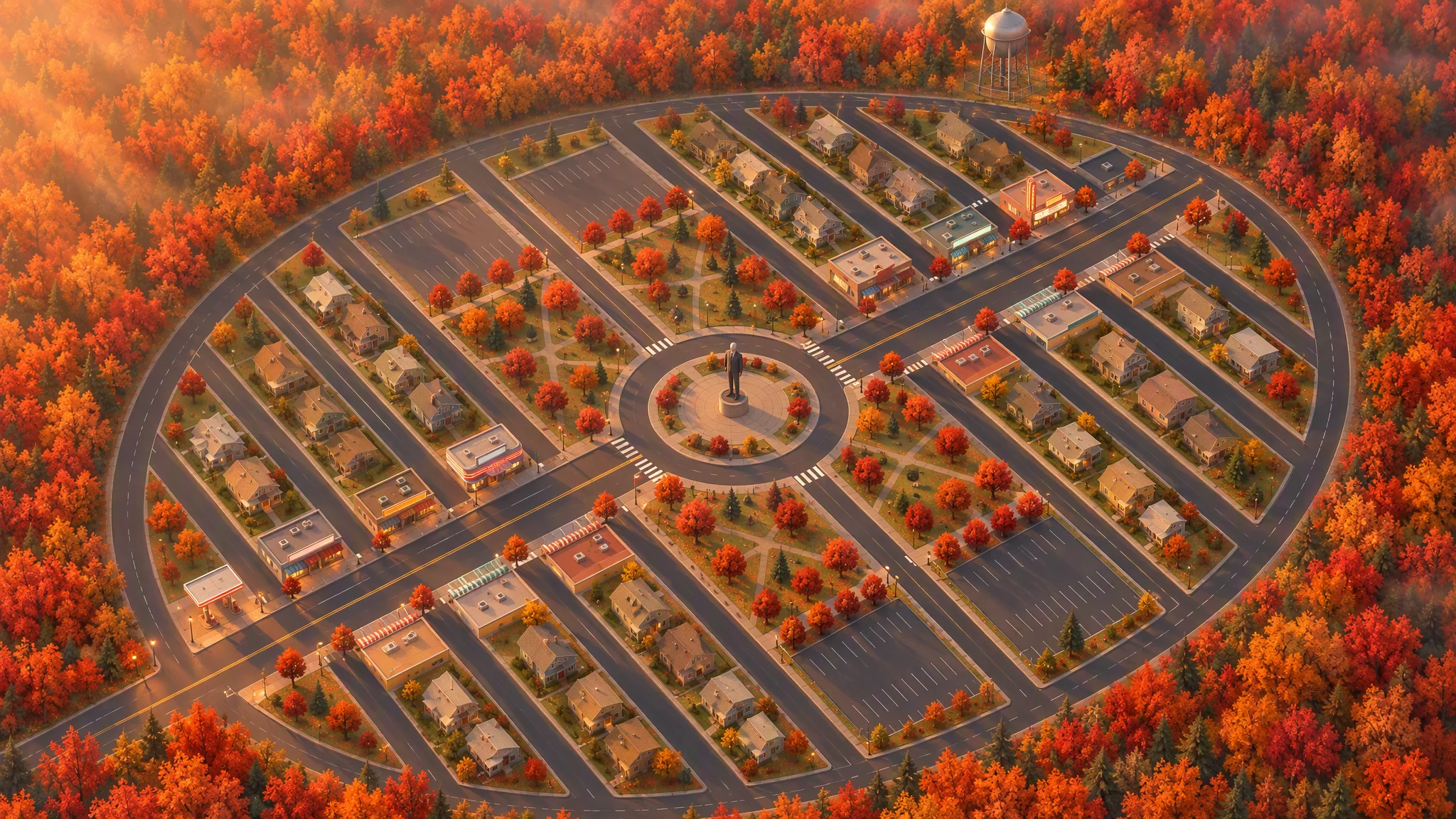
Define una dirección visual
Usé el layout como referencia estricta para una ilustración cenital, conservando las calles, las parcelas, la huella de los edificios, los árboles y el contorno del pueblo.
La primera vista a 45 grados parecía un mapa inclinado. Girar la referencia en local antes de regenerar la imagen le dio un ángulo convincente.
Strict layout reference: image[1]. Keep every road, block, building footprint, lot, park, parking lot, tree and the oval outline exactly as in image[1]. North up. Add, remove, move or resize nothing. Only restyle it as a finished top-down orthographic illustration of a quiet mid-1980s American small town in autumn.

[...town contents: main street, roundabout and statue, twelve shops seen as flat roofs only, all facing the main street, houses, parks, parking lots, red ash trees, a water tower...]

Style: stylized non-photorealistic game environment, simple hard-edged geometry, flat slightly exaggerated colors, light weathering, no grime. Warm late-afternoon sun from the west.

No vehicles, people, text, lettering, flags, or national or religious symbols. The statue has no face.
A partir del plano final y de la imagen a vista de pájaro, Claude hizo la lista de assets y separó los modelos de Tripo de los objetos construidos en Godot. Los niveles de número de caras mantuvieron dentro del presupuesto unas treinta imágenes conceptuales y treinta modelos.
The town concept art is done. Using the final plan (v6), list every asset we need, split into "generate with Tripo" and "build in the engine". Then write a concept-image prompt for each Tripo asset in design/asset_prompts.md.
- Shops on Main St should vary more, with clearly different heights, so the opening walk has an interesting skyline.
- Split scene assets into tiers (S / A / B / C) by importance and size, give each tier a model and a triangle budget (hard cap 10,000 per asset), and estimate the total for the scene.
05 / RESUMEN
Prototipa un asset antes de hacer el resto
Prueba un edificio representativo
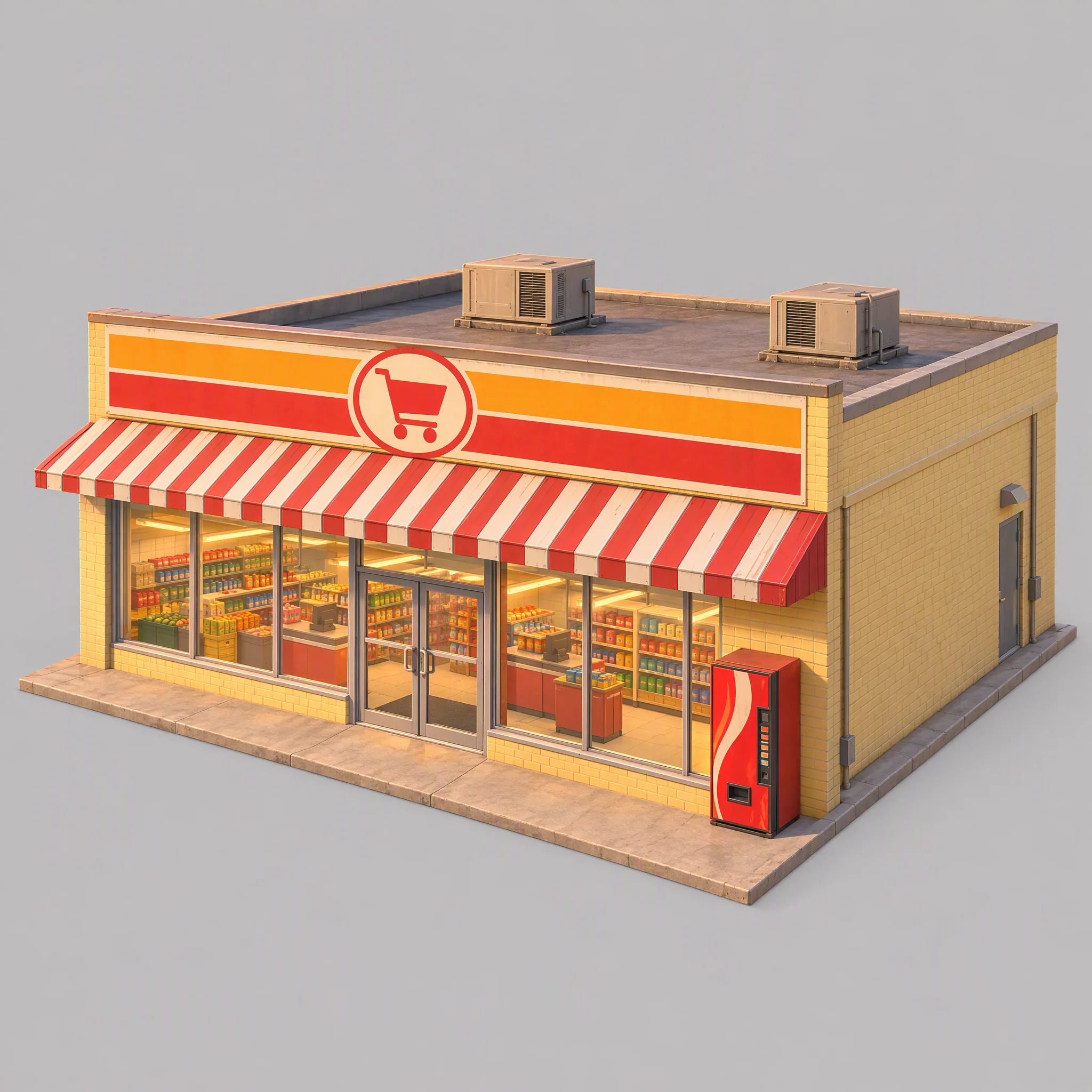
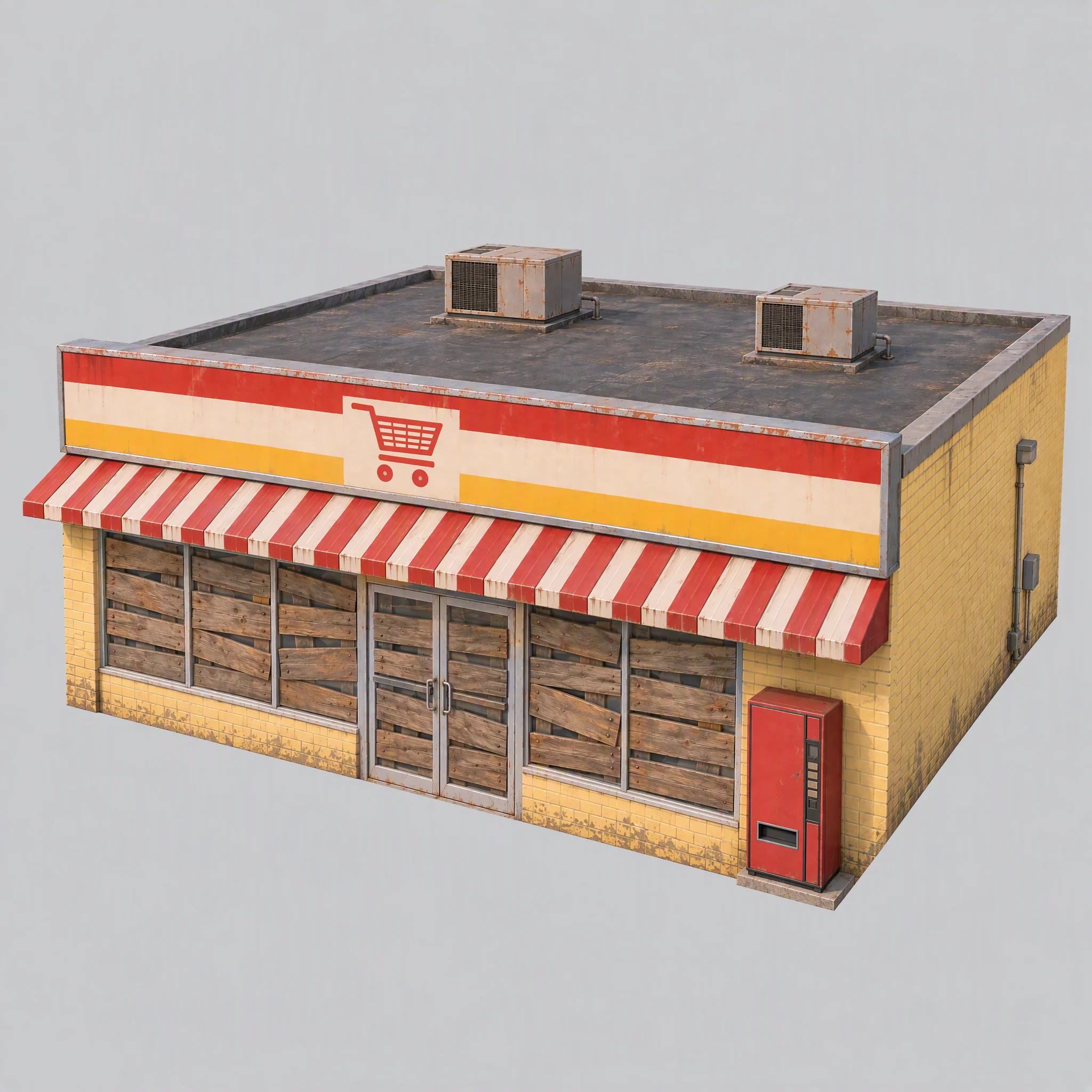
Primero probé el pipeline con un supermercado y comprobé su estilo visual, si servía como referencia de modelado y qué familia de modelos de Tripo era la adecuada.
- ¿Encaja la imagen conceptual con la dirección visual del pueblo?
- ¿Ofrece la imagen una referencia de modelado limpia?
- ¿Qué familia de modelos de Tripo produce la geometría adecuada?
La primera imagen tenía estanterías visibles, luz cálida horneada, una máquina expendedora con aspecto de marca comercial y unos cimientos sobredimensionados.
Actualicé las reglas compartidas: tapar las ventanas con tablones, apagar las luces, usar una iluminación de referencia blanca y neutra, y dejar los cimientos a ras de las paredes.
Use image[1] only as a reference for color palette, materials and rendering style. Do not copy its content or camera.

A single isolated one-story small-town supermarket from the mid-1980s: a wide, low box about 16 meters wide, 14 meters deep and 5 meters tall. The front is a long row of large plate-glass windows with a pair of glass doors in the middle, under a flat red-and-white striped metal awning. Above the awning, a tall flat sign panel runs the full width of the roofline, painted with bold color bands and a simple shopping-cart pictogram, no letters. Pale yellow painted brick walls, a flat roof with two boxy rooftop AC units. A plain red vending machine stands beside the doors. All windows and glass doors are boarded up with weathered wooden planks, so no interior is visible. All lights, signs and neon tubes are switched off. The building sits on a thin flat concrete slab exactly the size of its footprint, flush with the walls on every side.

Three-quarter front view from slightly above, the whole building in frame, centered on a plain light gray background, neutral white daylight with soft even lighting and no warm tint, no cast shadows, no ground beyond the slab.

Style: simplified realism with hard-edged, clean forms, mid-1980s American, slightly saturated comic-book colors, light weathering, no grime.

No text, no letters, no logos, no flags, no national or religious symbols, no people, no vehicles
Compara las familias de modelos antes de producir a gran escala
Con la misma imagen del supermercado y límites de caras controlados, la serie P produjo aristas duras más limpias; la serie H tenía triángulos más uniformes y superficies más suaves.
Para este juego, elegí:
- Usar P1.0 para los edificios, los vehículos y los props que se benefician de superficies duras y limpias.
- Usar H3.1 para formas orgánicas como la estatua y los fragmentos de suelo flotantes.
- Usar P2.0 para el niño, porque el personaje necesitaba una topología limpia para el rigging.
Fue una elección para este juego, no una clasificación universal de modelos.
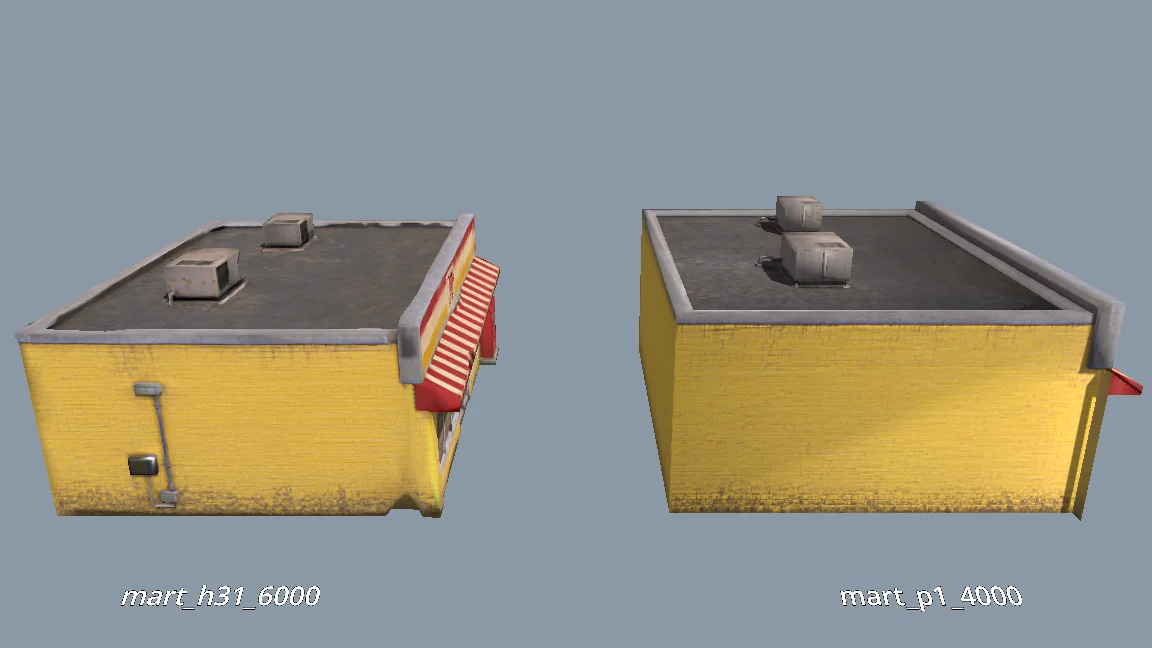
The current models are all clean and fairly flat. For performance, would P1.0 suit the buildings better than H3.1? Run a comparison: generate MART with P1.0 at 4000 faces and with H3.1 at 6000 faces, import both into a test folder, and render them side by side from the storefront, front, corner and top views (shaded and wireframe). Then tell me which one to use and why.
Genera el resto de assets de la escena
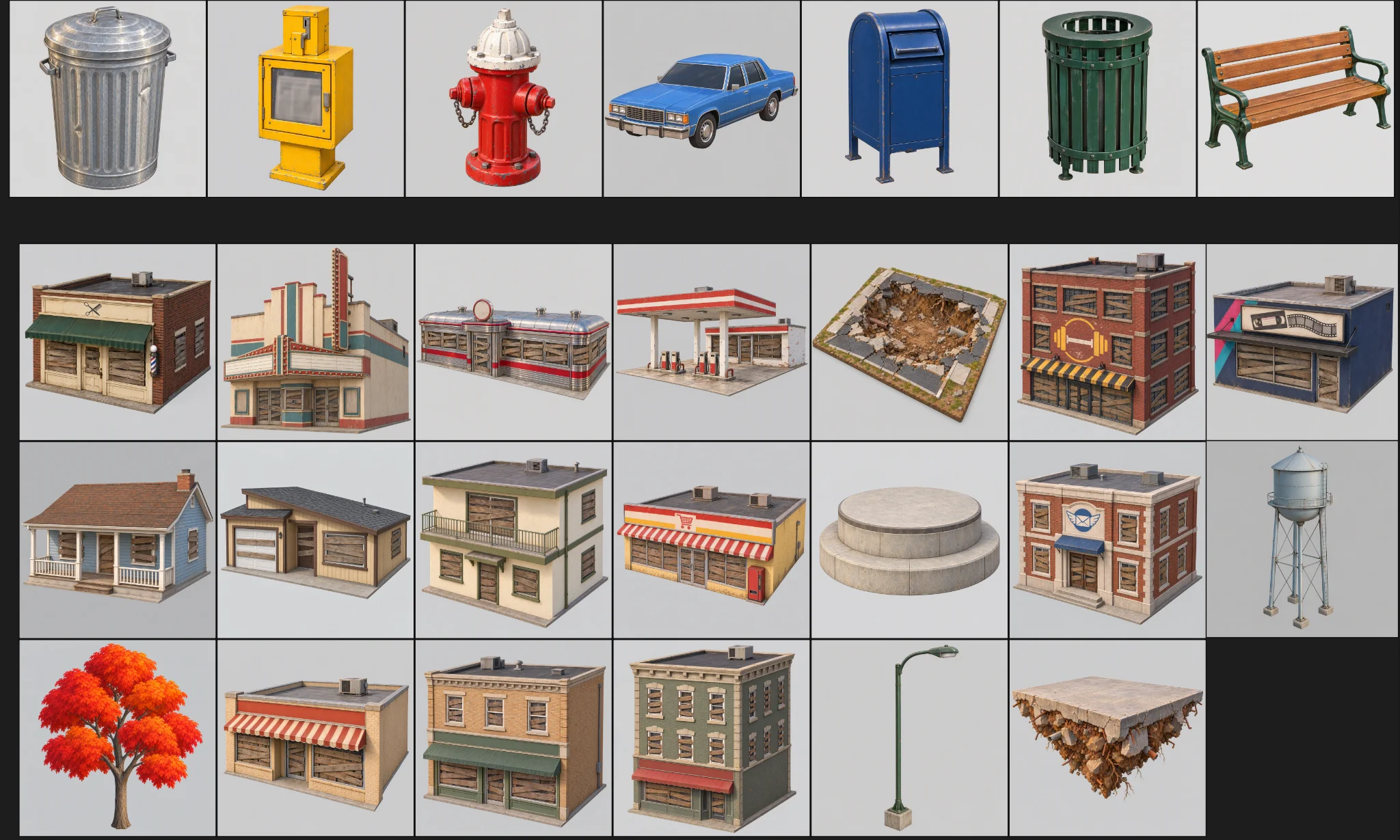
Cuando el prototipo pasó la revisión, generé el resto de assets. Cada uno tenía una categoría, una carpeta, un preset de modelo y un presupuesto de caras.
El lote tenía tres comprobaciones:
Generate concept images for all remaining scene assets the same way as MART, using the prompts in design/asset_prompts.md and cpt/town_birdseye.png as the style reference.
Check balance first. Save each image under cpt/assets/<category>/.
Check every image against the checklist in asset_prompts.md (single object, clean background, no text or symbols, matches the bird's-eye style, no thin fragile parts).
Retry failed tasks individually; never rerun the whole batch.
Record progress in design/batch_checkpoint.md so we can resume if we stop halfway.
When done, list what succeeded, what failed and what needs my review.
- Comprobar en cada imagen que haya un solo objeto, un fondo limpio, ningún texto accidental y ninguna pieza frágil.
- Reintentar individualmente las tareas fallidas.
- Registrar el progreso en un archivo de punto de control.
Regeneré uno a uno los fallos: una estación de servicio con un agujero en la pared trasera, una torre de agua que faltaba y geometría suelta en el supermercado.
Crea el personaje por separado
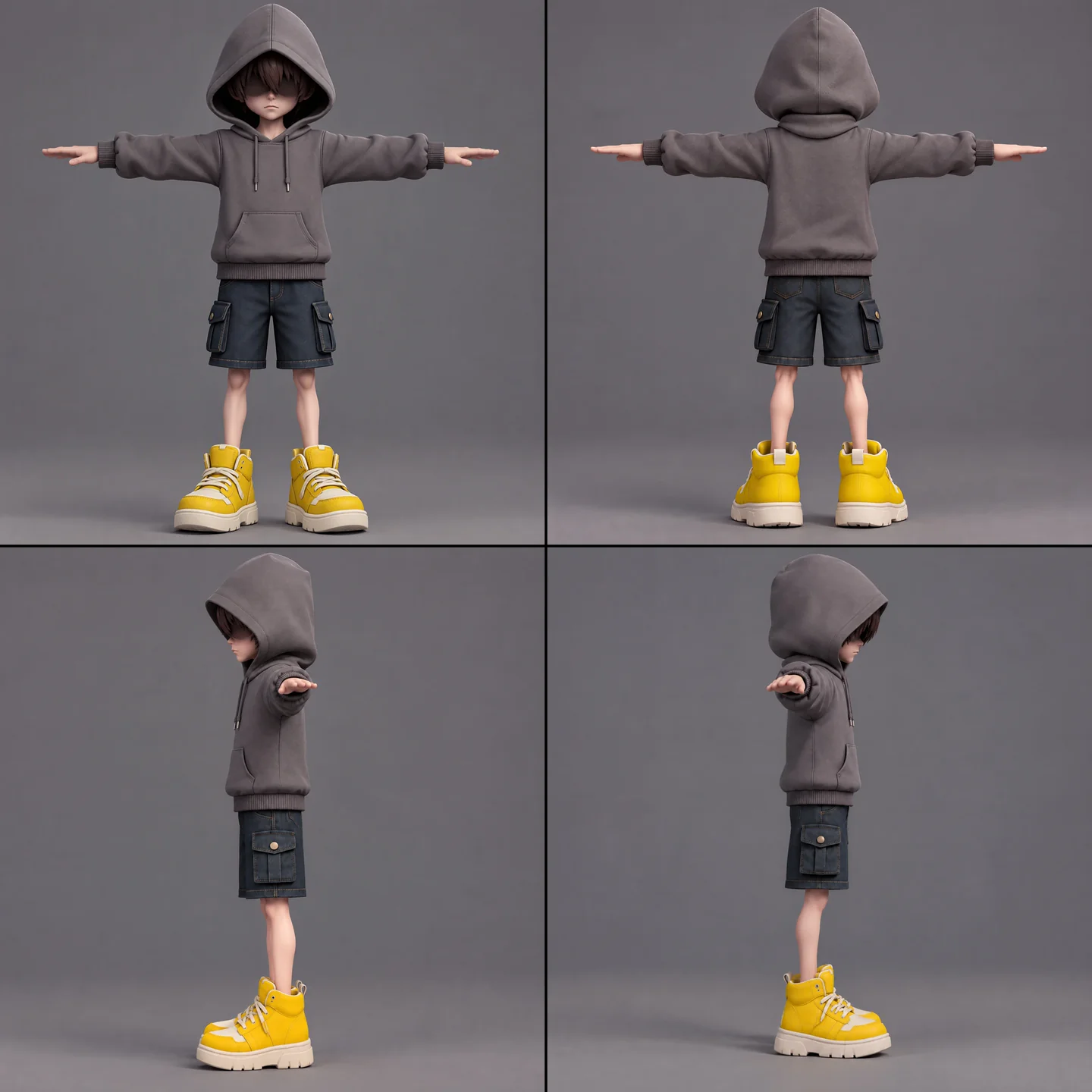
El niño necesitaba arte conceptual, modelado, una verificación de rigabilidad, rigging y retargeting de animaciones. Mantuve la bufanda aparte para evitar pesos de skinning no deseados y conservar sus movimientos complejos.
A full-body cartoon-style boy in a standard T-pose, arms extended horizontally, legs straight. He wears a gray hoodie with the hood up. His face is shrouded in shadow, eyes hidden, with only his mouth and grayish-brown bangs visible. He has a long red scarf wrapped around his neck, with both hanging ends draped down behind his back, not in front. He wears dark blue denim shorts ending above the knee so his knees are exposed, with buttoned flap pockets on both the left and right sides. He wears oversized yellow sneakers and has relatively thin legs. Cartoon character design, clean 3D model.
Primero ejecuté la verificación de rigabilidad gratuita. La lista de animaciones incluía reposo, caminata, carrera, salto, caída, lanzamiento, desvío, salto con bufanda, golpe recibido, derrota, sellado y victoria. Hacer el retargeting de más de cinco a la vez fallaba, así que lo repartí en tres trabajos más pequeños y los combiné en Godot.
The boy model is ready at models/boy/boy_body.glb. Rig it and add the animations the demo needs. Run the free rig check first. List the animations you plan to use, mapped to Tripo presets, before generating anything.
Antes de usarlas en el lote, revisé a mano las vistas del personaje en busca de manos en espejo y de pelo confundido con gafas de sol.
Estandariza las importaciones y los controles de calidad
Un paso de importación añadía normales ponderadas y aristas duras a las paredes que se veían demasiado suaves. Los límites de textura variaban según el asset, con excepciones para el niño, la bufanda, la estatua y los árboles.
Revisé la escala, la orientación, las paredes, los tejados y los polígonos sueltos antes de pasar los modelos del directorio de pruebas a la escena jugable. Los assets de producción debían tener cero problemas en los informes.
When I inspect the models, the normals are smoothed across every edge, so flat walls look soft and cheap. I want something like Blender's Weighted Normal modifier.
Write a Godot import hook that recomputes weighted normals on import (area-weighted, edges sharper than 30 degrees become hard edges, keep the normal map), plus a setup script that attaches the hook to a list of GLBs and limits texture size (4K, or 2K for small assets) with VRAM compression. Don't apply it to the boy, the scarf, the statue or trees.
Render before/after comparisons so I can judge the result.
06 / RESUMEN
Construye la demo por capas
Empieza con un blockout jugable
Un script de herramienta de Godot leía el JSON del pueblo para construir un blockout jugable con cajas de colisión de colores, suelo, punto de aparición y el layout flotante. Unos controles en el Inspector y un script de línea de comandos lo reconstruían cuando cambiaban los datos.
Después, Swap In Models sustituía las cajas por assets de Tripo en las mismas posiciones. Ambas versiones usaban los mismos datos de layout.
Las tiendas formaban la espiral que se podía escalar; las casas se quedaban en el fondo. Un informe comprobaba solapamientos, altura libre, separación entre tejados y si las plataformas eran alcanzables.
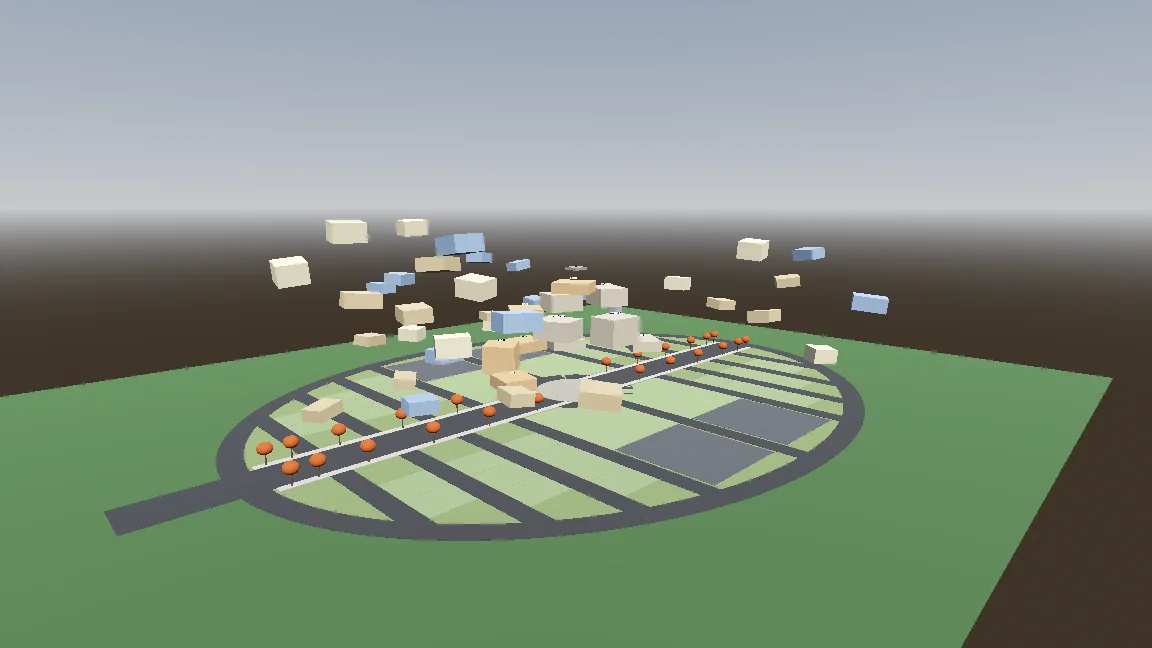
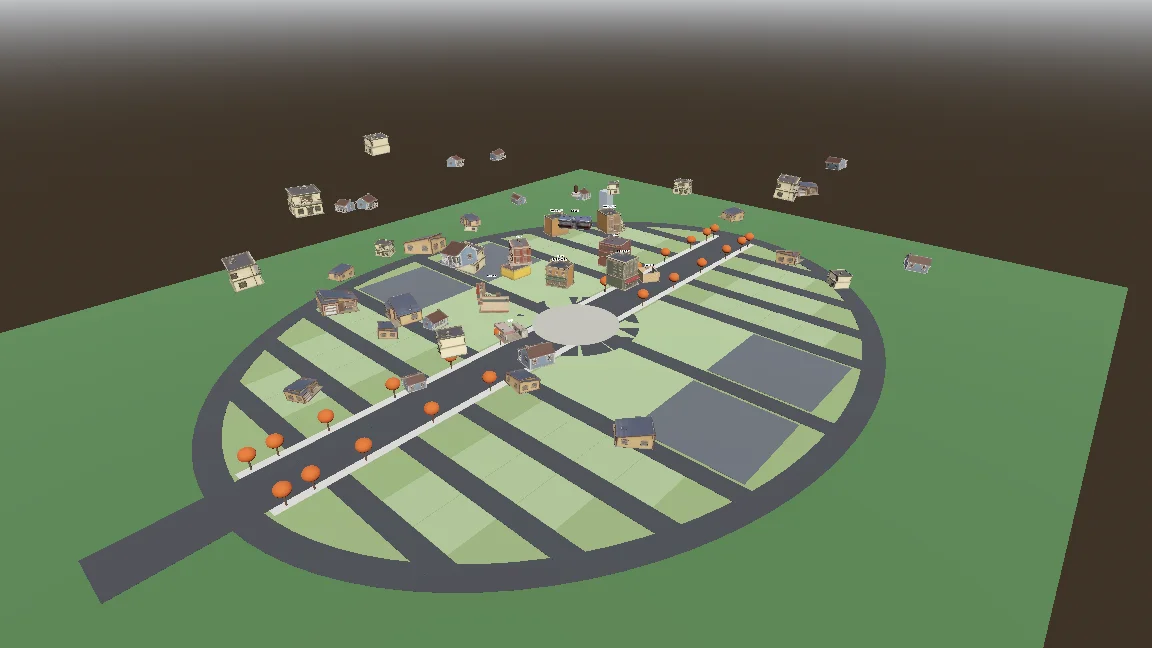
Build a gameplay-only blockout:
- Export the town plan as JSON (gen_town_svg.mjs --json) and write an @tool script (Scripts/town/town_builder.gd) that reads it and generates the ground, a colored box with collision for every shop and house (heights from the design doc), and the player spawn at the west entrance.
- Add inspector buttons: Build Town, Preview Tree, Reset To Ground, Swap In Models.
- Also add a command-line build script so you can rebuild the scene headless.
- Swap In Models replaces each box with res://Assets/Models/<model>.glb, scaled to the lot and rotated to face the street, keeping the position.
Show me screenshots from the street and from above.
Añade el movimiento y la bufanda procedural
El controlador tenía estados de suelo, aire, planeo y salto con bufanda. Unos parámetros expuestos y una prueba de humo ayudaron a ajustar y comprobar cada movimiento.
Start the player controller in the blockout scene. Use the rigged boy model directly, no capsule placeholder.
- CharacterBody3D with states: ground, air, hover (hold jump midair, drains scarf energy), scarf leap.
- Third-person over-the-shoulder camera, keyboard + mouse and gamepad input maps.
- AnimationTree state machine built by a generator script (Scripts/tools/build_player_scene.gd), not by hand in the editor.
- All feel parameters exported so I can tune them in the inspector.
- An automated smoke test that spawns the player, runs, jumps, hovers and scarf leap, and saves screenshots.
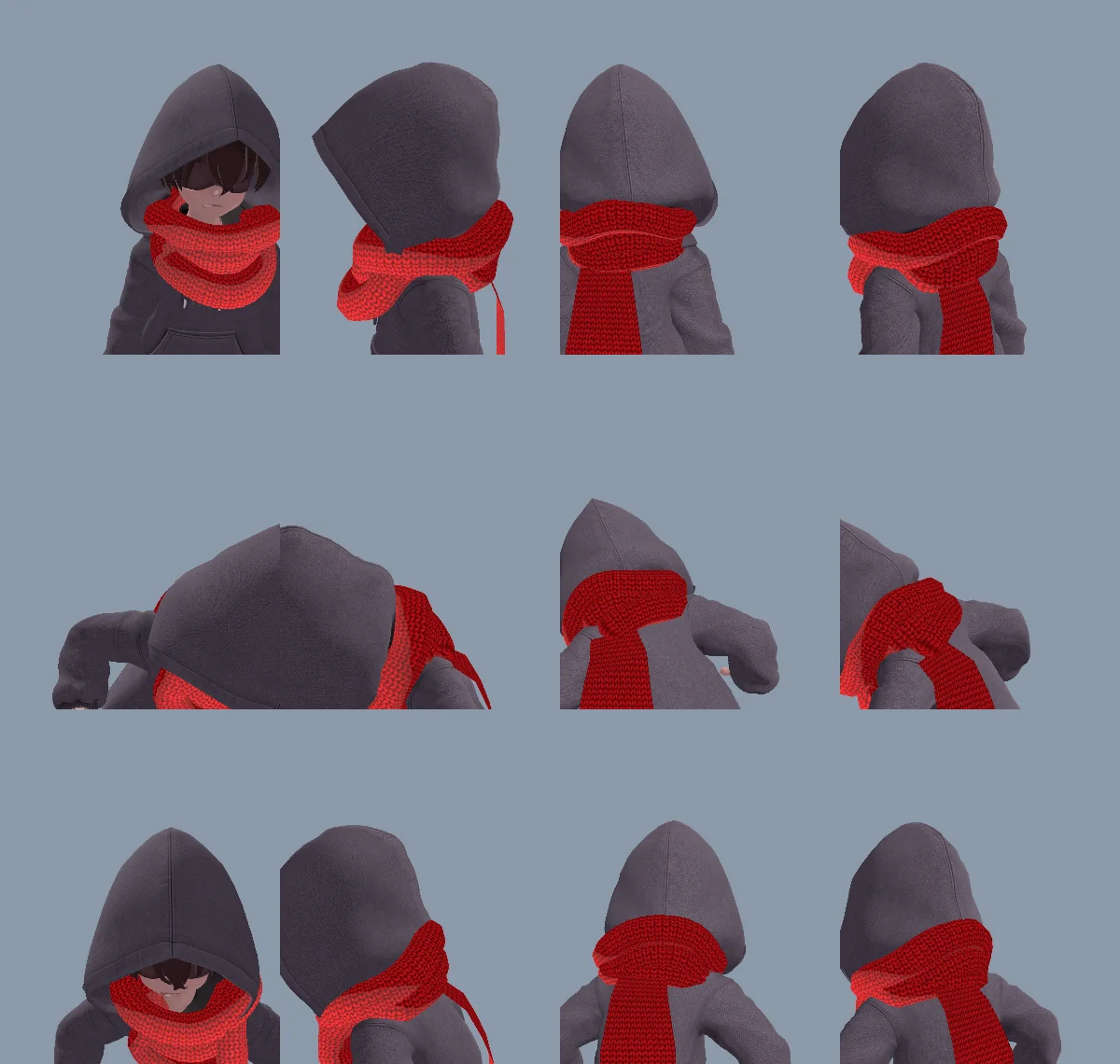
Una vuelta al cuello modelada quedaba demasiado rígida, así que el código generaba tanto la vuelta como el extremo suelto. Ese mismo extremo podía colgar, estirarse, agarrar, envolver la estatua y soltarse sin modelos ni animaciones aparte.
La primera vuelta parecía del revés por el orden de los vértices de los triángulos y unas normales invertidas. Claude corrigió la malla y anotó la causa en CLAUDE.md.
The neck scarf looks too stiff. Try generating it procedurally instead of using the Tripo model:
- ScarfWrap: three thick, soft knitted loops around the neck, rebuilt every frame from the neck, head and spine bones, pushed out by capsules on the head, neck, chest and upper arms, fuller at the back so it fills the gap between the hood and the shoulders, with a little spring lag.
- ScarfTail: a Verlet chain hanging from the knot at the back, with thickness, stiff enough not to stretch, colliding with body capsules. Reaching out to grab props, hanging from anchors and wrapping the statue all use the same tail (reach(point) / release()).
- Both share one wool material with the red knit texture and a soft sheen at grazing angles.
Keep the per-frame cost low and tell me the measured time.
Haz que el salto con bufanda se sienta deliberado
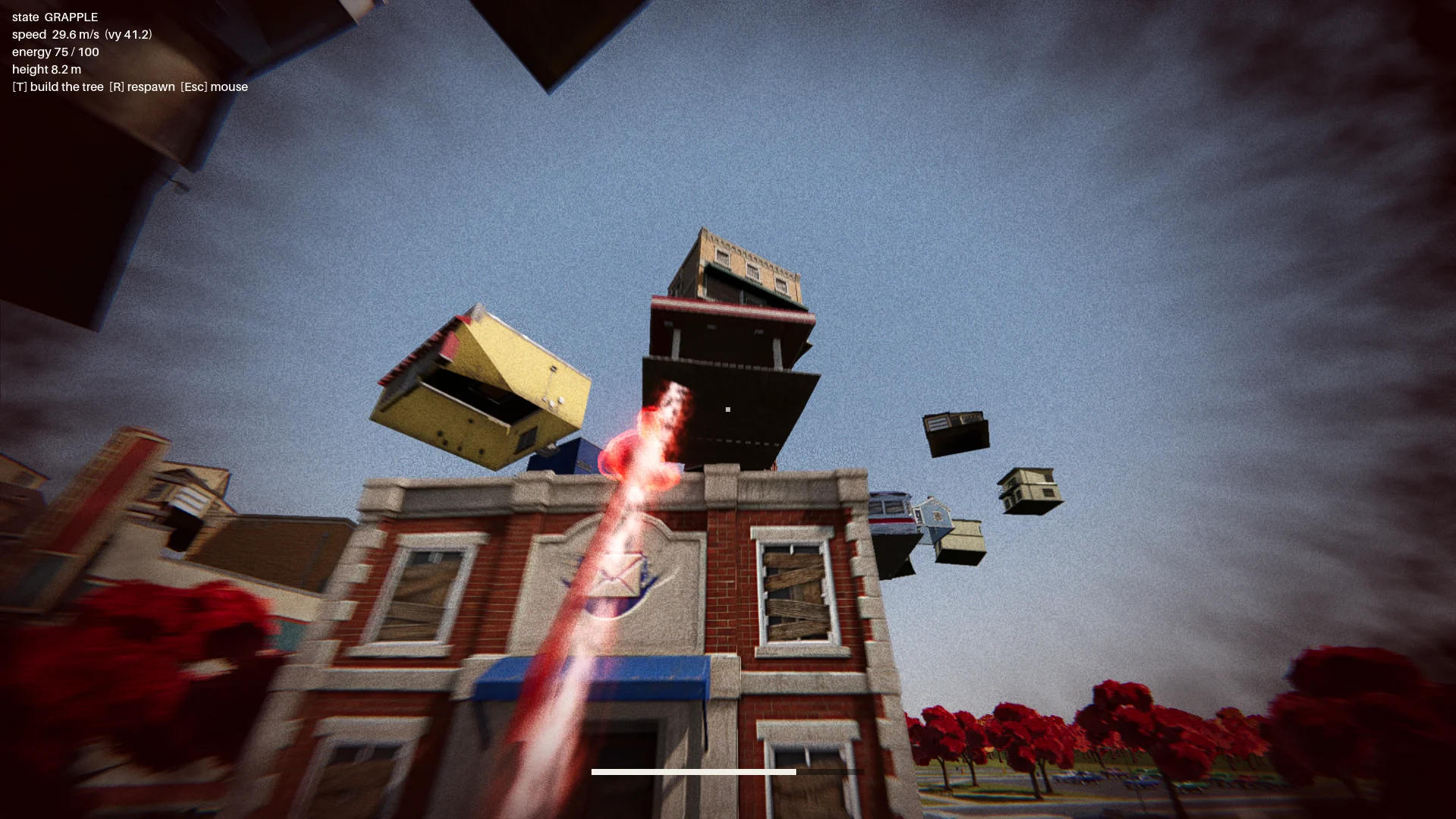
El primer salto con bufanda se balanceaba como un gancho de agarre. Lo cambié para que acelerara hacia un punto de aterrizaje elegido, con un aura roja, polvo, una estela y un pulso al aterrizar que hacían legible el movimiento.
Los primeros objetivos, situados sobre toldos, podían mandar al niño a través de un edificio o dejarlo atrapado. Añadí comprobaciones del aterrizaje y de la trayectoria de vuelo. Un objetivo válido tenía que:
- estar sobre un borde de tejado real;
- tener suficiente espacio libre por encima;
- dejar sitio para que el personaje pudiera estar de pie;
- evitar una trayectoria de vuelo que atravesara el edificio de destino.
Un informe comprobaba cada edificio desde doce direcciones y exigía cero puntos de salto no válidos.
Change how the scarf leap feels. Right now it swings like Spider-Man. Instead, the boy knows where he's going and moves straight to the target. While moving, rotate his model so his feet point at the target, as if his feet were pulling his whole body toward it.
Drop the scarf from the scarf leap and sell the power with effects: a red aura when the scarf leap starts, a puff of dust and a small energy pulse at the start point, a trail along a small arc, then the aura fades on landing with a small shockwave at the contact point.
The speed is not constant: a little slow at first, then accelerating hard, never slowing down until it arrives.
Integra el combate contra el jefe
El recorrido incluía el menú principal, la introducción, el ascenso del pueblo, un punto de control, un combate contra el jefe en tres tramos y el final.
La estatua lanzaba objetos, entre ellos uno luminoso que se podía desviar. Un desvío le abría el escudo durante unos siete segundos. Los ataques posteriores añadían una ráfaga en abanico y un coche que caía como un meteorito, mientras que unas comprobaciones de visibilidad impedían los lanzamientos a través de los edificios.
Finish all playable content for a first complete version:
- A basic main menu, pause menu and ending screen with buttons.
- The intro: "The Oval Town" title card; when the player enters the plaza, the statue shakes, lifts off its pedestal, a "The Statue" title card, then a shockwave pushes the boy back along the ground. Buildings fly up into the spiral tree. One checkpoint at the end of this sequence.
- The boss fight: shield, parry window about 0.25 s, about 7 s exposed window, damage only from throws while exposed, 3 health segments, attacks unlocked by remaining health: single throw, fan volley (only the glowing one can be parried), car meteor shower.
- Sealing: when its health reaches 0, a scarf leap point appears on the statue; scarf leap to it and press the seal button repeatedly.
- A full-flow automated test that plays the whole game with a real parry, three rounds of throws, a death and restart, the seal and the ending, saving screenshots at each stage.
Show me the plan first, then build it.
Cuando su vida llegaba a cero, aparecía sobre la estatua un objetivo de salto con bufanda. El jugador pulsaba repetidamente el botón de sellar para llenar un anillo; si paraba, el anillo volvía a bajar.
07 / RESUMEN
Pule, prueba y exporta
Añade el tratamiento visual de la escena
Cuando el combate ya funcionaba, añadí detalle al suelo, hierba, árboles, iluminación, postprocesado y efectos. Un único shader aditivo suave dio un aspecto coherente al aura, los anillos, los proyectiles y las estelas.
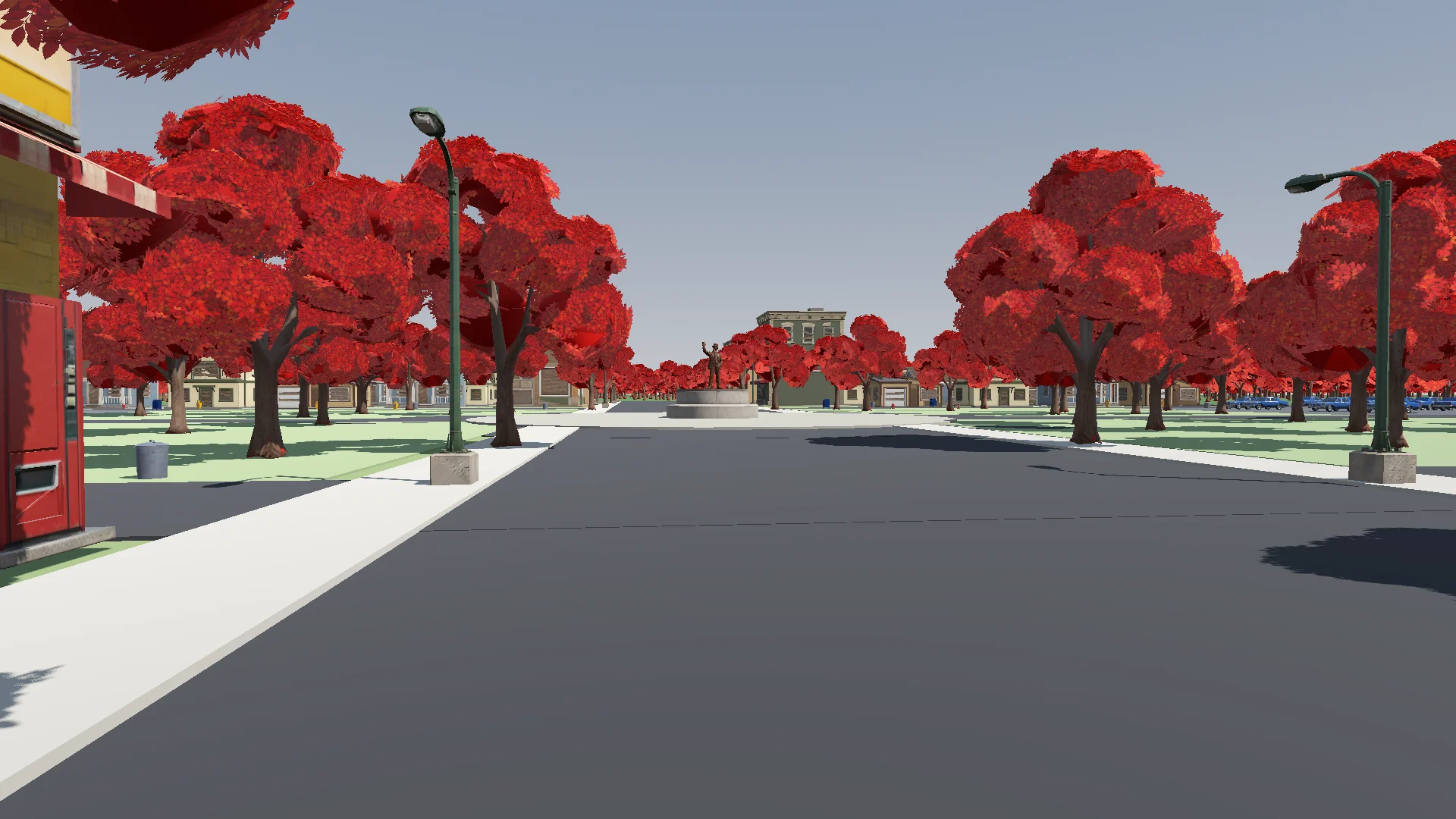
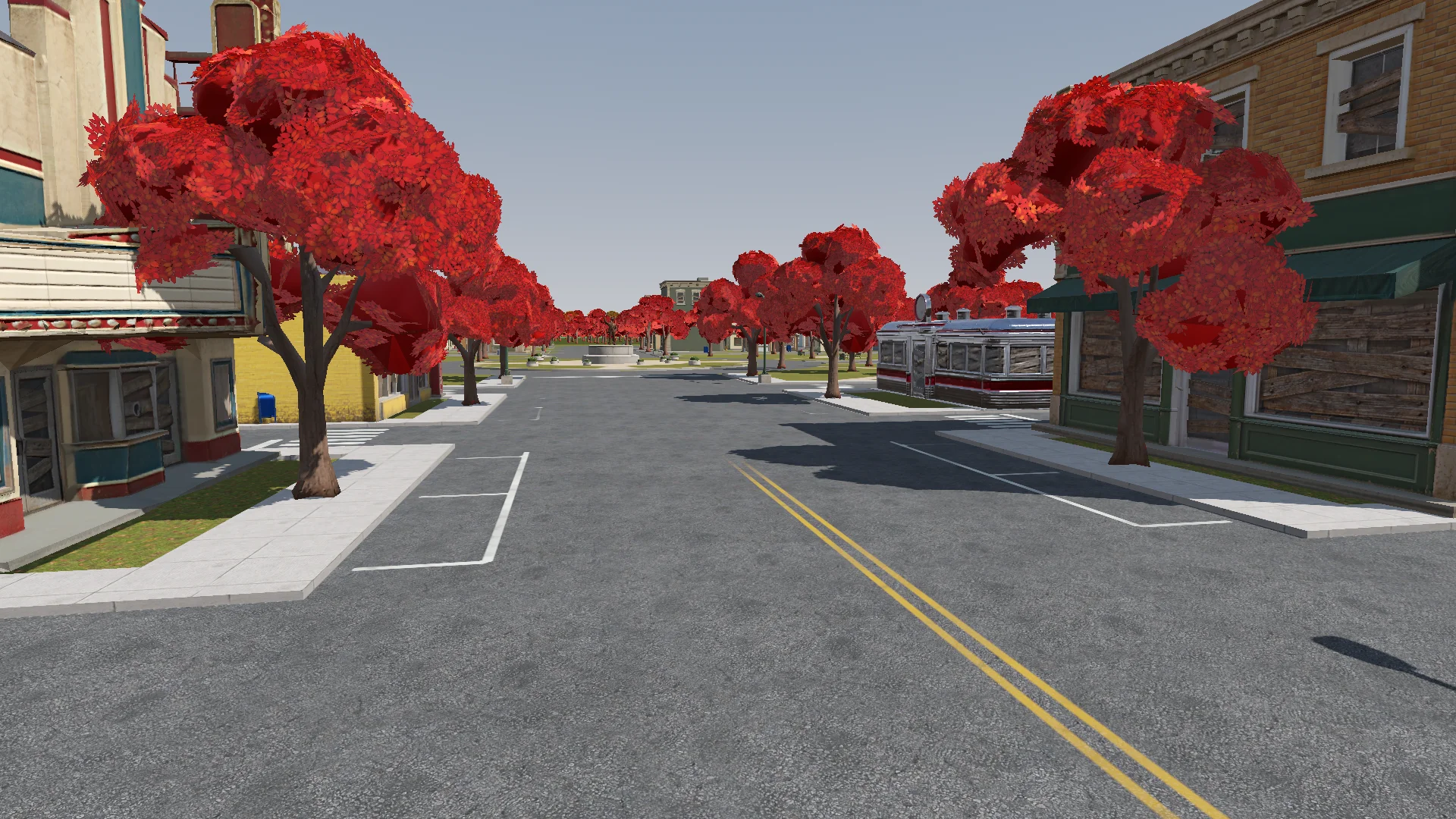
Polish: add the final details to the rest of the town based on the concept art (streets, parks, lane markings and so on). If details are missing or unclear, generate reference images of parts of the town first.
Street layout and lane markings should be as plausible as possible; use Tripo to generate textures if needed. The road surfaces must never flicker.
Add NPR style procedural grass on the lawns.
Revisé los cambios desde la cámara del jugador en busca de calles que parpadearan, puertas bloqueadas y farolas mal colocadas.
Render with ACES tone mapping. Add post-processing: bloom, ambient occlusion, SSIL, depth of field, film grain, motion blur, chromatic aberration, FXAA, and an FSR 2 option, all in an Options menu. Bloom, AO, SSIL and DOF have Off / Low / Medium / High; FSR 2 has Off / Native AA / Quality / Balanced / Performance; motion blur, chromatic aberration and film grain are toggles.
Also add VSync and resolution.
The film grain should closely emulate Super 8 film. Godot has no built-in film grain or motion blur, so implement them as Compositor effects.
Añade audio y feedback en la interfaz
Empecé con audio sintetizado y luego sustituí la mayor parte por música y efectos CC0 con sus créditos. Los sonidos sintetizados se quedaron donde no encajaba ningún clip adecuado.
Find CC0 music and sound effects to replace the synthesized ones. Music should be synthwave / analog synth. Prefer less popular sources so the game feels unique. Where nothing fits, keep the synthesized sound. Verify the license on every page and generate a credits file.
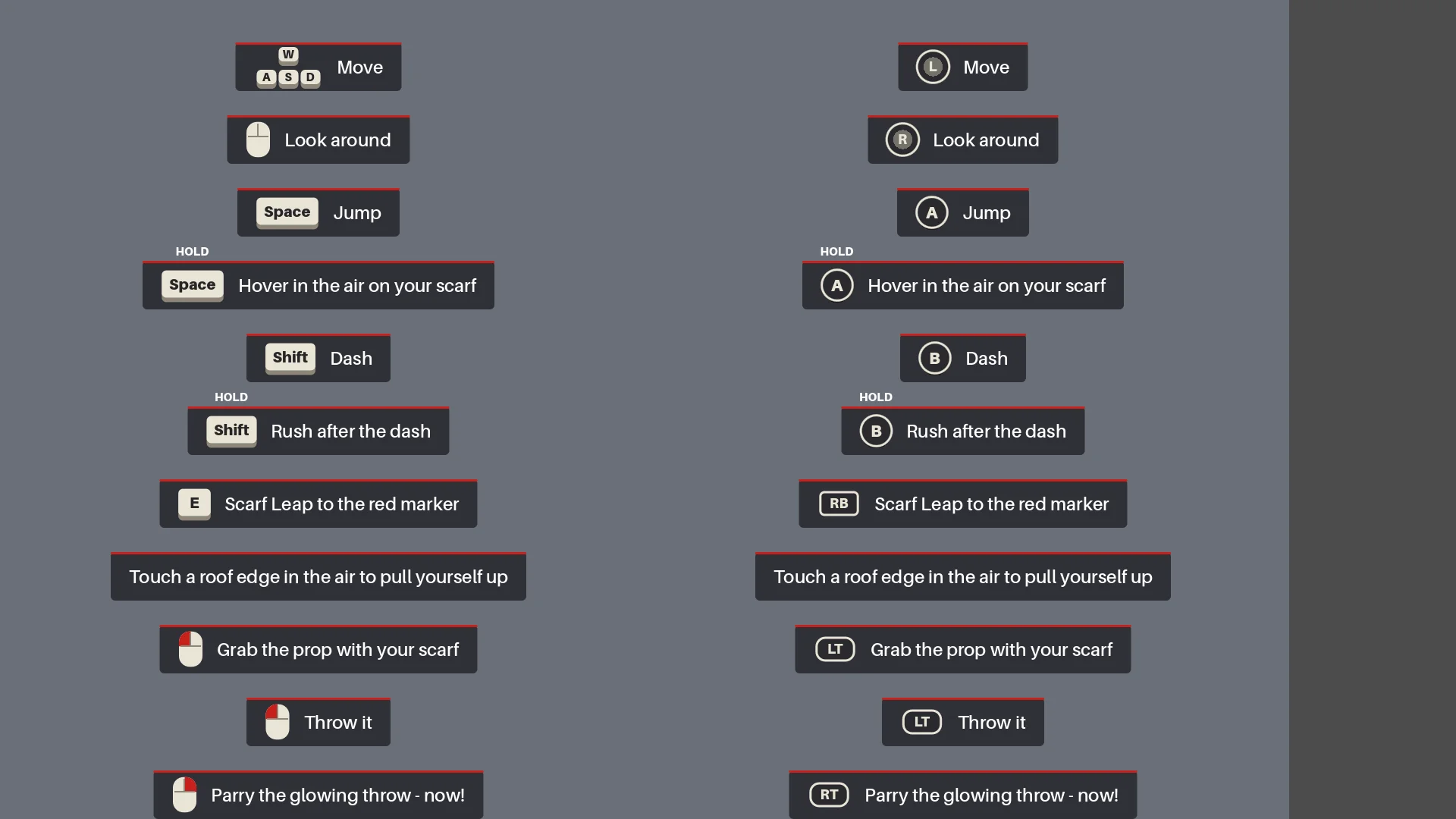
El HUD mostraba los controles según el contexto hasta que el jugador usaba cada movimiento. El primer objeto luminoso lanzado ralentizaba brevemente el tiempo para enseñar a desviar.
Add interactive hints the first time each move is needed (move, jump, hover, dash, rush, Scarf Leap, grab, throw, parry), for a more explicit and intuitive guide to the controls. Each hint stays until the player actually does the move, then it is ticked off.
Haz una pasada de regresión completa
Antes de exportar, Claude reconstruyó las escenas, ejecutó los informes y jugó desde el menú hasta el final, incluidos un desvío real, la muerte y el reinicio, el sellado y las capturas de pantalla.
Before we export, do a full pass:
1. Rerun every generator in order (build_blockout --float --swap, build_player_scene, build_game) and make sure the main scene is the main menu.
2. Run every report (tree_report, grapple_point_report, street_report, lamp_probe, audio_probe, skin_gap_report) and both automated tests. Everything must pass.
3. Play the game through MCP from the main menu to the ending, take screenshots at each stage and read the game log for errors and warnings.
Report: what passed, what failed, and anything I should check by hand.
La partida completa detectó errores de orientación, efectos que faltaban y puntos de control que se reiniciaban tras cambios en el movimiento o en los tiempos.
Export a Windows build of the game. Set up a Windows Desktop export preset for the_red_scarf (embed the PCK, the game icon, product name "The Red Scarf"). Check that the export templates for Godot 4.7.2 are installed; if not, tell me how to install them instead of guessing.
Exclude test scenes, test scripts and Assets/Models/_test/. Write a script that sets the build number and exports, run the exported exe once, and report the build size and any errors.
La primera exportación para Windows ocupaba 1,15 GB, sobre todo por las texturas. Eliminar los assets sin usar y los modelos antiguos, y usar una compresión de mapas de normales más ligera, la dejó en 755,5 MB.
08 / RESUMEN
Lo que me llevaría al próximo proyecto
El flujo de trabajo que repetiría es:
- Describir el resultado que se busca.
- Hacer un único prototipo pequeño.
- Revisarlo en el entorno de ejecución real.
- Convertir cada problema repetido en una regla o un informe.
- Solo entonces, pasar a gran escala.
Reutilizaría el mismo patrón: una sola fuente para el layout del pueblo, puntos de control para los lotes de assets, reglas geométricas para el salto con bufanda y una prueba completa del combate contra el jefe.
Para una demo parecida, empieza con un personaje, una ruta y un enemigo. Prueba un asset representativo antes de producir por lotes y convierte los problemas recurrentes en comprobaciones que puedas volver a ejecutar.